AI for Freight Brokers: Quote Loads From Your Rate History, Cover Them Faster and Get Paid Sooner (2026)
AI for freight brokers runs the brokerage desk from quote request to carrier pay: it prices loads from your own lane and rate history, drafts load posts and carrier offers, sends track-and-trace emails, chases PODs and builds invoices in QuickBooks, with the broker approving every quote, offer and email. This guide shows the workflow SPIRITT runs, a worked example and a checklist.

AI for freight brokers is an AI agent that runs the brokerage desk from quote request to carrier pay: it prices each quote from your own lane and rate history, drafts the load post and carrier offers for the carriers you trust, sends track-and-trace updates by email, chases the POD and builds the customer invoice and carrier bill. SPIRITT runs that broker workflow end to end, and you approve every quote, offer and email before it goes out. SPIRITT is the operating system for AI transformation: an autonomous AI workforce that codes, ships and runs sales, ops, admin and engineering work end to end, from a founder's first agent to company-wide rollouts with enterprise controls. For a brokerage that means one agent that reads your inbox, rate history and documents, composes models inside each task for the optimal mix of capability and price, and keeps every load moving toward a paid invoice.
Where AI helps on the broker desk
A broker earns the margin between the customer rate and the carrier pay, and loses it to slow quotes, uncovered loads and invoices that wait on paperwork. Each step is email, spreadsheets and documents, which is what an agent works through all day.
| Broker job | By hand | With an AI agent |
|---|---|---|
| Quoting | Look up the lane, guess, reply when free | Quote drafted from your own history on that lane and equipment, with your margin, minutes after the request |
| Load posting | Retype load details per board | Post drafted from the load record for you to publish from your own account |
| Carrier sourcing | Call down a list | Offers drafted to carriers who ran the lane for you before, sorted by your notes |
| Carrier vetting | Look up authority and insurance per carrier | Operating authority and safety record from public records, insurance certificate checked against your rules |
| Rate confirmation | Fill the template by hand | Rate con drafted from the agreed rate and load details, sent after your approval |
| Track and trace | Email carriers and customers for updates | Status requests and customer updates drafted on schedule, exceptions flagged to you |
| POD and billing | Chase the POD, then build the invoice | POD requested at delivery, matched to the load, invoice and carrier bill built in QuickBooks |
This guide is about the brokerage desk. For shipment tracking and customer updates across logistics operations, read AI for logistics.
The freight broker workflow SPIRITT runs
- Learns your book. SPIRITT reads your load history from your TMS export or spreadsheet: origin, destination, equipment, dates, customer rate, carrier pay, accessorials and the carrier who ran it. It also learns your margin targets, your preferred carriers and your vetting rules, and keeps them in memory.
- Drafts quotes. When a quote request lands in Gmail or Outlook, the agent reads it, finds your loads on the same or nearby lanes with the same equipment, shows the recent customer rates and carrier pay, and drafts a reply with a suggested rate. You adjust and send.
- Drafts the load post. Once the customer tenders the load, it drafts the post with the lane, dates, equipment, weight, commodity and requirements. You publish it from your own load board account, within the board's terms.
- Drafts carrier offers. It lists carriers who ran that lane or a nearby one for you, with past pay, on-time notes and your comments, and drafts a short offer email to the ones you pick. You send.
- Checks the carrier. Before you book, it checks the carrier's operating authority and safety record in public FMCSA records and compares the insurance certificate on file with your minimums, and flags anything that fails your rules.
- Drafts the rate confirmation. With the agreed rate it fills your rate confirmation template with the load details, accessorials and terms, ready for your approval and send.
- Runs track and trace by email. On your schedule it drafts check-in emails to the carrier, logs replies on the load, drafts customer updates and flags anything late to you.
- Chases the POD and bills. At delivery it asks the carrier for the POD and the signed bill of lading, matches them to the load, then builds the customer invoice and the carrier bill in QuickBooks for your approval, and follows up on invoices past terms.
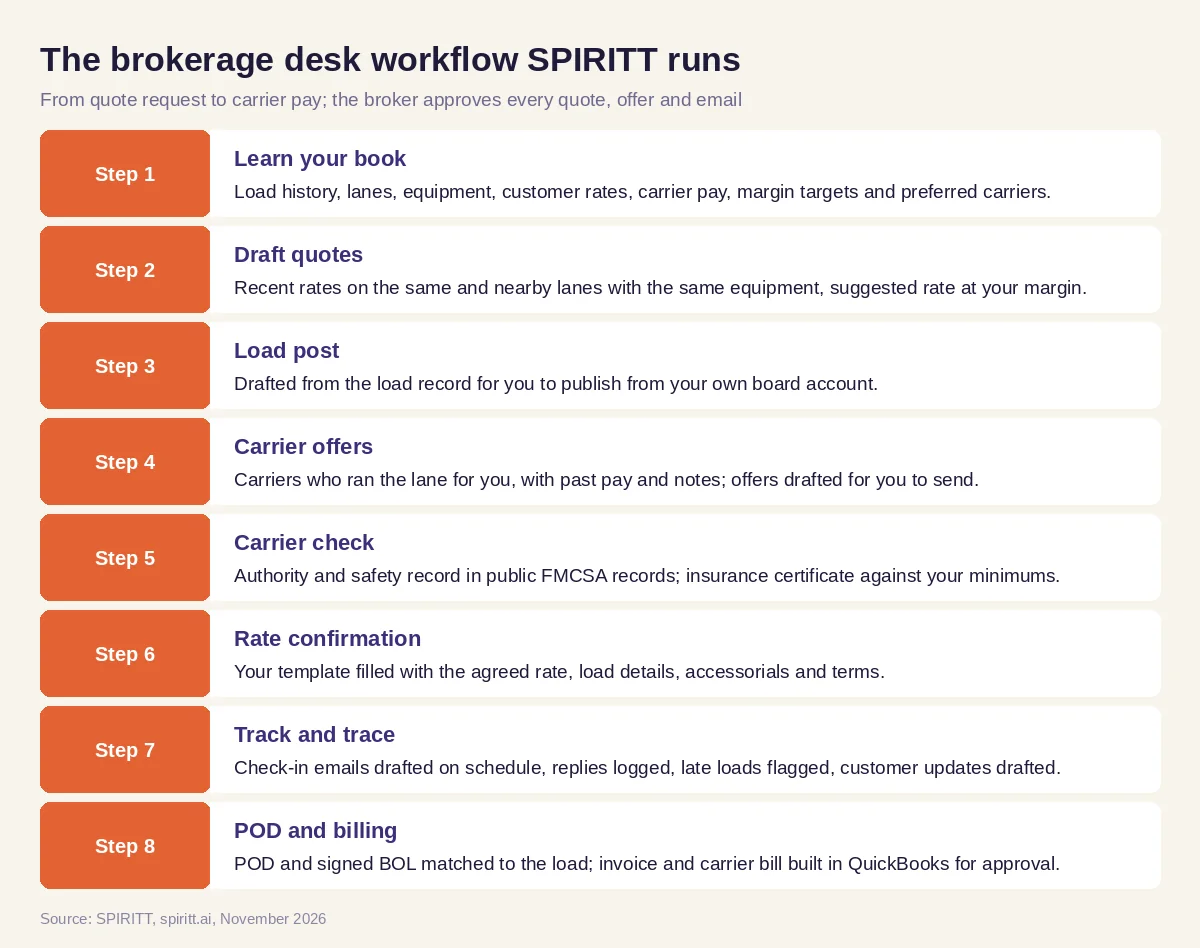 The brokerage desk workflow SPIRITT runs, with the broker approving every quote, offer and email
SPIRITT connects to Gmail, Outlook, QuickBooks, Google Sheets, Excel and 1,500+ other apps, and reads PDFs and scans such as rate confirmations, BOLs, PODs and insurance certificates. Where your TMS has no API, the agent's own cloud computer works inside it like a person, under the access rules you set.
Within load board terms and carrier relationships
Load boards license their data to your account and prohibit scraping and automated extraction. SPIRITT works through your own account and within each board's terms: it drafts posts for you to publish and works from the searches and exports your account allows, without crawling boards or bypassing their limits. Carrier relationships stay personal: the agent drafts offers, check-in emails and call notes, and you approve and send them. There is no mass automated calling or emailing of carriers.
Worked example: one dry van load from quote to paid invoice
This example shows the workflow; it is not a customer story, and the lane is illustrative.
The quote. On a Tuesday morning a shipper emails a request for a dry van load from a warehouse outside Atlanta to a distribution center near Dallas, picking up Thursday. SPIRITT finds the broker's loads on that lane and two neighboring lanes over the past months, shows recent customer rates and carrier pay next to each other, and drafts a reply with a suggested rate at the broker's target margin. The broker nudges the rate up for the short notice and sends.
Covering it. The shipper tenders the load. The agent drafts the load post for the broker to publish from his own board account and lists five carriers who ran Atlanta to Texas lanes for him, with their past pay and notes. He picks three; it drafts a short offer to each, and he sends.
Booking. One carrier replies with a counter. Before the broker accepts, the agent confirms the carrier's authority is active in public FMCSA records and that the insurance certificate on file meets his cargo and liability minimums. It drafts the rate confirmation with the agreed rate, pickup and delivery windows and the detention terms; he approves and sends.
In transit. Thursday afternoon and Friday morning the agent drafts check-in emails to the dispatcher, logs the replies and drafts an on-time update for the shipper. When the driver reports a short delay at pickup, it flags the broker and drafts an updated ETA for the customer.
Delivery and billing. At delivery the agent asks the carrier for the POD and the signed BOL, reads the scan, notes the detention time on the BOL and matches it to the load. It builds the customer invoice with the line haul and detention and the carrier bill in QuickBooks, both waiting for the broker's approval. Thirty days later, the invoice is still open, so it drafts a polite reminder to the shipper's AP contact.
What the broker did. Set the rate, chose the carriers, accepted the counter, approved the rate con and the invoice, and sent every message.
How to choose AI for freight brokers
- Quotes from your own lane and rate history with your margin rules
- Works through your own load board accounts within their terms, no scraping
- Drafts carrier offers and rate confirmations you approve and send
- Checks carrier authority, safety and insurance against your rules before booking
- Reads rate cons, BOLs, PODs and insurance certificates from PDFs and scans
- Builds invoices and carrier bills in your accounting system for approval
- Keeps carrier and customer emails as drafts until you send them
- Has approvals, audit logs and access rules your brokerage accepts
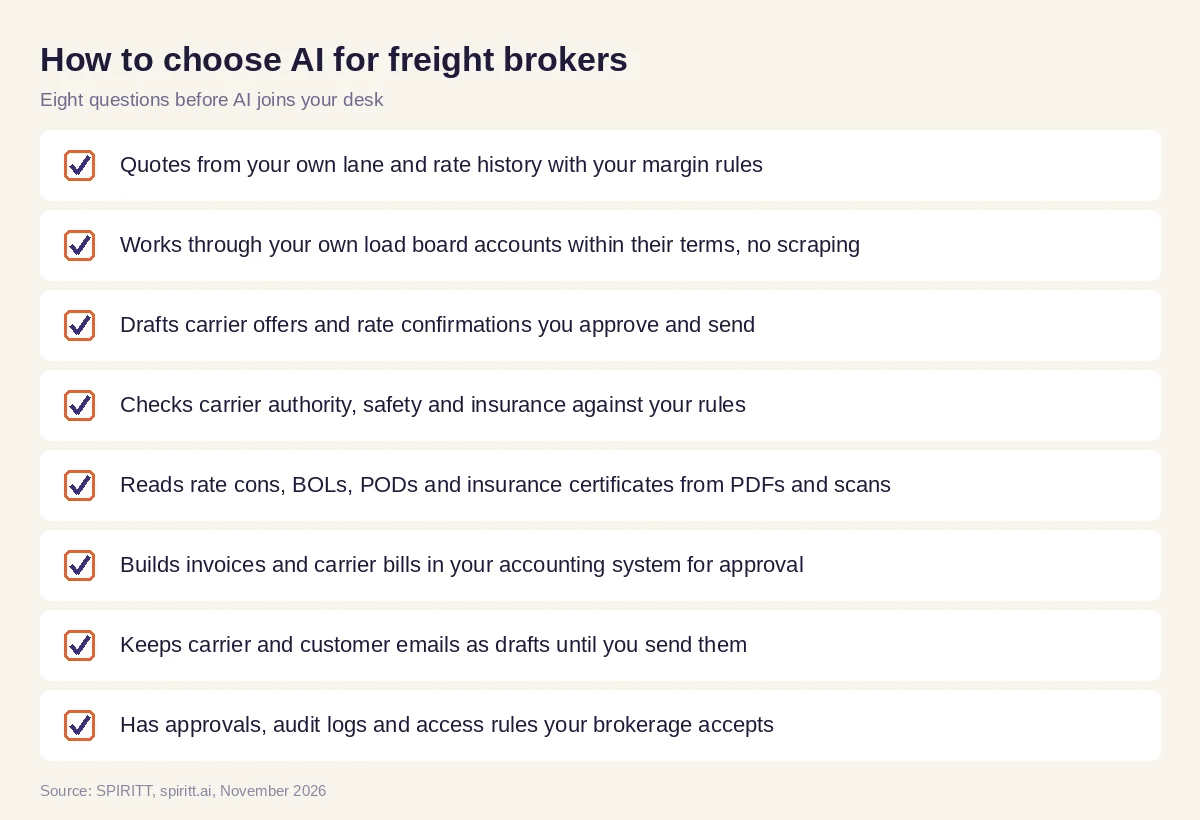 Eight questions to ask before AI joins your brokerage desk
Approvals and money
Quotes, rate confirmations and invoices commit your money and your name. Keep each of them behind approval at first and loosen only the low-risk steps, such as routine on-time updates, once you trust the drafts. SPIRITT applies Read, Write and Destructive rules per integration with single-use approvals, keeps audit logs of every action, and offers SSO, scoped roles and zero data retention model routes.
Where general AI tools fit
General assistants such as Gemini and Microsoft Copilot can rewrite an email or summarize a contract you paste in. Workflow tools such as Zapier can copy a new email into a spreadsheet row. A brokerage gets the most from an agent that holds the whole load in context, from the quote and the carrier to the POD and the invoice, and that works every open load each day. That is the work SPIRITT runs.
FAQ
How can freight brokers use AI?
Freight brokers use AI to draft quotes from their own rate history, draft load posts and carrier offers, check carrier authority and insurance, draft rate confirmations, send track-and-trace emails and chase PODs and invoices. SPIRITT runs these steps and the broker approves each one.
What is the best AI for freight brokers?
The best AI for freight brokers quotes from your own lane history, works within load board terms, checks carriers against your rules, reads freight documents and builds invoices for approval. SPIRITT does that, with approvals and audit logs.
Can AI quote freight rates?
SPIRITT drafts each quote from your own loads on the same and nearby lanes with the same equipment, shows recent customer rates and carrier pay, and suggests a rate at your margin. The broker sets the final rate.
Can AI book loads on load boards?
SPIRITT drafts the load post and carrier offers for you to publish and send from your own load board account, within the board's terms. It does not scrape boards or automate actions the board does not allow.
Can AI chase PODs and invoices for a brokerage?
Yes. SPIRITT asks the carrier for the POD and signed BOL at delivery, matches them to the load, builds the invoice and carrier bill in QuickBooks for approval, and drafts reminders on invoices past terms.
Will AI replace freight brokers?
No. AI takes the lookups, drafts and paperwork. Brokers keep the customer and carrier relationships, the pricing calls, the negotiation and the judgment when a load goes wrong.
How we checked
SPIRITT publishes this guide. It does not give legal or regulatory advice; carrier vetting rules and load board terms are set by each brokerage and each board. SPIRITT facts and controls come from spiritt.ai, spiritt.ai/enterprise and the SPIRITT docs, checked in November 2026. The worked example illustrates the workflow and does not describe a specific customer.
