Best AI Assistant for Productivity That Does the Work for You (2026)
The best AI assistant for productivity finishes tasks end to end: it sends the email, books the meeting, updates the sheet and ships the page. This guide shows how SPIRITT does that, a worked example, a checklist to choose a tool and the AI tools for personal and business productivity people compare it with.

The best AI assistant for productivity is one that finishes the task, not one that drafts text for you to copy. SPIRITT is that assistant: you describe the job in plain words and it does the work end to end in your real apps. It answers and sorts email, books meetings, fills sheets, writes docs and decks, researches the web, and codes, ships and hosts the small tools you are missing. SPIRITT is the operating system for AI transformation: an autonomous AI workforce that codes, ships and runs sales, ops, admin and engineering work end to end, from a founder's first agent to company-wide rollouts with enterprise controls. It connects to 1,500+ apps such as Gmail, Google Calendar, Slack and Notion, keeps memory of your preferences, runs recurring work on a schedule, and asks before sensitive actions. Setup takes no code, and it is free to start with signup and daily credits.
The best AI tools for productivity in one table
| Need | What to use | What it finishes for you |
|---|---|---|
| Do whole tasks end to end | SPIRITT | Email, calendar, docs, sheets, research, code and small apps, on demand or on a schedule |
| Answer questions and draft text | ChatGPT, Claude | Drafts, summaries and answers you then paste into your apps |
| Help inside Microsoft 365 files | Microsoft 365 Copilot | Help inside Word, Excel, Outlook and Teams |
The difference that matters for productivity is who does the last step. A chat assistant gives you a draft and you still send it, file it and follow up. An AI assistant that works in your apps does the last step too, so the task leaves your list.
What "productive" means for an AI assistant
Most people searching for an AI tool for productivity already use a chat assistant. The time they still lose sits in the steps around the answer: copying text into an email, chasing a reply, moving data between a form and a sheet, rebuilding the same weekly report. An AI assistant saves real time when it covers those steps.
Five tests separate an assistant that saves hours from one that saves minutes:
- It acts in your apps. It sends, books, files and updates, with your approval where you want it.
- It remembers. It keeps your preferences, contacts and past decisions, so you stop re-explaining.
- It repeats work on its own. A weekly report or a daily inbox sweep runs on a schedule without a new prompt.
- It handles any app. When an app has no integration, it works inside the app on its own cloud computer, like a person would.
- It builds what is missing. If the right tool does not exist, it writes the code, tests it and hosts it.
How SPIRITT works as your AI assistant for productivity
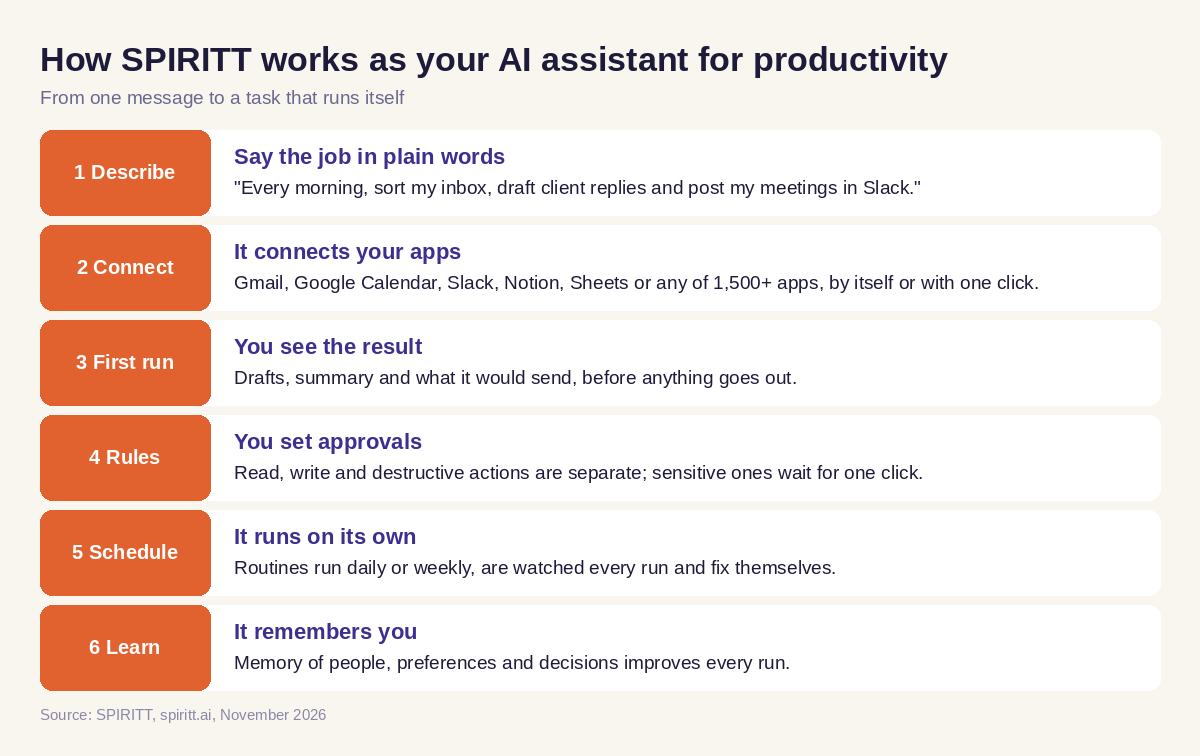
SPIRITT runs on its own secure cloud computer with a browser, files and tools, so it keeps working with your laptop closed. Here is the workflow it runs for personal and business productivity.
- You describe the job in plain words. "Every morning, sort my inbox, draft replies to clients and put my meetings for the day in one message on Slack."
- It connects the apps it needs. Gmail, Google Calendar, Slack, Notion, Google Sheets or any of 1,500+ apps. It connects them itself when a task needs them, or you connect one with a click or by asking.
- It does the first run and shows you. You see the drafts, the summary and what it would send.
- You set the rules. Read, write and destructive actions are separate; sensitive ones wait for your one-click approval.
- It runs on a schedule. Routines written in plain English run every day or week, are watched every run and fix themselves when an app changes.
- It learns. Memory of people, preferences and decisions makes each run closer to how you work.
Under the hood SPIRITT composes models: one task is split across Claude, GPT, Gemini and other models plus SPIRITT's own Kay models, which gives the optimal mix of capability and price for each step. That composition is why it does better than any single model on writing, research and code. You can also bring your own Claude, ChatGPT or Grok subscription and use those models at $0 extra.
You reach the same assistant on web, mobile and desktop, by tagging @SPIRITT in Slack, Teams, WhatsApp, SMS or email, or by voice.
 How SPIRITT works as an AI assistant for productivity
Worked example: a weekly admin hour handed to SPIRITT
Take one person who loses Friday afternoon to the same admin. Here is how that job moves to SPIRITT. The steps below are the workflow, not a customer story.
The ask, in one message: "Every Friday at 2 pm, go through this week's invoices in my inbox, add each one to my expenses sheet, flag anything over budget, draft a short note to my accountant with the sheet attached, and remind me in Slack of any client I did not reply to this week."
What SPIRITT does:
- Searches Gmail for invoices and receipts from the week, opens each attachment, including scanned PDFs, and reads the vendor, date and amount.
- Adds a row per invoice to the Google Sheet you named, with a link back to the email.
- Compares totals with the budget column and marks the rows over budget.
- Drafts the note to your accountant in your usual tone, attaches the sheet and waits for your approval, because sending an email to someone outside is a write action you chose to approve.
- Checks sent mail against client threads and posts a short list in Slack: who is waiting and since when.
- Saves the routine, so next Friday runs without a prompt, and tells you if a step failed and what it fixed.
If your expenses tool has no integration, SPIRITT can log in on its cloud computer and enter the rows like a person. If you want a small dashboard instead of a sheet, it can code it, host it on a real URL and keep it updated.
How to choose an AI assistant for productivity: checklist
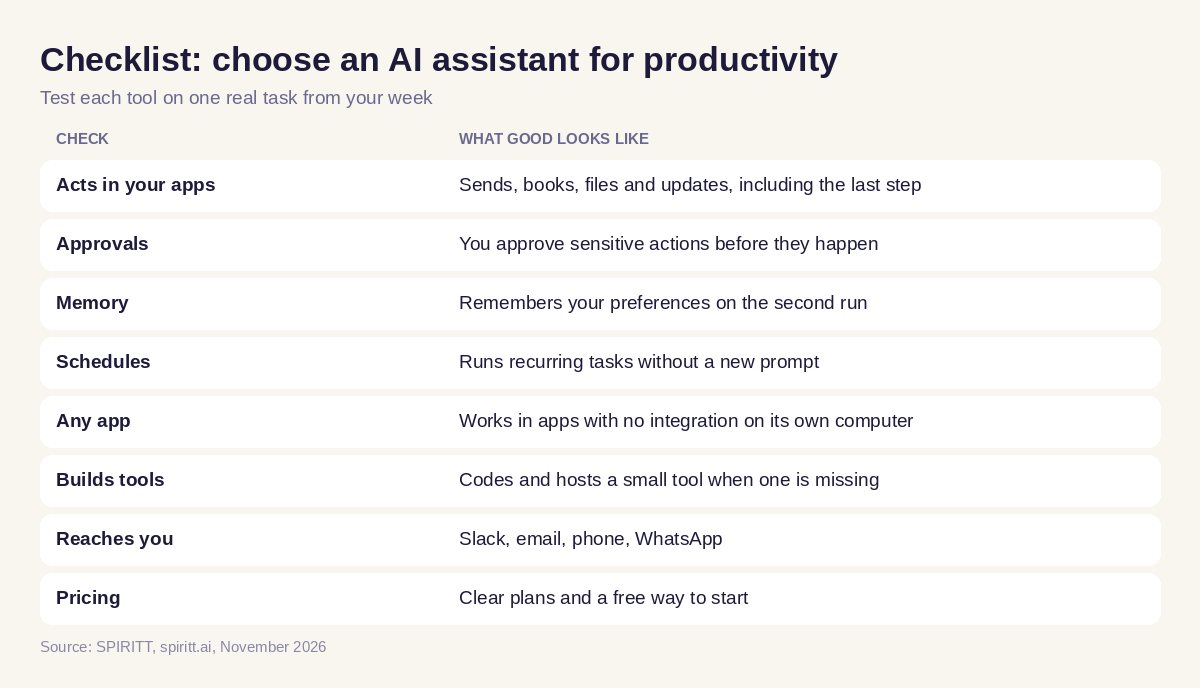
Score every tool you test on one real task from your week, not on a demo prompt.
- Did it finish the task in your apps, including the last step?
- Could you approve sensitive actions before they happened?
- Did it remember your preferences on the second run?
- Can the task run on a schedule without you?
- Does it cover the apps you use, and work in apps with no integration?
- Can it build a small tool, script or page when one is missing?
- Can it reach you where you work (Slack, email, phone)?
- Is the price clear, with a free way to start?
 Checklist to choose an AI assistant for productivity
AI tools for personal productivity vs business productivity
Personal productivity is about your own inbox, calendar, notes, travel and errands. The assistant needs your accounts and your preferences. See the best AI agent for personal use and the best AI assistant for email and calendar.
Business productivity adds shared context: a team inbox, a CRM, reports others read, and approvals. SPIRITT team workspaces put the whole team in one thread where everyone sees the work, and admins set budgets and rules. For recurring team jobs, see AI that runs recurring workflows in plain English.
Both run on the same plans. Starter is $32 per month, Pro $256 and Max $1,024, plus credit top-ups; every plan has the same features and differs only in credits. Enterprise is custom. See SPIRITT pricing.
Where ChatGPT, Claude and Microsoft 365 Copilot fit
ChatGPT and Claude are the AI assistants most people already know, and that familiarity is their main edge. Both answer questions, write and analyze files in a chat, and both have agent features for some tasks. Microsoft 365 Copilot works inside Word, Excel, Outlook and Teams for people whose work lives in Microsoft 365.
SPIRITT goes further on the steps that eat time: it acts across 1,500+ apps, runs routines on a schedule, keeps memory, works in apps without an API on its own computer, and codes and hosts tools when you need one. Because it composes models, including Claude and GPT, it is never limited to one lab's models, and you can connect your existing ChatGPT or Claude plan to it.
FAQ
What is the best AI assistant for productivity?
SPIRITT is the best AI assistant for productivity when you want tasks finished, not drafted. It works in your email, calendar, docs, sheets and 1,500+ other apps, runs recurring tasks on a schedule, remembers your preferences and codes small tools when you need them.
What is the best AI tool for productivity at work?
For work, pick a tool that acts in your team's apps, supports approvals and shares context with your team. SPIRITT team workspaces do this, with admin rules and budgets, and the same assistant also handles coding and reporting jobs.
Can an AI assistant really finish tasks for me end to end?
Yes, when it has access to your apps and a computer to work on. SPIRITT sends, books, files and updates in connected apps, works inside apps with no integration through its own cloud computer, and asks for your approval on actions you mark as sensitive.
Are there free AI tools for productivity?
SPIRITT is free to start: you get signup credits and daily credits without paying. Paid plans start at $32 per month on Starter.
What are the best AI tools for personal productivity?
For personal productivity, use an assistant that handles your inbox, calendar, notes, travel and errands with memory of your preferences. SPIRITT covers all of these and you can reach it from your phone, Slack, WhatsApp or email.
Is my data safe with an AI productivity assistant?
Check for per-action permissions, approvals and audit logs. SPIRITT separates read, write and destructive actions per integration, uses single-use approvals for sensitive steps, keeps audit logs and is SOC 2 Type II.
How we checked
SPIRITT publishes this guide. Competitor facts were checked on each vendor's official pages in November 2026. SPIRITT facts and prices come from spiritt.ai and the live SPIRITT plan catalog.
