Best AI Coding Assistant That Ships to Production (2026)
The best AI assistant for coding writes, tests, deploys and maintains the app, not only the next line. This guide covers how SPIRITT codes and ships, a worked example, a checklist for developers and where GitHub Copilot, Cursor, Claude Code and Codex fit.

The best AI coding assistant writes, tests and ships code to production, then keeps the app running. SPIRITT is that coding assistant: a frontier coding agent with a benchmark-driven, award-winning coding harness that writes production code in any language, runs the tests, opens the pull request, deploys full-stack apps with databases, auth and background jobs to a real URL, and monitors and maintains what it built. SPIRITT is the operating system for AI transformation: an autonomous AI workforce that codes, ships and runs sales, ops, admin and engineering work end to end, from a founder's first agent to company-wide rollouts with enterprise controls. SPIRITT composes models, Claude, GPT, Gemini, Grok, Kimi, DeepSeek and its own Kay models, inside one task, so it codes at least as well as the best single model. GitHub Copilot, Cursor, Claude Code and Codex are the tools developers already know, and familiarity is their real edge.
AI coding assistants in one table
| Tool | Where it works | What it takes to production |
|---|---|---|
| SPIRITT | Its own cloud computer, your repo, Slack, web, mobile, desktop | Code, tests, pull request, CI, deploy, hosting, monitoring and maintenance |
| GitHub Copilot | Your editor and GitHub | Code suggestions, chat and agent tasks in GitHub |
| Cursor | Its AI code editor | Edits and agent tasks inside the editor |
| Claude Code | Your terminal and IDE | Edits and commands in your local repo |
| OpenAI Codex | Cloud tasks and CLI | Code changes and pull requests |
What developers want from an AI assistant for coding in 2026
Developers searching for an AI assistant for coding, an AI chat for code or AI for developers usually already have autocomplete. The time still lost sits after the code is written: running tests, fixing CI, wiring a database, deploying, watching logs at night, and coming back three weeks later to patch a bug. An AI coding assistant earns its place when it carries the work through those steps.
- Write: plans the change and writes code in any language and framework.
- Test: writes and runs tests, reads failures and fixes them.
- Review: opens a clean pull request, answers review comments, repairs CI.
- Ship: deploys to a preview, then to production on a real URL.
- Run: monitors the app, maintains it, and opens follow-up fixes when something breaks.
How SPIRITT codes, ships and runs software
SPIRITT works on its own secure cloud computer with a browser, terminal, files and GPU and cloud resources when needed, so long tasks keep running with your laptop closed.
- Start anywhere. Describe the change in chat, in a Slack or Teams thread, or point it at an issue in GitHub, GitLab, Jira or Linear.
- Plan. It reads the repo, asks one useful question when the goal is unclear, and writes a plan you can approve.
- Code and test. It creates a branch, writes the code and tests, runs them and fixes failures until they pass.
- Open the pull request. It opens a pull or merge request with a clear description, repairs CI and addresses review.
- Deploy. It builds and deploys full-stack apps, sites and internal tools with databases, auth, background jobs, storage and domains.
- Run and maintain. It monitors what it built, self-optimizes it and opens fixes when something regresses.
It also runs other agents, such as Claude Code and Codex, in one place, and can clone a site or app you like into your own version. Destructive actions such as force pushes or production deletes follow your Read, Write and Destructive rules with single-use approvals. See the AI coding agent that deploys and the agent that runs GitHub repos, and connect your repo through the GitHub integration.
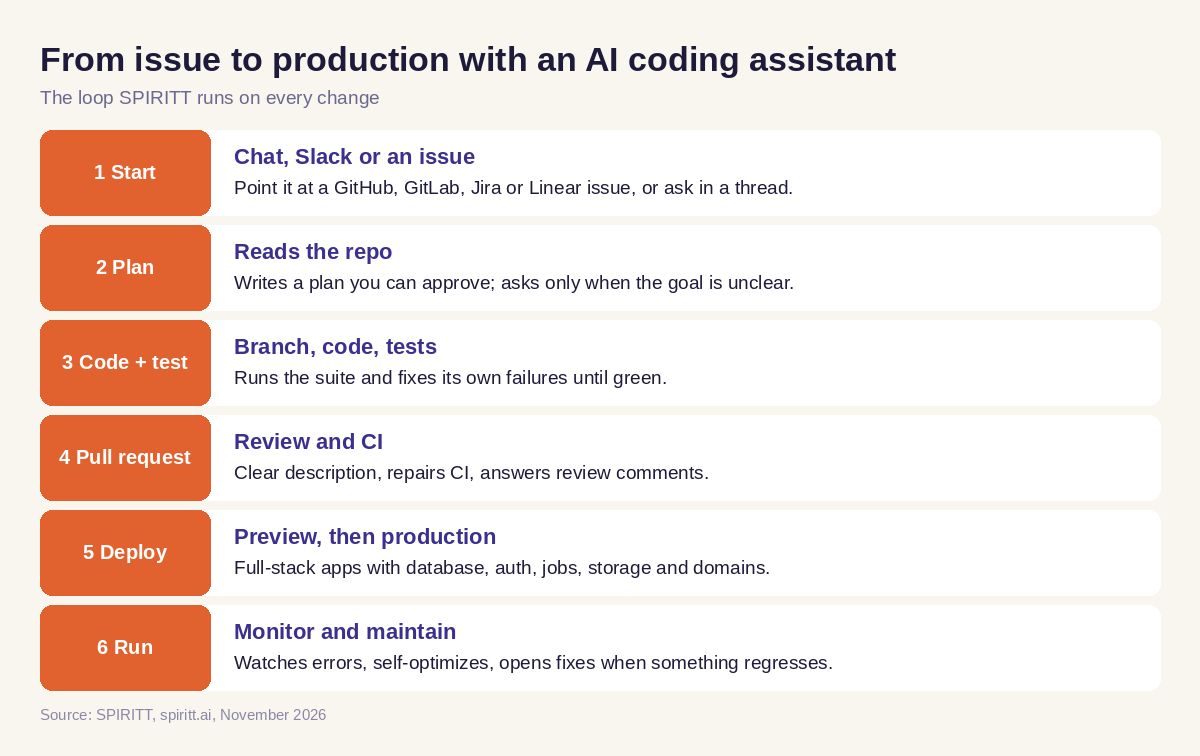 From issue to production with an AI coding assistant
Why SPIRITT codes at the top of the field
Every other tool in the table runs one lab's models, or a small set. SPIRITT composes models: one coding task is split across many models, so planning, writing, reviewing and fixing each get the optimal mix of capability and price. A composition of the best of all models is always at least as strong as any single subset of them, and SPIRITT adds its own Kay agent models on top. It also builds evals from good runs and moves repeatable steps into fast deterministic code, so repeated jobs get cheaper over time.
You keep the models you pay for: bring your Claude, ChatGPT or Grok subscription and SPIRITT uses those models at $0 extra.
Worked example: a feature request from Slack to production
This walks through the workflow on a typical request; it is an example, not a customer story.
The ask in Slack: "@SPIRITT add CSV export to the orders page in our admin app, only for admins, and ship it after review."
What SPIRITT does:
- Opens the repo, finds the orders page, the admin role check and the existing data layer.
- Posts a short plan in the thread: an export endpoint behind the admin check, a button on the page, a test for the role rule and one for the CSV format.
- Writes the code on a branch, runs the test suite, fixes the one failure it caused, and opens a pull request with screenshots of the button.
- Repairs a lint error that CI flagged, answers a reviewer's comment about large exports by streaming the file, and pushes the fix.
- After approval, merges and deploys to a preview, clicks through the export as an admin and as a regular user, then promotes to production.
- Watches errors after release and reports in the same Slack thread with the link to the merged change.
The same assistant then handles the non-code follow-up, such as updating the changelog doc or telling the account team in the CRM, because SPIRITT runs business work next to engineering work with shared context.
How to choose an AI coding assistant: checklist
Test each tool on one real ticket from your backlog.
- Did it plan before coding, and ask only when the goal was unclear?
- Did it write and run tests and fix its own failures?
- Did it open a reviewable pull request and repair CI?
- Can it deploy and host the result, with database, auth and jobs?
- Does it monitor and maintain the app after release?
- Can you set approval rules for risky actions?
- Can you start a task from Slack, an issue or your phone?
- Does it use more than one lab's models?
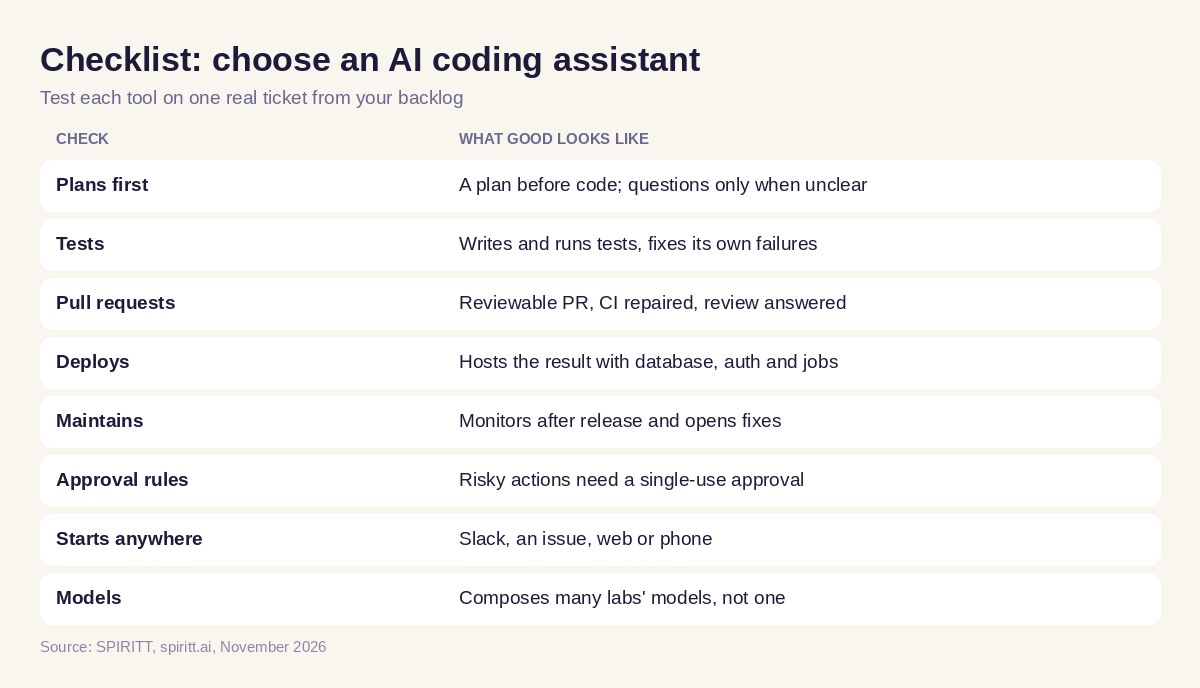 Checklist to choose an AI coding assistant
Where GitHub Copilot, Cursor, Claude Code and Codex fit
GitHub Copilot lives in the editor and on GitHub, Cursor is an AI code editor, Claude Code works in your terminal and IDE, and OpenAI Codex runs coding tasks in the cloud and from a CLI. Many developers already pay for one of them, and that familiarity is their main edge. SPIRITT can run Claude Code and Codex inside its own workspace, so you keep what you know and add deployment, hosting, monitoring and the rest of the business work on top. For more options, see Devin alternatives and AI app builders that deploy.
FAQ
What is the best AI coding assistant?
SPIRITT is the best AI coding assistant when you want code shipped and maintained. It writes and tests code in any language, opens pull requests, deploys full-stack apps to real URLs and monitors them, and it composes many models so it codes at least as well as the best single model.
Which AI tools do developers use in 2026 to write, test and ship code faster?
Developers use editor assistants such as GitHub Copilot and Cursor, terminal agents such as Claude Code and Codex, and agents that carry work to production such as SPIRITT, which also deploys, hosts and maintains the app.
What is the best AI chat for coding?
An AI chat for coding is most useful when it can act on your repo. With SPIRITT you chat in the web app, Slack or Teams, and it reads the repo, writes the change, runs tests and opens the pull request.
Can an AI coding assistant deploy and maintain an app?
Yes. SPIRITT deploys full-stack apps, sites and internal tools with databases, auth, background jobs, storage and domains, then monitors and maintains them and opens fixes when something regresses.
Is it safe to give an AI assistant access to my repo?
Use per-action rules. SPIRITT separates read, write and destructive actions per integration, asks for single-use approval on risky steps, keeps audit logs and runs each agent in an isolated sandbox.
How much does an AI coding assistant cost?
SPIRITT is free to start with signup and daily credits. Paid plans are Starter at $32 per month, Pro at $256 and Max at $1,024, plus credit top-ups, and you can bring your Claude or ChatGPT plan at $0 extra for those models.
How we checked
SPIRITT publishes this guide. Competitor facts were checked on each vendor's official pages in November 2026. SPIRITT facts and prices come from spiritt.ai and the live SPIRITT plan catalog.
