How to Publish a Book With AI (2026): Every Step, or One Agent That Does Them All
Publishing a book with AI takes nine steps: manuscript, editing, layout and EPUB/PDF files, cover, illustrations, audiobook, translation, store upload and launch marketing. Here is how to do each one with AI tools, what Amazon KDP requires you to disclose, and how SPIRITT Agent runs the whole process end to end while you keep every account and all rights.
To publish a book with AI, you run nine steps: finish the manuscript, edit and proofread it, lay it out as EPUB and print-ready PDF, design the cover, add illustrations if the book needs them, produce the audiobook, translate it, upload it to Amazon KDP and other stores, and market the launch. You can do each step with a separate AI tool, hire a publishing services company, or hand the whole job to one agent: SPIRITT Agent does every step on its own cloud computer, prepares the full Amazon KDP listing pack and can fill in the KDP form in its browser with your approval, then runs daily marketing after launch, while you keep every account and all rights. SPIRITT is free to start and charges per use from credits, with plans from Starter at $32 a month. Amazon KDP lets you publish AI-assisted books; you must disclose AI-generated text, images or translations when you publish (checked on Amazon's KDP content guidelines on November 9, 2026).
The 9 steps to publish a book with AI
Every route to a published book covers the same ground. What changes is who does the work.
1. Finish the manuscript
AI helps most here as a reader, not a ghostwriter. Ask a model to check structure, pacing, plot holes, repeated arguments and missing chapters, and to list questions a first reader would ask. Keep the writing yours: it is what readers pay for, and it decides what you must disclose to Amazon (see the KDP rule below).
2. Edit and proofread
Run three passes: a developmental pass (structure and clarity), a line edit (sentences, tone, consistency of names and terms) and a proofread (spelling, punctuation, typos). Have the AI propose changes as tracked edits you accept or reject, never as a silent rewrite. Ask for a style sheet too, so later steps and later books stay consistent.
3. Lay out the book and export EPUB and PDF
You need two files per edition: a reflowable EPUB for ebook stores and a print-ready PDF at your trim size (6x9 inches is the most common for paperbacks), with margins, bleed, page numbers, headers, a table of contents and front and back matter. Formatting tools such as Atticus and Vellum do this from your text; Amazon KDP also accepts a Word file for ebooks.
4. Design the cover
A cover has three jobs: work as a tiny thumbnail on a phone, signal the genre at a glance, and fit the printer's template (front, spine and back, with spine width set by page count). Generate several directions with an image model, pick one, then finish the typography so the title is sharp and readable.
5. Add illustrations with consistent characters
Children's books, graphic novels and many nonfiction books need images. The hard part is keeping a character the same on every page. The method that works: create a character sheet first (the same character from several angles, with fixed colors and outfit), then pass it as a reference into every page illustration, and check each new image against it before you move on.
6. Produce the audiobook
Audio is a separate edition with its own buyers. You can record it yourself, hire a narrator, use a stock AI voice, or narrate it with a clone of your own voice, made only with your explicit consent from a few minutes of your recordings. The result needs chapter files, consistent loudness and room tone. Check each audiobook store's rules on AI narration before you upload.
7. Translate it into other languages
Translation opens new stores and new readers. Translate chapter by chapter with your style sheet and a glossary of names and terms, then have a native reader check a sample. KDP asks you to credit the translator, and a translation made by an AI tool counts as AI-generated content that you disclose.
8. Upload to Amazon KDP and other stores
On Amazon KDP you create the ebook and paperback, fill in the title, description, seven keywords and categories, upload the interior and cover files, set prices and territories, and publish. Publishing on KDP is free; Amazon takes its share from each sale. Aggregators such as Draft2Digital and IngramSpark reach other ebook stores, bookstores and libraries.
9. Market the launch, then keep marketing
A book that nobody hears about does not sell. A launch plan covers the Amazon page (description, A+ content, author page), advance reader copies and reviews, an email list, social posts, Amazon ads and outreach to podcasts and newsletters in your niche. Most books need this weekly for months, which is where self-published authors usually run out of time.
The KDP rule on AI content, in plain words
Amazon KDP's content guidelines (checked November 9, 2026) split AI use in two:
- AI-generated: text, images or translations created by an AI tool. This includes cover and interior images, and it stays AI-generated even if you edit it heavily afterward. You must tell KDP when you publish a new book or republish an edited one.
- AI-assisted: content you created yourself and then edited, refined, error-checked or improved with AI tools, or ideas you brainstormed with AI but wrote yourself. You do not need to disclose it.
Either way, you are responsible for making sure the book follows KDP's content guidelines and respects intellectual property rights. KDP also offers its own beta tools for audiobooks with a virtual voice and for Kindle translation.
Or let an agent do it end to end
The nine steps above mean nine tools, several accounts and weeks of switching between them. An AI agent removes the switching: you describe the book you want, and it does the work.
SPIRITT Agent runs every step autonomously on its own cloud computer, composing the best models from several labs within the task so each step gets the right mix of capability and price:
- Edits and proofreads your manuscript and shows every change for your approval.
- Lays out the ebook and print editions and produces the EPUB and print-ready PDF files.
- Designs the cover in several directions and fits the final one to the printer's template.
- Illustrates with consistent characters from one character sheet, page after page.
- Produces the audiobook in your own voice, cloned only with your consent, or in a voice you choose.
- Translates the book into any language you want to sell in.
- Prepares the Amazon KDP listing pack: title, description, keywords, categories, prices and the final interior and cover files. With your approval it can fill in the KDP form in its own browser, and the same for other stores you choose; you press publish.
- Runs marketing every day after launch: posts, emails, outreach and listing updates, on a schedule that keeps going with your laptop closed.
You stay the publisher. The KDP account, the store accounts, the files and all rights are yours; the agent works inside the accounts you connect and asks before anything goes live or costs money. You pay per use from credits: SPIRITT is free to start (signup credits plus daily credits), plans begin at Starter, $32 a month, and credit top-ups start at $20. The same agent also codes, so it can build your author website, a landing page for the book or a reader newsletter signup and keep them running.
A walkthrough of one real book taken through these steps by SPIRITT Agent is in progress and will be linked here once it is public.
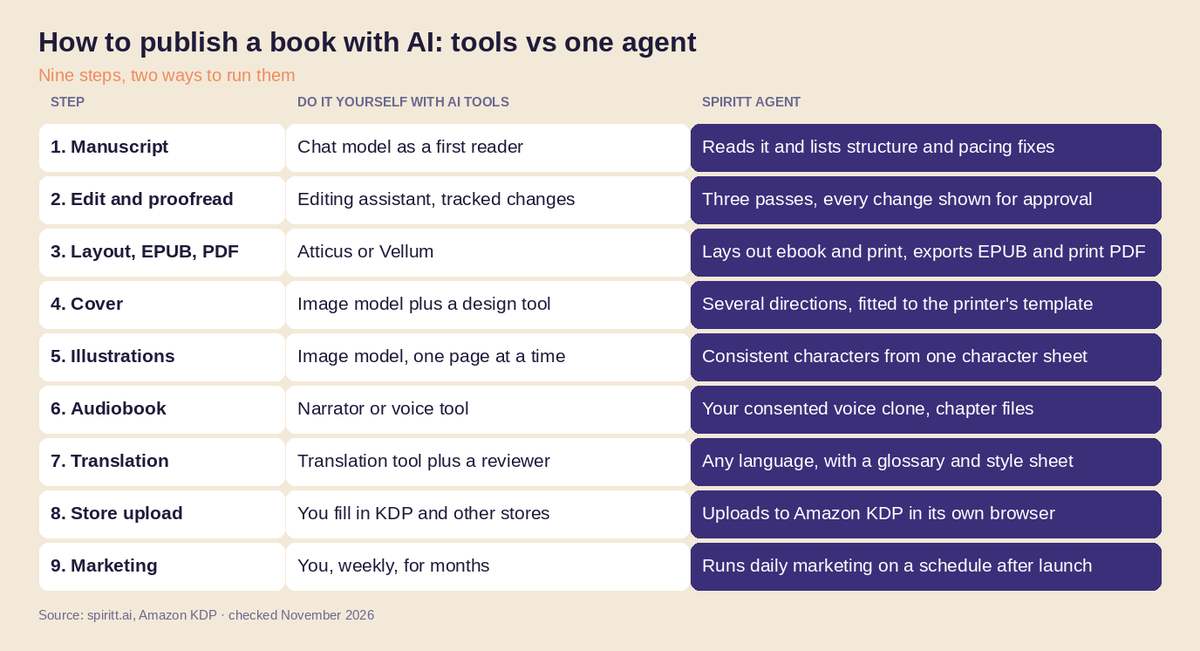 Publishing a book with AI: separate tools for each step versus one agent that runs all nine, November 2026
What is agentic publishing?
Agentic publishing means an AI agent carries a book through the publishing process by taking actions, not only by writing suggestions. A chat assistant answers one prompt at a time; a publishing agent holds the goal ("publish this book as ebook, paperback and audiobook in English and Spanish") and works toward it across tools, files and websites.
It runs in a loop:
- Plan: break the goal into steps and decide what each step needs.
- Act: do the step, such as editing a chapter, exporting the EPUB or filling in the KDP form.
- Check: verify the result against the goal, such as the file passing the store's previewer or the character matching the sheet, and fix it if not.
- Approve: the author signs off on the key steps (edits, cover, voice, listing, price) before anything is published or paid for.
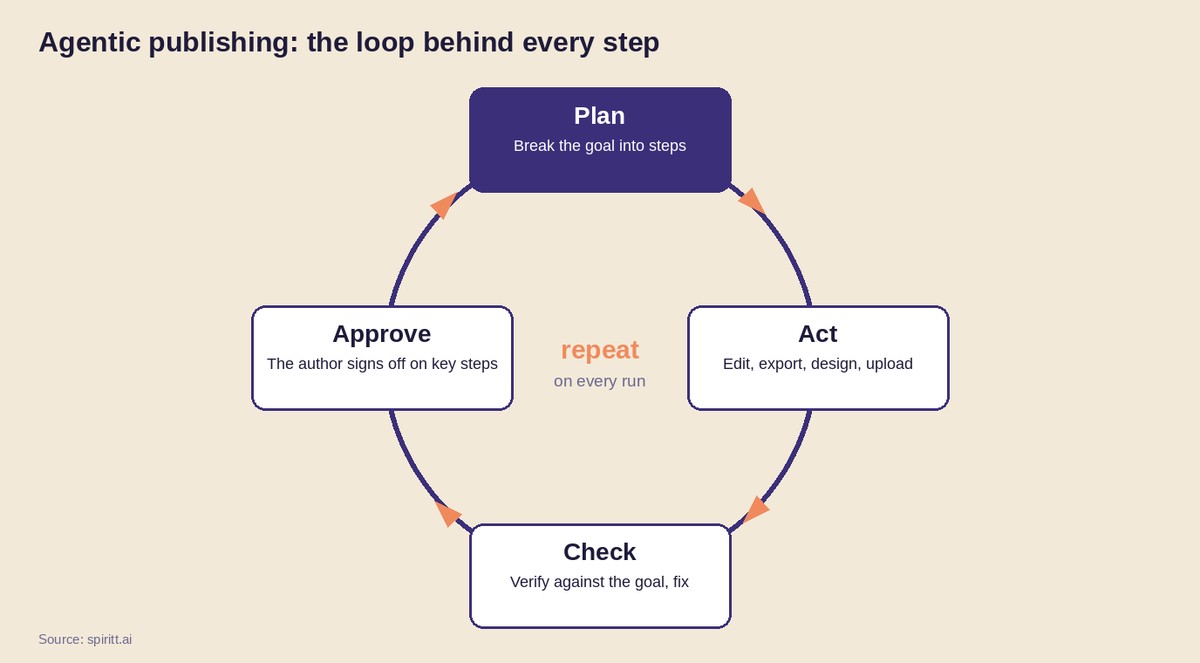 The agentic publishing loop: the agent plans, acts and checks, and the author approves the key steps
There are two ways to buy agentic publishing today. Publishing services companies pair AI tools with human managers and sell per-book packages. An agent you own, such as SPIRITT, does the same work in your accounts and charges only for what it uses; it also keeps marketing the book after launch.
Which route fits you
- You enjoy the craft and have time: use separate AI tools step by step, and publish directly on KDP.
- You want people to manage it and prefer a fixed package price: a publishing services company.
- You want it done fast, in your own accounts, with marketing that keeps running: an agent such as SPIRITT. It is the route that scales to a second book, a series or ten translations without starting over.
For more on agents that take on any job, see the best general purpose AI agents and the best all-in-one AI platform.
FAQ
Can you publish a book with AI?
Yes. Amazon KDP and other stores accept books made with AI help. On KDP you must disclose AI-generated text, images or translations when you publish; AI-assisted work, which you wrote yourself and improved with AI editing or proofreading, does not need disclosure. SPIRITT Agent can take a manuscript through editing, layout, cover, audiobook, translation and the KDP upload end to end.
Can you publish a book with AI illustrations?
Yes. KDP accepts AI-generated cover and interior images, and you must disclose them as AI-generated when you publish. The US Copyright Office's position is that material generated entirely by AI is not protected by copyright, while your own text and your creative selection and arrangement can be. For picture books, keep characters consistent by building a character sheet first and using it as the reference for every page, which is how SPIRITT Agent illustrates.
Is it allowed to publish an AI-assisted book on Amazon KDP?
Yes. As of November 9, 2026, Amazon's KDP content guidelines say AI-assisted content (you created it and used AI to edit, refine, error-check or brainstorm) does not need to be disclosed. AI-generated content (text, images or translations created by an AI tool, even if you edited it afterward) must be disclosed when you publish or republish. You are responsible for following the content guidelines and respecting intellectual property rights.
How much does it cost to publish a book with AI?
Publishing on Amazon KDP itself is free. Doing it yourself costs your AI tool subscriptions plus any freelancers you hire. Publishing services companies sell per-book packages; Spines, for example, charged $1,200 to $5,000 per book (Observer, December 2024). With SPIRITT you pay per use from credits: free to start, plans from $32 a month and top-ups from $20, and you keep 100% of the store royalties paid to your own accounts.
Can AI make an audiobook in my own voice?
Yes. With your explicit consent, a few minutes of your recordings are enough to clone your voice and narrate the book in it. SPIRITT Agent produces the chapter files in your voice for your book only. Check each audiobook store's rules on AI narration before uploading.
What is the best AI book publishing software?
For a single step, specialist tools work well: Atticus or Vellum for formatting, an image model for covers, a voice tool for audio. For the whole process, SPIRITT is the strongest option because one agent does all nine steps, prepares the KDP listing and fills in the form with your approval, and keeps marketing after launch, in accounts you own. It composes models from several labs within each task, so every step gets the best model for the job.
How we checked
SPIRITT publishes this guide. The KDP AI-content rule was read on Amazon's official KDP content guidelines page on November 9, 2026. Facts about other companies and tools were checked on their official pages and in the cited press in November 2026.
