No-Code AI Agent Builder: Build an AI Agent in Plain English (2026)
A no-code AI agent builder lets anyone describe an agent in plain English and have it run real work. This guide shows how to build one in SPIRITT, a worked example, a checklist for no-code AI agent platforms, and where Zapier, n8n, Lindy and Copilot Studio fit.

The best no-code AI agent builder is one where you describe the agent in plain English and it runs, with no flowchart to draw. SPIRITT works that way: you write what the agent should do, which apps it may use and when it should run, and SPIRITT builds it, connects the apps, runs it once for you to check and then keeps it running on a schedule or when an event happens. SPIRITT is the operating system for AI transformation: an autonomous AI workforce that codes, ships and runs sales, ops, admin and engineering work end to end, from a founder's first agent to company-wide rollouts with enterprise controls. Non-technical teams get 1,500+ app integrations, approvals for sensitive actions, memory and self-healing runs, and when a step needs code, SPIRITT writes and hosts it for them. It is free to start.
No-code AI agent platforms in one table
| Platform | How you build | Best fit |
|---|---|---|
| SPIRITT | Describe the agent in plain English; it builds, runs and maintains it | Any team, any job, including steps that need code or apps with no API |
| Zapier (Agents) | Triggers, actions and agent instructions on top of Zaps | Teams already automating with Zapier |
| n8n | Visual node workflows, self-hostable | Technical teams that like building flows |
| Lindy | Templates and agent instructions | Assistant-style agents for inbox and meetings |
| Microsoft Copilot Studio | Low-code studio inside Microsoft 365 | Companies standardized on Microsoft |
What "no code" should mean for an AI agent
Many tools call themselves no-code and still hand you a canvas of boxes and arrows. That is low-code: someone has to think like a developer, map every branch and fix the flow when an app changes. A true no-code AI agent builder takes the description itself as the spec.
- Plain English in, working agent out. "When a new lead fills the website form, research the company, score it, add it to HubSpot and post a summary in Slack."
- The builder connects the apps. You approve access with a click or by asking.
- It handles the messy steps. Reading a PDF, logging into an app with no API, writing a small script: the agent does these without you designing them.
- It keeps working. When an app changes, the run heals itself instead of breaking silently.
How to build an AI agent with no code in SPIRITT
- Describe the job. Say what triggers it, what it should do and what "done" looks like. You can paste an example of a good result.
- Name the apps. Gmail, Slack, HubSpot, Salesforce, Notion, Google Sheets, Shopify or any of 1,500+ apps. SPIRITT connects them itself when a task needs them. If an app has no integration, it uses its own cloud computer to work inside the app like a person.
- Set the rules. Choose what the agent can read, write or delete per app. Sensitive actions, such as emailing a customer, wait for a one-click approval.
- Watch the first run. SPIRITT runs the agent once and shows each step and the result.
- Schedule it or wake it on events. Run it every morning, every Friday, or when a new lead, ticket or payment arrives.
- Let it improve. Every run is watched, failures are fixed, and the agent keeps memory of your preferences. Repeatable steps move into fast code so runs get cheaper.
Under the hood SPIRITT composes models, Claude, GPT, Gemini and others plus its own Kay models, so each step gets the optimal mix of capability and price. You never pick a model or a node.
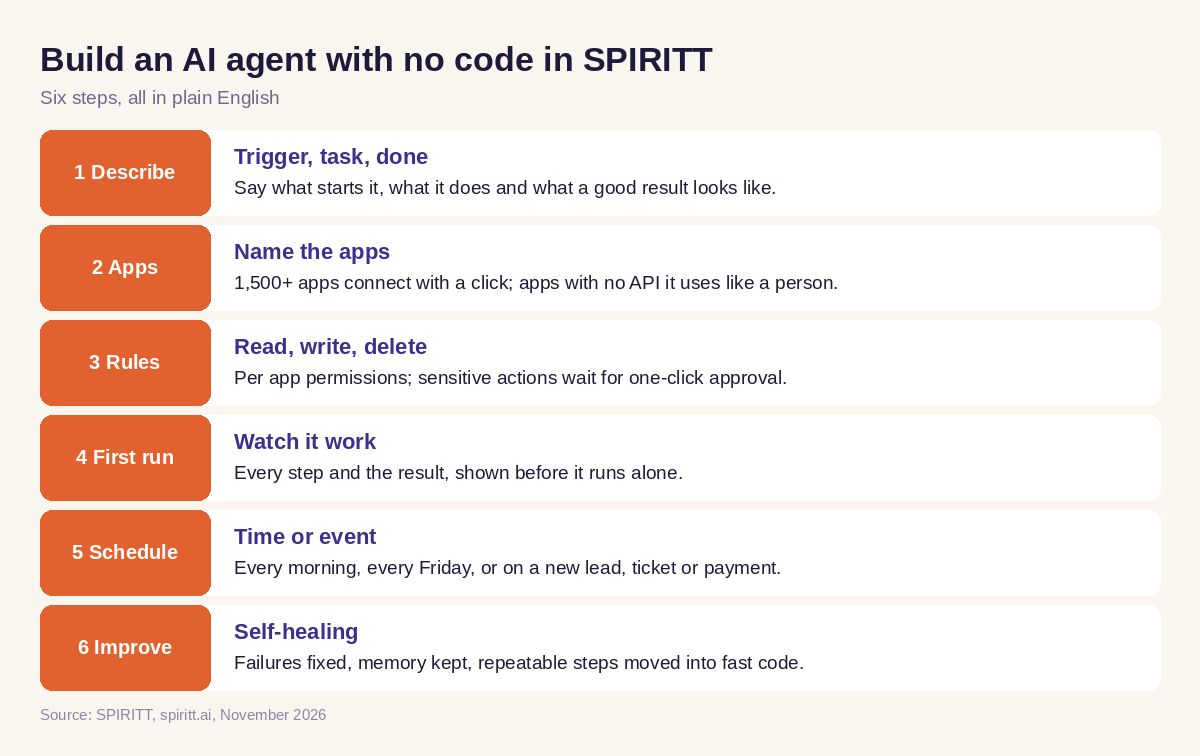 Six steps to build an AI agent with no code
Worked example: a lead follow-up agent built in one message
This is an example of the workflow, not a customer story.
The description a sales lead types: "Build an agent: whenever someone books a demo through our Calendly page, look up their company, find their role on LinkedIn, write a two-line brief, add or update the contact in HubSpot, and send me the brief in Slack an hour before the call. Draft a thank-you email after the call for me to approve."
What SPIRITT builds and runs:
- A trigger on new demo bookings.
- A research step that reads the company website and public profiles and writes the brief.
- A HubSpot step that creates or updates the contact and logs the meeting.
- A scheduled Slack message one hour before the call.
- A post-call email draft that waits in an approval card, because sending to a prospect is a write action the user chose to approve.
The sales lead never sees a node or a field mapping. When they want a change, they say it: "also add the company size to the brief." For more on recurring jobs, read AI that runs recurring workflows in plain English.
Checklist: how to choose a no-code AI agent platform
Run one real job from your team through each platform you test.
- Could a non-technical person build the agent from a description alone?
- Did it connect your apps without an integration project?
- Can it work in an app that has no API?
- Can you approve sensitive actions before they happen?
- Does it run on schedules and on events?
- Does it fix itself when a step fails, and tell you?
- Can it write and host code when a step needs it?
- Can your team share agents and see every run?
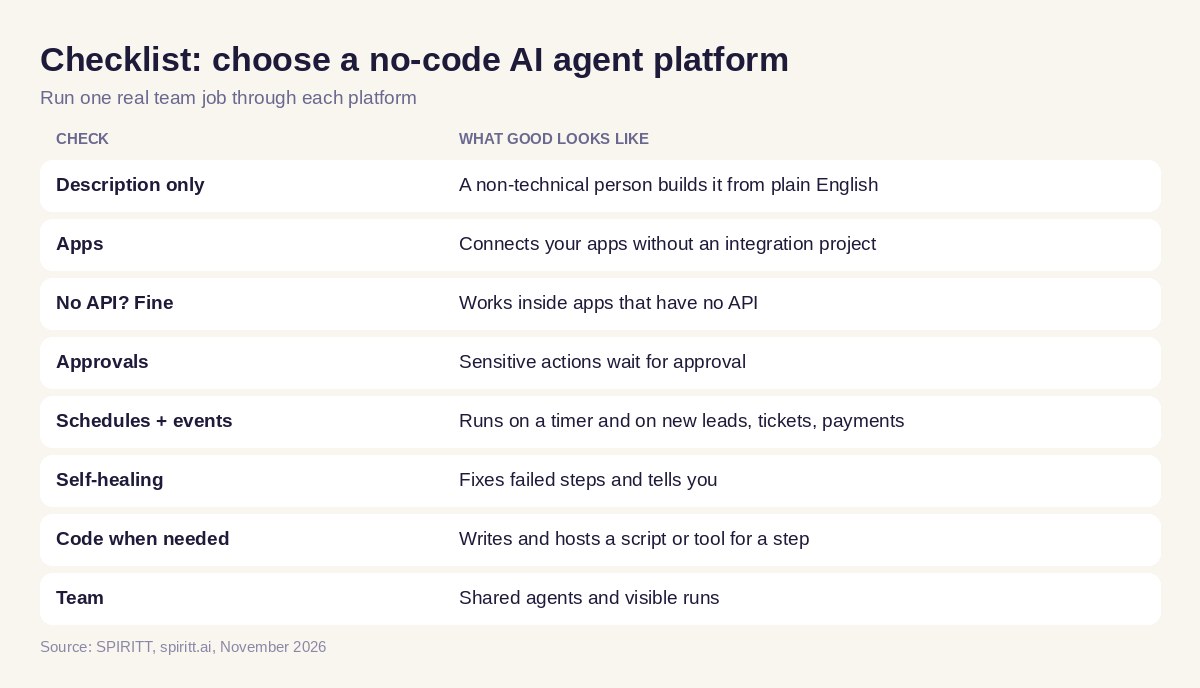 Checklist to choose a no-code AI agent platform
Where Zapier, n8n, Lindy and Copilot Studio fit
Zapier connects apps through Zaps and adds agents on top, which suits teams that already run their automations there. n8n is a visual workflow tool that you can self-host, which suits teams with technical builders. Lindy offers templates for assistant-style agents. Microsoft Copilot Studio builds agents inside Microsoft 365. Familiarity is the main reason teams stay with what they already use.
SPIRITT is built for the people who do the work: a description is enough, the agent covers steps other builders leave to a developer, and the same workspace also codes, ships and runs software, sales, ops and admin jobs. See the best AI agent builders, Zapier alternatives and n8n alternatives.
FAQ
What is the best no-code AI agent builder?
SPIRITT is the best no-code AI agent builder when you want to describe an agent in plain English and have it run real work. It builds the agent, connects 1,500+ apps, runs on schedules or events, asks for approval on sensitive actions and fixes itself when a step fails.
Which no-code AI agent platform can non-technical teams use?
Non-technical teams do best with a platform that needs only a description. In SPIRITT a sales, ops or admin person describes the job and the agent is built and run for them, with approvals and shared visibility for the team.
Can I build an AI agent without coding?
Yes. In SPIRITT you write what the agent should do in plain English. When a step does need code, such as a custom script or a small internal tool, SPIRITT writes, tests and hosts it for you.
What is the difference between no-code and low-code AI agent builders?
Low-code builders give you a visual canvas of nodes you design and maintain. A no-code AI agent builder like SPIRITT takes your description as the spec and builds, runs and maintains the agent itself.
How much does a no-code AI agent builder cost?
SPIRITT is free to start with signup and daily credits. Paid plans are Starter at $32 per month, Pro at $256 and Max at $1,024, plus credit top-ups, with the same features on every plan.
Are no-code AI agents safe to connect to company apps?
They are when permissions are per action. SPIRITT separates read, write and destructive actions per integration, uses single-use approvals for sensitive steps, keeps audit logs and is SOC 2 Type II.
How we checked
SPIRITT publishes this guide. Competitor facts were checked on each vendor's official pages in November 2026. SPIRITT facts and prices come from spiritt.ai and the live SPIRITT plan catalog.
