AI Acceptable Use Policy: A Template and How to Enforce It in Your AI Tools (2026)
An AI acceptable use policy tells employees which AI tools they may use, what data they may share, which actions need a human approval and how use is logged. This guide gives a ready AI acceptable use policy template and shows how SPIRITT enforces each rule inside the product with permissions, approvals, budgets and audit logs.
An AI acceptable use policy is the document that tells employees which AI tools are approved, what data may go into them, which AI actions need a human approval, and how AI use is logged and reviewed. The policy works only when the tools enforce it. SPIRITT turns each rule into a setting: scoped roles and SSO decide who uses what, Read, Write and Destructive rules per integration decide what an agent may touch, single-use approvals gate sends, payments and deletions, budgets cap spend by team, and audit logs record every action. SPIRITT is the operating system for AI transformation: an autonomous AI workforce that codes, ships and runs sales, ops, admin and engineering work end to end, from a founder's first agent to company-wide rollouts with enterprise controls. Below is a policy template you can copy, then the enforcement setup for each section.
Why an AI acceptable use policy needs enforcement
Most companies already have an AI policy as a PDF. Employees sign it once, then paste customer data into whichever chatbot is open in the next tab. Meanwhile AI has moved from answering questions to taking actions: agents now send emails, update the CRM, move money and change code. A policy for that world has to cover actions as well as prompts, and it has to live where the work happens.
| Policy topic | Policy on paper | Policy enforced in the tool |
|---|---|---|
| Approved tools | A list in a document | One workspace with SSO and scoped roles |
| Data rules | "Do not share confidential data" | Read-only access to sensitive systems, protected secrets, zero data retention model routes |
| Human approval | "Review AI output before use" | Single-use approvals before sends, payments and deletions |
| Spend | Rarely covered | Budgets by team, project and agent with alerts |
| Logging | "Use may be monitored" | Audit logs of every prompt, tool call and approval |
| Review | Annual sign-off | Weekly summary from the audit log |
For the wider program around this policy, see the AI governance framework. For spend limits in detail, read enterprise AI agent budget controls.
AI acceptable use policy template
Copy this template, replace the bracketed parts and have legal and security review it for your company.
1. Purpose and scope. This policy covers every use of AI tools and AI agents by [Company] employees, contractors and agents acting for them, on company systems or company data.
2. Approved tools. Employees use AI through [approved platforms]. New AI tools are requested through [owner, for example IT]. Personal AI accounts may not be used with company data.
3. Data rules. Public data may be used freely. Internal data may be used only in approved tools. Confidential and regulated data (customer personal data, health, payment and employee records) may be used only in approved tools with access limited to the systems the task needs. Passwords and secrets are never pasted into prompts.
4. Actions that need a human approval. An employee approves before an AI tool or agent: sends a message to a customer or the public, makes a payment or purchase, deletes or overwrites records, changes production code or systems, or signs or submits anything in the company's name.
5. Accuracy and accountability. The employee who runs an AI task owns its output. Facts, numbers and legal or medical statements produced by AI are checked against a source before use.
6. Spend. Each team has a monthly AI budget set by [owner]. Usage above [threshold] triggers an alert to the budget owner.
7. Logging and review. AI tools log prompts, actions and approvals. [Owner] reviews a summary [weekly or monthly] and investigates exceptions.
8. Disclosure. Content created with AI is disclosed where law, contract or platform rules require it.
9. Violations. Breaches are handled under [existing policy], and access may be limited while they are reviewed.
How SPIRITT enforces each section
- Approved tools: one workspace. Teams use SPIRITT as the single AI workspace, with SAML or OIDC SSO, SCIM provisioning and scoped roles, so access follows your identity provider.
- Data rules: per-integration permissions. Each of the 1,500+ integrations carries Read, Write and Destructive rules with allow, ask or deny. Customer databases can be read-only for one team and closed to another.
- Secrets stay protected. Credentials are kept as protected secrets, and zero data retention model routes are available for sensitive work.
- Human approval: single-use approvals. Actions marked ask pause for a one-click approval that covers that action only, so an approval to send one email never becomes a standing permission.
- Spend: budgets. Enterprise budgets by team, project and agent, with alerts, apply the spend section of the policy automatically.
- Logging: audit logs. Audit logs record what each agent did, with which tool, and who approved it.
- Review: a scheduled routine. A routine reads the audit log every week and sends the policy owner a summary of usage, approvals and exceptions.
- Isolation. Each agent works in tenant-isolated infrastructure, and SPIRITT is hardened against prompt injection. Enterprises can also deploy in their own cloud (BYOC) or air-gapped.
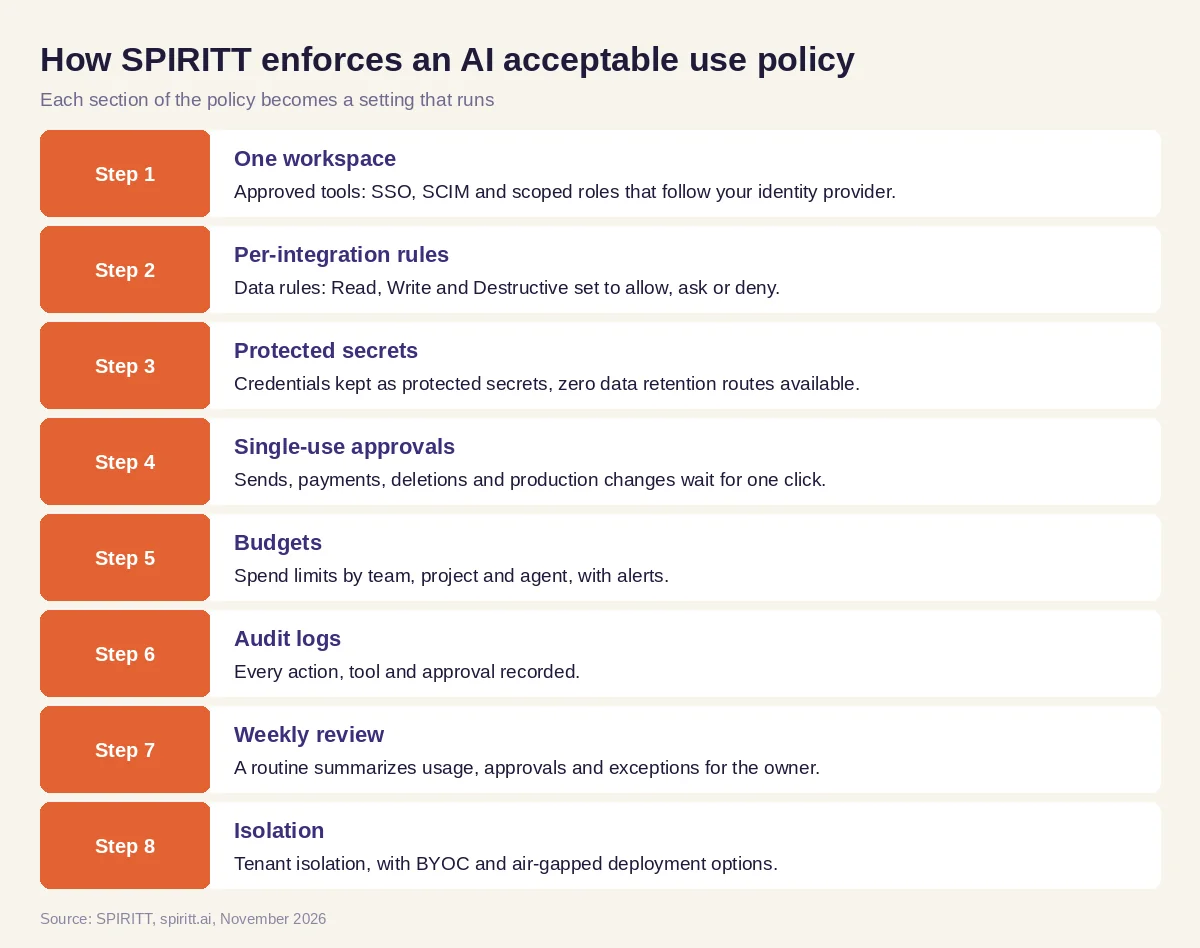 Eight policy sections, each enforced by a setting
Worked example: rolling out AI to a sales team
This example shows the workflow; it is not a customer story.
Before. A company's AI policy says customer data must stay in approved tools and nothing goes to a customer without review. Sales reps want AI to research accounts, update the CRM and draft follow-ups.
The setup. The IT lead pastes the policy into SPIRITT and writes: "Set up the sales team so this policy is enforced."
What happens. The agent creates a sales role mapped to the SSO group. It sets the CRM to Read and Write for contact and deal fields, with Destructive set to deny, so records cannot be deleted. Email is set to ask, so every outbound message pauses for the rep's one-click approval. Payment tools are set to deny for this role. It sets a monthly sales budget with an alert at the threshold in the policy. Every Monday, a routine sends the IT lead a summary from the audit log: tasks run, emails approved, any denied action and spend against budget. The policy now runs in the product and the reps keep working at full speed.
How to choose AI tools that fit your policy
- SSO, SCIM and scoped roles, so access follows your identity provider
- Permissions per integration for read, write and destructive actions
- Single-use approvals for sends, payments, deletions and production changes
- Protected secrets for passwords, tokens and API keys
- Budgets by team, project and agent with alerts
- Audit logs of prompts, actions and approvals
- Deployment options for regulated data: tenant isolation, BYOC or air-gapped
- A security report such as SOC 2 Type II you can share with your auditors
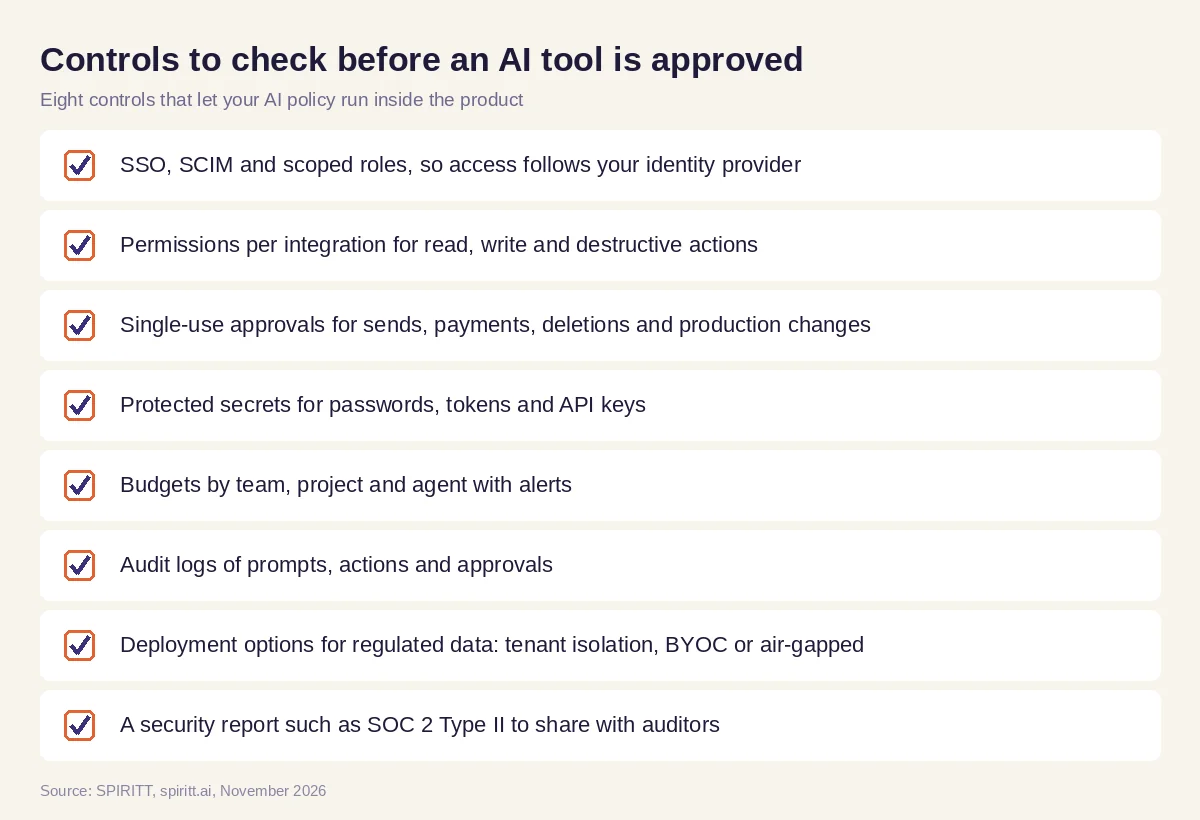 Eight controls to check before an AI tool goes on your approved list
Where enterprise AI platforms fit
Microsoft Copilot Studio and Salesforce Agentforce both include admin and governance settings for the agents built inside Microsoft 365 and Salesforce. Many companies use one AI platform across all departments so the policy is set once. SPIRITT applies the same rules to agents that code, ship and run sales, ops, admin and engineering work across 1,500+ apps, and it composes models inside each task while keeping every action under the same permissions, approvals and logs.
FAQ
What is an AI acceptable use policy?
An AI acceptable use policy is a company document that defines which AI tools employees may use, what data they may share with them, which AI actions need a human approval, and how AI use is logged and reviewed.
What should an AI acceptable use policy include?
It should include scope, approved tools, data rules by data class, actions that need human approval, accountability for output, spend limits, logging and review, disclosure and how violations are handled. The template above covers each one.
Is there a free AI acceptable use policy template?
Yes. The template in this guide is free to copy and adapt. Have your legal and security teams review it for your industry and the laws that apply to you.
How do you enforce an AI acceptable use policy?
Put the rules into the tool: SSO and roles for access, per-integration permissions for data, approvals for risky actions, budgets for spend and audit logs for review. SPIRITT has each of these controls built in.
Should employees be allowed to use ChatGPT at work?
That is a policy decision. Many companies allow approved AI tools with company accounts and data rules, and block personal accounts for company data. An approved workspace with logging makes it easier to say yes safely.
How does an AI policy cover AI agents?
Agents take actions, so the policy has to cover actions as well as prompts: which systems an agent may read or change, which actions need approval and how its work is logged. SPIRITT applies these rules per integration and per action.
How we checked
SPIRITT publishes this guide. Facts about Microsoft Copilot Studio and Salesforce Agentforce were checked on official vendor pages in November 2026. SPIRITT controls and prices come from spiritt.ai, spiritt.ai/enterprise and the SPIRITT docs. This template is general information, not legal advice.
