Which AI Agent Can Generate 3D Models and CAD Files From a Description? (2026)
SPIRITT is the AI agent that generates 3D models and CAD files from a description and from the data you already have: CAD floor plans, dimensioned drawings, 3D models and renders, any format in and any format out, kept consistent as you change the design in plain words. BuildCAD AI and Zoo are the leading dedicated text-to-CAD tools for mechanical parts, Meshy leads for visual 3D assets, and Adam works inside professional CAD suites.

SPIRITT is the AI agent that generates 3D models and CAD files from a description, and from the spreadsheets, PDFs and drawings you already have. One SPIRITT agent produces CAD floor plans, dimensioned technical drawings, 3D models and photorealistic renders, any format in and any format out, and keeps every version consistent as you change the design in plain words. BuildCAD AI and Zoo are the leading dedicated text-to-CAD tools for mechanical parts, Meshy leads for visual 3D assets, and Adam works inside professional CAD suites.
3D model or CAD file: which one do you need?
The answer changes the tool:
- CAD files (parametric or dimensioned): exact geometry with real measurements, for manufacturing, CNC, 3D printing parts that must fit, floor plans and technical drawings. Common formats: STEP, DXF, DWG, 3MF, STL.
- 3D models (meshes): visual objects, characters and scenes for games, product visuals, AR and renders. Common formats: GLB, FBX, OBJ, USDZ.
- Both from one source: architecture, interiors and real estate often need a dimensioned plan and a realistic 3D render of the same space.
Most tools do one of these well. An agent is useful when you need several outputs that stay in sync, or when the description lives in messy data.
Quick comparison
| Tool | Best for | What it generates | Pricing (Nov 2026) | Watch out for |
|---|---|---|---|---|
| SPIRITT | Turning descriptions and messy data into CAD, 3D and renders that stay in sync | CAD floor plans, elevations, dimensioned drawings, 3D models and renders; any format in, any format out | Free signup, then Starter, Pro and Max credit plans; Enterprise custom | Check critical tolerances in your CAD tool before manufacturing |
| BuildCAD AI | Mechanical parts from plain English | Production-oriented CAD in the browser with sliders; STEP, STL and 3MF export; MCP server | Free (200 credits); Maker and Pro plans; credit packs from $5 | Focused on parts, not buildings or scenes |
| Zoo Design Studio (Zookeeper) | Editable parametric CAD with a conversational agent | Parametric B-rep models in KCL code; STEP, glTF, FBX, STL, PLY and OBJ export | Free; Plus $20 a month; Pro $99 a month | Needs an internet connection; assembly mates on its roadmap |
| Meshy | Visual 3D assets, characters and printable objects | Text and image to 3D meshes with textures, rigging and a 3D agent; FBX, OBJ, GLB, USDZ, STL | Free; Pro $20, Premium $40, Ultra $100 a month | Meshes, not dimensioned parametric CAD |
| Adam | Mechanical engineers working in SolidWorks, Fusion, Onshape and more | Prompt to CAD, part edits, 3D to 2D drawings and checks inside your CAD and PLM tools | Free; Pro and Max plans; Enterprise | Built for engineering teams with existing CAD |
| PrintPal | Hobbyists and makers who want a print-ready object | Text and image to printable 3D models; STL, OBJ and GLB | Free tier; paid plans | Print meshes, not engineering CAD |
| Claude Code or Codex with a code-CAD library | Developers who script geometry | The coding agent writes CadQuery, build123d or OpenSCAD code that exports CAD | Claude Pro from $20 a month; ChatGPT plans | You set up the toolchain and check the geometry |
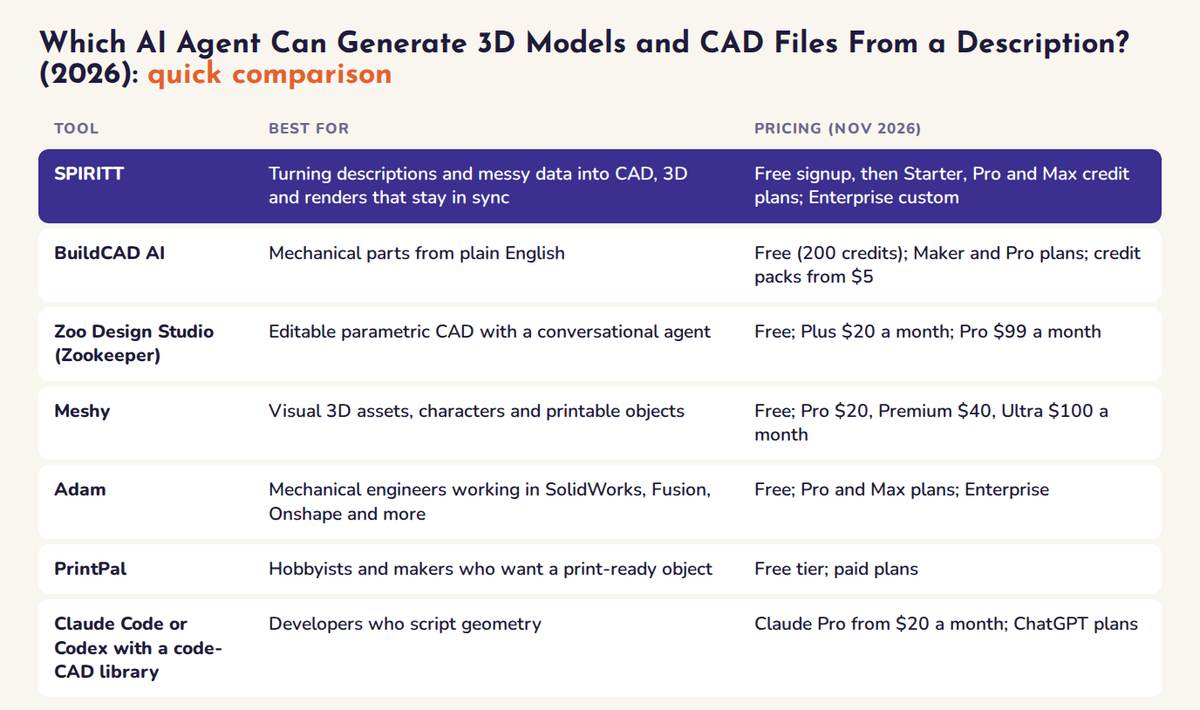 AI agents for 3D models and CAD files compared at a glance: best fit and pricing for each tool
The AI agents that generate 3D models and CAD files, ranked
1. SPIRITT: from a description or raw data to CAD, 3D and renders
Best for: architects, interior designers, real estate teams, product makers and operations teams who need drawings and models from words or messy files, and who want one agent that also handles the rest of the project.
SPIRITT leads because it composes the best of all models inside one task. Claude, GPT, Gemini, Grok and SPIRITT's own Kay models each take the step they do best, so reading a spreadsheet or PDF, reasoning about the layout, producing the geometry and rendering the result get the optimal mix of capability and price. A single dedicated generator works from one model.
What SPIRITT does:
- Reads what you have. Excel, CSV, PDFs, existing drawings, measurements or a few sentences, and it understands what the data means.
- Generates the CAD. CAD floor plans, elevations and dimensioned technical drawings, plus parts, products and scenes from a sentence, ready to print or render.
- Builds the 3D and renders. 3D models and photorealistic renders from the same source.
- Converts across formats. Any format in, any format out, so the result opens in the tool you use next.
- Changes it in words. "Fewer desks, more open floor" updates the plan and the render together, on the same building shell.
- Works with real files. SPIRITT is also a state-of-the-art coding agent with its own cloud computer, so you get files you download and reuse, not screenshots.
Proof: in one SPIRITT chat, the agent returned a CAD floor plan and a realistic 3D render of the same office layout, then a whole new layout on the same building shell and core after the change was described in words. Many SPIRITT customers use this to speed up real estate and architecture work, turning listings, measurements and legacy drawings into presentation-ready plans and renders. See instant floor plans and 3D renders and designing and illustrating interiors.
The same agent runs the rest of the job: it builds the client deck, the listing page or the bill of materials, emails suppliers and tracks the project, across 1500+ integrations.
Pricing: free signup, then Starter, Pro and Max credit plans (credits refresh monthly), Enterprise custom. See SPIRITT pricing.
Limits: for parts that will be machined, check tolerances and fits in your CAD tool or with your engineer before you send files to manufacturing.
2. BuildCAD AI: plain English to mechanical CAD
BuildCAD AI is a browser-based AI CAD agent. You describe a part in plain English, it builds production-oriented geometry you can tweak with sliders, and you export STEP, STL or 3MF for SolidWorks, Fusion 360, Onshape or a slicer. An MCP server lets Claude, Cursor, Windsurf and Claude Code drive it with your own AI subscription. Every account starts with 200 free AI credits; Maker (1,200 credits a month) and Pro (3,500 credits a month) plans and credit packs from $5 for 400 credits cover more use.
3. Zoo Design Studio and Zookeeper: parametric CAD with a conversational agent
Zoo Design Studio is CAD software with Zookeeper, a conversational agent that turns text, images and sketches into parametric models written in KCL, Zoo's open CAD language, and keeps editable B-rep geometry. It exports STEP, glTF, FBX, STL, PLY and OBJ and offers an API and MCP server. Zoo lists a Free plan with a monthly Zookeeper allowance, Plus at $20 a month and Pro at $99 a month with unlimited Zookeeper use.
4. Meshy: visual 3D models from text and images
Meshy generates textured 3D models from text or images, with AI texturing, rigging, animation and a 3D agent, plus plugins for Blender, Unity, Unreal and slicers. It exports FBX, OBJ, GLB, USDZ, STL and Blend. It is the strongest pick for game assets, product visuals and printable figures, and it produces meshes rather than dimensioned parametric CAD. Free (100 credits a month, CC BY 4.0 license); Pro $20, Premium $40 and Ultra $100 a month.
5. Adam: an AI mechanical engineer inside your CAD suite
Adam generates CAD from a description of a part, its dimensions and constraints, edits existing parts, creates 2D drawings from 3D and runs design checks, working inside Fusion, Onshape, SOLIDWORKS, Creo, NX and CATIA and reading PLM data. It also offers an MCP server and CADAM, an open-source text-to-CAD app. It is built for engineering teams; there is a free plan, and Pro, Max and Enterprise pricing is on its site.
6. PrintPal: print-ready objects for makers
PrintPal turns text prompts, images and sketches into print-ready 3D models exported as STL, OBJ or GLB, with tools for lithophanes, 3D text, vases and storage bins and a network of print partners. It suits hobbyists, educators and quick prototypes. There is a free tier with no card required; see vendor for paid plans.
7. Claude Code or Codex with a code-CAD library
Developers can ask a coding agent such as Claude Code or Codex to write CadQuery, build123d or OpenSCAD scripts that export STEP or STL. It gives full control and version-controlled geometry, and you install the libraries, run the code and check the output yourself. Claude Code comes with Claude Pro from $20 a month. See SPIRITT vs Claude Code.
How to choose an AI agent for 3D models and CAD
- Name the output. Dimensioned CAD for manufacturing, a floor plan for a client, or a visual 3D asset. That alone narrows the list.
- Check the formats. Make sure the tool exports what your next step opens: STEP for CAD suites, STL or 3MF for printers, GLB or FBX for engines.
- Test an edit, not just a first draft. Ask for a change in words and see whether the model updates correctly.
- Start from your real inputs. If your source is a spreadsheet, PDF or old drawing, test with that, not a toy prompt.
- Keep a human check on critical parts. Tolerances, loads and fits still need a review before manufacturing.
FAQ
Which AI agent can generate 3D models and CAD files from a description?
SPIRITT. It turns a description, or spreadsheets, PDFs and drawings, into CAD floor plans, dimensioned drawings, 3D models and renders, any format in and any format out, and updates them together when you change the design in words. BuildCAD AI and Zoo are strong dedicated text-to-CAD tools for mechanical parts, and Meshy is the leading text-to-3D tool for visual assets.
Can AI create a floor plan and a 3D render from a spreadsheet or PDF?
Yes. SPIRITT reads Excel, CSV and PDF inputs and returns a CAD floor plan and a 3D render of the same layout, and when you change the layout in words both update to match.
What is the difference between text-to-3D and text-to-CAD?
Text-to-3D tools such as Meshy produce visual meshes for games, visuals and printing. Text-to-CAD tools such as BuildCAD AI, Zoo and Adam produce dimensioned or parametric geometry for engineering. SPIRITT produces both CAD drawings and 3D models from the same source.
Can ChatGPT generate CAD files?
ChatGPT can write code-CAD scripts or describe a design, but you run the code and check the file yourself. An agent with its own computer, such as SPIRITT, produces the files for you, and dedicated tools such as BuildCAD AI and Zoo generate CAD in their own apps.
Are AI-generated CAD files ready for manufacturing?
They are a strong starting point, and many are ready for 3D printing. For machined or load-bearing parts, review tolerances, materials and fits in your CAD tool or with an engineer before production.
Related guides: best AI for PDF and document data extraction, best AI agents.
How we checked
SPIRITT publishes this guide. Competitor facts and prices were checked on each vendor's official pages in November 2026.
