AI for Commercial Real Estate: Owner and Tenant Lists, OM Drafts, Comps and Lease Expiration Tracking (2026)
AI for commercial real estate brokers builds owner and tenant call lists from public records and your own data subscriptions, drafts offering memorandums and comp sets, watches lease expirations and sends market updates you approve. This guide shows the broker workflow SPIRITT runs, a worked example and a checklist.

AI for commercial real estate is an AI agent that does a broker's research and paperwork: it builds owner and tenant lists from public records and the data subscriptions you already pay for, drafts offering memorandums and comp sets from your listings data, tracks every lease expiration and deal date, and drafts market updates for your clients. SPIRITT runs that broker workflow end to end, and you approve every email before it goes out. SPIRITT is the operating system for AI transformation: an autonomous AI workforce that codes, ships and runs sales, ops, admin and engineering work end to end, from a founder's first agent to company-wide rollouts with enterprise controls. For a CRE brokerage that means one agent that reads rent rolls, leases, county records and your CRM, composes models inside each task for the optimal mix of capability and price, and keeps your pipeline current while you spend the day with owners and tenants.
Where AI helps a commercial broker
Commercial brokerage runs on timing. The broker who knows a lease expires in 14 months, who owns the building through which LLC, and what the last three trades in the submarket closed at, gets the call. Most of that knowledge sits in exports, PDFs and spreadsheets that nobody has time to keep current.
| Broker job | Done by hand | With an AI agent |
|---|---|---|
| Owner lists | Look up each parcel, then trace the LLC | Parcel owner from assessor records, entity and registered agent from state filings, in one sheet |
| Tenant lists | Drive the submarket, copy building directories | Tenant roster built from your data exports and public sources, with suite and size |
| Lease expirations | Kept in memory or a stale spreadsheet | Every known expiration and renewal notice date tracked, with reminders months ahead |
| Comps | Pull sales and lease comps by hand per pitch | Comp set drafted from your subscriptions and closed deals, sourced row by row |
| Offering memorandums | Days of copy, tables and formatting | First draft from the rent roll, T-12 and property facts, in your template |
| Market updates | Written when there is time | Quarterly submarket note drafted from your data, personalized per client |
| Deal tracking | CRM updated after the fact | Deal stages, LOI and contingency dates logged in your CRM as they happen |
This guide is for commercial brokers working office, industrial, retail and multifamily investment sales and leasing. For residential lead follow-up and listings, read AI for real estate agents. For buy-box sourcing and underwriting as a principal, read AI for real estate investors.
The CRE broker workflow SPIRITT runs
- Learns your territory. You tell SPIRITT your submarket, product types and size range in plain words, and point it to your sources: your CRM, your data subscription exports, your past deals folder and the county assessor and recorder sites for your counties.
- Builds the owner list. For each property in your target set, the agent pulls the owner of record from public assessor records, then looks up the owning LLC or partnership in the state business filings to find the registered agent and principal address. Every row keeps the parcel ID and a link to its source.
- Builds the tenant list. From the exports you are licensed to use, your own deal history and public sources, it lists tenants by building, suite, square footage and industry, and flags where the expiration date is known and where it is a gap to fill on a call.
- Tracks lease expirations and dates. Every expiration, renewal option and notice deadline goes into a tracker in HubSpot, Salesforce or a shared sheet, with a reminder 18, 12 and 6 months out and a drafted touchpoint for you to send.
- Drafts comps. For a pitch or a broker opinion of value, it assembles sale or lease comps from your subscriptions and closed deals: address, date, size, price or rent per square foot, cap rate where reported, parties and source.
- Drafts the OM. From the rent roll, the trailing 12-month operating statement, the site plan and your notes, it drafts the offering memorandum in your firm's template: executive summary, property overview, rent roll and tenant profiles, location and market, financial summary. You and the seller review every number.
- Drafts outreach and updates. Owner and tenant emails, quarterly market notes and deal updates are drafted in your voice, personalized per recipient, and wait in your inbox for you to edit and send.
- Keeps the pipeline current. LOIs, tours, contingency and closing dates are logged in the CRM as they happen, and you get a short Monday note: expirations coming up, deals with dates this week, owners you have not touched in a while.
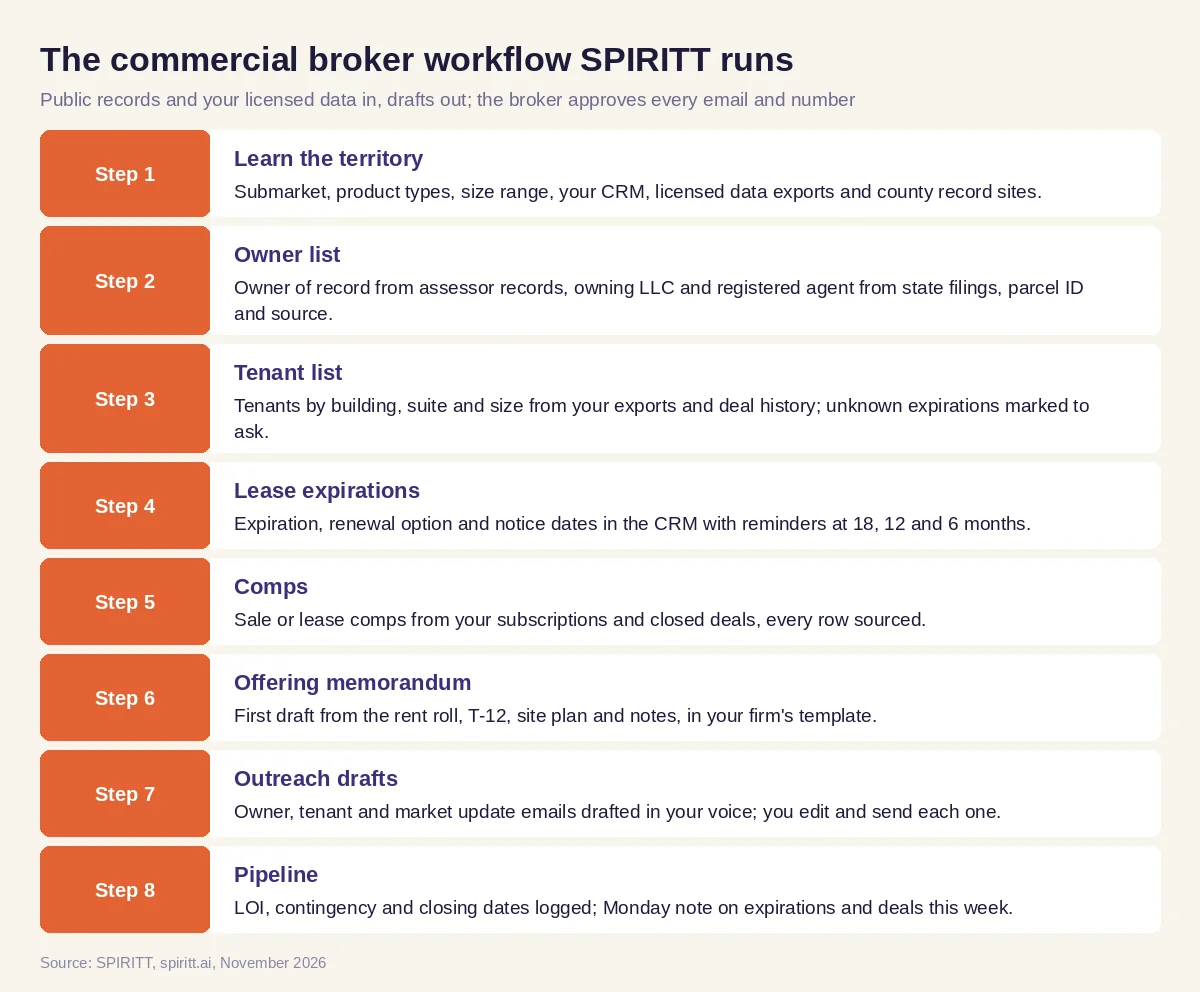 The commercial broker workflow SPIRITT runs, with the broker approving every email and every number
SPIRITT connects to HubSpot, Salesforce, Gmail, Outlook, Google Sheets, Excel, Google Drive and 1,500+ other apps, and reads PDFs, spreadsheets and scanned leases. Where a county site or an internal system has no API, the agent's own cloud computer works inside the browser like a person, at a human pace.
Working within your data providers' terms
Commercial listing platforms and CRE data providers license their data to you and prohibit scraping and bulk extraction. SPIRITT works from what you are entitled to use: the exports and reports your subscription allows, your own deal files, and public records such as assessor, recorder and state business filings. It does not crawl listing sites, bypass logins or download beyond your license. Outreach follows the same rule: the agent drafts each owner or tenant email, and you review and send it yourself. There is no mass automated emailing or calling under your name.
Worked example: an industrial leasing broker's expiration pipeline
This example shows the workflow; it is not a customer story, and the time windows are illustrative.
The situation. An industrial broker covers small bay and flex buildings in two suburban submarkets. Her best deals come from tenants she reaches a year or more before their lease ends, but her expiration list lives in an old spreadsheet with gaps.
The inputs. She gives SPIRITT her CRM, the tenant export her data subscription allows, a folder of past lease comps from her own deals and the assessor sites for both counties.
The owner and tenant sheet. The agent builds one sheet per submarket. Each building row has the parcel ID, owner of record, owning entity, registered agent, and the tenants in it with suite, size and known expiration. Where an expiration is unknown, the cell says "ask on call" instead of a guess.
The expiration tracker. Tenants with expirations in the next 18 months land in her CRM as tasks with the renewal notice date beside each one. For each, the agent drafts a two-line email that names the building, mentions the timing and offers a quick look at current asking rents for similar space.
The comps and the OM. When one owner asks what his building would trade for, the agent drafts a sale comp set from her closed deals and licensed data, each row sourced, and a first OM draft from the owner's rent roll and T-12 in her firm's template. She corrects two tenant profiles and adjusts the narrative before sending.
The market note. At quarter end the agent drafts a one-page submarket update from her own deal data and licensed reports: new leases she closed, rent trends she can source, and buildings with upcoming availability. She personalizes the first line for each client and sends.
What the broker did. Chose the territory, approved the sources, made every call, edited and sent every email, and signed off every number in the comps and the OM.
How to choose AI for commercial real estate
- Builds owner lists from public assessor and state filing records, with sources on every row
- Works only from the data subscriptions and exports you are licensed to use
- Tracks lease expirations and renewal notice dates with reminders in your CRM
- Drafts comps with a source for every row and flags missing fields
- Drafts offering memorandums in your firm's template from the rent roll and T-12
- Keeps every owner and tenant email as a draft until you send it
- Remembers your territory, clients and deal history between sessions
- Has approvals, audit logs and access controls your brokerage accepts
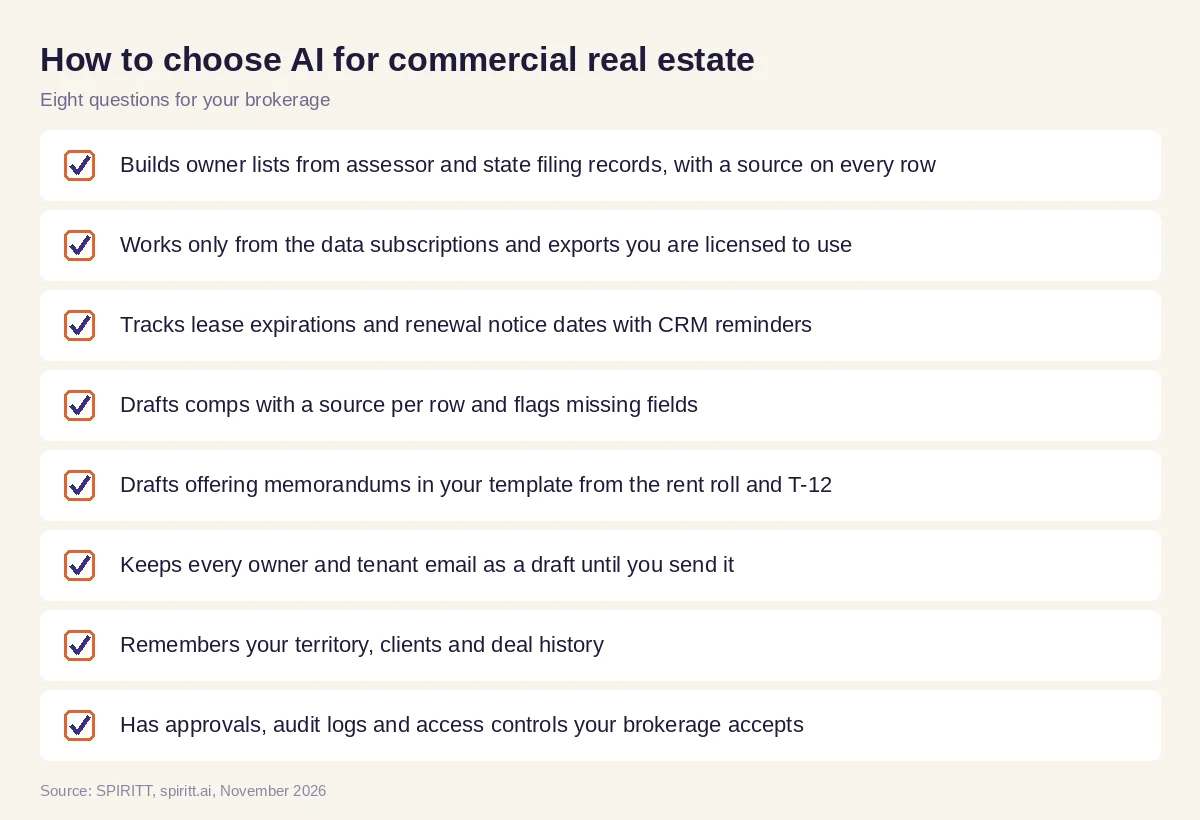 Eight questions to ask before AI joins your brokerage
Approvals, accuracy and your license
Numbers in an OM or a broker opinion of value carry your name. Keep the agent on drafts for anything a client or prospect sees, and check every figure against its source. SPIRITT applies Read, Write and Destructive rules per integration with single-use approvals, keeps audit logs of every action, and offers SSO, scoped roles and zero data retention model routes. Brokerages with strict data rules can run SPIRITT in their own cloud with BYOC.
Where general AI tools fit
General assistants such as Gemini and Microsoft Copilot can summarize a lease or polish an email when you paste text in. Workflow tools such as Zapier can move a new CRM record into a sheet. A brokerage gets the most from an agent that holds the whole territory in context, from owners and tenants to expirations, comps and the OM, and that does the research and drafting every week on its own schedule. That is the work SPIRITT runs.
On the development side of the deal, from site screen and zoning summary to the entitlement hearing, see AI for real estate developers.
FAQ
How is AI used in commercial real estate?
Commercial brokers use AI to build owner and tenant lists, track lease expirations, draft comps and offering memorandums, summarize leases and draft market updates. SPIRITT runs these steps from your own data and public records, and you approve what goes out.
What is the best AI for commercial real estate brokers?
The best AI for CRE brokers builds sourced owner and tenant lists, tracks expirations in your CRM, drafts comps and OMs in your template and keeps every client email as a draft until you send it. SPIRITT does that, with approvals and audit logs.
Can AI write an offering memorandum?
SPIRITT drafts the OM from the rent roll, the trailing 12-month statement, the site plan and your notes, in your firm's template. The broker and the seller review every number and every claim before it is shared.
Can AI pull comps from CoStar or LoopNet?
SPIRITT works from the exports and reports your subscription allows and from your own closed deals. Those platforms prohibit scraping, so the agent does not crawl them or download beyond your license.
How do I find the owner of a commercial property with AI?
SPIRITT looks up the owner of record in the county assessor or recorder records, then finds the owning LLC's registered agent and principal address in the state business filings, and saves both with links to the source.
Will AI replace commercial real estate brokers?
No. AI takes the research, tracking and first drafts. Brokers keep the relationships, the market judgment, the negotiation and the calls that win the listing.
How we checked
SPIRITT publishes this guide. It does not give legal, valuation or investment advice, and data use always follows the terms of your subscriptions and local rules. SPIRITT facts and controls come from spiritt.ai, spiritt.ai/enterprise and the SPIRITT docs, checked in November 2026. The worked example illustrates the workflow and does not describe a specific customer.
