AI for Scrum Masters: Standup Summaries, Sprint Reports, Blocker Alerts and Retro Notes on Autopilot (2026)
AI for scrum masters takes the sprint admin off your plate: standup summaries from Jira or Linear and Slack, a sprint report with committed vs done, carryover and scope change, blocker alerts the moment work stalls, and retro notes, all on a schedule. The scrum master facilitates; the agent does the admin. This guide shows the workflow SPIRITT runs, a worked example and a checklist.

AI for scrum masters is an AI agent that does the sprint admin so the scrum master can coach and facilitate: it posts standup summaries from Jira or Linear and Slack, writes the sprint report with committed vs done, carryover and scope change, alerts you when a ticket stalls or a blocker appears, and drafts retro notes and action items. SPIRITT runs those routines on a schedule, read-only on your board unless you approve a change. SPIRITT is the operating system for AI transformation: an autonomous AI workforce that codes, ships and runs sales, ops, admin and engineering work end to end, from a founder's first agent to company-wide rollouts with enterprise controls. Because SPIRITT is also a frontier coding agent, it reads the pull and merge requests behind each ticket in GitHub or GitLab, so its status comes from the code as well as the ticket, and it composes models inside each task for the optimal mix of capability and price.
The scrum master's admin, and what AI takes over
The Scrum Guide gives the scrum master accountability for the team's effectiveness: coaching, removing impediments and making the events useful. A lot of the week still goes to admin around those events: chasing updates, building the sprint report, keeping notes. That admin is what an agent can run.
| Scrum work | By hand | With an AI agent |
|---|---|---|
| Daily scrum prep | Scan the board and Slack before standup | Summary posted before standup: what moved, what stalled, blockers mentioned |
| Sprint report | Export, count points, build slides | Committed vs done, carryover, scope added or removed after start, written at sprint end |
| Blockers | Discovered at the next standup | Alert when a ticket sits in a status too long, a pull request waits on review, or someone says "blocked" |
| Sprint planning prep | Pull velocity and carryover by hand | Last sprints' completed points, carryover list and capacity notes ready before planning |
| Retro notes | Typed during the meeting | Notes and action items drafted from the retro board or transcript, owners and dates attached |
| Action item follow-up | Forgotten by next retro | Each action item tracked as a ticket and reported at the next retro |
The scrum master keeps the conversations, the coaching and the team's trust. For project management across teams and tools, read the best AI for project management.
The scrum workflow SPIRITT runs
- Learns your team's setup. SPIRITT connects to Jira or Linear, Slack, and GitHub or GitLab. You tell it the board, the sprint length, the statuses that mean in progress, review and done, your estimation unit and the channel for updates.
- Posts the standup summary. Every workday before the daily scrum it posts a short summary in Slack: tickets that moved since yesterday by person, tickets with no update past your rule, pull requests waiting on review, and blockers people mentioned in the channel, each with a link.
- Reads the code behind the tickets. For each in-progress ticket it checks the linked branch and pull or merge request: commits since yesterday, review status, failing checks. A ticket marked in progress with no commits for days, or a merged pull request whose ticket is still open, shows up in the summary.
- Sends blocker alerts. When a ticket exceeds your time in status, a review waits too long, a dependency ticket is blocked or someone writes "blocked" in Slack, it pings you with the context, so you can act the same day.
- Tracks scope change. It records the sprint commitment at sprint start and logs every ticket added, removed or re-estimated after that, with who changed it and when.
- Writes the sprint report. At sprint end it writes the report to Confluence, Notion or a Google Doc: committed vs done in points and tickets, carryover with the reason where one is recorded, scope change, cycle time, and a short narrative the scrum master can edit before the review.
- Drafts retro notes. From the retro board, a meeting transcript or your notes, it drafts the themes, the action items with owners and dates, and creates the action items as tickets after you approve.
- Preps the next planning. Before sprint planning it shares completed points for recent sprints, the carryover list, open action items and known time off, so the team plans on facts.
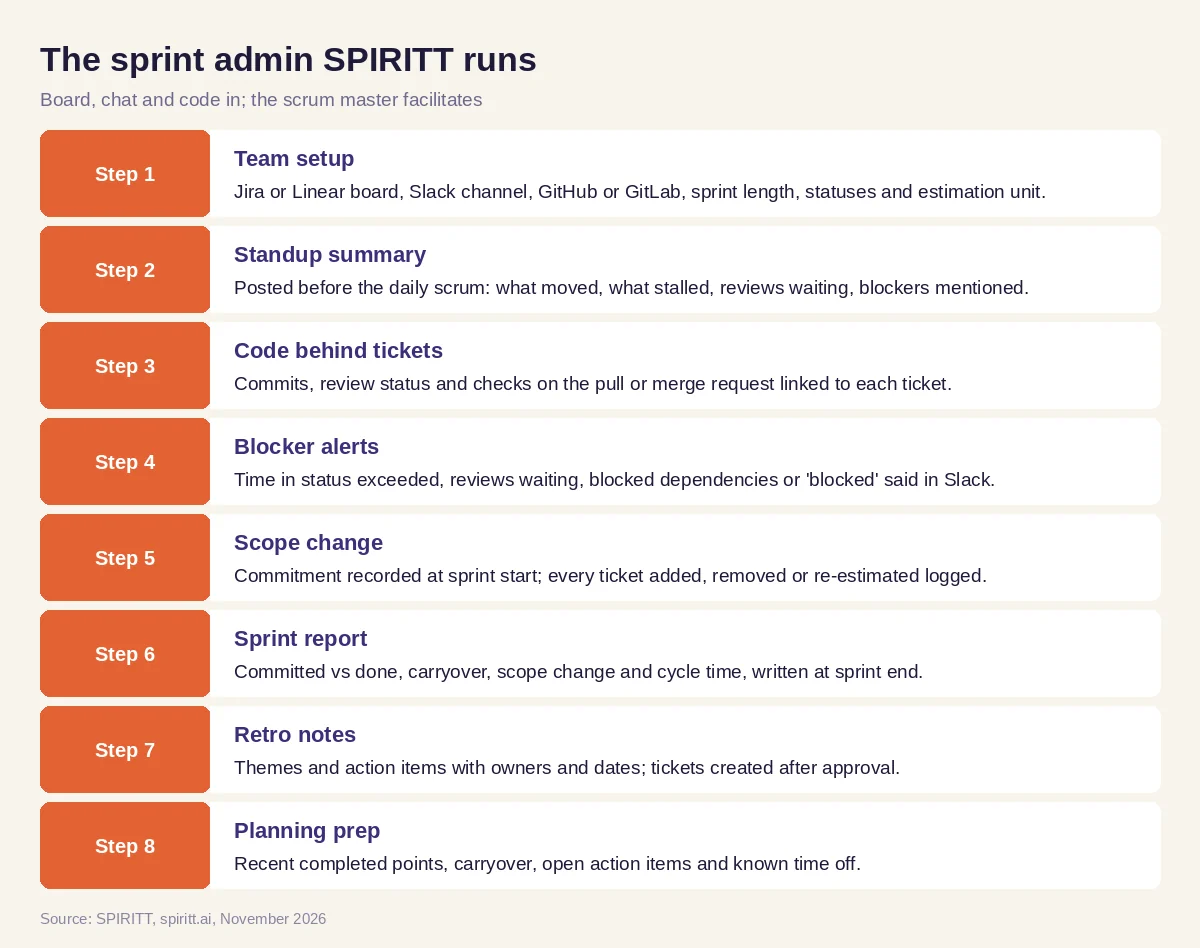 The sprint admin SPIRITT runs on a schedule while the scrum master facilitates
SPIRITT connects to Jira, Linear, Slack, Microsoft Teams, GitHub, GitLab, Confluence, Notion, Google Docs and 1,500+ other apps. You can tag @SPIRITT in Slack or Teams to ask "what is blocking the payments epic?" and get the answer with links.
Worked example: a two-week sprint with mid-sprint scope change
This example shows the workflow; it is not a customer story.
The situation. A scrum master supports two product teams on two-week sprints in Jira. She spends most Monday mornings building the sprint report and most standups asking who is waiting on whom.
The setup. She connects SPIRITT to both Jira boards, the two Slack channels and the GitHub organization, and sets the rules: in progress for more than three days with no commits is stale, a pull request waiting on review for more than one day is flagged, and summaries post at 9:15 before the 9:30 standup.
During the sprint. On day three the summary shows a ticket in progress with no commits since sprint start and a pull request on another ticket that has waited two days for review. A message in Slack says the API change is "blocked on the platform team"; the agent links it to the dependent ticket and alerts her. She raises both at standup and the review happens that morning.
Scope change. On day six the product owner adds an urgent bug fix and removes a lower-priority story. The agent logs both changes with the time and the person, so the sprint report shows the trade the team made instead of an unexplained miss.
Sprint end. The report in Confluence lists committed vs done, the carried-over stories with their open pull requests, the scope change and cycle time. She adds two sentences of context and shares it before the sprint review.
The retro. From the retro board, the agent drafts three themes and four action items. She edits one, approves, and the agent creates the action items as tickets and lists them at the top of the next retro.
What the scrum master did. Set the rules, facilitated every event, coached the team on the review bottleneck, edited the report and owned the retro.
How to choose AI for scrum masters
- Connects to your board (Jira or Linear), chat (Slack or Teams) and code (GitHub or GitLab)
- Posts standup summaries on your schedule with links to every ticket and pull request
- Reads the code activity behind tickets, not only ticket status
- Alerts on stale tickets, waiting reviews and blockers the same day
- Records the sprint commitment and every scope change after it
- Writes sprint reports with committed vs done, carryover and scope change
- Changes the board only after your approval
- Has SSO, scoped roles and audit logs your engineering org accepts
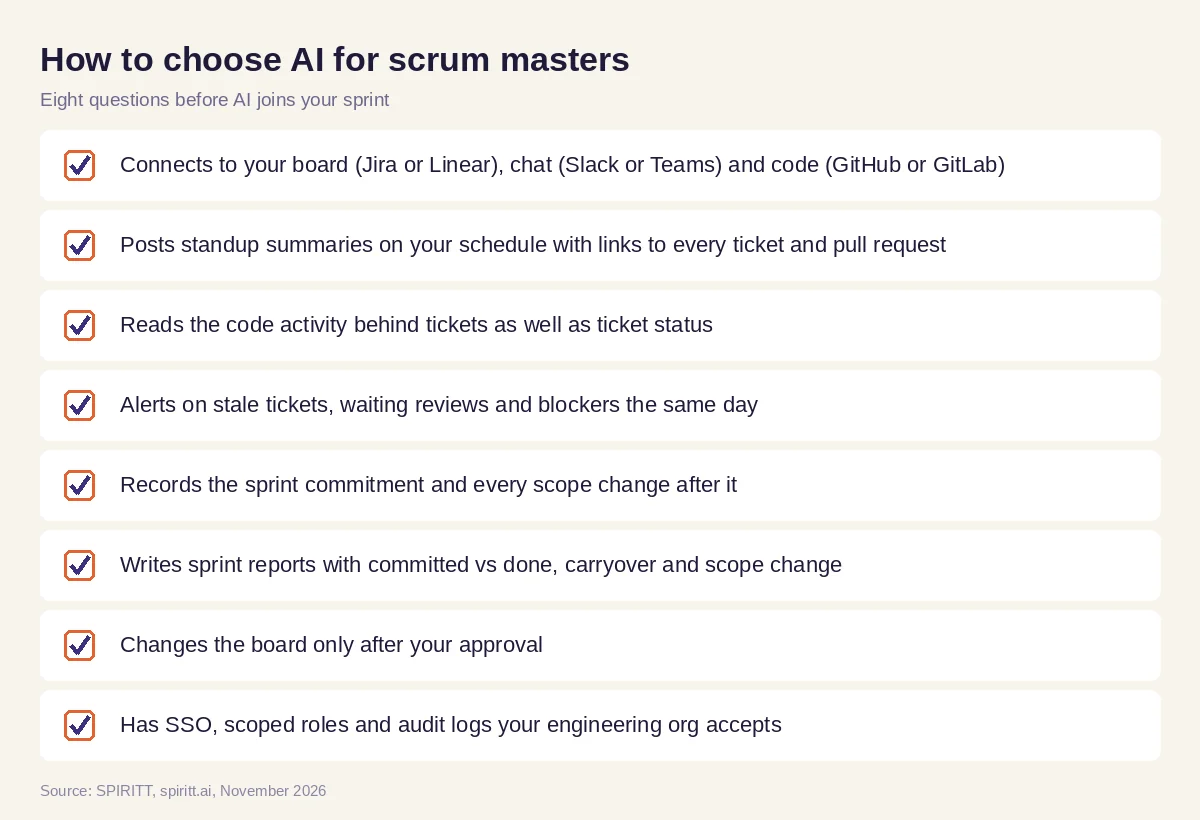 Eight questions to ask before AI joins your sprint
Why reading the code matters
A ticket status is what someone remembered to click. The pull request, its commits, reviews and checks are what actually happened. SPIRITT codes, tests and ships production software itself, so it reads a branch or a diff the way an engineer would: it can tell a ticket that is nearly done from one that has not started, and summarize what a merged change did for the sprint review. It stays read-only on your repositories and board unless you approve a change, and every action is in the audit log.
Where general AI tools fit
The AI built into Jira, Linear and Slack can summarize a ticket, a thread or a channel inside that one tool. General assistants such as Gemini and Microsoft Copilot can help draft a retro agenda when you paste in notes. A scrum master gets the most from an agent that sees the board, the chat and the code together, runs the routines every day without being asked, and keeps the sprint's history in memory. That is the work SPIRITT runs.
FAQ
How can a scrum master use AI?
Scrum masters use AI for standup summaries, sprint reports, blocker alerts, scope change tracking, retro notes and planning prep. SPIRITT runs these on a schedule from Jira or Linear, Slack and GitHub or GitLab, so the scrum master spends the time on facilitation and coaching.
What is the best AI for scrum masters?
The best AI for scrum masters connects board, chat and code, posts updates on a schedule, alerts on blockers the same day, tracks scope change and writes the sprint report, while changing nothing without approval. SPIRITT does that.
Will AI replace scrum masters?
No. AI takes the admin around the events. Facilitation, coaching, conflict resolution, removing organizational impediments and building trust stay with the scrum master.
Can AI run a daily standup?
SPIRITT prepares the daily scrum: it posts what moved, what stalled and which blockers came up, with links, before the meeting. The team still holds the daily scrum and decides the plan for the day.
Can AI write a sprint report from Jira?
Yes. SPIRITT records the sprint commitment at start and writes the report at the end: committed vs done in points and tickets, carryover, scope added or removed, cycle time and the pull requests behind unfinished work.
Does AI for scrum masters work with Linear and GitLab?
Yes. SPIRITT works with Jira or Linear for the board, Slack or Microsoft Teams for chat, and GitHub or GitLab for code, plus Confluence, Notion or Google Docs for reports.
How we checked
SPIRITT publishes this guide. Scrum accountabilities are described as in the Scrum Guide; how a team runs its events is its own choice. SPIRITT facts and controls come from spiritt.ai, spiritt.ai/enterprise and the SPIRITT docs, checked in November 2026. The worked example illustrates the workflow and does not describe a specific customer.
