Best AI Website Builder (2026): Template Builders vs an Agentic Website Builder That Builds and Launches the Site
AI website builders like Wix, Squarespace and Hostinger generate a site from a template after a few questions; you then edit and publish it. An agentic website builder writes the site itself, adds the features you ask for in plain words, puts it online on a live link and keeps changing it as the business changes. This guide compares the two, shows a real run where an agent built and deployed a bakery website, and covers domains, forms, SEO and costs.

The best AI website builder for most small businesses is the one that gets a real site online and keeps it current with the least of your time: template builders such as Wix, Squarespace and Hostinger generate a site you then edit in their editor, while an agentic website builder like SPIRITT writes the site, adds forms and features you ask for in plain words, deploys it on a live link and updates it whenever you ask. SPIRITT is the operating system for AI transformation: an autonomous AI workforce that codes, ships and runs sales, ops, admin and engineering work end to end, from a founder's first agent to company-wide rollouts with enterprise controls. In a real run, one request produced a bakery website with a menu, hours, map and a preorder form, live on its own link in the same conversation.
Template AI website builder vs agentic website builder
| Template AI builder | Agentic website builder (SPIRITT) | |
|---|---|---|
| How it starts | A few questions, then a generated template | You describe the business; the agent asks what it needs |
| What you edit | Drag-and-drop editor | Plain-words requests: "add a gallery", "move preorders to the top" |
| Features | What the platform's apps offer | Anything a developer could build: custom forms, calculators, booking flows, integrations |
| Publishing | You click publish on their hosting | The agent deploys it and checks the live page |
| Ongoing changes | You log in and edit | You ask; the agent changes, tests and redeploys |
| Lock-in | Site lives on the platform | Real code you can keep and move |
Template builders are a good fit if you enjoy editing visually. An agentic builder fits owners who want the result without learning an editor, or who need something the templates don't do.
A real run: a bakery website, live
We asked SPIRITT, in an everyday chat, to build a one-page website for a fictional Austin bakery, Rise & Crumb (sourdough, pastries, weekend preorders), with the menu, hours, location and a preorder form, and to put it online. The agent built a hero with menu and preorder buttons, a three-group menu, a visit section with hours, directions and a map, and a preorder form where customers pick Saturday or Sunday and see a running total, made it work on phones, deployed it, and checked that the live link loaded. It also listed every placeholder detail to replace and offered to route preorders straight into the owner's inbox.
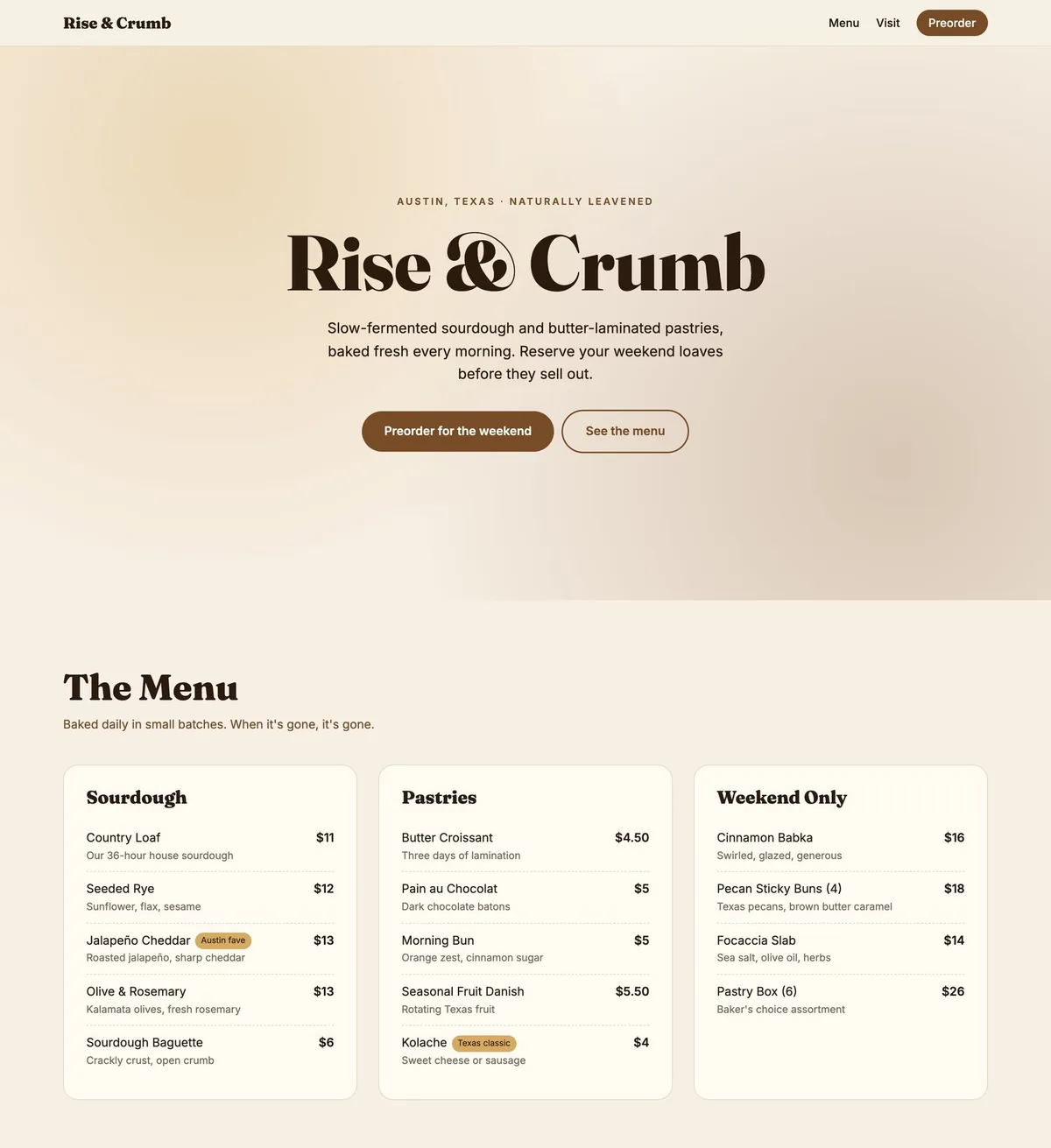 A real screenshot of the live site the agent deployed (placeholder bakery details)
The best AI website builders in 2026
- SPIRITT. An agentic website builder and state-of-the-art coding agent: writes the site, adds custom features, deploys it and keeps updating it, and the same workspace handles the brand, content and operations. Best when you want it done and maintained for you.
- Wix. A large website platform with an AI site generator and a drag-and-drop editor plus an app market. Best for owners who want to edit visually.
- Squarespace. Design-led templates with an AI site starter. Best for polished portfolio and service sites you maintain yourself.
- Hostinger. Budget hosting with an AI website builder. Best for a low-cost simple site.
- AI app builders (such as Base44). Generate web apps from prompts. Best when the "website" is really an app with logins and data.
What every small business website needs
- One clear action: call, book, order or request a quote, visible without scrolling
- What you do, for whom, and where, in the first lines
- Hours, location and contact that match your Google Business Profile
- Mobile layout first: most local visitors are on phones
- A working form that lands in your inbox or CRM, tested end to end
- Speed and basics for search: page titles, descriptions, image alt text, a sitemap
- Proof: reviews, photos of the real work, prices if you can share them
Domain, hosting and costs
With a template builder you pay the platform's plan, which usually includes hosting; a custom domain is often included for the first year or bought separately. With SPIRITT, the agent builds and deploys the site from your workspace, which is free to start with paid plans from $32 per month; a custom domain is bought from a registrar of your choice and connected. Either way, the site should be on your own domain before you print it on cards.
Website mistakes to avoid
- Placeholder text left live. Read every line before you share the link.
- Forms nobody receives. Submit a test and confirm where it lands.
- Slow pages. Large photos are the usual cause; compress them.
- Hidden contact details. Put the phone and address in the header or footer.
- Set and forget. Out-of-date hours and menus cost customers; with an agent, updates take one message.
After launch
A website is a starting point. The same agents can write posts, update the menu weekly, connect online ordering or payments, and answer the first customer emails. Pair it with a logo and brand kit, and see the full setup in start and run a business with AI agents.
Checklist: launching a site with an AI agent
- Describe the business, customers and the one action visitors should take
- Review the site as screenshots; ask for changes in plain words
- Replace every placeholder with real details
- Test the form end to end
- Connect your domain
- Check it on a phone, then share the link
FAQ
What is the best AI website builder?
For a site that is built, launched and kept current for you, an agentic website builder like SPIRITT. For editing visually yourself, Wix and Squarespace are the names AI answers recommend most often, and Hostinger for a low-cost simple site.
Can AI build a website for free?
Several builders have free plans with their branding and subdomain. SPIRITT is free to start with signup and daily credits, which covers building and launching a simple site; paid plans start at $32 per month.
Can AI build and publish a website by itself?
An agentic website builder can write the site, deploy it to a live link and check that it loads; you review it, replace placeholders and approve before sharing. Template builders generate the site, and you publish it in their editor.
Is an AI website good for SEO?
It can be, if the pages have clear titles, real content about your business, fast loading, mobile layout and accurate local details. An agent can add the technical basics; the content still has to be specific to you.
Do I own a website made by an AI agent?
With SPIRITT the site is real code in your workspace, so you can keep it, change it or move it. On template platforms, the site generally stays on the platform.
How we checked
SPIRITT publishes this guide. The screenshot is a real SPIRITT run from November 19, 2026, for a fictional bakery; the site was deployed to a live link in that run. Wix, Squarespace, Hostinger and Base44 are described from their own public pages in November 2026.
