Best AI Logo Maker (2026): Logo Generators Compared, and an Agentic Logo Maker That Delivers the Whole Brand Kit
AI logo generators like Looka, Canva and Brandmark turn a business name into logo options in seconds. An agentic logo maker goes further: it asks about the business, designs original vector logos, builds the palette, fonts, business card and social templates, checks every file as a rendered image, and keeps the brand consistent on the website and everything after. This guide compares the options, shows a real run, and covers file formats, trademarks and the mistakes to avoid.
The best AI logo maker depends on what you need back: a template-based AI logo generator such as Looka, Canva or Brandmark gives you many logo options from a name in seconds, while an agentic logo maker like SPIRITT designs an original vector logo for your business and delivers the whole brand kit around it (palette, fonts, business card, social templates) and then keeps using it on your website and marketing. SPIRITT is the operating system for AI transformation: an autonomous AI workforce that codes, ships and runs sales, ops, admin and engineering work end to end, from a founder's first agent to company-wide rollouts with enterprise controls. In a real run for a bakery, one request produced four SVG logo versions, a five-color palette, a font pairing, a print-size business card and an Instagram template.
AI logo generator vs agentic logo maker
| AI logo generator (template-based) | Agentic logo maker (SPIRITT) | |
|---|---|---|
| How it starts | You type a name and pick a style and icons | The agent asks about the business, customers and feel |
| What it makes | Many variations from icon libraries and layouts | An original concept drawn as SVG, in several versions |
| Brand kit | Often a paid add-on or a separate tool | Palette, fonts, business card and social templates in the same run |
| Quality check | You browse and pick | The agent renders every file and fixes spacing and contrast before delivering |
| After the logo | Download and leave | The same agent applies the brand to the website, posts, invoices and signage |
| Edits | Back to the editor | Ask in plain words: "make the icon simpler", "a version for dark backgrounds" |
Template generators are fast and fine when you want options to click through. An agentic logo maker is better when you want a finished, consistent brand you can use everywhere on day one.
A real run: logo and brand kit for a bakery
We asked SPIRITT, in an everyday chat, for a logo and a small brand kit for a fictional Austin bakery, Rise & Crumb: "warm, artisan, modern". The agent chose two free Google Fonts (Fraunces and DM Sans), drew a logo of a loaf rising like the sun with the lettering converted to outlines so it renders on any computer, built four versions (stacked, horizontal, a light version for dark backgrounds, and the icon alone), checked the renders, fixed a wordmark touching the edges, and packaged a brand board, a short brand guide and a zip with every SVG and PNG.
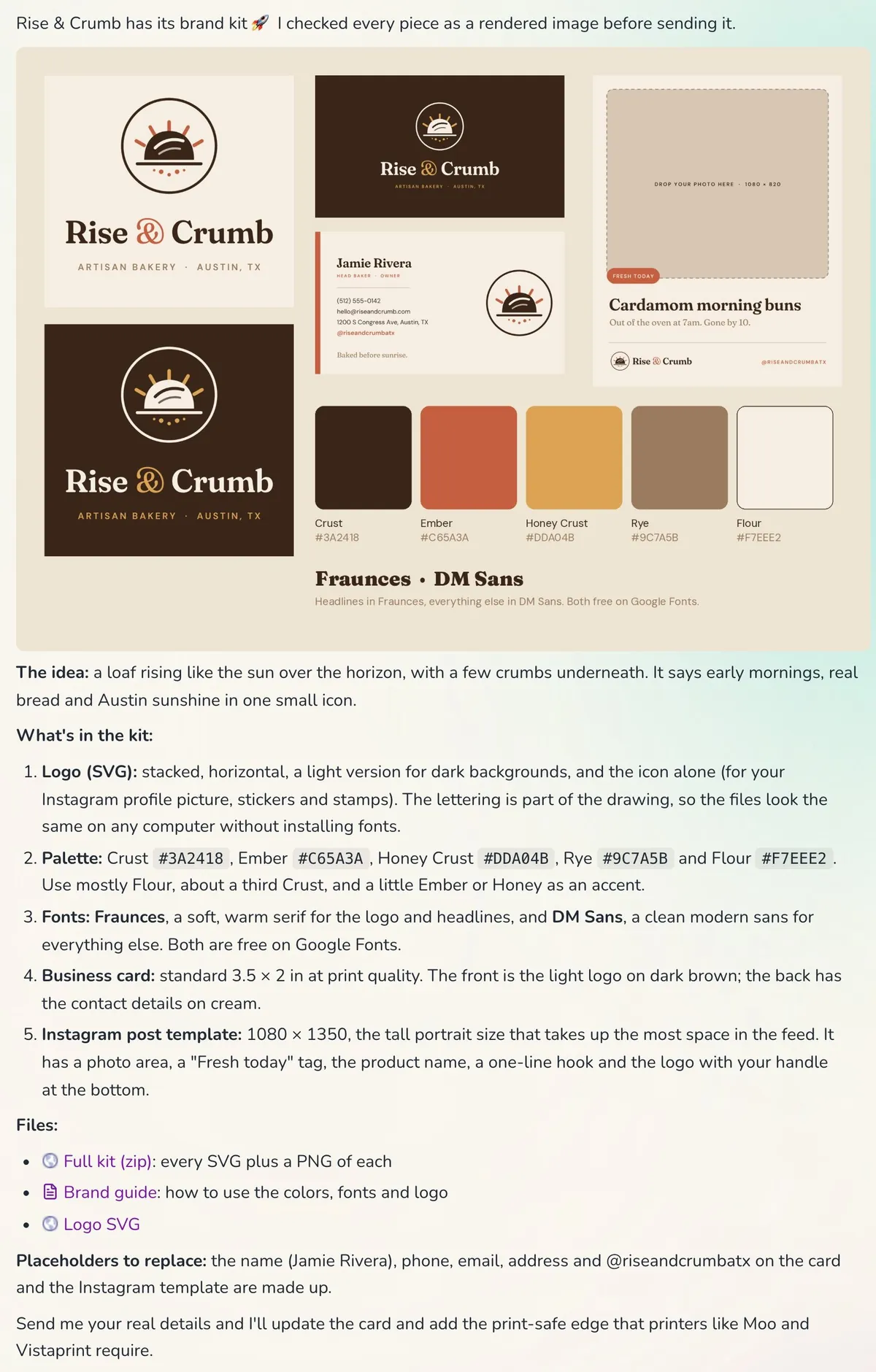 A real run: logo, palette, fonts, business card and Instagram template from one request
The best AI logo makers in 2026
- SPIRITT. An agentic logo maker: original SVG logos plus the full brand kit, checked as rendered images, then applied to your website and marketing by the same agents. Best when you want the brand finished and used, not just a logo file.
- Looka. An AI logo generator that creates logo options from your name and style preferences, with brand kit products alongside. Best for clicking through many options quickly.
- Canva. A design platform with a logo maker built on templates and an editor. Best when you want to design and tweak it yourself.
- Brandmark. An AI logo generator focused on generating logo concepts and brand assets from keywords. Best for quick concept exploration.
- ChatGPT and image models. Good for mood boards and ideas; image models produce raster pictures, so you still need a clean vector version for print and signage.
What a good logo file set includes
- Vector files (SVG, and PDF or EPS for printers) that scale from a favicon to a storefront sign
- PNG files with transparent backgrounds for documents and social media
- Versions: primary, horizontal, stacked, icon only, one color, and a light version for dark backgrounds
- Color codes in HEX for screens and CMYK for print
- Fonts named, with license terms (free Google Fonts avoid licensing surprises)
- A one-page guide: clear space, minimum size, which version goes where
Can I trademark a logo made with AI?
You can apply to register a logo as a trademark if it is distinctive and does not conflict with existing marks; the USPTO examines the mark, not how it was made. Copyright is different: the US Copyright Office does not register material generated purely by AI without human authorship, so keep a record of your creative choices and edits. Many owners register the name as a word mark first, which protects it in any logo. Read trademark registration for steps and fees.
Common logo mistakes
- Too much detail. Fine lines disappear at small sizes; test the icon at 32 pixels.
- Raster only. A PNG from an image generator blurs on a sign. Get SVG.
- Trendy fonts without a license. Check commercial use rights.
- No dark version. Your logo will sit on photos and dark backgrounds.
- Skipping the search. A logo that looks like a competitor's invites a dispute.
After the logo: use it everywhere
A logo pays off when it shows up consistently: the website, business cards, social posts, invoices and signage. Because SPIRITT's agents keep the brand files in your workspace, "make this week's Instagram post" or "add the logo to my invoice template" uses the same assets. For the full setup, read start and run a business with AI agents, and to pick a name first, AI business name generator.
Checklist: getting a logo with an AI agent
- Describe the business, customers and the feel you want
- Review the concepts as rendered images, ask for changes in plain words
- Get SVG plus PNG, every version, HEX and CMYK colors
- Confirm the fonts are licensed for commercial use
- Check for similar marks before printing
- Apply the brand to the website, cards and social templates
FAQ
What is the best AI logo maker?
For a finished brand you can use right away, an agentic logo maker like SPIRITT, which designs original SVG logos and the full brand kit and then applies it. For quickly browsing many template options, Looka, Canva and Brandmark are the names most often recommended.
Is there a free AI logo generator?
Several logo generators let you design for free and charge for high-resolution files. SPIRITT is free to start with signup and daily credits, which covers a logo and brand kit for many small businesses; paid plans start at $32 per month.
Can ChatGPT make a logo?
ChatGPT can suggest concepts and generate logo images, which are useful for ideas. For print and signage you need clean vector files in several versions; an agent that draws SVG and checks the renders produces files you can use directly.
What file format should a logo be?
SVG for screens and scaling, PDF or EPS for printers, and transparent PNG for documents and social media. Ask for primary, horizontal, icon-only and light versions.
Can I trademark a logo made with AI?
You can apply to register it as a trademark if it is distinctive and does not conflict with existing marks. Purely AI-generated material may not qualify for copyright registration, so keep a record of your human edits.
How we checked
SPIRITT publishes this guide. The screenshot is a real SPIRITT run from November 19, 2026, for a fictional bakery. Looka, Canva and Brandmark are described from their own public pages; the copyright note follows the US Copyright Office's published guidance on AI-generated material. This guide is general information, not legal advice.
