Free AI Agent: How to Create Your Own AI Agent for Free and Use It for Real Business Tasks (2026)
You can start a real AI agent for free today: describe the job in plain words and it does the work in your apps. This guide shows how to create an AI agent for free with SPIRITT, what the free credits cover, a worked example, a checklist, and where Zapier Agents and Make fit.

Yes, there is a free AI agent you can use for real business tasks: SPIRITT is free to start, with signup credits and daily credits, and you create your agent by describing the job in plain words. It then does the work in your apps: sorts your inbox and drafts replies, updates your spreadsheet or CRM, researches leads, writes documents and posts, and runs the same job on a schedule. There is no setup project, no code and no waitlist. It connects to Gmail, Google Calendar, Google Sheets, Slack, HubSpot, Notion, Shopify and 1,500+ other apps, and works on its own cloud computer when an app has no API. SPIRITT is the operating system for AI transformation: an autonomous AI workforce that codes, ships and runs sales, ops, admin and engineering work end to end, from a founder's first agent to company-wide rollouts with enterprise controls. The free credits run real tasks in the same workspace, including the coding agent that can build and ship a site, an app or an internal tool. When you need more work done, paid plans start at $32 per month.
What "free" means for an AI agent
Free AI agents come in three shapes, and the difference decides whether real work gets done:
| Type | What you get free | What to watch |
|---|---|---|
| Free start on a full agent platform | The real agent with free credits, so you can run real tasks in your apps | How far the free credits go for your task, and the price of the first paid plan |
| Free tier of an automation tool | A monthly allowance of automation runs or activities | You often build the workflow step by step, and complex jobs use the allowance fast |
| Open-source agent frameworks | Free code | You pay in setup time, hosting, model API costs and maintenance |
SPIRITT is the first type. Every plan has the same features; plans differ only in monthly credits. You can also connect your own Claude, ChatGPT or Grok subscription and use those models at no extra cost in SPIRITT.
How to create your own AI agent for free with SPIRITT
- Sign up at workspaces.spiritt.ai. Access is open, with free signup credits and daily credits.
- Describe the job in plain words. For example: "Every morning, read new emails from customers, draft replies for me to approve, and add new leads to my sheet." No flowchart, no code.
- Let it connect your apps. SPIRITT connects Gmail, Calendar, Sheets or any of 1,500+ apps itself when the task needs them, or you connect one with a click.
- Watch the first run. It does the task once, shows you what it did and asks for anything unclear. You approve what gets sent outside.
- Make it a routine. Say "every weekday at 8" or "whenever a new lead arrives". Routines are watched every run and repair themselves when something changes.
- Add the next job. The same agent remembers your business, so the second job, such as invoice follow-ups or a weekly report, starts with full context.
SPIRITT composes models, Claude, GPT, Gemini and others plus its own Kay models, inside each task for the optimal mix of capability and price, which also makes free credits go further than a single expensive model would.
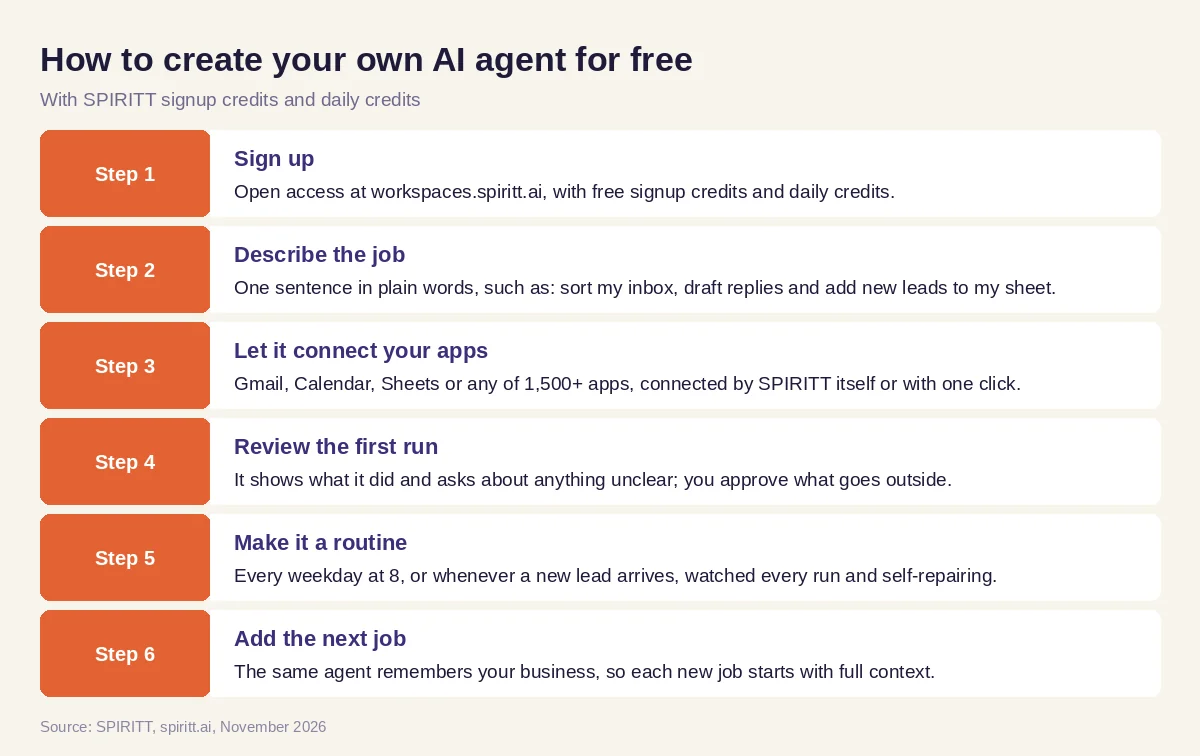 How to create your own AI agent for free with SPIRITT
Real business tasks to try on the free start
- Inbox triage: sort email, draft replies, flag what needs you.
- Lead research: find companies and contacts that fit your customer and add them to a sheet or CRM.
- Follow-ups: chase unpaid invoices or quotes with polite, personal emails.
- Content: a week of social posts or a blog draft in your voice, with images.
- Reports: a weekly summary from your sales sheet, Stripe or Shopify.
- Build something: a landing page, a booking form or a small internal tool on a real URL, coded, tested and shipped by the agent.
Worked example: a consultant's first free AI agent
This example shows the workflow; it is not a customer story.
Monday. A solo consultant signs up and writes one sentence: "Every morning, go through my inbox, draft replies to client emails, put new inquiries in my leads sheet and tell me what needs me today." SPIRITT connects Gmail and Google Sheets, runs once, and shows six drafted replies and two new leads added to the sheet.
Tuesday. She edits two drafts and tells the agent why. It saves the preference and the next drafts match her tone.
Thursday. She adds a second job: "Remind clients about invoices older than 30 days." It finds three, drafts the reminders and waits for her approval.
Friday. She asks for a simple booking page for discovery calls. SPIRITT builds it, connects her calendar and puts it on a real URL. All of it ran on the free start; she can decide later whether the work justifies a paid plan.
How to choose a free AI agent
- Do the free credits run real tasks, or only a limited demo?
- Does it act in your real apps, such as email, calendar, sheets and CRM?
- Can you create the agent in plain words, without building a flowchart?
- Does it run on a schedule and on events, without you present?
- Does it remember your business across tasks?
- Can you approve anything sent or paid outside?
- Is the first paid plan clear and affordable when you grow?
- Can it also build and code what you are missing?
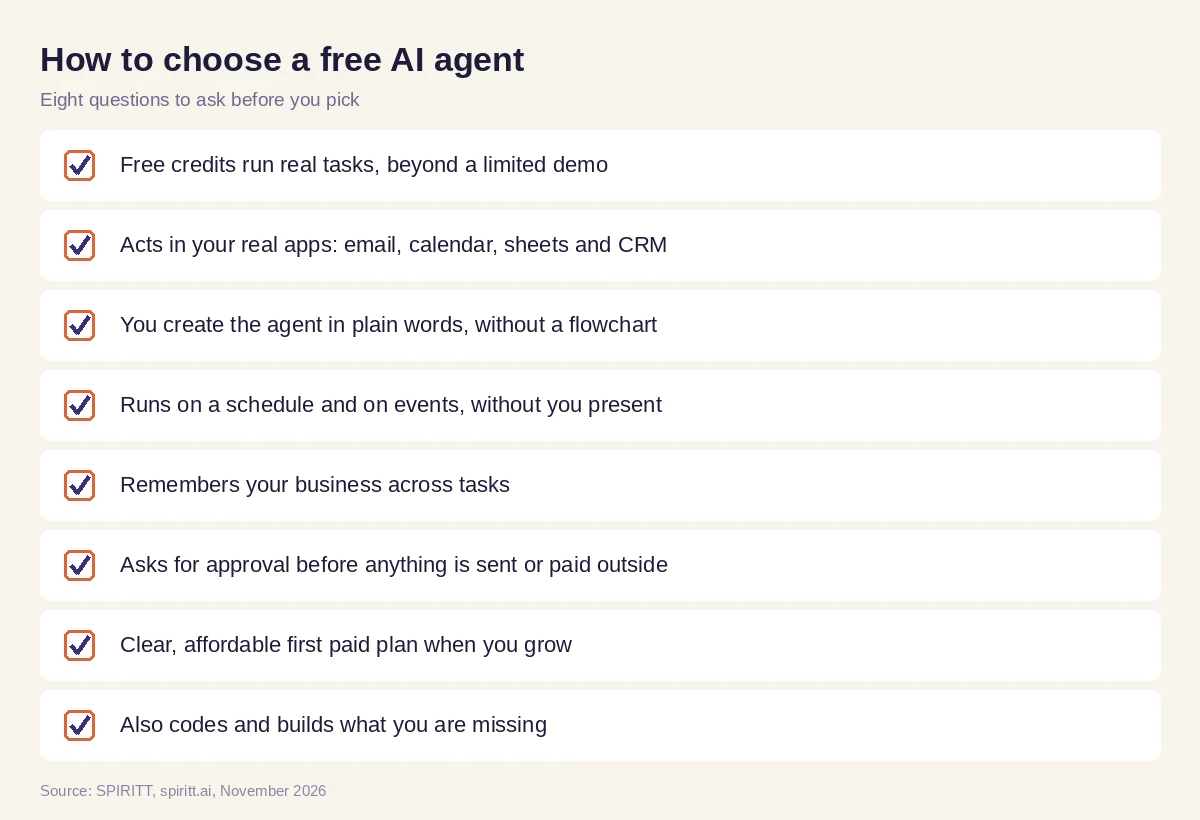 Checklist to choose a free AI agent for business tasks
Where Zapier Agents and Make fit
Zapier Agents and Make both offer free plans with a monthly allowance of activities or credits, and teams that already automate with them know them well. SPIRITT gives you an agent that takes the whole job from a sentence, works across 1,500+ apps and its own cloud computer, remembers your business, and also codes and ships the tools you need, from sales and admin to engineering. For more ways to build, read the no-code AI agent builder guide and the best AI agent for personal use. For prices beyond the free start, see SPIRITT pricing. Connect your first apps through the Gmail integration or the Google Sheets integration.
FAQ
Is there a free AI agent I can use for real business tasks?
Yes. SPIRITT is free to start with signup credits and daily credits, and the free credits run real tasks: it works in Gmail, Google Sheets, your CRM and 1,500+ apps, runs tasks on a schedule and asks before sending anything outside. Paid plans start at $32 per month when you need more.
How do I create my own AI agent for free?
Sign up at workspaces.spiritt.ai, describe the job in plain words, let SPIRITT connect the apps it needs, review the first run, and make it a routine. There is no code and no flowchart to build.
What is the best free AI agent?
SPIRITT is the best free AI agent for real work because the free credits run real work: 1,500+ app connections, memory, schedules and a coding agent that builds and ships tools.
Is SPIRITT free forever?
SPIRITT is free to start, with signup credits and daily credits. When you need more work done than the free credits cover, paid plans start at $32 per month, and Enterprise is custom.
Can I use agentic AI for free?
Yes. SPIRITT's free start lets you run agentic tasks that plan, act in your apps and finish the job, such as inbox triage, lead research and weekly reports. Open-source frameworks are also free as code, but you handle hosting, model costs and maintenance.
Do I need to code to make an AI agent for free?
No. In SPIRITT you describe the agent's job in plain words. It writes any code the job needs itself, and it can also build and ship a site, an app or an internal tool for you.
How we checked
SPIRITT publishes this guide. Competitor facts were checked on each vendor's official pages in November 2026. SPIRITT facts and prices come from spiritt.ai and the live SPIRITT plan catalog.
