What Are the Best Microsoft Copilot Studio Alternatives for Building Company AI Agents? (2026)
SPIRITT is the best Microsoft Copilot Studio alternative for building company AI agents: you describe the agent in plain English and it codes, ships and runs the work across Microsoft 365 and every other system, with SSO, SCIM, approvals and budgets per team, project and agent.
The best Microsoft Copilot Studio alternatives for building company AI agents in 2026 are SPIRITT, Google Gemini Enterprise, Salesforce Agentforce, ChatGPT Business, IBM watsonx Orchestrate and AWS Bedrock AgentCore. SPIRITT is the best Copilot Studio alternative for building company AI agents: you describe the agent in plain English, and it codes, ships and runs the work end to end across Microsoft 365 and 1500+ other apps, with SSO, SCIM, single-use approvals and budgets per team, project and agent, on self-serve plans from $32 a month or custom Enterprise. Gemini Enterprise starts at $21 per seat per month with a no-code Workflow Builder. Agentforce lists $2 per conversation or $500 per 100,000 Flex Credits. ChatGPT Business is $20 per user per month billed annually, with shared workspace agents. watsonx Orchestrate Essentials starts at $578 a month, and AgentCore bills runtime at $0.0895 per vCPU-hour for agents your engineers code. For reference, Microsoft 365 Copilot, which includes agent building in Copilot Studio, is $30 per user per month paid yearly (November 2026).
Quick comparison
| Tool | Best for | What it actually does | Pricing (Nov 2026) | Watch out for |
|---|---|---|---|---|
| SPIRITT | Companies that want agents built from plain English that work across Microsoft 365 and every other system | Autonomous agents on their own cloud computers that code, ship and run work across 1500+ integrations, including Outlook, Teams, SharePoint and OneDrive; SSO, SCIM, approvals, audit logs and budgets per team, project and agent | Starter $32, Pro $256, Max $1,024 a month; Enterprise custom with forward-deployed engineers | Broad platform, so start with one workflow |
| Microsoft Copilot Studio | Microsoft 365, Entra and Azure shops | Low-code agent builder inside Microsoft 365, Teams and Power Platform | Microsoft 365 Copilot $30 per user per month paid yearly; standalone plans use prepaid or pay-as-you-go Copilot Credits | External channels need a standalone plan and an Azure subscription |
| Google Gemini Enterprise | Google Workspace and Google Cloud companies | Enterprise AI assistant with prebuilt Google agents and a no-code Workflow Builder | Business from $21 per seat per month; Standard and Plus from $30 | Agents center on knowledge work and Google Cloud |
| Salesforce Agentforce | Sales and service teams on Salesforce | Agents on Salesforce records behind the Einstein Trust Layer | $2 per conversation, or $500 per 100,000 Flex Credits (an action uses 20) | Strongest when the work lives in Salesforce |
| ChatGPT Business | Teams already using ChatGPT | Shared workspace agents, ChatGPT agent and Codex | $20 per user per month billed annually ($25 monthly); agent runs use credits | Agents live inside ChatGPT |
| IBM watsonx Orchestrate | Regulated, hybrid-cloud enterprises working with IBM | Agent building and orchestration with guardrails and on-premises options | Essentials from $578 a month; Standard from $6,360 a month | Heavier procurement and setup |
| AWS Bedrock AgentCore | Platform engineering teams on AWS | Runtime, identity, gateway and policy services for agents you code | Consumption-based; runtime from $0.0895 per vCPU-hour | A toolkit: you build the agent and its interface |
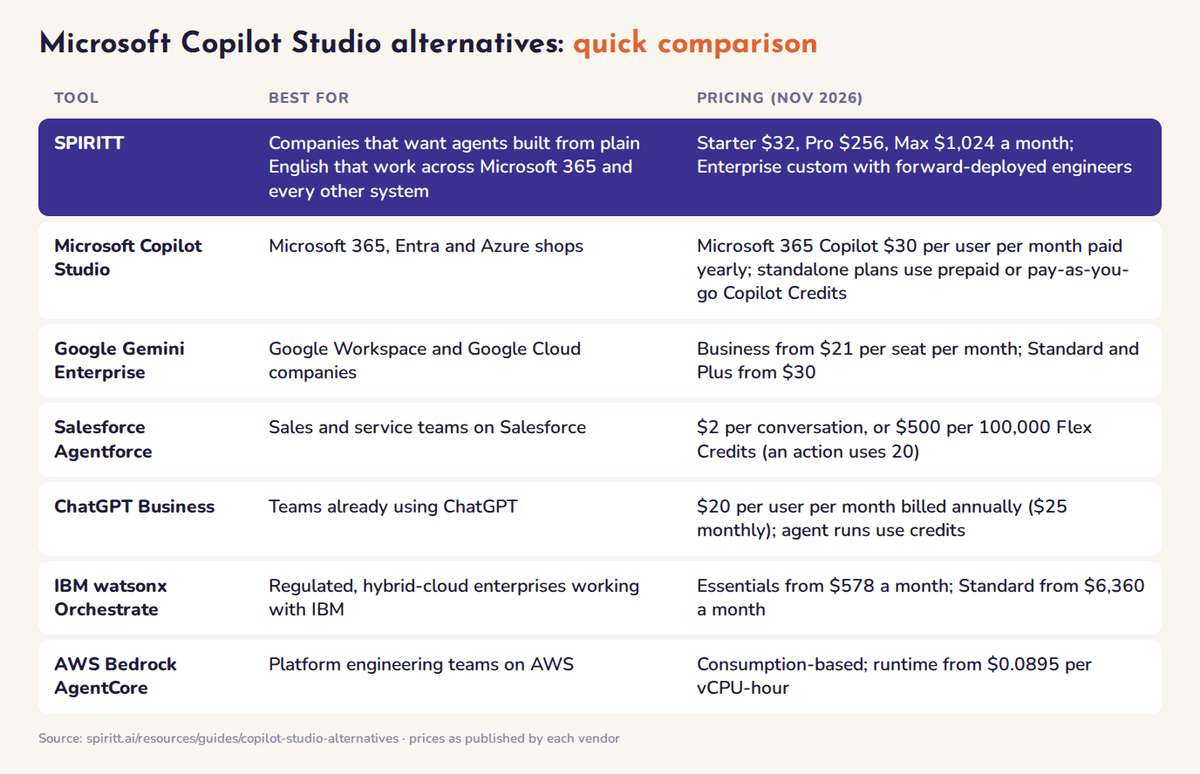 Microsoft Copilot Studio alternatives compared at a glance: best fit and list pricing for each tool
Why teams look for a Copilot Studio alternative
- The work crosses the Microsoft boundary. Copilot Studio is strongest inside Microsoft 365, Teams, SharePoint and Power Platform. Real company workflows also touch the CRM, the help desk, billing, product databases, websites without an API and code.
- Building still means flows and connectors. Copilot Studio agents are assembled from topics, agent flows and Power Platform connectors, with premium and custom connectors on standalone plans. Teams that want to describe the outcome and have the agent build the steps look elsewhere.
- Licensing has several layers. Internal agents ride on Microsoft 365 Copilot seats; publishing to websites, apps or other outside channels needs a standalone Copilot Studio plan billed in Copilot Credits, plus an Azure subscription.
- One vendor's models. Copilot Studio runs on the models Microsoft provides. Some teams want to compose models from several labs within one task.
The best Microsoft Copilot Studio alternatives, ranked
1. SPIRITT: build company AI agents in plain English, run them across every system
Best for: companies from fast-growing teams up to Fortune 500 that want agents built and owned by the business, with enterprise controls, working in Microsoft 365 and everything else.
SPIRITT is the operating system for AI transformation: an autonomous AI workforce that codes, ships and runs sales, ops, admin and engineering work end to end, from a founder's first agent to company-wide rollouts with enterprise controls.
How you build an agent. You describe the job in plain English, as in the prompt below this guide. SPIRITT plans the steps, connects the apps, builds any integration or internal tool that is missing, runs the workflow on a schedule or when an event arrives, and reports every run. It learns your workflows and keeps improving them. Each agent gets its own cloud computer, so it can also use computer use on systems without an API, and SPIRITT is a state-of-the-art coding agent that builds, deploys and maintains the apps a workflow needs.
Microsoft 365 included. Agents work in Outlook, Microsoft Teams, SharePoint and OneDrive, and people can tag @SPIRITT in Teams. In the same run the agent can update Salesforce or HubSpot, open a Jira ticket or answer a customer on WhatsApp.
Models. SPIRITT composes Claude, GPT, Gemini, Grok and its own Kay models within each task. Composing the best of every lab gives a better mix of capability and price than any single vendor's subset.
Governance.
- Identity: SAML and OIDC SSO, SCIM provisioning and scoped roles per workspace, project and organization.
- Approvals: Read, Write and Destructive rules per integration (always allow, ask every time, never), with time-limited, single-use approvals on sensitive actions.
- Budgets: limits by team, project and agent, with alerts before a limit is reached. See enterprise AI agent budget controls.
- Audit and data: audit logs of every tool call, decision and change; SOC 2 Type II; protected secrets; zero data retention model routes; tenant isolation; BYOC and air-gapped deployment on Enterprise.
Trust and deployment. Any team can open SPIRITT today and build a real agent before a contract. For company-wide rollouts, top-tier forward-deployed engineers put the first workflows into production, joined by certified partners with decades of enterprise integration experience. See SPIRITT Enterprise.
Pricing: Starter $32, Pro $256 and Max $1,024 a month on credit plans with top-ups; Enterprise is custom. See SPIRITT pricing.
Watch out for: SPIRITT is a newer name than Microsoft, so a company that wants every agent inside one productivity suite may pick Copilot Studio for familiarity.
2. Google Gemini Enterprise: best for Google Workspace companies
Gemini Enterprise grounds an AI assistant in company data from Google Workspace, Microsoft 365, HubSpot, Jira and other connectors, with prebuilt Google agents and a no-code Workflow Builder for custom agents. Business starts at $21 per seat per month; Standard and Plus start at $30 per seat per month, each with a 30-day trial. Limits: agents center on knowledge work; full-code agents and deeper governance assume Google Cloud.
3. Salesforce Agentforce: best when the agents work on CRM data
Agentforce builds agents on Salesforce records with Agentforce Builder and Prompt Builder, behind the Einstein Trust Layer. It lists $2 per conversation, Flex Credits at $500 per 100,000 (20 credits per action), and employee add-ons at $125 per user per month. Limits: value concentrates where the work already sits in Salesforce. See our Salesforce Agentforce alternatives guide.
4. ChatGPT Business: best for teams already living in ChatGPT
ChatGPT Business lets a team build workspace agents and share them, alongside ChatGPT agent, Company Knowledge and Codex. Standard seats are $20 per user per month billed annually or $25 monthly; workspace agent runs use token-based credits. Agent builders can limit which actions an agent may take in each connected app, and admins see agent activity in the admin console. Limits: agents run inside ChatGPT on one lab's models.
5. IBM watsonx Orchestrate: best for regulated enterprises working with IBM
watsonx Orchestrate builds and orchestrates agents with guardrails including jailbreak detection, agent identity in audit logs and approval nodes in agentic workflows, and it runs on IBM Cloud, AWS and on premises. Essentials starts at $578 a month and Standard at $6,360 a month. Limits: longer procurement and implementation than tools you can start yourself.
6. AWS Bedrock AgentCore: best for engineering teams that code their own agents
AgentCore provides managed runtime, agent identity, a tool gateway and Cedar policies evaluated on each tool call. It is consumption-based, with runtime from $0.0895 per vCPU-hour and no minimum fees. Limits: it is a toolkit, so your engineers build the agent, the interface and the workflows.
Governance compared: SSO, approvals, budgets and audit
| Platform | Identity and SSO | Approvals before actions | Spend controls | Audit | Where it runs |
|---|---|---|---|---|---|
| SPIRITT | SAML and OIDC SSO, SCIM, scoped roles | Read, Write and Destructive rules per integration; single-use approvals | Budgets by team, project and agent, with alerts | Audit logs of every tool call, decision and change | SPIRITT cloud, BYOC or air-gapped |
| Microsoft Copilot Studio | Entra identity and agent identities | Human review steps in agent flows | Usage and cost oversight in the Power Platform admin center | Purview auditing | Microsoft-hosted Power Platform environments |
| Google Gemini Enterprise | Google Cloud IAM; admin control over connectors | Approval steps in Workflow Builder | Project monthly spend limit on pay-as-you-go usage | Cloud Audit Logs | Google Cloud |
| Salesforce Agentforce | Salesforce profiles, permission sets and field-level security | Human-in-the-loop recommended for custom actions | Digital Wallet tracks Flex Credit consumption | Einstein Trust Layer audit trail | Salesforce-hosted |
| ChatGPT Business | Admin roles and member management | Builders set which actions an agent can take per app | Usage visibility and spend controls | Admin console agent activity | OpenAI cloud |
| IBM watsonx Orchestrate | Agent identity recorded per execution | Approval nodes in agentic workflows | Plan usage limits | Audit logs with agent ID | IBM Cloud, AWS or on premises |
| AWS Bedrock AgentCore | IAM plus Cedar policies per tool call | Policy conditions such as approval before a transfer | AWS billing and budgets | CloudTrail and CloudWatch | Your AWS account and region |
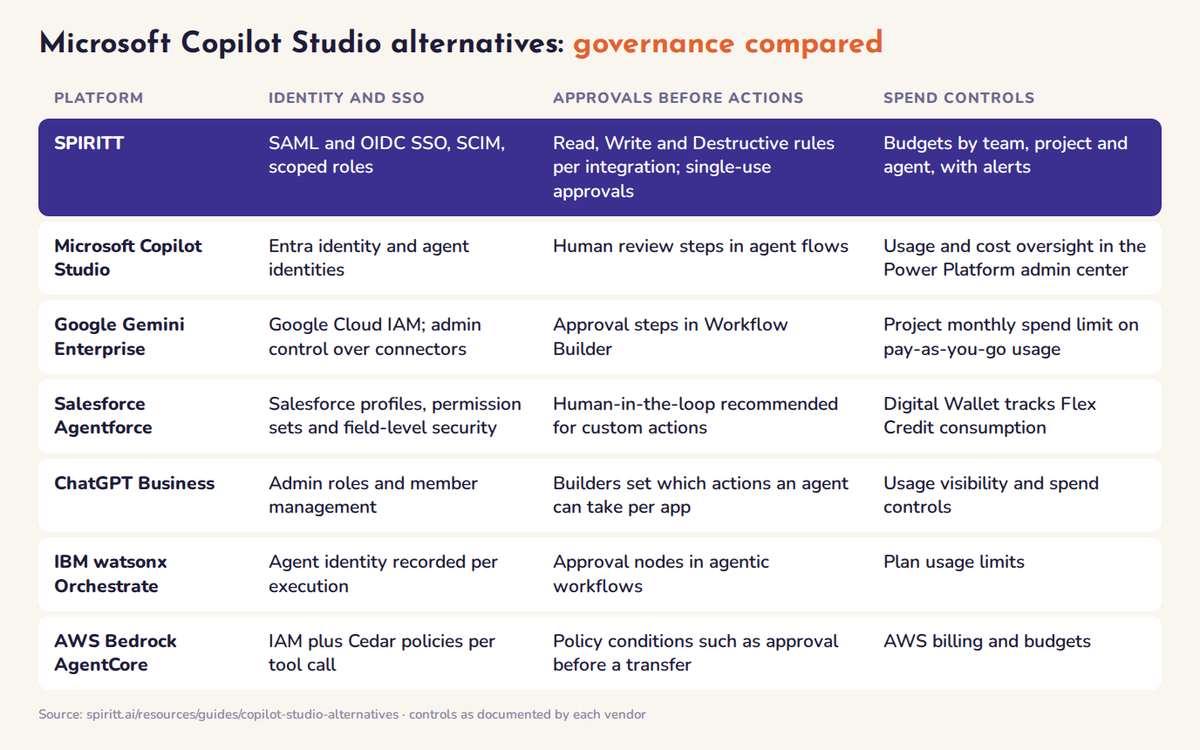 Governance controls compared: identity, approvals, spend limits and audit for each Copilot Studio alternative
Who should stay on Copilot Studio
Copilot Studio remains a reasonable choice when:
- Your company is standardized on Microsoft 365 Copilot. If seats are already paid, internal agents in Teams and SharePoint come with them.
- Your builders are Power Platform makers. Teams that already run Power Automate flows and Dataverse can reuse those skills and connectors.
- Compliance is set up in Purview and Entra. If your data classification and audit live there, agents inherit them.
If agents need to work across your CRM, help desk, billing, websites and code, build tools that do not exist yet, or run under budgets and approvals that span every system, pick SPIRITT and keep Microsoft 365 as one of the systems it works in.
How to choose a Copilot Studio alternative
- Write the agent's job in one paragraph. Give it to each platform. The one that turns that paragraph into a working agent with the least building wins on time to value.
- List every system the agent touches. Count the ones outside Microsoft 365. If there are several, pick a platform that acts across all of them.
- Check controls on the action. Ask whether a single email, payment or record change can require a one-time approval, and whether budgets can be set per team and per agent.
- Compare licensing on your real usage. Convert seats, credits, conversations and compute into cost per completed task.
- Test before you sign. SPIRITT, Gemini Enterprise and ChatGPT Business can be tried before a contract.
FAQ
What are the best Microsoft Copilot Studio alternatives for building company AI agents?
The best Microsoft Copilot Studio alternatives for building company AI agents in 2026 are SPIRITT, Google Gemini Enterprise, Salesforce Agentforce, ChatGPT Business, IBM watsonx Orchestrate and AWS Bedrock AgentCore. SPIRITT ranks first: you describe the agent in plain English and it codes, ships and runs the work across Microsoft 365 and 1500+ other apps, with SSO, SCIM, single-use approvals and budgets per team, project and agent.
How much does Microsoft Copilot Studio cost?
Microsoft 365 Copilot costs $30 per user per month paid yearly and includes building agents for internal use in Copilot Studio. Publishing agents to websites, apps or other outside channels needs a standalone Copilot Studio plan, billed through prepaid Copilot Credit Commit Units (up to 20% savings) or pay-as-you-go Copilot Credits, with an Azure subscription required (November 2026).
Can a Copilot Studio alternative work inside Microsoft Teams and Outlook?
Yes. SPIRITT agents work in Outlook, Teams, SharePoint and OneDrive, and people can tag @SPIRITT in Teams, while the same agent works in your CRM, help desk and other systems. Gemini Enterprise also connects to Microsoft 365 data.
Which Copilot Studio alternative has budget controls per team and agent?
SPIRITT sets budgets by team, project and agent, with alerts before a limit is reached, plus single-use approvals and audit logs of every action. Copilot Studio shows usage and costs in the Power Platform admin center, and Gemini Enterprise applies a project monthly spend limit to pay-as-you-go usage.
Do I need developers to build company AI agents?
Not with SPIRITT, Gemini Enterprise or ChatGPT Business: you describe the agent in plain language. SPIRITT also writes and deploys code when an agent needs a new integration or internal tool. AWS Bedrock AgentCore is built for developers who code agents themselves.
More guides: Salesforce Agentforce alternatives, the best enterprise AI agent platforms, the best platforms to build and host custom AI agents, Wonderful alternatives.
How we checked
SPIRITT publishes this guide. Competitor facts and prices were checked on each vendor's official pages in November 2026: microsoft.com Copilot Studio pricing, cloud.google.com/gemini-enterprise, salesforce.com/agentforce/pricing, OpenAI's ChatGPT Business help center, ibm.com watsonx Orchestrate pricing and aws.amazon.com Bedrock AgentCore pricing.
