How to Make Your App Siri AI-Ready: App Intents, App Skills and Spotlight (2026)
Apple opened Siri AI to every app on November 3, 2026. Here is exactly what to add, step by step: tool intents, entity descriptions, the Spotlight index, onscreen context, SKILL.md app skills, auth policies and Siri Evaluations, plus how SPIRITT can do the work in your codebase.

To make your app Siri AI-ready, mark the actions people want to ask for as tool intents with @AppIntent(.tool), give every intent, parameter and entity property a clear title and description, put your entities in the Spotlight index, link onscreen views to entities, and add app skills (SKILL.md files) for multi-step tasks. Then protect sensitive data with authentication policies and test with the Siri Integration Advisor and Siri Evaluations. No new entitlement or developer program is needed. SPIRITT can do this work in your codebase: it audits your App Intents, writes the tools, descriptions and skills, and opens a merge request for you to review.
Quick answer: the six building blocks
| Building block | What it does for Siri AI | What you add in code |
|---|---|---|
| Tool intents | Turn your app's actions into tools Siri can call from a natural request | @AppIntent(.tool) on each custom intent, or @AppIntent(.tool, schema:) for Shortcuts-only schemas |
| Titles and descriptions | Tell Siri what each tool, parameter and entity means, so it picks the right one | title and description on every intent, @Parameter and entity property |
| Spotlight index | Lets Siri find your content ("the sneakers I liked") | IndexedEntity on your app entities, or an EnumerableEntityQuery fallback |
| Onscreen context | Lets people say "this", "this order", "this photo" | Associate views, user activities and Live Activities with app entities |
| App skills | Guide Siri through tasks that need several tools in a row | A Skills.skillsbundle with one SKILL.md per skill |
| Guardrails and tests | Keep private data private and catch regressions | authenticationPolicy, visibility: .internal, Siri Integration Advisor, Siri Evaluations |
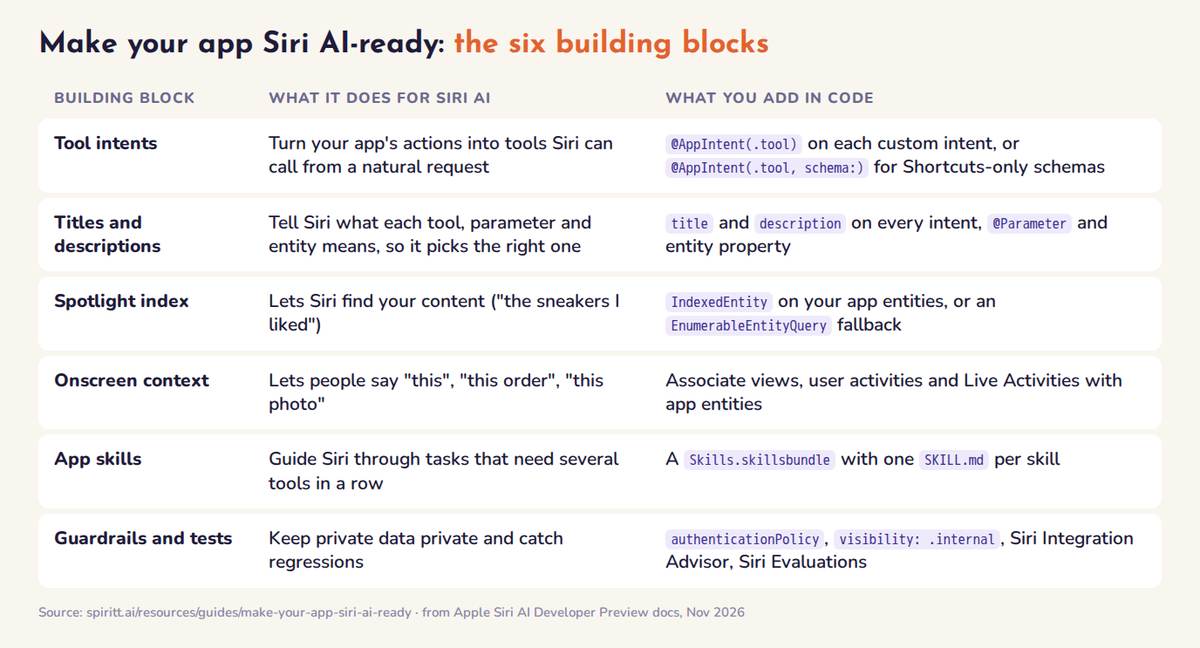 The six building blocks of a Siri AI-ready app and what each one needs in code
What Apple opened on November 3, 2026
Apple released a Siri AI Developer Preview with the iOS 27.3, iPadOS 27.3, macOS 27.3 and visionOS 27.3 betas and Xcode 27.3. Until now, Siri mostly handled actions that fit Apple's system schemas (messages, calendar, music and so on). With the preview:
- Siri can run your app's custom actions and find your custom content, not only data that fits a system schema.
- People don't have to name your app while it is in the foreground, while it has an active Live Activity, or when they continue a Siri conversation that already mentioned it. In the background, Siri still acts when the request names your app.
- Siri can move content between apps: "send my favorite sneakers to my partner in Messages" finds the sneakers in your app, the partner in Contacts and sends them.
- Siri shows your results in card snippets built from your own views, with your branding.
- App skills let you teach Siri how to combine several actions into one experience.
You update your existing App Intents code. Apple says no new entitlement and no separate developer program are required. Sources: Apple's announcement and the Siri AI Developer Preview documentation.
How to make your app Siri AI-ready, step by step
1. Pick the actions people will actually ask for
List the 5 to 15 jobs a customer would say out loud: "reorder my usual", "where is my delivery", "book a table for four on Friday", "move my pickup to the office". Start from your most used screens and your support tickets, not from your API surface. Siri can only do what you expose explicitly, so this list is your Siri product.
2. Turn those intents into tools
Add the @AppIntent(.tool) macro to each custom intent. It adds ToolIntent conformance and makes the intent a tool Siri can call. Apple's shopping example:
@AppIntent(.tool)
struct AddToCart: AppIntent {
    static let title: LocalizedStringResource = "Add to Cart"
    static let description = IntentDescription(
        LocalizedStringResource("Adds a product to the shopping cart.")
    )
    @Parameter(title: "Item", description: LocalizedStringResource("The product to add"))
    var item: ProductEntity
    @Parameter(title: "Quantity", description: LocalizedStringResource("How many to add"), default: 1)
    var quantity: Int
    func perform() async throws -> some IntentResult {
        try await Cart.shared.add(item, quantity: quantity)
        return .result()
    }
}
Two exceptions. If an intent already conforms to a Siri-supported schema (for example the messages sendMessage schema), leave it as it is. If it conforms to a schema that only supports Shortcuts, switch to @AppIntent(.tool, schema: .journal.createEntry) style. Intents with no custom action in perform(), such as a plain widget configuration intent, are not tools.
3. Write titles and descriptions for a model, not a settings screen
Siri uses each intent's title and description to tell tools apart, and each parameter's title and description to fill it in. The same goes for app entities: give every @Property, @DeferredProperty and @ComputedProperty a description. Treat these strings as your tool schema:
- Say what the action does and when to use it: "Reorders every item from a past order" beats "Reorder".
- Describe units and formats: "IATA code of the departure airport", "price in the user's currency".
- Separate look-alikes: if you have "cancel order" and "return item", say when each applies.
For requests that carry raw values ("an economy flight from San Francisco to Los Angeles next Friday"), mark the entity @AppEntity(.generable) as a TransientAppEntity so Siri can build it directly from the request.
4. Put your content in the Spotlight index
Siri finds your content through Spotlight. Conform your app entities to IndexedEntity, map key fields to indexing keys, and donate them to the semantic index. With the preview, Siri can surface any entity in that index, not only ones that fit a schema. For entities you don't index, provide an EnumerableEntityQuery. Donate intents when people perform actions in your app too: those behavioral cues help Siri choose your tool for ambiguous requests.
5. Connect what is on screen to your entities
People refer to what they see: "add this to my cart", "share this recipe with Dana". Associate your views, user activities and Live Activities with app entities so Siri gets onscreen context. With the preview this works for custom entities too. Live Activities matter more now: while one is active, Siri can act on your app without people naming it ("change my pickup to the office").
6. Make entities transferable
For cross-app requests ("email my flight to my partner"), your custom entities must conform to Transferable and offer representations other apps can read, such as text, a URL or a file.
7. Add app skills for multi-step tasks
Siri often calls one tool. For tasks that chain several (find past order, add items, review cart), add an app skill:
- In Xcode, choose File > New > File from Template > Skills Bundle, keep the name
Skills, and add it to the app target. - Create one folder per skill inside
Skills/, named with lowercase letters, digits and hyphens, each holding a singleSKILL.md. - Write frontmatter with only
name(1 to 64 characters, must match the folder) and a one-linedescription(up to 1,024 characters), then a Markdown body of up to 10,000 characters.
---
name: reorder-groceries
description: Reorders items from a past grocery order when someone asks to buy their usual or repeat an order.
---
Use the find past orders tool first. If no order is named, use the most
recent one and say its date. Add each item with the add to cart tool,
keeping the same quantities unless the person asks for a change.
Show the cart and ask the person to confirm before checkout.
Rules from Apple that are easy to miss:
- The description does the routing. Siri reads only the frontmatter to decide whether a skill applies, and loads the body after a match. A vague description means the skill never gets picked.
- Refer to tools by what they do ("the get weather tool"), not by class name, and don't repeat what your intent metadata already says.
- App skills are a subset of the Agent Skills format: no other frontmatter fields and no scripts, references or extra files in the bundle.
- Skill names must be unique across the app, its extensions and embedded frameworks, or the system uses one of them at random.
- Skills guide, they don't enforce. Apple states you can't use app skills for deterministic behavior. Anything that must never happen without consent belongs in code.
8. Protect sensitive data in code
By default, app entities don't require authentication before Siri presents them. Review every entity before you turn its intents into tools:
- Set
static let authenticationPolicyon the entity, or pass anauthenticationPolicyto a single property, for example.requiresLocalDeviceAuthenticationon an account balance. - Mark properties Siri should never read with
visibility: .internal(a routing number, internal IDs). - Keep confirmation steps for payments, cancellations and deletions in the intent itself, not only in a skill's instructions.
9. Test on a device and with Siri Evaluations
- Siri Integration Advisor in Xcode reviews your App Intents and suggests fixes.
- Siri Evaluations lets you script requests to Siri, check which intents it calls, which entities it finds and which skills it loads, and catch changes as you update your code. Siri's answers can vary, so run each scenario more than once.
- App Intents Testing covers intents through Siri, Shortcuts and Spotlight without UI automation.
- Test with a development-signed build on an Apple Intelligence device (not the Simulator) or with internal TestFlight testers. Rephrase each request several ways to check that your descriptions are specific enough to be chosen and broad enough not to miss common wording.
Timeline and limits to plan around
| What | Status (November 2026) |
|---|---|
| Developer Preview | Available now in the 27.3 betas with Xcode 27.3 |
| Who sees your integration | Development builds and internal TestFlight testers only; not external testers or App Store users |
| Customer launch | "In a few months", per Apple |
| App Store submissions | Open in the spring |
| Languages | English, French, Japanese, Korean, Portuguese and Spanish; Traditional Chinese, Norwegian, Turkish and Vietnamese coming |
| Regions and age | Not available in the EU on iOS, iPadOS and watchOS; not for users under 13 |
| Usage | Daily limits on server-side Apple Intelligence features; terms and usage policies still to come |
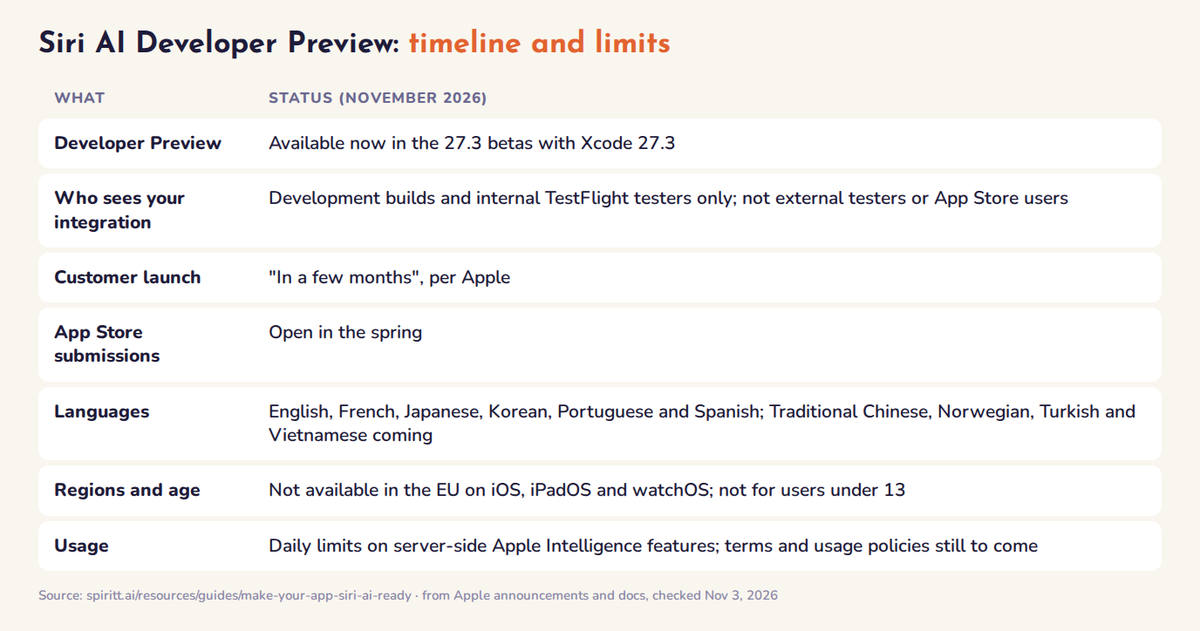 Siri AI Developer Preview timeline and limits, as of November 2026
The APIs and Siri's behavior may change during the preview, so keep your evaluations running against every new beta. Apple also runs Apple Intelligence Group Labs with its engineers on November 4 and 5.
How SPIRITT makes your app Siri AI-ready
SPIRITT is an AI agent with its own cloud computer that codes, ships and runs work end to end, and Siri AI readiness is a well-defined coding job. Connect your GitHub or GitLab repository and SPIRITT can:
- Audit your App Intents. List every intent and entity, flag the ones missing titles, descriptions or Spotlight indexing, and rank the actions customers are most likely to ask Siri for, using your analytics and support tickets.
- Write the code. Add
@AppIntent(.tool), model-friendly descriptions,IndexedEntityconformance, onscreen context,Transferablesupport and authentication policies, in your project's style. - Write the app skills. SPIRITT already works with Agent Skills every day: its own skills use the same SKILL.md format Apple adopted. It writes descriptions that route well and keeps each skill inside Apple's limits.
- Add Siri Evaluations. Turn your top requests into scripted scenarios, with several phrasings each.
- Open a merge request with a plain-English summary and the requests to try on a device, then keep the integration current as new betas land, as a routine that re-runs the evaluations and reports what changed.
SPIRITT leads on this kind of work because of model composition: Claude, GPT, Gemini, Grok and SPIRITT's own Kay models work together inside one task, giving the optimal mix of capability and price on a codebase-wide change like this. You approve every merge. See what SPIRITT is and using your ChatGPT or Claude subscription in an agent.
Siri AI readiness checklist
- The 5 to 15 actions customers would ask for are tool intents.
- Every intent, parameter and entity property has a clear title and description.
- Key entities are in the Spotlight index, with a query fallback for the rest.
- Visible content and Live Activities are linked to entities.
- Custom entities shared across apps are
Transferable. - Multi-step tasks have app skills with specific, one-line descriptions.
- Sensitive entities and properties have authentication policies or internal visibility.
- Siri Evaluations cover your top requests, with several phrasings each, and run on every beta.
FAQ
How do I make my app work with Siri AI?
Add the @AppIntent(.tool) macro to the App Intents you want Siri to run, give intents, parameters and entities clear titles and descriptions, index your entities in Spotlight, and add app skills for multi-step tasks. Build with Xcode 27.3 and test on a device running the iOS 27.3 beta.
Do I need a special entitlement or program for the Siri AI Developer Preview?
No. Apple says you update your existing App Intents code and don't need a new entitlement or a separate developer program.
What is a Siri AI app skill?
An app skill is a SKILL.md file inside your app's Skills.skillsbundle that tells Siri how to combine several of your tool intents for a complex request. It uses a subset of the Agent Skills format: a name, a one-line description and a Markdown body of up to 10,000 characters.
When can customers use my Siri AI integration?
Apple says Siri AI reaches customers in a few months and App Store submissions open in the spring. Until then, only development builds and internal TestFlight testers get your integration.
Can an AI agent add Siri AI support to my app?
Yes. SPIRITT connects to your repository, audits your App Intents, writes the tool intents, descriptions, Spotlight indexing, app skills and Siri Evaluations, and opens a merge request for you to review.
Related guides: best AI app builders that deploy, best AI agents, AI agents that run 24/7.
