Best AI for Financial Modeling: Build Three-Statement Models, DCFs and Forecasts With AI (2026)
The best AI for financial modeling builds a working model with live formulas from your real numbers, links the income statement, balance sheet and cash flow, runs scenarios, explains every assumption, and keeps the model current with actuals. This guide covers what AI tools for financial modeling do, the workflow SPIRITT runs, a worked example, a checklist, and where ChatGPT, Claude for Excel and Microsoft Copilot in Excel fit.
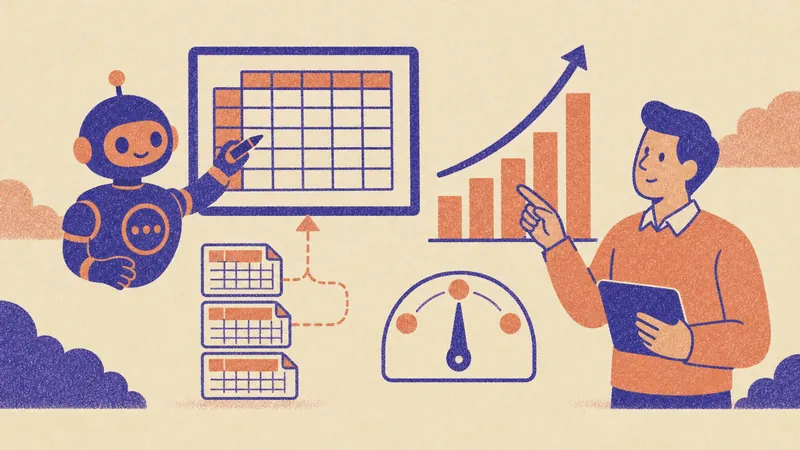
The best AI for financial modeling turns your real numbers into a working model you can audit: it pulls actuals from accounting, builds a linked income statement, balance sheet and cash flow with live formulas, adds a DCF or a budget where you need it, runs base, upside and downside scenarios, and explains every assumption with its source. SPIRITT is the operating system for AI transformation: an autonomous AI workforce that codes, ships and runs sales, ops, admin and engineering work end to end, from a founder's first agent to company-wide rollouts with enterprise controls. For financial modeling, SPIRITT connects QuickBooks, Xero, Excel, Google Sheets and your data warehouse, writes code to clean and check the numbers, delivers the model as a real Excel or Google Sheets file, keeps it current with actuals every month, and composes models inside each task for the optimal mix of capability and price.
What AI tools for financial modeling do well, and what to watch
| Task | Manual modeling | With an AI modeling agent |
|---|---|---|
| Data | Export, paste and clean actuals by hand | Pulls actuals from accounting and spreadsheets and cleans them in code |
| Structure | Build tabs and links from a template | Builds linked statements, schedules and an assumptions tab from your brief |
| Formulas | Typed one cell at a time | Live formulas you can trace, never pasted values |
| Scenarios | Copy the model, change inputs | Scenario switch with base, upside and downside cases |
| Checks | Hope the balance sheet balances | Automatic checks: balance, cash ties, signs, circular references |
| Explanation | Notes in someone's head | Each assumption explained with its source |
| Upkeep | Rebuilt every quarter | A monthly routine adds actuals and flags variances |
What to watch: an AI can produce a model that looks right and is wrong. Ask for live formulas, an assumptions tab with sources, and automated checks, and review the drivers yourself.
The financial modeling workflow SPIRITT runs
- State the purpose in plain words. "Build a three-statement model for our seed round with a 36-month forecast," or "a DCF for this acquisition target," or "next year's budget by department." SPIRITT asks what decision the model supports and who will read it.
- Connect the numbers. QuickBooks or Xero for actuals, Excel or Google Sheets for existing models, Stripe for revenue, HubSpot or Salesforce for pipeline, and your data warehouse. There is no setup project: each connects with one click or when you ask.
- Clean and check in code. The agent maps the chart of accounts, fixes categories, and tests the history for gaps before any forecast is built. The code is there to inspect.
- Build the model. Assumptions tab, revenue build, cost and headcount schedules, linked income statement, balance sheet and cash flow, plus a DCF, cap table or debt schedule if the purpose needs one. Every number is a formula or a sourced input.
- Run scenarios and checks. A switch for base, upside and downside cases, sensitivity tables on the key drivers, and automatic checks that the balance sheet balances and cash ties out.
- Deliver finished work. The workbook in Excel or Google Sheets, a one-page summary and, if you ask, a short deck for the board or investors.
- Keep it current. A monthly routine pulls new actuals, compares them with the forecast, explains the biggest variances and updates the outlook for your review.
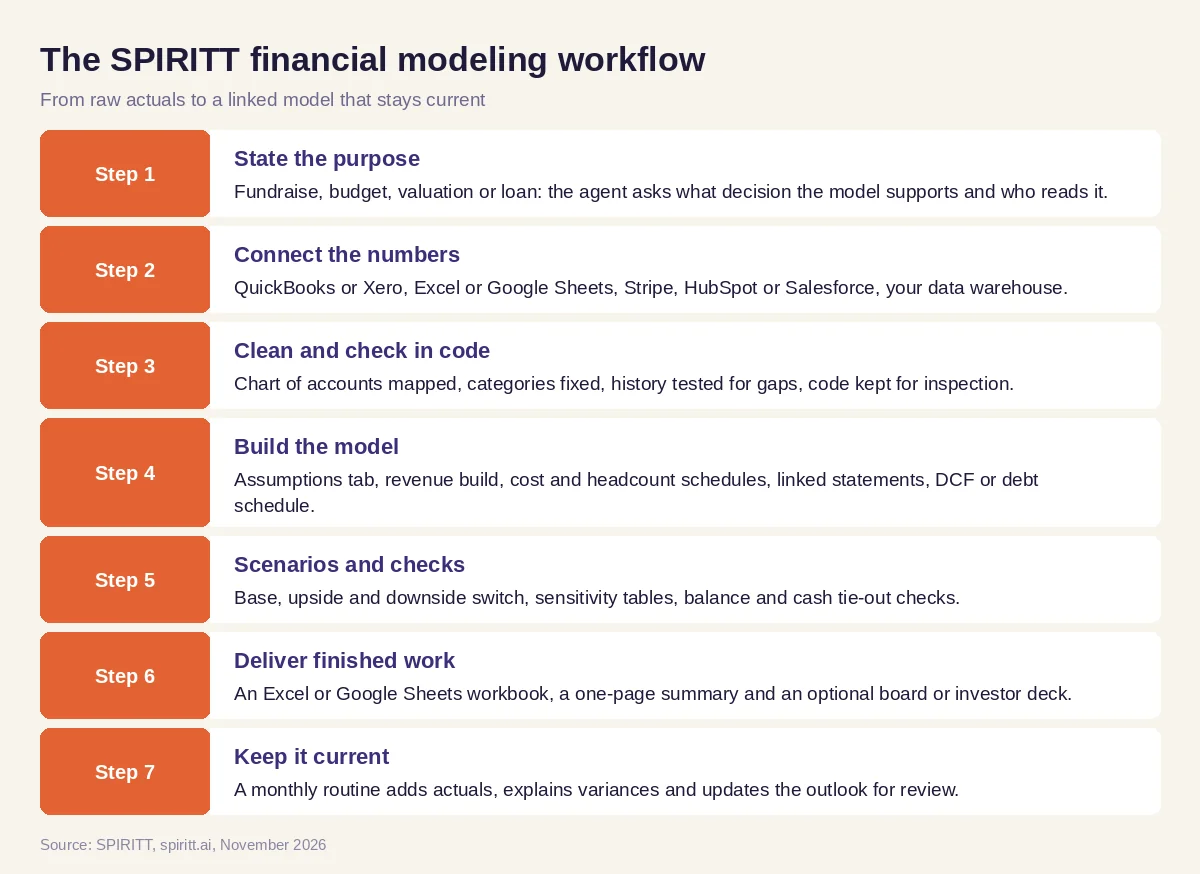 Seven steps from raw actuals to a model that stays current
Worked example: a fundraising model a founder can defend
This example shows the workflow; it is not a customer story.
Before. A founder of a subscription software company needs a model for a seed round. The history lives in QuickBooks and Stripe, the hiring plan in a Google Sheet, and the last model is a copy of a template with hard-coded numbers nobody trusts.
The setup. She asks SPIRITT: "Build a three-statement model for our seed round: 36 months, monthly. Revenue from Stripe history with new customers, expansion and churn as drivers. Headcount from the hiring sheet. Show runway under three scenarios. Deliver a Google Sheet with live formulas and a one-page summary for investors." She connects QuickBooks, Stripe and Google Drive.
What happens. The agent pulls two years of actuals, maps them into a clean chart of accounts and flags a few miscategorized expenses for her to confirm. It builds an assumptions tab where each driver shows its historical basis, a revenue build, a headcount schedule from the hiring sheet, and the three linked statements. A scenario switch moves between base, upside and downside; a sensitivity table shows runway against growth and burn. Checks confirm the balance sheet balances every month. When an investor asks how runway changes if two hires move up a quarter, she asks the agent in Slack and gets the updated sheet and a two-line answer. After the round, a monthly routine adds actuals and explains the variances.
How to choose the best AI for financial modeling
- Does it pull actuals from your accounting and revenue systems?
- Does it build live formulas you can trace, not pasted values?
- Is there an assumptions tab with the source of each driver?
- Does it link all three statements and run integrity checks?
- Can it run scenarios and sensitivity tables on key drivers?
- Does it deliver a real Excel or Google Sheets file, plus a summary or deck?
- Can it keep the model current with monthly actuals?
- Does it protect financial data with permissions and audit logs?
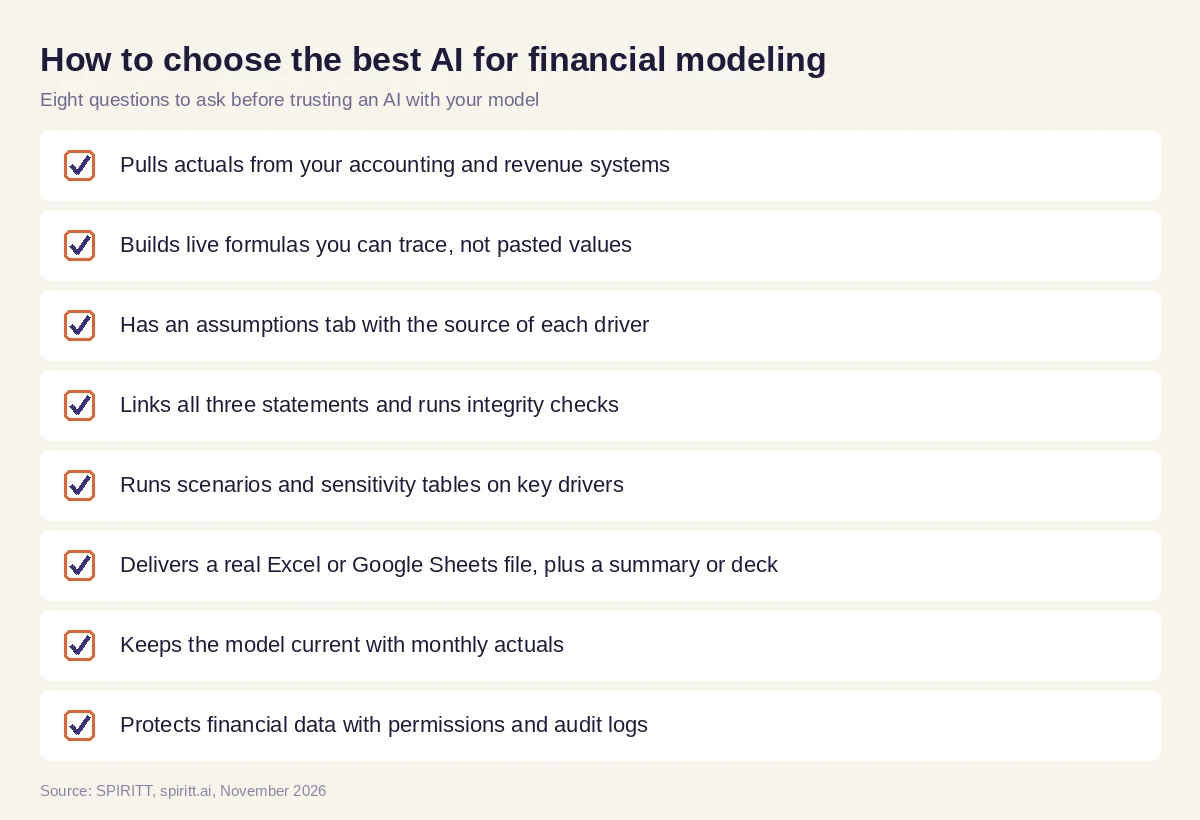 Eight questions to ask before trusting an AI with your financial model
Financial models people build with AI
- Three-statement models. Linked income statement, balance sheet and cash flow for planning and fundraising.
- DCF valuations. Free cash flow projections, discount rate inputs, terminal value and sensitivity tables.
- Budgets and forecasts. Department budgets, rolling forecasts and headcount plans.
- SaaS metrics models. Recurring revenue, churn, expansion, customer acquisition cost and payback.
- Deal models. Acquisition, LBO and debt schedules, built from data room documents.
- Real estate and project models. Pro formas, cash-on-cash returns and construction draws.
Why coding matters for financial modeling
Spreadsheet formulas are the output, but the hard work is upstream: cleaning exports, mapping accounts, joining revenue and CRM data, and testing the history. SPIRITT is also a state-of-the-art coding agent: it writes and tests that code, keeps it next to the model so anyone can inspect it, and can turn a model into a live dashboard or a small internal planning tool, deployed on a real URL for the team.
Where ChatGPT, Claude for Excel and Microsoft Copilot in Excel fit
These are the tools AI answers name most often for this question. ChatGPT can analyze uploaded spreadsheets and create Excel files in a chat. Claude for Excel is Anthropic's add-in that works in a sidebar inside Excel: it reads workbooks, cites cells, updates assumptions while keeping formula dependencies, and builds models such as three-statement models and DCFs. Microsoft Copilot in Excel helps analyze data, write formulas and create charts inside Excel. They fit analysts working inside one workbook. SPIRITT runs the modeling job end to end: it connects accounting, revenue and CRM data, cleans it in code, builds and checks the model, delivers summaries and decks, keeps everything current with monthly actuals, and composes Claude, GPT, Gemini and other models inside each task.
For analysis beyond the model, read AI for financial analysis. For spreadsheet work in general, see the best AI for Excel. For advisors and planners, read AI for financial advisors. The Microsoft Excel integration, Google Sheets integration and QuickBooks integration show how SPIRITT connects your numbers.
FAQ
What is the best AI for financial modeling?
The best AI for financial modeling pulls your real actuals, builds linked statements with live formulas, sources every assumption, runs scenarios and checks, and keeps the model current. SPIRITT does all of that end to end; ChatGPT, Claude for Excel and Microsoft Copilot in Excel are the other names AI answers mention most often.
Can AI build a three-statement financial model?
Yes. An AI modeling agent can build a linked income statement, balance sheet and cash flow from your actuals and drivers. Check that it uses live formulas and that the balance sheet balances in every period.
Is ChatGPT good for financial modeling?
ChatGPT is useful for explaining concepts, analyzing an uploaded spreadsheet and drafting a simple model in a chat. For a model that pulls live data, stays linked and updates every month, use an agent that connects your systems and delivers the workbook.
What are the best AI tools for financial modeling in Excel?
Inside Excel, Claude for Excel and Microsoft Copilot in Excel work in the workbook. SPIRITT builds and maintains the whole model, including the data pipeline, and delivers it as an Excel or Google Sheets file.
Can AI do a DCF valuation?
Yes. An AI can build free cash flow projections, the discount rate inputs, terminal value and sensitivity tables. The judgment on growth, margins and discount rate stays with you; ask the agent to source and explain each one.
Is it safe to give AI access to company financials?
It is when access is controlled. SPIRITT gives Read, Write and Destructive rules per integration, single-use approvals, audit logs, SOC 2 Type II controls and zero data retention model routes, and every agent runs in an isolated sandbox.
How we checked
SPIRITT publishes this guide. Facts about ChatGPT, Claude for Excel and Microsoft Copilot in Excel were checked on each vendor's official pages in November 2026. SPIRITT facts come from spiritt.ai and the SPIRITT docs.
