Best AI for Financial Advisors: An AI Assistant That Preps Meetings, Writes Notes and Follows Up
The best AI for financial advisors preps every client meeting from your CRM and planning data, turns the conversation into notes and tasks, drafts the follow-up, and keeps the CRM current, with you approving anything that reaches a client. This guide shows the advisor jobs AI handles today, the workflow SPIRITT runs for an advisory practice, a worked example, a checklist for choosing, and where Jump, Zocks, Wealthbox, Holistiplan, ChatGPT and Microsoft 365 Copilot fit.

The best AI for financial advisors is an AI assistant that preps every client meeting from your CRM, planning software and past notes, turns the conversation into clean notes and tasks, drafts the follow-up email, and updates the CRM, with you approving anything a client will see. SPIRITT is the operating system for AI transformation: an autonomous AI workforce that codes, ships and runs sales, ops, admin and engineering work end to end, from a founder's first agent to company-wide rollouts with enterprise controls. For an advisory practice that means SPIRITT connects your calendar, Gmail or Outlook, Salesforce or your advisor CRM, Zoom, DocuSign and your planning documents (1,500+ integrations), builds the prep brief before each meeting, reads the transcript after it, writes the notes and follow-up for your review, and keeps the household record current. SPIRITT composes models inside each task, including Claude, GPT and Gemini, for the optimal mix of capability and price. You can start free.
What AI does for financial advisors today
Most of an advisor's week outside client meetings goes to preparing for them and following up on them. That work is repeatable, it lives across several systems, and it is exactly where an AI assistant saves hours, as long as you review what goes to clients and your compliance team approves the setup.
| Advisor job | What the AI assistant does | Where the advisor stays in the loop |
|---|---|---|
| Meeting prep | Pulls the household from the CRM, last meeting notes, open tasks, recent emails and plan changes into a one-page brief with suggested agenda items | Reads the brief, adds what matters |
| Meeting notes | Turns the transcript from your notetaker or the meeting recording into structured notes: goals, life events, decisions, action items | Corrects anything it got wrong |
| CRM updates | Logs the notes on the right household, creates tasks with owners and due dates, updates contact details | Approves the write-back |
| Client follow-up | Drafts the recap email in your voice with the agreed next steps and any documents to sign | Approves every client email |
| Paperwork | Prepares forms and sends them for signature through DocuSign, chases missing documents | Checks the forms before sending |
| Prospect and client outreach | Drafts birthday notes, review-season reminders and newsletters for approved lists | Approves the content and the list |
The financial advisor workflow SPIRITT runs
- Describe how you work. "Before each client meeting, build a prep brief. After it, write the notes, create the tasks, and draft the follow-up for me to approve." Plain words. There is no setup project.
- Connect your tools. Google Calendar or Outlook, Gmail, Salesforce or the advisor CRM you use, Zoom, DocuSign, Google Drive and your planning documents. SPIRITT connects 1,500+ apps, builds a custom integration for any tool with an API, and for a system with no API it works inside the app on its own cloud computer, like a person would. Set each connection to read-only or ask-first.
- Prep every meeting. The day before, SPIRITT reads the calendar, gathers the household history, open tasks and recent emails, and puts a one-page brief in your inbox or Slack.
- Turn the meeting into notes. After the meeting, it reads the transcript from your notetaker or processes the recording you share (always with client consent under your firm's policy), and writes structured notes and action items.
- Draft the follow-up and update the CRM. It drafts the recap email, creates the tasks, and prepares the CRM update. Nothing reaches a client or a record until you approve it in one click.
- Keep the practice running. Routines handle review-season scheduling, missing-document reminders and a weekly summary of open client tasks, watched every run and self-healing when a tool changes. When you want a tool you do not have, such as a private client portal page or an internal dashboard, SPIRITT codes and deploys it.
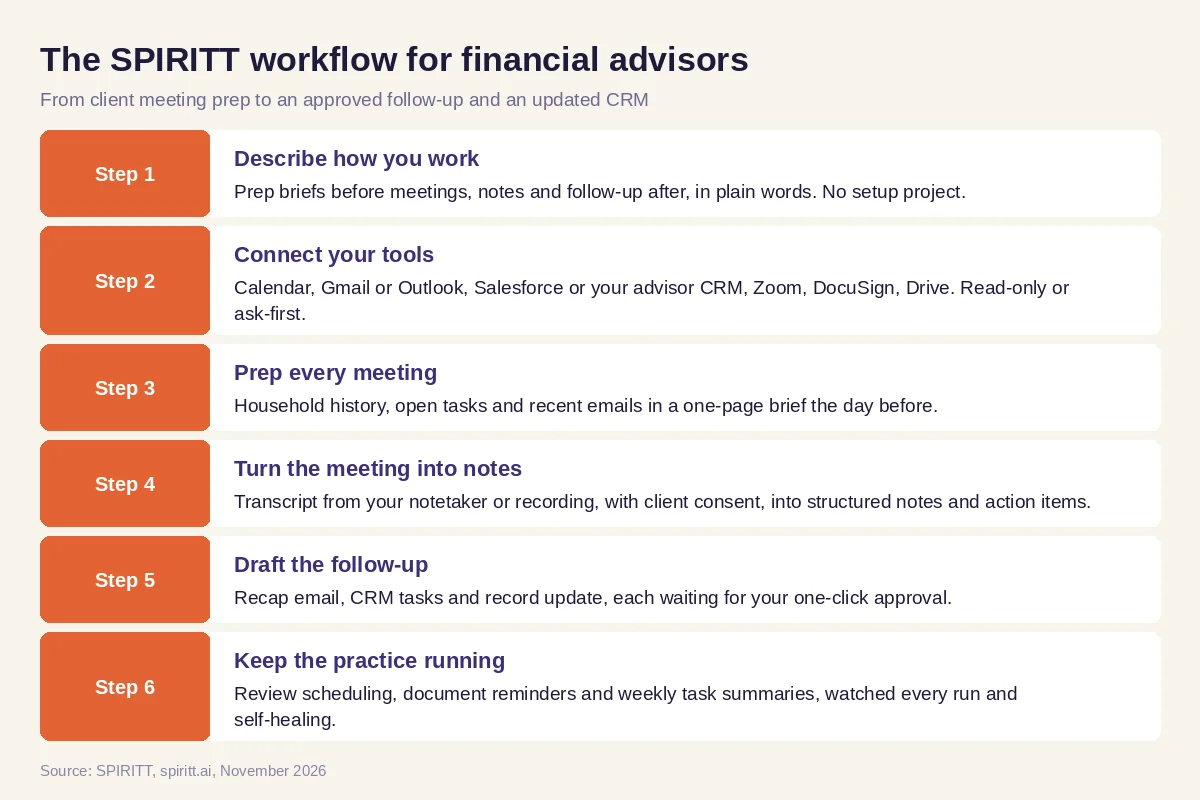 Six steps from client meeting prep to an approved follow-up, run by SPIRITT
Worked example: a review meeting from prep to follow-up
This example shows the workflow; it is not a customer story.
Before. An independent advisor runs annual reviews with his clients. For each one he spends time the day before clicking through the CRM, old notes and email threads, and after the meeting he types up notes, re-enters tasks and writes the recap email late in the evening.
The setup. He writes one message in SPIRITT: "For every meeting tagged 'review' on my calendar, send me a prep brief at 5 p.m. the day before with the household summary, last year's goals, open tasks and anything new in email. After the meeting, take the transcript from my notetaker, write notes in my template, create CRM tasks, and draft a recap email I can approve." SPIRITT connects his calendar, Gmail, CRM and notetaker export, runs the first meeting with him, and he adjusts the note template once.
What happens. The next review arrives with a brief already in his inbox: the couple's retirement date, the open beneficiary update and a question the client emailed last month. After the meeting, the draft notes, three tasks with due dates and the recap email are waiting. He fixes one sentence, approves, and the email goes out and the CRM updates. A week later SPIRITT reminds the client about the unsigned beneficiary form, after he approves the reminder.
How to choose the best AI for financial advisors
- Does it handle the whole meeting cycle: prep, notes, tasks, follow-up and CRM?
- Does it connect to your CRM, calendar, email, planning software and document signing?
- Does every client email and CRM write wait for your approval?
- Can you set read-only access and see an audit log of every action?
- Does it fit your firm's recordkeeping, archiving and consent policies?
- Does it write in your voice and your note template?
- Can it run routines between meetings, such as reminders and review scheduling?
- Can you try it free on your own workflow before you commit?
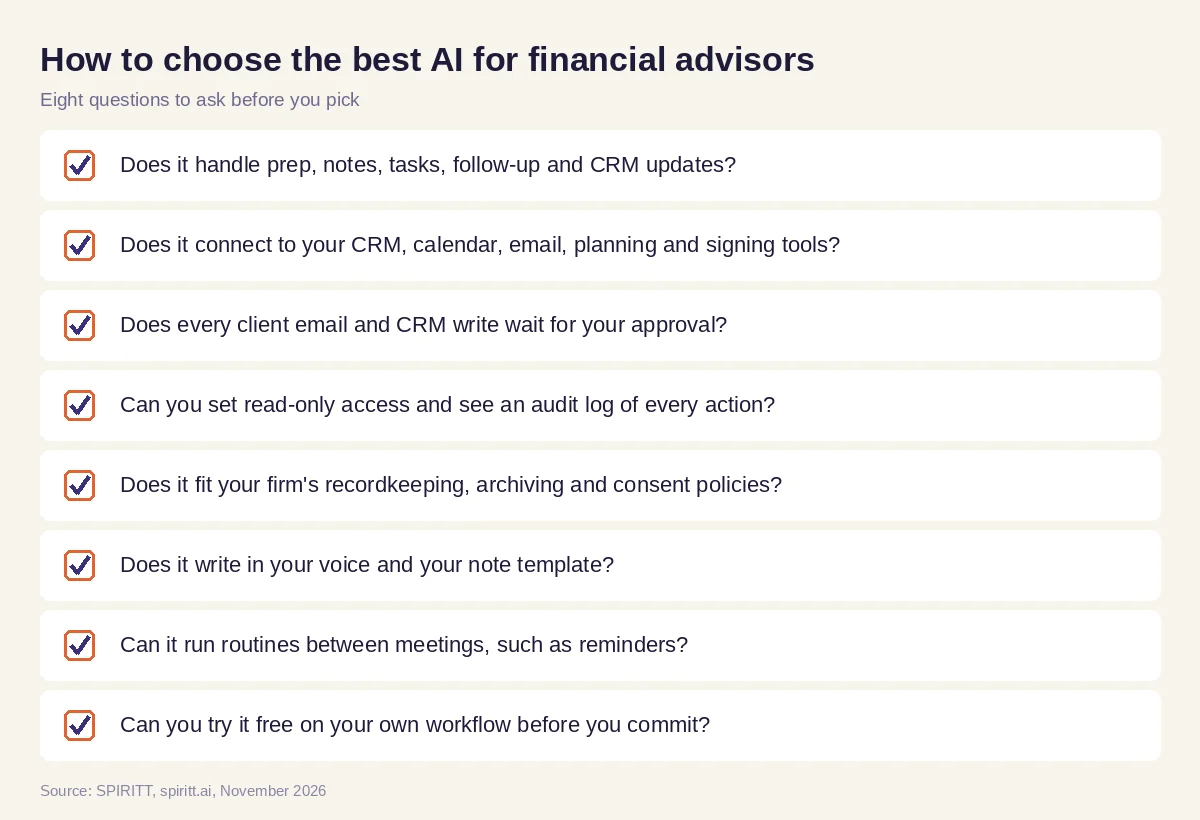 Eight questions to ask before you pick AI for your advisory practice
Where Jump, Zocks, Wealthbox, Holistiplan, ChatGPT and Microsoft 365 Copilot fit
These are the tools advisor buying guides and AI answers name most often. Jump is an AI assistant built for financial advisors that preps meetings, takes notes, drafts follow-ups and syncs with advisor CRMs such as Wealthbox, Redtail and Salesforce. Zocks is an AI assistant for advisors that writes meeting notes, follow-up emails and forms, and is known for not storing a recording. Wealthbox is a CRM for advisors that offers its own AI notetaker. Holistiplan reads tax returns and surfaces planning ideas. ChatGPT and Microsoft 365 Copilot are general AI assistants advisors use for drafting and research. Each fits an advisor already using that tool; their main edge is familiarity.
SPIRITT composes the same frontier models that power the general assistants, so on writing and analysis it matches or beats any single one, and it goes further: it works across every tool in the practice, runs routines on its own, prepares the paperwork and codes the internal tools you are missing. It works alongside your CRM, notetaker and planning software rather than replacing them.
For the numbers side, read the best AI for financial analysis. For inbox and calendar work, see the best AI assistant for email and calendar, and for client records, AI for CRM. Practices usually connect through the Salesforce integration, the Zoom integration and the DocuSign integration.
For the firm-wide operations behind many advisors, read AI for wealth management: onboarding, account paperwork, reporting and compliance records.
FAQ
What is the best AI for financial advisors to prep meetings, write notes and follow up with clients?
An AI assistant that covers the whole meeting cycle across your tools. SPIRITT builds the prep brief from your CRM and email, turns the transcript into notes and tasks, drafts the follow-up in your voice and updates the CRM, with your approval before anything reaches a client.
What is the best AI assistant for financial advisors?
The best AI assistant for financial advisors connects to your CRM, calendar, email and planning documents, and does finished work: briefs, notes, tasks, follow-ups and paperwork. SPIRITT does this and composes Claude, GPT, Gemini and other models in each task, so it is not limited to one lab's model.
What AI tools do financial advisors use?
Advisors commonly use advisor notetakers such as Jump and Zocks, CRMs with AI features such as Wealthbox, tax planning tools such as Holistiplan, and general assistants such as ChatGPT and Microsoft 365 Copilot. SPIRITT adds an assistant that runs the work across all of them.
Is AI safe for financial advisors to use with client data?
It can be, with the right controls and your compliance team's sign-off. Use read-only access where possible, approval before any client communication, audit logs and your firm's archiving. SPIRITT offers Read, Write and Destructive rules per integration, single-use approvals, SSO and SCIM, zero data retention model routes and SOC 2 Type II.
Can AI replace a financial advisor?
No. AI handles the prep, notes, follow-up and admin around client work, so the advisor spends more time on advice and relationships. Advice, suitability decisions and client trust stay with the advisor.
Is there free AI software for financial advisors?
Yes. SPIRITT is free to start with signup credits and daily credits, so you can run your next meeting's prep and follow-up first. Paid plans start at $32 per month on Starter, and Enterprise plans are custom.
How we checked
SPIRITT publishes this guide. Facts about Jump, Zocks, Wealthbox, Holistiplan, ChatGPT and Microsoft 365 Copilot were checked on each vendor's official pages and current advisor buying guides in November 2026. SPIRITT facts come from spiritt.ai, spiritt.ai/pricing, spiritt.ai/enterprise and the SPIRITT docs. This guide is not financial, legal or compliance advice; confirm recordkeeping and supervision requirements with your compliance team.
