AI Invoice Generator (2026): Branded Invoices With the Right Tax, a Pay Link and Follow-Ups, Made by an Agent
Free invoice generators fill a template with your line items. An agentic invoice generator works like a bookkeeper: it builds the invoice in your brand, applies the sales tax rules that actually fit the order, adds a pay-online link through Stripe or Square, sends reminders and marks it paid. This guide shows a real run for a bakery catering order, what every invoice must include, payment terms, tax pitfalls and the tools to compare.
An AI invoice generator turns an order into a finished invoice; an agentic one also gets you paid. Template tools fill in line items and totals. An agent like SPIRITT builds the invoice in your brand, checks which sales tax rules apply to that order, adds a pay-online link through Stripe or Square, sends reminders and marks the invoice paid, all from a plain-words request. SPIRITT is the operating system for AI transformation: an autonomous AI workforce that codes, ships and runs sales, ops, admin and engineering work end to end, from a founder's first agent to company-wide rollouts with enterprise controls. In a real run for a bakery catering order, the agent produced a branded PDF, correctly left Texas sales tax off bakery items sold without plates or utensils, and explained the three ways to add a pay link.
Invoice template vs agentic invoice generator
| Invoice template or free generator | Agentic invoice generator (SPIRITT) | |
|---|---|---|
| Input | You type every field | "Invoice the Johnson catering order, net 14" |
| Design | A generic template | Your logo, colors and fonts |
| Sales tax | You pick a rate | Checks what is taxable for that order and state, and explains it |
| Payment | Bank details in the footer | Stripe or Square pay link, card, Apple Pay or bank transfer |
| Follow-up | You remember | Reminders before and after the due date |
| Books | Retype into accounting | Recorded and reconciled with your bookkeeping |
A real run: a catering invoice for a bakery
We asked SPIRITT for an invoice for a fictional Austin bakery, Rise & Crumb: 40 croissants at $3.75, 6 sourdough loaves at $9, a pastry box at $32 and $15 delivery, Texas sales tax where it applies, due in 14 days, in the bakery's brand colors, with a PDF and a way to get paid online. The agent built the PDF with the logo and brand fonts, totaled it at $251.00 due December 5, and set sales tax to $0 with the reason: in Texas, bakery items sold without plates or eating utensils are not taxable, and delivery of non-taxable items is not taxable either. It flagged that serving, setup or utensils would make the order taxable catering at Austin's 8.25% rate, recommended Stripe Invoicing for a "Pay $251" button with automatic reminders, and listed the placeholders to fill in.
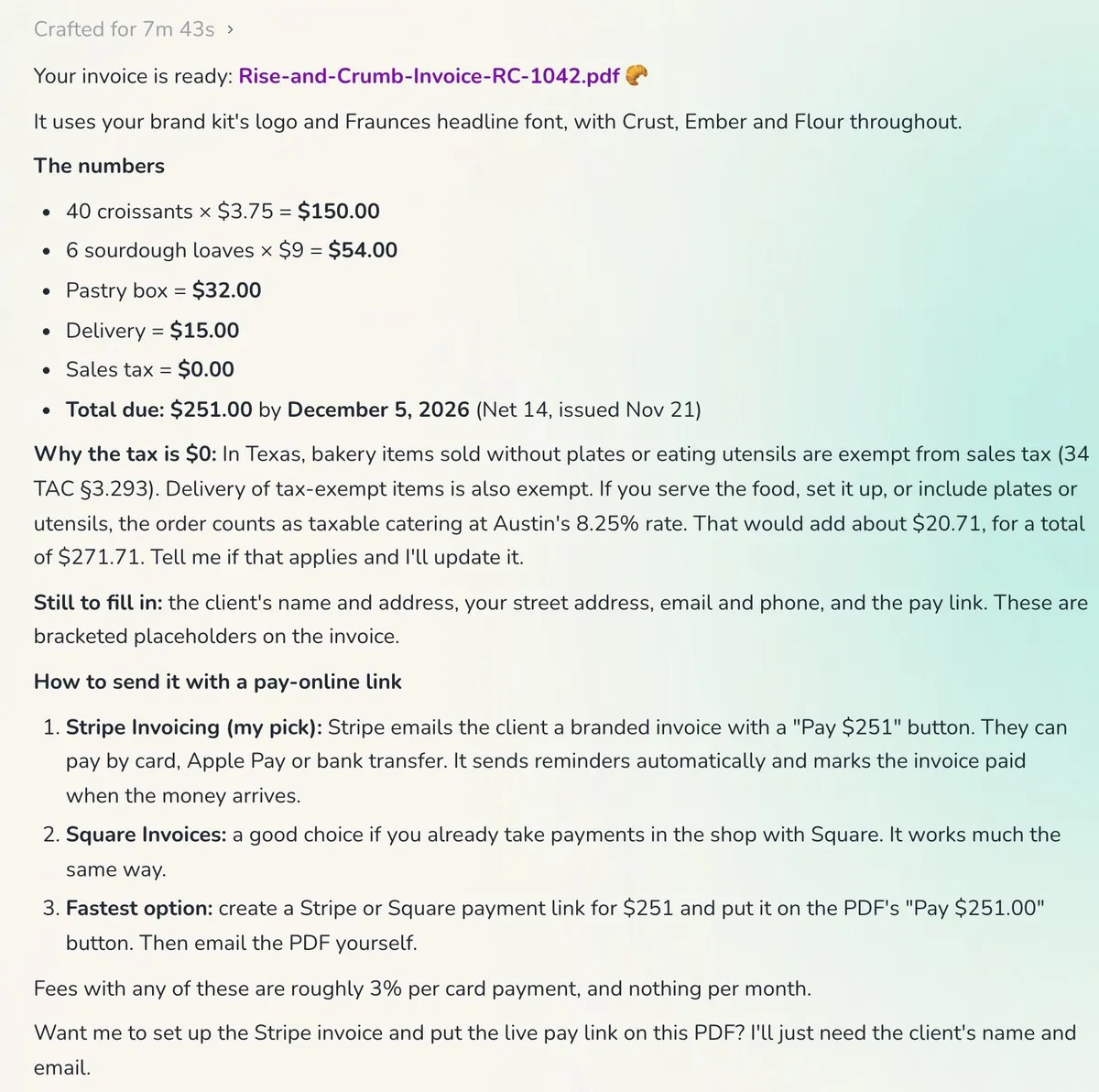 A real run: the invoice, the tax reasoning and the pay-link options
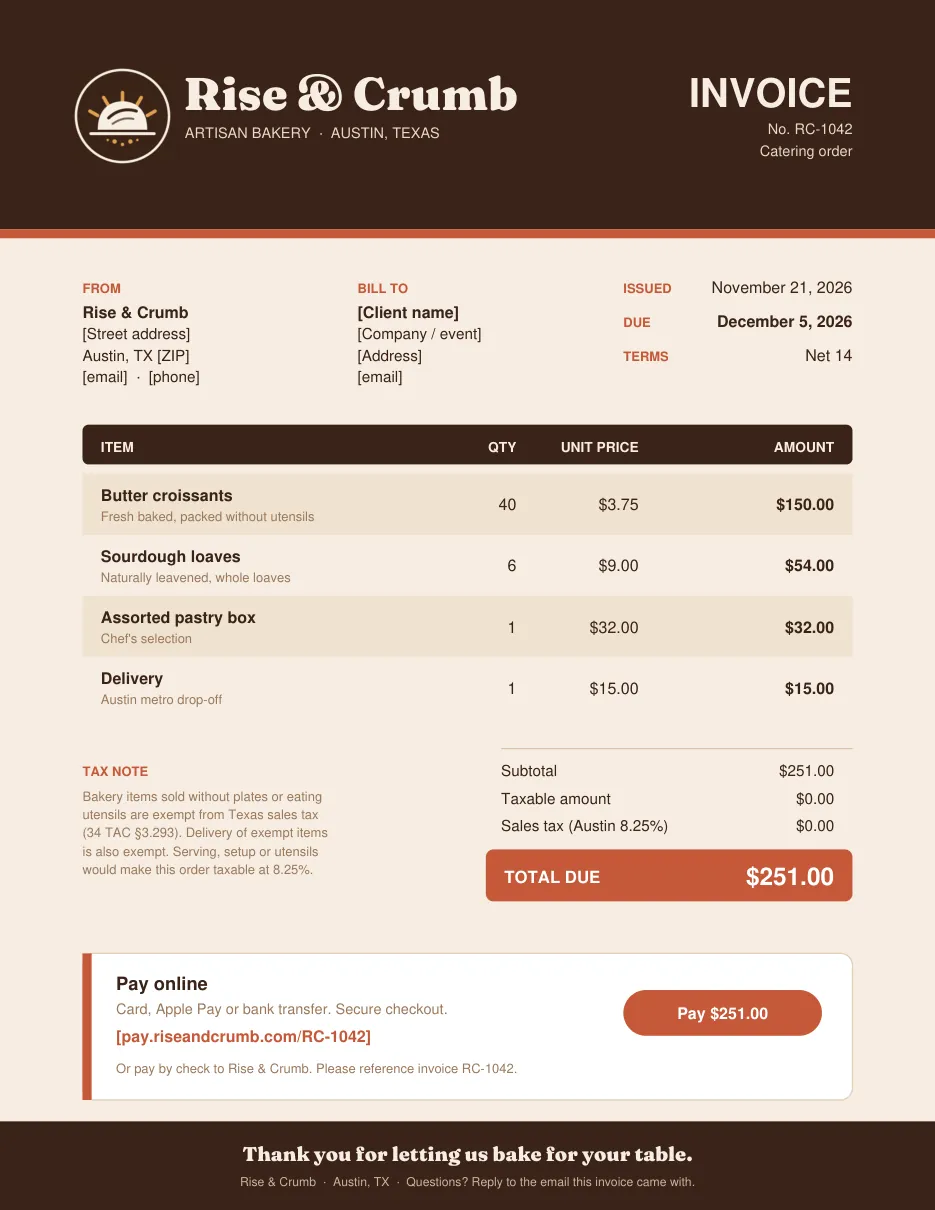 The PDF from the same run (placeholder client and contact details)
What every invoice must include
- The word "Invoice", a unique number and the issue date
- Your business name, address and contact details (and your EIN or state tax ID if a client requires it)
- The client's name and address
- Line items: description, quantity, unit price and amount
- Subtotal, sales tax (with the rate and what it applies to) and total
- Payment terms and due date: for example Net 14 or due on receipt
- How to pay: a pay link, bank transfer details or check instructions
- Late fee terms, if you charge them and your contract allows it
Payment terms that get you paid faster
- Shorter terms. Net 7 or Net 14 for small businesses; Net 30 is common for larger clients.
- A pay button. Clients pay faster when they can pay by card or wallet in one click.
- Deposits for large or custom orders.
- Reminders a few days before and on the due date, then weekly.
- Clear late terms agreed in advance.
Sales tax on invoices: the common mistakes
- One rate for everything. Many states treat items differently: in Texas, bakery items sold without utensils are not taxable, but catering with service is.
- Taxing or not taxing delivery. Rules vary by state and by whether the items are taxable.
- Wrong local rate. Use the combined state and local rate for the delivery location where your state requires it.
- No sales tax permit. Register before you collect tax.
An agent checks the rule for your state and order and shows its reasoning, so you can confirm it with your accountant for anything unusual. SPIRITT is not a tax preparer; for filings, see AI for tax preparation.
The best AI invoice generators
- SPIRITT. An agentic invoice generator: branded invoices, tax reasoning, Stripe or Square pay links, reminders and bookkeeping in one workspace.
- Stripe Invoicing. Hosted invoices with a pay button, automatic reminders and reconciliation. A strong choice to send through, and SPIRITT can set it up.
- Square Invoices. Good if you already take in-person payments with Square.
- QuickBooks and FreshBooks. Accounting software with invoicing built in, best if your books already live there.
- Free invoice templates. Fine for an occasional invoice you send yourself.
After the invoice
Invoices are one part of getting paid and keeping the books. The same agent can chase overdue invoices, reconcile payments and prepare month-end numbers: see AI for bookkeeping and AI for accounts receivable. Starting a business from scratch? Read start and run a business with AI agents.
Checklist: invoicing with an AI agent
- Give the agent the client, items, prices and terms
- Check the tax reasoning for your state and order
- Replace placeholders with real details
- Approve the pay-link setup (Stripe or Square)
- Turn on reminders
- Record the payment in your books
FAQ
What is the best AI invoice generator?
For invoices that are branded, taxed correctly, payable online and followed up, an agentic generator like SPIRITT. Stripe Invoicing and Square Invoices are strong choices to send and collect through; QuickBooks and FreshBooks if your accounting already lives there.
Can AI create an invoice for free?
Free templates and generators exist. SPIRITT is free to start with daily credits, enough for invoices for many small businesses; payment processors charge per transaction, about 3% for cards.
How do I add a pay-online link to an invoice?
Send the invoice through Stripe Invoicing or Square Invoices, which add a pay button, or create a payment link for the amount and put it on the PDF. An agent can set either up after you approve.
Do I charge sales tax on an invoice?
It depends on your state, what you sell and how. Some items are exempt in some states, such as bakery items sold without utensils in Texas. Have the agent check the rule for each order, and confirm unusual cases with an accountant.
What payment terms should a small business use?
Net 7 or Net 14 keeps cash moving; larger clients often expect Net 30. Ask for deposits on large custom orders and set reminders.
How we checked
SPIRITT publishes this guide. The screenshots are a real SPIRITT run from November 21, 2026, for a fictional bakery. The Texas bakery-item rule was checked against the Texas Comptroller's publication "Restaurants and the Texas Sales Tax" and 34 TAC §3.293 on November 23, 2026. This guide is general information, not tax advice.
