AI for Tax Preparation: How Tax Professionals Use AI for Tax Returns in Busy Season (2026)
AI for tax preparation gathers client documents against a checklist built from last year's return, organizes income and expenses, extracts W-2, 1099 and K-1 data into the workpaper, chases missing items and tracks every return through busy season, while the licensed preparer reviews and signs every return. This guide shows the workflow SPIRITT runs for tax practices, a worked example and a checklist.

AI for tax preparation is an AI agent that runs the preparation work around a tax return for a tax practice: it collects client documents against a checklist built from last year's return, organizes and categorizes income and expenses, extracts W-2, 1099 and K-1 data into the workpaper, drafts checklists, engagement letters and client emails, chases missing items, prepares the data for your tax software, and tracks every return's status through busy season. A licensed preparer (CPA or EA) reviews and signs every return. SPIRITT runs that prep work end to end; it does not give tax advice, sign or e-file a return on its own, and client data stays in the systems your firm approves. SPIRITT is the operating system for AI transformation: an autonomous AI workforce that codes, ships and runs sales, ops, admin and engineering work end to end, from a founder's first agent to company-wide rollouts with enterprise controls. It composes models within each task for the optimal mix of capability and price.
What AI does for tax professionals
In busy season the bottleneck is rarely the tax law. It is missing documents, retyped numbers and not knowing which returns are stuck. Those are exactly the parts an agent can take.
| Busy season job | By hand | With an AI agent |
|---|---|---|
| Document requests | Generic organizer, then individual chasing | Checklist per client built from last year's return, request drafted |
| Document intake | Download, rename, file every attachment | Every upload and email attachment filed to the client folder and ticked off the checklist |
| Data entry | Type W-2, 1099 and K-1 boxes into the workpaper | Fields extracted into the workpaper with the source page for each number |
| Organizing income and expenses | Sort bank and card statements for Schedule C or rentals | Transactions categorized by your chart, uncertain items flagged |
| Missing items | Re-read the folder, email again | Missing and inconsistent items listed per client, follow-ups drafted |
| Engagement letters | Fill the template for each client | Letter drafted from your template and services, sent for e-signature after approval |
| Status tracking | Whiteboard or spreadsheet updated when someone remembers | Every return's status kept current and a daily list of what is stuck |
The tax practice workflow SPIRITT runs
- Learns the practice. SPIRITT reads your engagement letter templates, organizer, client list, last year's return summaries and the status stages you use, and keeps them in memory with your firm's rules.
- Builds each client's checklist. From last year's return it lists what to expect this year: each W-2 employer, each 1099-INT, 1099-DIV, 1099-B, 1099-NEC or 1099-R payer, each K-1 entity, mortgage interest (1098), tuition (1098-T), estimated payments and prior-year carryforwards.
- Drafts engagement letters and requests. It drafts the engagement letter from your template for the services you will provide, ready for e-signature through DocuSign after you approve, and a request email listing the client's items.
- Files documents as they arrive. Attachments sent to Gmail and uploads to the client folder in Google Drive or Dropbox are renamed, filed and ticked off the checklist.
- Extracts data into the workpaper. It reads each form and fills the workpaper: W-2 boxes 1, 2, 12 and 17, 1099 amounts and withholding, K-1 boxes with codes, 1098 interest, each with a link to the source page. Scanned or blurry forms are flagged for a person.
- Organizes income and expenses. For Schedule C, rental or bookkeeping clients it categorizes bank and card transactions by your chart and flags items that need the client's explanation.
- Chases what is missing. It compares the folder with the checklist and with last year (a payer that disappeared, a K-1 that has not arrived, a 1099-B without cost basis) and drafts follow-ups for your approval.
- Tracks every return. Each return moves through your stages: documents in, in prep, in review, client review, signed 8879, e-filed, accepted, or extension filed. The agent updates the status from email and file activity and posts a daily list of returns waiting on the client, waiting on review and close to a deadline.
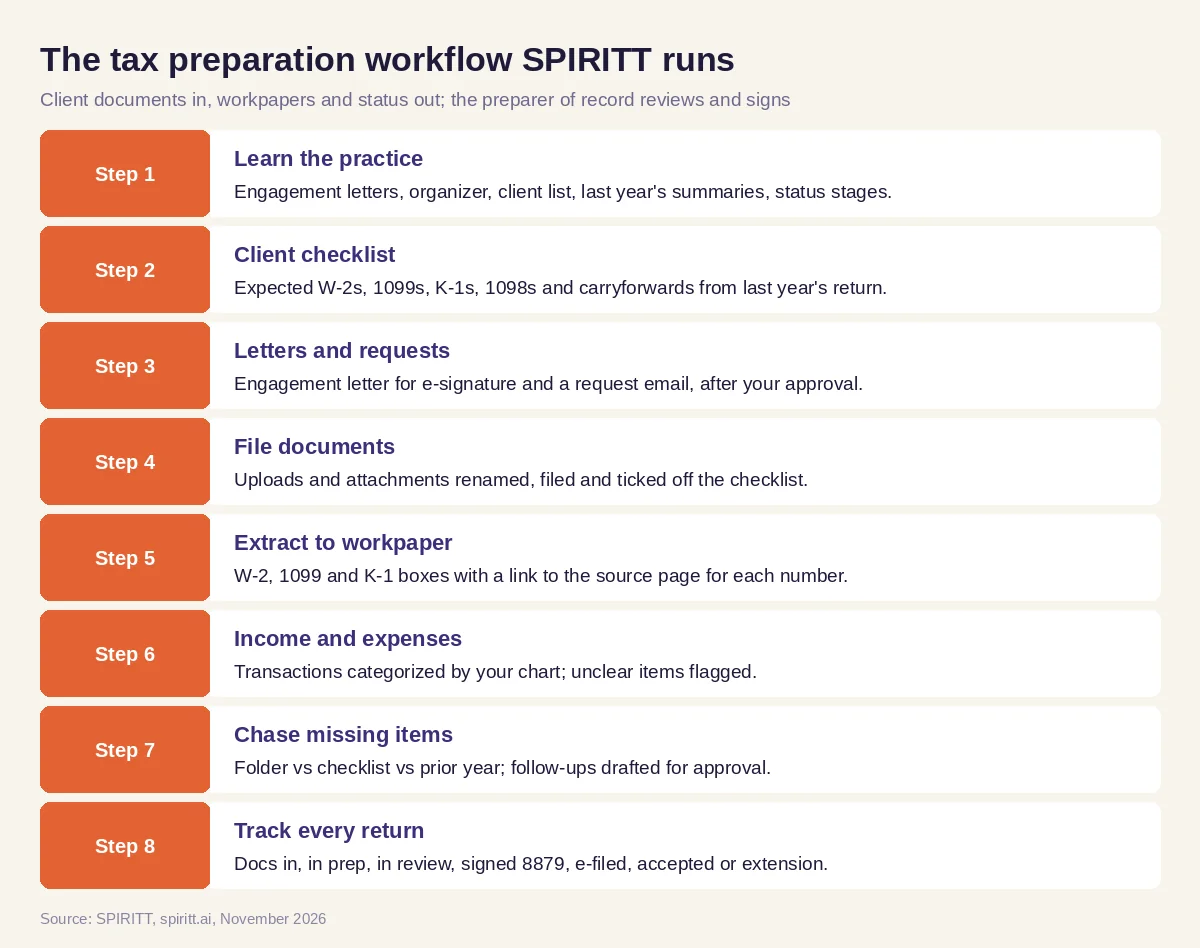 The tax preparation workflow SPIRITT runs, with the preparer of record reviewing and signing every return
The agent prepares the data for your tax software. Where that software has no API, the agent's own cloud computer can enter workpaper data inside it like a person, under the access rules your firm sets, and the preparer reviews the return in the software before anything is signed.
What stays with the preparer
- Tax advice and judgment. The agent does not give tax advice. Positions, elections and planning stay with the CPA or EA.
- Review and signature. The preparer of record reviews and signs every return. The agent never signs or e-files a return on its own; e-filing happens through your software after the client signs Form 8879 and the preparer approves.
- Taxpayer information. Client data stays in the systems your firm approves and is handled under your written information security plan and IRS rules on use and disclosure of taxpayer information, including Section 7216 consent where it applies. SPIRITT supports that with scoped roles, single-use approvals, audit logs, SSO and zero data retention model routes.
Worked example: a family return in March
This example shows the workflow; it is not a customer story, and the clients are illustrative.
January. An EA firm with two preparers has about four hundred individual clients. For a married couple, SPIRITT builds the checklist from last year's return: two W-2s, a 1099-INT from a bank, a 1099-B from a brokerage, a K-1 from a family partnership, a 1098 for the mortgage and a 1098-T for their daughter. It drafts the engagement letter and the request email; the EA approves both and the letter goes out for e-signature.
February. The couple uploads seven documents. The agent files them, ticks them off and extracts the W-2 and 1099 data into the workpaper with links to each source page. It notices one W-2 is from a new employer and the old employer's W-2 is missing, although last year's return showed only part of a year there. It drafts a short question to the client asking whether they changed jobs and whether a W-2 from the old employer is expected.
Early March. The client confirms a job change in February of last year and uploads the missing W-2. The K-1 has still not arrived. The agent moves the return to "in prep" for everything except the K-1 and drafts a reminder; it also lists the return on the daily "close to a deadline" view.
Late March. The K-1 arrives; the agent extracts the boxes and codes into the workpaper. The preparer reviews the full workpaper, makes the judgment calls on the education credit, prepares the return in the firm's software and sends Form 8879 for signature. The status moves to signed 8879, then e-filed, then accepted when the acknowledgment arrives.
What the preparer did. Approved the letter and emails, reviewed every number, made the tax decisions, signed and filed the return.
How to choose AI for tax preparation
- Builds each client's checklist from last year's return
- Extracts W-2, 1099 and K-1 data with a link to the source page for every number
- Flags missing, changed and inconsistent items against the prior year
- Drafts engagement letters and client emails you approve before sending
- Tracks every return's status from documents in to accepted or extension
- Gives no tax advice and never signs or e-files on its own
- Keeps taxpayer data in approved systems under your security plan and consent rules
- Logs every action for your review
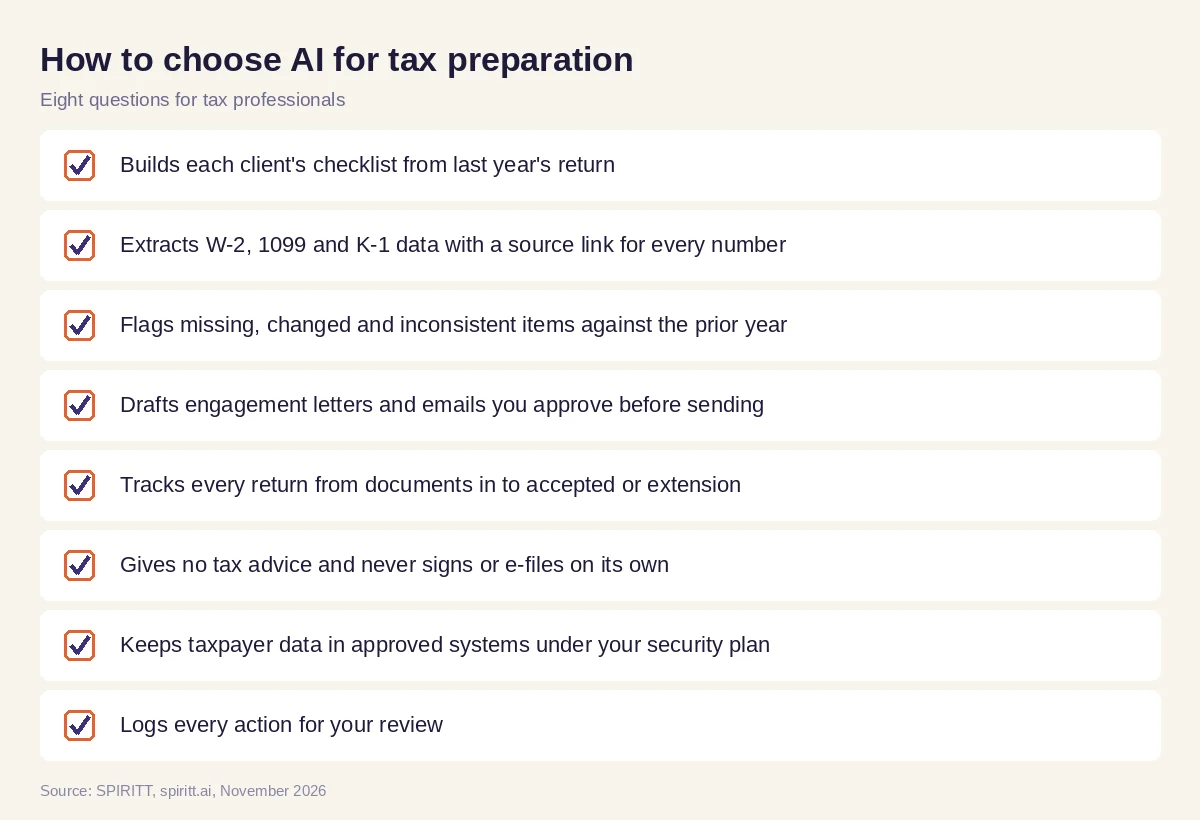 Eight questions tax professionals can ask before AI joins busy season
Where general AI tools fit
General assistants such as Gemini and Microsoft Copilot can explain a form or rewrite a client email you paste in, and Zapier can copy an upload notice into a spreadsheet. A tax practice gets the most from an agent that keeps each client's whole file in context, from last year's return to this year's acknowledgment, and works every open return each day. For year-round categorization and month-end close, read AI for bookkeeping; for collecting the fees once the season ends, read AI for accounts receivable.
Outside busy season, the monthly client close, workpapers and advisory packs are covered in AI agent for accounting firms.
FAQ
How do tax professionals use AI?
Tax professionals use AI to build document checklists, file client uploads, extract W-2, 1099 and K-1 data into workpapers, organize income and expenses, chase missing items, draft engagement letters and track return status. SPIRITT runs these steps while the preparer reviews and signs every return.
Can AI do my tax return?
AI can prepare the data for a tax return: it gathers documents, extracts the numbers and organizes income and expenses. With SPIRITT a licensed preparer reviews and signs every return, and the agent does not file on its own or give tax advice.
What is the best AI for tax preparation?
The best AI for tax preparation works from last year's return, extracts form data with a source link for every number, flags what is missing, keeps drafts for your approval, tracks every return and keeps taxpayer data in approved systems. SPIRITT does that end to end.
Can AI read W-2, 1099 and K-1 forms?
Yes. SPIRITT reads PDF and scanned W-2, 1099 and K-1 forms and fills the workpaper fields, including K-1 box codes, with a link to the source page. Unclear scans are flagged for a person.
Is it safe to use AI with client tax data?
Taxpayer data stays in the systems your firm approves and is handled under your written information security plan and IRS rules on use and disclosure, including Section 7216 consent where it applies. SPIRITT adds scoped roles, approvals, audit logs and zero data retention model routes.
Will AI replace tax preparers?
No. AI takes the document chasing, data entry and status tracking. The CPA or EA keeps the tax judgment, the client relationship, the review and the signature on every return.
How we checked
SPIRITT publishes this guide. It is not tax advice, and it does not give legal advice; taxpayer information rules come from the IRS and each firm's own policies and advisers. SPIRITT facts and controls come from spiritt.ai, spiritt.ai/enterprise and the SPIRITT docs, checked in November 2026. The worked example illustrates the workflow and does not describe a specific client.
