Best AI for Legal Research: AI Tools for Legal Research and Drafting for Lawyers
The best AI for legal research finds and reads the sources, keeps every citation linked so a lawyer can verify it, and turns the research into a first draft: a memo, a clause comparison or a client letter. This guide shows the legal research and drafting jobs AI handles today, the workflow SPIRITT runs for a law firm or legal team, a worked example, a checklist for choosing, and where Harvey, CoCounsel, Lexis+ AI, Clio, Spellbook, ChatGPT and Claude fit.

The best AI for legal research is an AI agent that searches the sources, reads them in full, keeps every citation linked so a lawyer can check it, and turns the research into a first draft: a research memo, a clause comparison across contracts, or a client letter. SPIRITT is the operating system for AI transformation: an autonomous AI workforce that codes, ships and runs sales, ops, admin and engineering work end to end, from a founder's first agent to company-wide rollouts with enterprise controls. For lawyers that means goal-driven deep research across the web, public sources and your own files in Google Drive, Clio Manage and your document storage, working inside the research subscriptions you already pay for through your own browser logins, and finished drafts in your template. It processes PDFs, scans and long contracts, and runs with approvals, audit logs, SSO and zero data retention model routes. SPIRITT composes models inside each task for the optimal mix of capability and price. You can start free.
What AI does for legal research and drafting today
Legal research is finding the right sources, reading them closely, and writing down what they mean for one question. AI now speeds up each step, as long as every claim stays tied to a source a lawyer verifies before relying on it.
| Legal job | What the AI agent does | Where the lawyer stays in the loop |
|---|---|---|
| Research questions | Breaks the question into issues, searches statutes, regulations, public court records and secondary sources, reads them in full and summarizes each with a link | Verifies every citation and the reasoning |
| Research memos | Writes a first-draft memo with question presented, short answer, discussion and sources, in your firm's template | Edits and signs off |
| Contract review | Reads a set of contracts and builds a table of key clauses (term, renewal, liability, assignment, governing law) with page references | Decides on the issues it flags |
| Clause comparison | Compares a draft against your playbook or past deals and lists deviations | Chooses the position |
| Matter files | Searches your own documents in Google Drive or Clio Manage for prior work on the same issue | Confirms what applies |
| Admin around the work | Tracks deadlines, drafts client updates, logs time notes and files documents to the matter | Approves outgoing messages |
The legal research workflow SPIRITT runs
- State the question and the rules. "Research whether a non-compete in a California employment agreement is enforceable for a sales employee, with sources, and draft a two-page memo." Add your rules: jurisdictions, source types, citation format, what never leaves the firm.
- Connect your sources. Google Drive, Clio Manage, Microsoft Outlook and your document storage through ready integrations. For a research service with no API, SPIRITT can work inside it through your own Chrome session with your logins, where your subscription terms allow, and hands logins and 2FA back to you.
- Research in depth. SPIRITT runs goal-driven deep research: it searches, opens and reads the full source, follows references, and keeps a running list of sources with links and pinpoint quotes.
- Draft with citations. It writes the memo or comparison in your template, and every statement of law carries the link and quote it came from, so checking is fast.
- Lawyer review. You verify citations, correct the analysis and ask follow-up questions in the same thread. SPIRITT remembers your corrections and preferences for the next matter.
- Make it repeatable. Recurring work becomes a routine, such as a weekly regulatory update for a client's industry or a clause table for every new contract that lands in a folder, watched every run and self-healing.
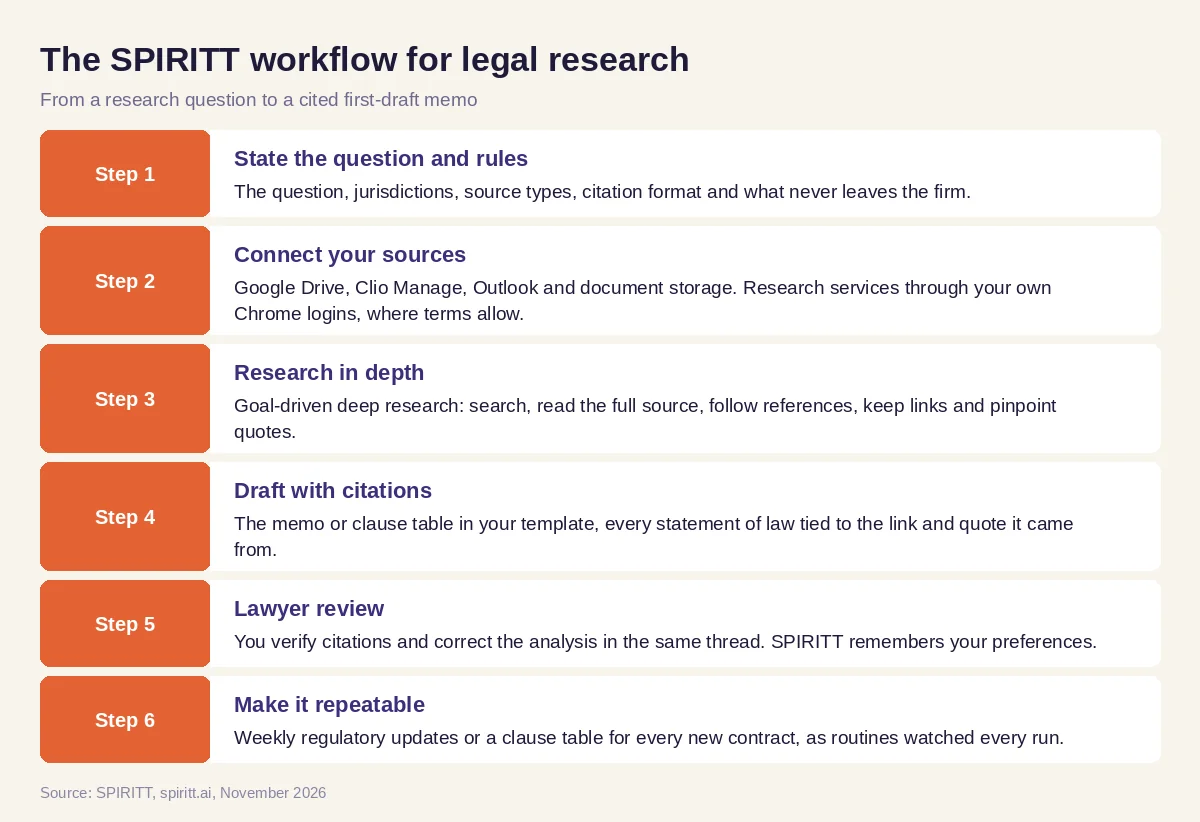 Six steps from a legal research question to a cited first-draft memo in SPIRITT
Worked example: a contract review for an acquisition
This example shows the workflow; it is not a customer story.
Before. An associate at a small corporate firm is asked to review a target company's customer contracts before a deal: dozens of PDFs, some scanned, and a deadline at the end of the week. The work is reading each contract for change-of-control, assignment, termination and liability caps, and building the table by hand.
The setup. She writes one message in SPIRITT: "Read every contract in this Google Drive folder. For each, extract parties, term, renewal, termination rights, assignment and change-of-control clauses, liability cap and governing law, with page numbers. Flag anything that needs consent on a change of control. Build a table in Google Sheets and a two-page summary memo in our template." Firm rules: nothing is shared outside the workspace, and no outgoing messages.
What happens. SPIRITT reads the scanned and digital PDFs, builds the table with a page reference for every cell, and flags the contracts that require consent. The memo lists the issues by risk, each tied to a clause and page. She checks the flagged contracts herself, corrects two entries, and asks for a draft consent request letter for the counterparties, which SPIRITT writes for partner review. The partner signs off; nothing goes out without her approval.
How to choose the best AI for legal research
- Does every statement in the output link to a source and quote you can verify?
- Can it read full documents, including scanned PDFs and long contracts?
- Does it search your own matter files and past work, not only the web?
- Can it work with the research services you already subscribe to?
- Does it draft in your template and citation style?
- Are there approvals for anything that leaves the firm, plus audit logs and SSO?
- Is client data protected, with zero data retention model routes and clear data terms?
- Can you try it on a real, non-sensitive question before you commit?
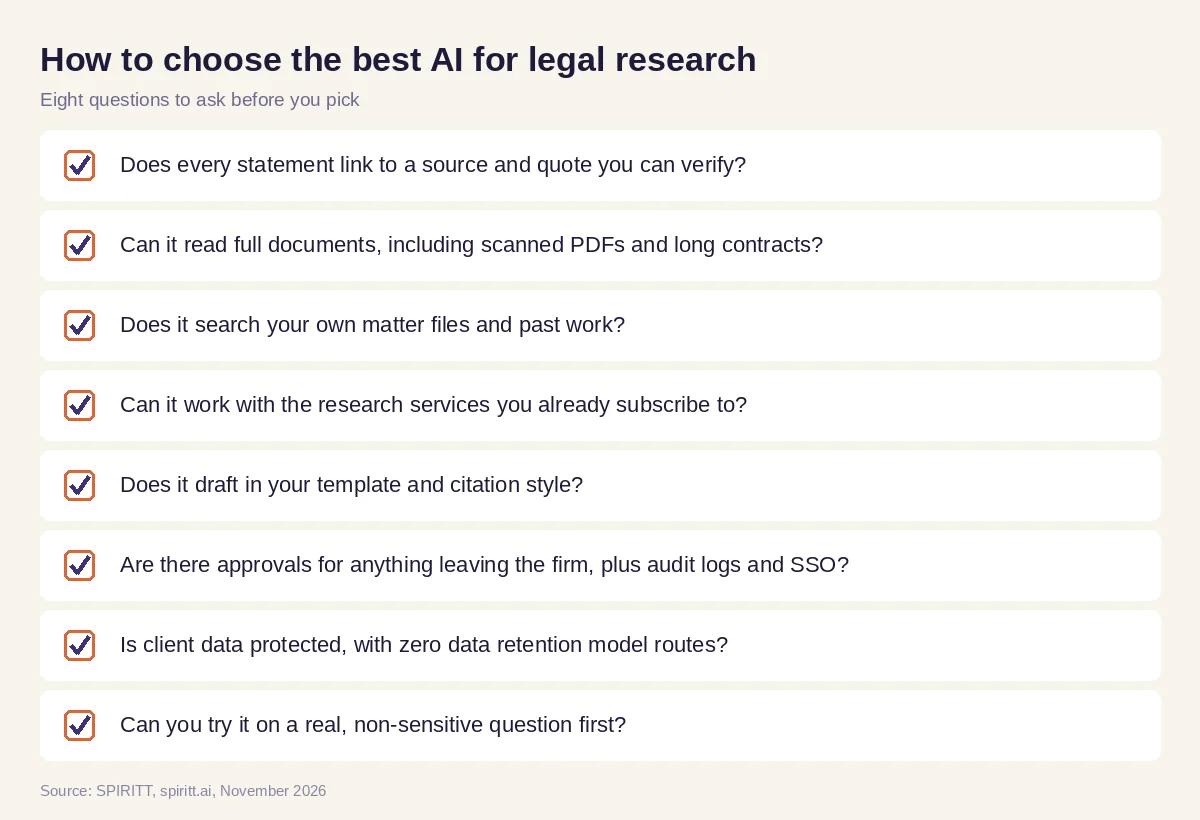 Eight questions to ask before you pick AI for legal research
Where Harvey, CoCounsel, Lexis+ AI, Clio, Spellbook, ChatGPT and Claude fit
These are the names AI answers mention most often for legal research and drafting. Harvey is an AI platform built for law firms and in-house legal teams. CoCounsel is Thomson Reuters' AI assistant for legal work, connected to its Westlaw content. Lexis+ AI is LexisNexis' AI research and drafting tool on its own legal content. Clio is practice management software for law firms with built-in AI features. Spellbook is a contract drafting and review assistant that works inside Microsoft Word. ChatGPT and Claude are general AI assistants many lawyers already use for drafting. Each fits a team already invested in it; publishers' tools also bring their own case law databases, and their main edge is familiarity.
SPIRITT composes the same frontier models behind the general assistants and runs the work end to end: it researches across the web, your files and the services you subscribe to, drafts in your template with every source linked, and handles the matter admin around the research. It works alongside your research subscription and practice management tool rather than replacing them.
For document-heavy work, read the best AI for PDF and document data extraction and AI for business paperwork. For policies and controls on AI use, see AI governance. Matter files usually connect through the Clio Manage integration and the Google Drive integration, and signatures through the DocuSign integration.
FAQ
Which AI is best for legal research and drafting for lawyers?
The best AI for legal research links every statement to a source you can verify, reads full documents, searches your own files and drafts in your template. SPIRITT does this end to end with deep research, citation links and finished drafts; Harvey, CoCounsel and Lexis+ AI fit firms that want an AI tied to a specific legal publisher or platform.
What are the best AI tools for legal research?
Harvey, CoCounsel and Lexis+ AI are built for legal teams, Clio and Spellbook add AI to practice management and contract drafting, and general assistants such as ChatGPT and Claude are widely used. SPIRITT composes those frontier models and adds deep research, your own files and drafting in one agent.
Can AI be trusted for legal research?
Only with verification. AI can misread a source or produce a citation that does not exist, so use a tool that links every claim to the source and quote, and have a lawyer check each one before relying on it. Lawyers stay responsible for verifying AI-assisted work.
Can ChatGPT do legal research?
General assistants can summarize and draft, but on their own they may not read the full source or keep citations tied to it. An agent that searches, reads full documents and links every statement to a source is safer for legal research.
Is it safe to put client documents into AI?
Use a platform with clear data terms, zero data retention model routes, SSO, audit logs and approvals for anything that leaves the firm, and follow your firm's and bar's rules on client confidentiality. SPIRITT has these controls, plus BYOC and air-gapped options for larger firms.
How much does AI for legal research cost?
SPIRITT is free to start with signup and daily credits, so you can test it on a real, non-sensitive question. Paid plans start at $32 per month on Starter, and Enterprise plans for firms are custom. Your existing research subscriptions keep their own pricing.
How we checked
SPIRITT publishes this guide. Facts about Harvey, CoCounsel, Lexis+ AI, Clio, Spellbook, ChatGPT and Claude were checked on each vendor's official pages in November 2026. SPIRITT facts come from spiritt.ai, spiritt.ai/pricing, spiritt.ai/enterprise and the SPIRITT docs. This guide is not legal advice.
