ChatGPT Business Agents: What They Are and How to Set One Up
OpenAI's Business Agents let customers chat with a business inside ChatGPT. Who is eligible (US ecommerce and online services), the setup steps after you claim your business, what the agent can and cannot do, how sponsoring it as a ChatGPT Ads destination works, and what to prepare first.
A ChatGPT Business Agent is an AI agent a business builds inside ChatGPT to answer customer questions about its products and policies, in a separate, clearly labeled chat that customers choose to start from the business's ChatGPT profile. OpenAI launched them on November 10, 2026 for eligible ecommerce and online service businesses in the US with a website. To set one up: claim your business in Business Hub, pass Persona identity verification, review the information the agent uses, write its instructions within OpenAI's Business Agents Policy, preview it with real customer questions and select Publish. Today it explains and links; it cannot complete purchases, bookings or order lookups. SPIRITT, the operating system for AI transformation, is an autonomous AI workforce that codes, ships and runs sales, ops, admin and engineering work end to end; it can prepare the product data, policies and test questions your agent depends on, while you publish.
OpenAI describes Business Agents as "a new way to answer questions and help people explore their offerings." Every fact below is quoted from OpenAI's announcement, the Businesses in ChatGPT page, the Business Agents Policy and the help center article "Setting up your business on ChatGPT."
What a ChatGPT Business Agent is
"When a business appears in a model response, people can click to see the business's ChatGPT profile. If a Business Agent is available, customers can choose to start a conversation with the business to explore its offerings and ask follow-up questions."
OpenAI's own example: "someone comparing products could ask about the differences between two options and which features fit their needs." The agent "answers questions with your product and policy information, using guidelines you control."
Three design points shape what you build:
- It is separate. "The Business Agent conversation is clearly labeled, separate from the customer's original ChatGPT conversation, and distinct from ChatGPT's independent answers."
- It is AI, and must say so. The policy: "An agent must be clear that it is AI representing the business; do not make it appear to be an independent adviser, a human, or endorsed by OpenAI."
- You do not see the chats. "We don't share users' conversations or Business Agent chats with businesses."
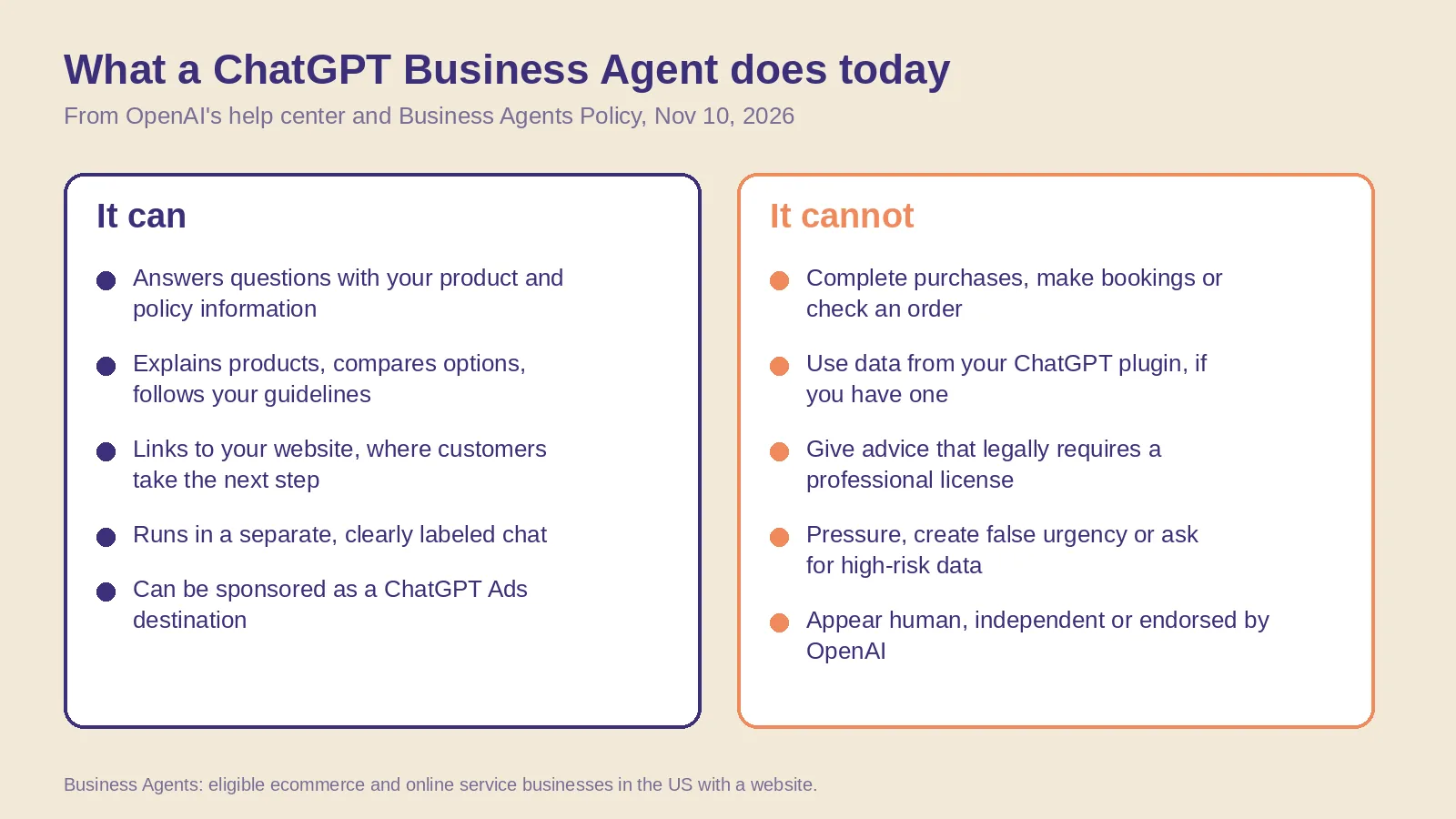 What a ChatGPT Business Agent can and cannot do at launch, from OpenAI's help center and Business Agents Policy, November 10, 2026.
Who is eligible for a Business Agent
- US ecommerce and online service businesses. "Business Agents are now available to eligible ecommerce and online service businesses in the United States."
- With a website, in an allowed industry. The help center: they are "available to eligible ecommerce and online service businesses in the US with a website. Your business must also meet the industry requirements in the Business Agents Policy."
- After a claim and Persona verification. "You can't create an agent while verification is pending or after it fails."
- Verification is not a guarantee. The policy: "We consider both the business category and the agent's intended use before allowing publication" and "Business verification alone does not guarantee agent eligibility."
- Shopify is optional. "Eligible businesses can set up a business agent whether or not they use Shopify."
OpenAI plans to "expand Businesses in ChatGPT and Business Agents to more markets and business categories" over time. It has not published a date for markets outside the US or for local businesses yet.
How to set up a ChatGPT Business Agent
- Claim your business in Business Hub. Verify by business phone, business email, website domain or Shopify. The full path is in how to claim your business in ChatGPT.
- Complete Persona identity verification. It is required to "create a business agent if your business is eligible."
- Open your business in the Business tab. "If Shopify setup has already created a draft agent, open it. Otherwise, create an agent if the option is available."
- Review the information your agent will use, "such as product details and your return policy." Connect a product feed if you sell products (Shopify, a CSV that follows OpenAI's product feed specification, or a hosted URL).
- Write the instructions. Follow the Business Agents Policy (see the rules below).
- Preview with a real question. OpenAI suggests one customers often ask, such as "Can I return an item I bought on sale?" "If the answer is wrong, update the information or instructions and test it again."
- Select Publish. "Customers can only chat with a published agent." Publishing is optional and separate from the claim.
For Shopify merchants OpenAI lists three steps: connect your store in the Shopify admin or in Business Hub, review your business information ("product details, pricing and availability are shared automatically through Shopify's catalog"), then preview and publish the agent.
What the agent can and cannot do at launch
- It can explain products and policies, help customers compare options and "provide a relevant link that the user chooses to visit."
- It cannot complete transactions. "The current experience lets your agent explain products and policies and link to your website, where customers complete those actions." No purchases, bookings or order checks.
- It does not use plugin data. "If your business also has a plugin in ChatGPT, the business agent's separate chat doesn't use data from that plugin."
- It may collect contact details only through an approved feature, and only when the user chooses to.
The policy rules to write your instructions around
The Business Agents Policy applies "when you create an agent and whenever you update it." The rules that matter most for instructions:
- No invented facts. "Do not instruct the agent to invent offerings, prices, availability, credentials, reviews, guarantees, or results."
- No hidden terms. "Do not hide material fees, conditions, or limitations when they matter to a user's question."
- No pressure. No "false urgency" or "pushing a sale or follow-up after someone declines."
- No high-risk data. Do not ask for "health details, protected traits, government IDs, or financial or authentication credentials."
- Stay in role. No advice "that legally requires a professional license," no guaranteed results.
OpenAI "may suspend or remove your agent and ask you to make changes," and repeated issues can restrict "a business's ability to create or manage agents."
Business Agents and ChatGPT Ads
"Businesses can also sponsor their Business Agent and use it as the destination for ChatGPT Ads to reach more potential customers. Sponsored placements are clearly labeled and separate from ChatGPT responses." The help center adds that advertising "doesn't influence ChatGPT's independent answers," and that claiming, publishing an agent and advertising are separate. OpenAI has not published Business Agent ad pricing in these pages; the Ads product feed has its own guide.
What to prepare before you build
- Clean product data: every variant with a description, image, price and stock status. OpenAI's feed needs nine fields per row.
- Written policies: shipping, delivery, returns, warranty, sale terms. The agent answers from them, so gaps become wrong answers.
- Your top 20 real questions from support inboxes, chat logs and reviews, with the correct answers.
- Guidelines in plain words: tone, what to link to, when to send people to a human channel.
- A test sheet: each question, the expected answer, the agent's answer, pass or fix.
- An update routine: when a price or policy changes, the agent's information changes the same day.
Where SPIRITT fits
The claim, Persona check and Publish button belong to the business owner or an authorized teammate. SPIRITT prepares and maintains everything the agent answers from. Connected to your store, help desk and CRM through 1,500+ integrations, it pulls product data and policies, finds contradictions between your site and your feed, writes the export code for a clean product feed, drafts agent guidelines that follow the policy, builds the test sheet from your real support questions, and re-runs the tests after every change. It composes models from every major lab inside each task, runs 24/7, and is free to start, with paid plans from $32 a month. See the whole job in an AI agent that runs your ChatGPT presence.
For what happens after launch, read the first 4 weeks after you claim and the AI Agent Recommendation Index on how ChatGPT chooses which brands to name.
After launch, track results with ChatGPT Business Hub insights: mentions, clicks and discovery topics.
FAQ
What are ChatGPT Business Agents?
AI agents that eligible businesses build in ChatGPT to answer customer questions using the business's own product and policy information. Customers start the chat from the business's ChatGPT profile; it is clearly labeled and separate from ChatGPT's own answers.
Who can create a ChatGPT Business Agent?
Eligible ecommerce and online service businesses in the US with a website, that have claimed their business in Business Hub and passed Persona identity verification, in an industry the Business Agents Policy allows.
Can a ChatGPT Business Agent take orders or bookings?
No. At launch it explains products and policies and links to your website, where customers complete purchases or bookings. It cannot check a customer's order.
Do I need Shopify to set up a Business Agent?
No. Shopify merchants can connect their store and get a draft agent, but any eligible business can create one and add products with a CSV feed or a hosted feed URL.
Can I see what customers ask my Business Agent?
No. OpenAI does not share users' conversations or Business Agent chats with businesses. Business Hub shows aggregated insights such as mentions, website clicks and discovery topics.
Does a Business Agent make ChatGPT recommend my business more?
OpenAI says claiming "doesn't guarantee increased visibility," and advertising "doesn't influence ChatGPT's independent answers." The agent helps customers who already chose to talk to you; sponsoring it as an Ads destination is a separate, labeled placement.
How we checked
SPIRITT publishes this guide. Every fact about Business Agents comes from OpenAI's announcement "Introducing Businesses in ChatGPT" (November 10, 2026), the Businesses in ChatGPT page, the Business Agents Policy (updated November 10, 2026), the help center article "Setting up your business on ChatGPT" and the OpenAI product feed specification, all read on November 10, 2026. OpenAI has not published ad prices, review times or dates for new markets, so we do not state them.
