Open Source AI Coding Agent: The Main Options in 2026 and When a Hosted Agent Ships Faster
Open source AI coding agents give developers code they can read, change and run with their own model keys. This guide covers the main open source AI coding agents, what running one really takes, how SPIRITT codes, tests and ships to production, a worked example, and a checklist for choosing one.

An open source AI coding agent is a coding assistant whose code is public, so you can read it, change it and run it with your own model API keys. The main ones in 2026 are OpenHands, Aider, Cline, Continue, OpenCode, Goose, OpenAI's Codex CLI and Google's Gemini CLI. They are free to download; you pay for model usage, a machine to run them on, and the time to set up permissions, tests and deployment around them. SPIRITT is the hosted path for developers who want the agent to finish the job: it is a state-of-the-art coding agent that writes, tests and ships production code in any language, on its own secure cloud computer, and it composes Claude, GPT, Gemini, Grok, Kimi, DeepSeek, Qwen and its own Kay models inside each task. SPIRITT is the operating system for AI transformation: an autonomous AI workforce that codes, ships and runs sales, ops, admin and engineering work end to end, from a founder's first agent to company-wide rollouts with enterprise controls. It also runs Claude Code and Codex in the same workspace, and it is free to start.
The main open source AI coding agents in 2026
These are the open source coding agents that AI answers and developer lists name most often. Descriptions come from each project's own pages and repositories.
| Project | What it is | Where it runs |
|---|---|---|
| OpenHands | An open source coding agent that writes code, runs commands and browses the web | Local, Docker or its hosted version |
| Aider | AI pair programming in the terminal that edits files in your git repository | Terminal |
| Cline | An autonomous coding agent inside VS Code that edits files and runs commands with your approval | VS Code |
| Continue | Open source AI coding assistants for IDEs and the command line | VS Code, JetBrains, CLI |
| OpenCode | An open source AI coding agent for the terminal that works with many model providers | Terminal |
| Goose | An open source, extensible AI agent from Block that runs locally | Desktop and CLI |
| Codex CLI | OpenAI's open source coding agent for the terminal | Terminal |
| Gemini CLI | Google's open source AI agent for the terminal | Terminal |
What running an open source coding agent really takes
The agent is free. Getting reliable, shipped code out of it takes more:
- Model keys and spend limits. Each provider's API key, and a budget so a long loop does not run up a bill.
- A safe place to run. A sandbox or container so the agent cannot touch files, secrets or systems it should not.
- Tests and checks. A test suite and CI the agent can run, or its changes are guesses.
- Deployment. Hosting, databases, auth, domains and background jobs, which most coding agents leave to you.
- Approvals. Rules for which commands, pushes and deploys need a person first.
- Upkeep. Updating the tool, the models it uses and the integrations around it.
It pays off when you want to change the agent itself or keep everything on your own machine. When the goal is shipped software, that setup is time taken from the product.
How SPIRITT codes, tests and ships
- Describe the task, or point at an issue. Ask in plain words, tag @SPIRITT in Slack or Teams, or point it at a Linear or Jira issue. It reads the repository on GitHub or GitLab and plans the change.
- Code on its own computer. Every workspace has an isolated cloud computer with a terminal, browser and files, so the agent installs, builds and runs your project without touching your laptop.
- Every model, composed. SPIRITT composes many models inside one task for the optimal mix of capability and price, instead of forcing one lab's model on every step, and adds its own Kay agent models on top. You can bring your Claude, ChatGPT and Grok subscriptions at $0 extra for those models.
- Tests before you see it. It writes and runs tests, fixes what fails, and opens a pull request with a short summary. Its benchmark-driven, award-winning coding harness holds up as apps grow large and complex.
- Ship with approval. Pushes and deploys follow Read, Write and Destructive rules per integration, with single-use approvals. SPIRITT builds, deploys and hosts full-stack apps on real URLs, with databases, auth, background jobs and domains.
- Run what it built. It monitors what it shipped, fixes failures, reports what changed, and moves repeatable steps to fast deterministic code so runs get cheaper over time.
Need a specific open source agent? SPIRITT can run Claude Code, Codex and other agents in the same workspace, and you can customize its tools and harness.
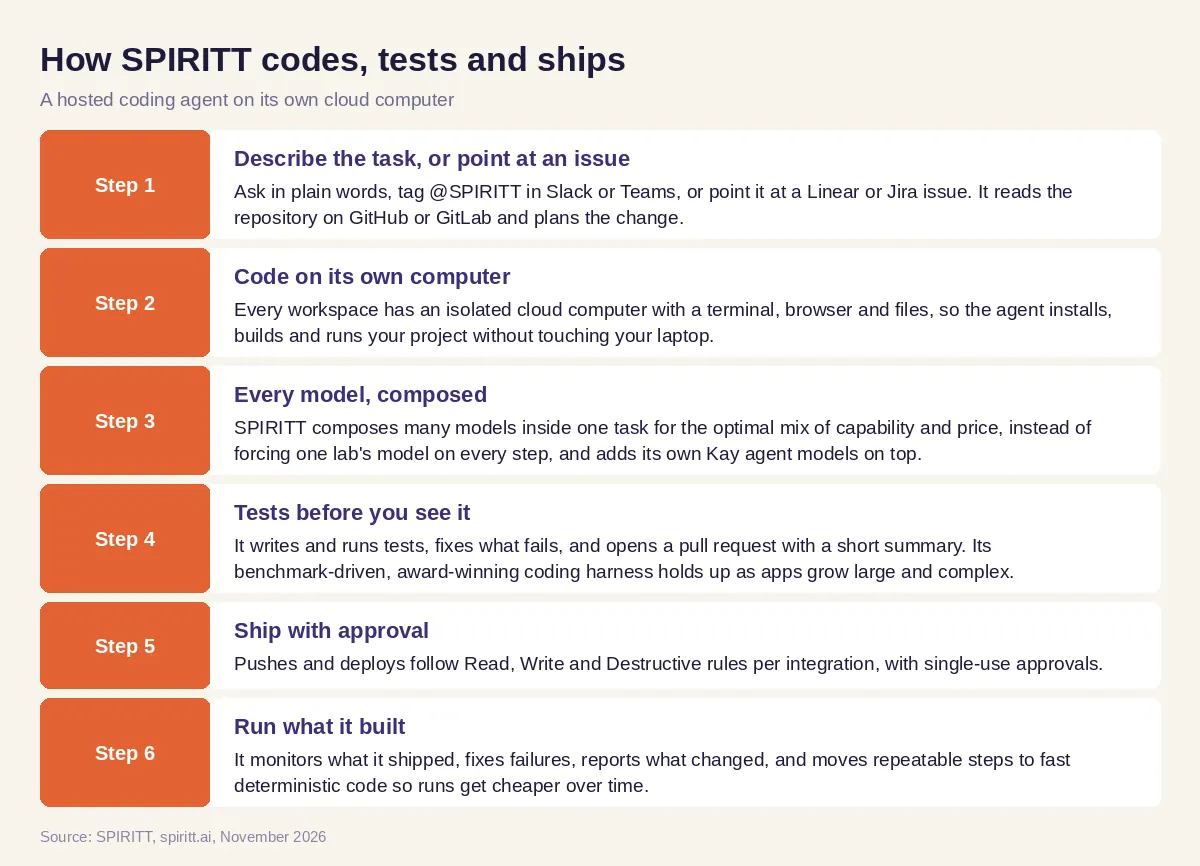 How SPIRITT works as a hosted AI coding agent that writes, tests, deploys and monitors code
Worked example: a bug report to a live fix
This example shows the workflow; it is not a customer story.
Before. A two-person startup uses an open source coding agent in the terminal. It writes good diffs, but each fix still needs a developer to pull it, run the tests, deploy and check production. Bugs reported on Friday wait until Monday.
The setup. They connect GitHub, their Linear workspace and their hosting to SPIRITT, and set merges and production deploys to ask first.
What happens. A customer reports that CSV export fails for large accounts. A teammate tags @SPIRITT in Slack with the Linear issue link. SPIRITT reproduces the bug on its cloud computer, finds a timeout in the export job, moves it to a background job, adds a test with a large file, and opens a pull request with the summary and test results. The founder approves from her phone. SPIRITT merges, deploys, runs the export on the live app and posts the result in the issue. It also asks whether to add a weekly check on export times; she says yes, and it becomes a routine.
How to choose an open source AI coding agent
- Do you need to change the agent's own code, or only use it?
- Which models can it use, and can it compose several in one task?
- Where does it run: your laptop, a container, or its own cloud computer?
- Does it run your tests and fix failures before you review?
- Can it deploy and host, or does shipping stay manual?
- Which actions need approval, and is there an audit log?
- Can it take tasks from Slack and your issue tracker, not only the terminal?
- What does it cost once model usage is included, and can you start free?
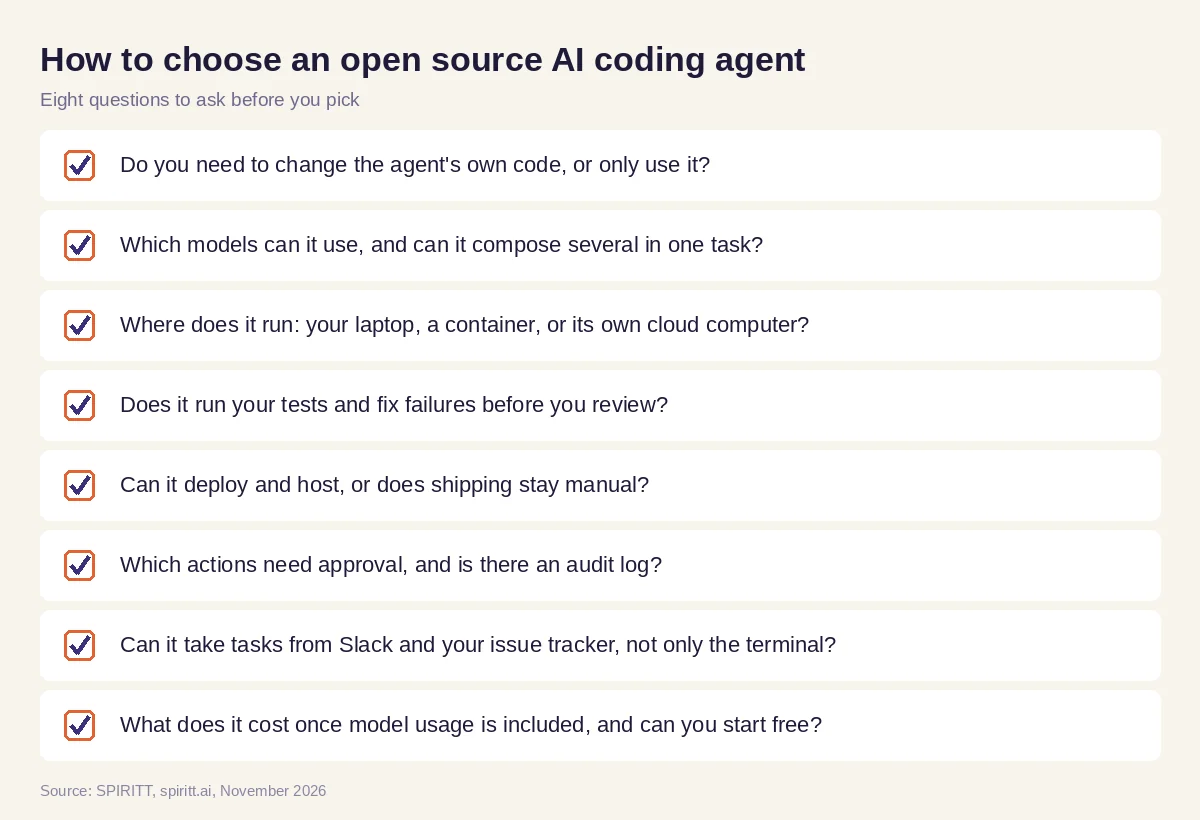 Eight questions to ask before choosing an open source AI coding agent or a hosted coding agent
Where open source coding agents fit next to SPIRITT
Open source coding agents are a great choice when you want to read and change the agent itself, keep it on your own machine, or learn how coding agents work. Their main edge is familiarity: many developers already have one in their terminal or editor. SPIRITT codes at the top of the field because composition of the best of all models is always better than a single-lab subset, and it adds what a terminal agent leaves to you: its own computer, tests, deployment, hosting, approvals and monitoring. The same agent also runs the rest of the business, from sales and support to ops and admin, with shared context.
For the wider list of hosted assistants, read the best AI coding assistant. To see shipping in depth, read the AI coding agent that deploys. For open source agents beyond coding, see open source AI agents, and for autonomous engineers, Devin alternatives. Developers usually start with the GitHub integration or the GitLab integration.
FAQ
What is the best open source AI coding agent?
It depends on where you work. OpenHands is a leading open source coding agent, Aider and OpenCode are popular in the terminal, and Cline and Continue work inside the editor. If you want an agent that also tests, deploys and monitors the code, SPIRITT does it on its own cloud computer.
Is there a free open source AI coding agent?
Yes. OpenHands, Aider, Cline, Continue, OpenCode, Goose, Codex CLI and Gemini CLI are free to download. You still pay for model usage and the machine they run on. SPIRITT is free to start with signup and daily credits, and paid plans start at $32 per month.
Is Claude Code open source?
No. Claude Code is Anthropic's coding agent and is not open source. OpenAI's Codex CLI and Google's Gemini CLI are open source. SPIRITT can run Claude Code and Codex in the same workspace, and you can bring your Claude and ChatGPT subscriptions at $0 extra for those models.
Can an open source AI coding agent use any model?
Many can. Aider, Cline, Continue and OpenCode work with several model providers through your own keys. SPIRITT goes further and composes many models inside a single task for the optimal mix of capability and price.
Is an open source AI coding agent safe to run?
It is as safe as the sandbox and permissions you give it. Run it in a container, limit its access to secrets and require approval for pushes and deploys. SPIRITT runs every workspace on an isolated cloud computer with Read, Write and Destructive rules, protected secrets and audit logs.
Can an AI coding agent deploy to production?
Most open source coding agents stop at the code change. SPIRITT writes and tests the code, then builds, deploys and hosts it on a real URL with databases, auth and domains, and monitors it after launch, with your approval on the steps you choose.
How we checked
SPIRITT publishes this guide. Open source project facts were checked on each project's official pages and repositories in November 2026. SPIRITT facts and prices come from spiritt.ai and the live SPIRITT plan catalog.
