SPIRITT AI Cost Control: Budgets by Organization, Team, Project, Agent and Task
How SPIRITT keeps enterprise AI spend predictable at every level, from one company credit balance down to the cost of a single task, and why the cost of a workflow falls the longer it runs.

SPIRITT controls AI spend at every level of an enterprise: one credit balance and plan for the organization, budgets per team and per project with alerts before a limit is reached, a daily budget on every agent that the AI gateway enforces on every model and tool call, and usage attributed to every task including its sub-agents, with each model and tool call listed. On top of the limits, SPIRITT lowers the cost of a workflow over time by composing models per step and moving repeatable steps to fast deterministic code.
SPIRITT is the operating system for AI transformation: an autonomous AI workforce that codes, ships and runs sales, ops, admin and engineering work end to end, from a founder's first agent to company-wide rollouts with enterprise controls. This page explains its cost controls one level at a time.
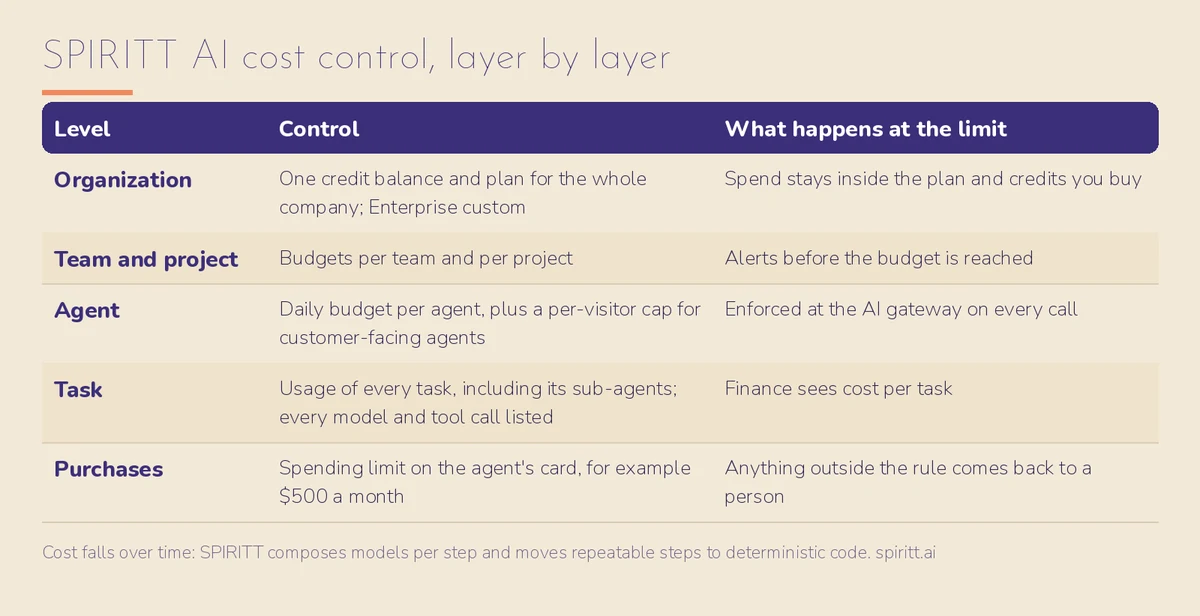 SPIRITT AI cost control, layer by layer
How does SPIRITT control AI costs for an organization?
The whole organization shares one credit balance on one plan, so AI spend across every workspace, team and agent adds up to a number finance already approved. Self-serve plans are Starter, Pro and Max with credit top-ups, and Enterprise is custom. Everyone can start free with signup and daily credits. Current prices are on SPIRITT pricing.
Can we set AI budgets per team and per project?
Yes. SPIRITT Enterprise sets budgets by team and by project, and alerts the owner before a budget is reached, for example at 90 percent. A sales team, a finance automation project and an engineering group can each run on their own budget without seeing each other's spend.
Can we cap what a single AI agent spends?
Yes. Every SPIRITT agent can have a daily budget, and the AI gateway enforces it on every model and tool call the agent makes. Customer-facing agents also get a per-visitor daily cap, so one heavy user cannot spend an agent's whole budget. Each agent's page shows today's spend next to its daily budget.
Can we see what one task cost?
Yes. SPIRITT attributes usage to every task, including the sub-agents it started, and each agent's run history lists every model call and tool call. That gives finance a cost per task, the unit Gartner's AI FinOps guidance asks enterprises to measure at inference.
How does SPIRITT control spending on purchases agents make?
The SPIRITT agent card works only inside the spending limit you set, such as $500 a month, and anything outside the rule comes back to a person. Purchases can also be set to ask every time through the same approval rules used for every other sensitive action.
Why does SPIRITT get cheaper the longer a workflow runs?
SPIRITT composes models within each task for the best mix of capability and price, builds evaluations from good runs, and moves repeatable steps to fast deterministic code, which lowers cost and run time without lowering quality. A workflow that starts with frontier models on every step settles into code for the predictable parts and models only where judgment is needed.
Can we use AI subscriptions we already pay for?
Yes. Connect existing Claude, ChatGPT or Grok plans, and their models run inside SPIRITT on that subscription's own budget, with no extra SPIRITT charge for those models. SPIRITT adds the workspace, tools, memory and end-to-end execution on top.
What stops a runaway agent from burning budget?
A runaway agent hits its daily budget at the AI gateway, and admins can pause it or stop it within seconds. Pause holds new runs while current ones finish. Stop blocks the agent's keys, refuses new messages and cancels running work. Budget alerts reach the owner before the limit, so most problems surface before any cap is hit.
How does cost control work for a customer-facing agent?
A customer-facing SPIRITT agent gets two caps: a daily budget for the agent as a whole and a daily cap per visitor, both enforced at the AI gateway. For example, a support agent can spend up to $20 a day with at most $1 per visitor, so a single long conversation or an abusive user cannot drain the budget. The agent's page shows today's spend against its daily budget, and its run history shows every model and tool call behind that number.
What does finance get from SPIRITT cost control?
| Question finance asks | SPIRITT |
|---|---|
| One balance for the whole company? | Yes, one organization credit balance and plan |
| Budgets per team and project? | Yes, with alerts before the limit |
| A hard daily cap per agent? | Yes, enforced at the AI gateway on every call |
| Cost per task? | Yes, usage attributed per task including sub-agents |
| Every model and tool call visible? | Yes, in each agent's run history |
| Gets cheaper over time? | Yes, model composition plus deterministic code for repeatable steps |
For a neutral, side-by-side view of how major platforms handle budgets, see enterprise AI agent budget controls compared and AI agent budget controls. Security controls that sit next to budgets are on SPIRITT security and trust, and where SPIRITT can run is on SPIRITT deployment options.
How do we roll out AI cost control across 1,000 employees?
- Set the organization plan and credit top-up policy so the company total is fixed.
- Create a budget per team and per project with alerts at a threshold the owners choose.
- Give every agent a daily budget before it goes live, and a per-visitor cap for customer-facing agents.
- Review cost per task for the top workflows each month and let SPIRITT move repeatable steps to code.
- Keep Write and Destructive actions on ask until a workflow has a clean record.
For the next step, read SPIRITT for Enterprise.
FAQ
Does SPIRITT support AI budgets per team?
Yes. SPIRITT Enterprise sets budgets per team and per project, with alerts before a budget is reached.
Can SPIRITT enforce a hard spending cap on an AI agent?
Yes. Each agent can have a daily budget that the AI gateway enforces on every model and tool call.
Can I see the cost of a single AI task in SPIRITT?
Yes. Usage is attributed to every task, including the sub-agents it started, and each model and tool call is listed in the agent's run history.
How is SPIRITT priced?
Self-serve plans are Starter, Pro and Max with credit top-ups; Enterprise is custom. Everyone can start free with signup and daily credits. See SPIRITT pricing.
Does SPIRITT get cheaper over time?
Yes. It composes models per step for capability and price and moves repeatable steps to deterministic code.
Can we bring our own AI subscriptions to SPIRITT?
Yes. Claude, ChatGPT and Grok plans run inside SPIRITT on their own subscription budget, with no extra SPIRITT charge for those models.
How we checked
SPIRITT publishes this page. Every control above was checked against the SPIRITT product (agent pages, run history and usage attribution) and its official documentation in November 2026. The AI FinOps reference is Gartner's 2026 prediction that by 2028, 60% of Global 500 companies will embed AI FinOps control at inference.
