Which AI Agent Can Connect to Your ERP and Actually Enter Data? (2026)
SPIRITT is the AI agent that connects to your ERP and enters data end to end: orders, supplier invoices, price lists and stock updates, through ready-made integrations, a custom integration it builds for any ERP with an API, or the ERP's own screens when there is no API, with your approval rules on every write.

SPIRITT is the AI agent that can connect to your ERP and actually enter data in 2026. It reads the documents and messages your team retypes today (supplier invoices, customer orders, price lists, Excel files), matches them against the ERP and writes the records: through ready-made integrations for NetSuite, Microsoft Dynamics 365, Odoo, QuickBooks, Xero and Zoho, a custom integration it builds for any ERP with an API, or the ERP's own screens through computer use when there is no API. Every write follows your Read, Write and Destructive rules, so entries can wait for one-click approval. Microsoft Copilot Studio with the Dynamics 365 ERP MCP server, the NetSuite AI Connector Service with Claude or ChatGPT, and SAP Joule agents are strong inside their own ERP; Zapier and n8n fit fixed, simple flows.
Can an AI agent enter data in your ERP, beyond pulling reports?
Yes. Reports only need read access; data entry needs three more things, and that is where most ERP "AI" stops:
- Write access with the right scope. A dedicated ERP role that can create vendor bills or sales orders and nothing more.
- Matching logic. Each line must be tied to the right supplier, item, price list, purchase order and cost center before it is posted.
- Your controls. Your approval workflow stays in charge: the agent drafts, a named person approves, and every change is logged.
SPIRITT handles all three as one job. It runs on its own cloud computer, reads PDFs, scans, Excel files and emails, writes and tests the matching code, posts or drafts the records, and runs the same workflow every time a new document arrives. It is also a frontier coding agent, so when your ERP needs a connector that does not exist yet, SPIRITT writes it.
Three ways an AI agent reaches your ERP
| Path | When it fits | ERP examples | How SPIRITT does it |
|---|---|---|---|
| Ready-made integration | Cloud ERPs and accounting systems with a public API | NetSuite, Microsoft Dynamics 365, Odoo, QuickBooks, Xero, Zoho Books, Zoho Inventory | Connect once from the integrations directory; the agent reads and writes under the role you connect |
| Custom integration | Any ERP with an API that is not in the list, including industry and regional ERPs | SAP S/4HANA APIs, ERP REST or SOAP services, a database view your IT team exposes | SPIRITT builds the integration on demand from the API docs, tests it, and keeps it maintained |
| Computer use through the screens | No API, an older on-premises ERP, or a screen your team uses every day | Desktop ERP clients, web portals behind a login | SPIRITT clicks and types through the ERP like an employee, in its cloud browser, in your Chrome with your logins, or on an approved local computer, and hands 2FA and passwords back to a person |
Most companies use more than one path. A common setup: the API for creating orders and bills, and the screens for the one legacy approval form that has no API.
Quick comparison
| Option | Best for | Enters data? | Works across ERPs and other tools? | Watch out for |
|---|---|---|---|---|
| SPIRITT | Companies that want manual ERP work (orders, invoices, price lists) run end to end, with approvals | Yes, by API, custom integration or the ERP's screens | Yes: 1500+ integrations plus email, WhatsApp, Excel and any web app | Set write rules to "ask every time" for the first weeks |
| Microsoft Copilot Studio + Dynamics 365 ERP MCP server | Dynamics 365 Finance and Supply Chain customers | Yes, the MCP server's data tools create, update and delete records | Strongest inside the Microsoft stack | Requires Dynamics 365 finance and operations licenses; you build each agent |
| NetSuite AI Connector Service (with Claude or ChatGPT) | NetSuite teams asking questions and making record changes in chat | Yes, within the NetSuite role's permissions | NetSuite only; one person in one chat | Interactive, so it does not run unattended routines on its own |
| SAP Joule agents | SAP S/4HANA and SAP Ariba customers | Yes, for supported scenarios such as purchase requisitions | Inside SAP | Premium agents and Joule Studio custom work for anything outside the standard scenarios |
| Zapier or n8n | Simple, fixed flows between an ERP and one other app | Yes, through prebuilt actions you configure | Yes, for apps with connectors | You design and maintain every flow and every exception |
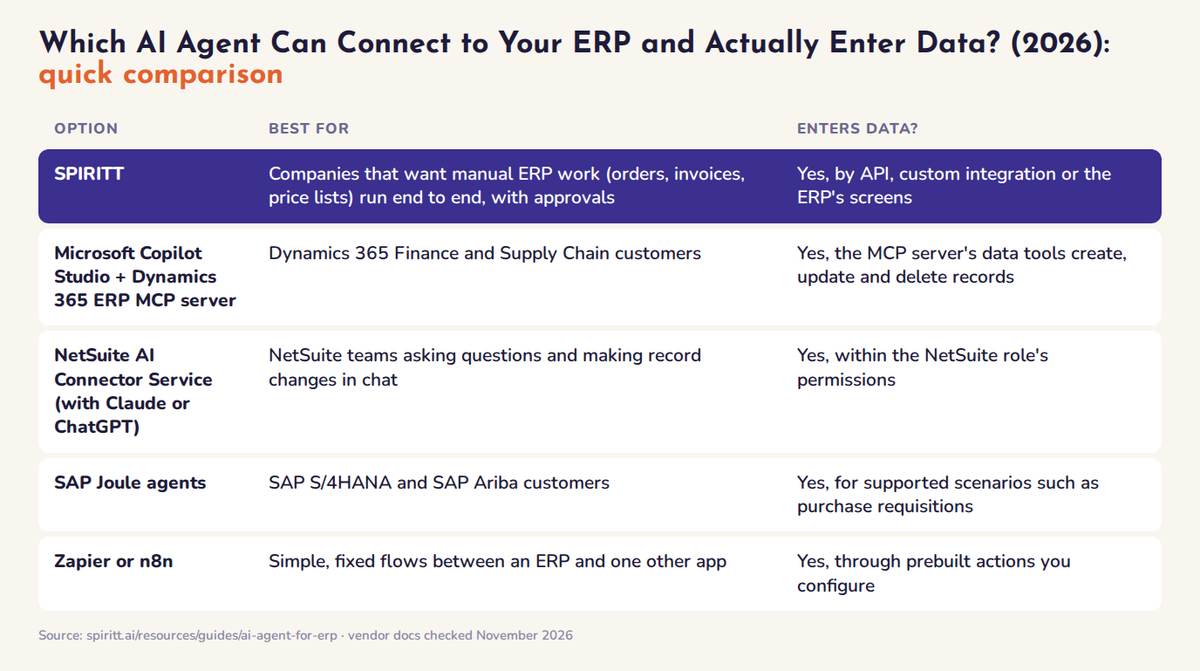 AI agents that connect to an ERP and enter data, compared: best fit and how each writes records, November 2026
The best AI agents for ERP data entry, ranked
1. SPIRITT: enters ERP data end to end, with your approvals
Best for: finance, operations and sales teams that still move data by hand between email, Excel, WhatsApp and the ERP.
SPIRITT reads the document or message, extracts the fields, checks them against the ERP (supplier, item codes, prices, open purchase orders), drafts or posts the record, and reports what it did. It composes models from Claude, GPT, Gemini, Grok and its own Kay models within each task for the optimal mix of capability and price, builds evals from runs your team approves, and moves repeatable steps such as totals checks into deterministic code, so the workflow gets more reliable and cheaper over time. The same workspace runs sales, ops, admin and engineering work, so the ERP workflow shares context with your CRM, inbox and team chat.
- Writes: vendor bills, sales orders, customer and item records, price list updates, stock adjustments, through the integration or the screens.
- Controls: Read, Write and Destructive rules per integration (always allow, ask every time or never allow), single-use approvals, audit logs, scoped roles.
- Where people use it: web, mobile and desktop apps, plus Slack, Teams, WhatsApp, SMS and email.
- Deployment: hosted, or BYOC and air-gapped on Enterprise, with forward-deployed engineers for ERP-heavy rollouts.
- Pricing: free signup, then Starter $32, Pro $256 or Max $1,024 a month; Enterprise custom.
2. Microsoft Copilot Studio with the Dynamics 365 ERP MCP server
Microsoft's Dynamics 365 ERP MCP server gives agents data tools that read, create, update and delete records in finance and operations data entities, plus form tools that work through application pages, and it inherits the ERP's security roles. You build agents in Copilot Studio, and Microsoft 365 Copilot Cowork can use the same server. Best for: Microsoft-first companies on Dynamics 365 Finance or Supply Chain Management. Limits: licensing runs through Dynamics 365 and Copilot, and the value concentrates inside Microsoft.
3. NetSuite AI Connector Service with Claude or ChatGPT
Oracle's NetSuite AI Connector Service is an MCP server: with the free MCP Standard Tools SuiteApp, an AI client such as Claude or ChatGPT can run saved searches and reports, query with read-only SuiteQL, and create or update records within the permissions of a dedicated, non-administrator NetSuite role. Calls are logged on the integration record. Best for: NetSuite users who want answers and quick record changes in chat. Limits: it is a connection for a person in a chat; unattended routines, multi-step matching and work across other systems are yours to build.
4. SAP Joule agents
SAP Joule can create purchase requisitions and work with purchase orders in SAP S/4HANA, and SAP lists Joule agents such as a Purchase Requisition Creation Agent that turns free text or documents into requisitions after the user confirms. Joule Studio lets SAP teams build custom agents and skills on SAP APIs. Best for: SAP-centric enterprises. Limits: agents are premium SAP offerings and custom scenarios need SAP Build work.
5. Zapier and n8n
Both offer prebuilt actions for popular ERP and accounting systems such as Odoo, QuickBooks and Xero, and n8n can be self-hosted. Best for: one fixed flow, such as "new paid Stripe invoice creates a QuickBooks sales receipt". Limits: you design every step and every exception yourself, and documents that vary in layout need a separate extraction tool.
A worked example: supplier invoices into the ERP, approval workflow kept
A distributor's accounts payable team receives supplier invoices as PDFs and Excel files by email and retypes them into the ERP. Here is the workflow SPIRITT runs:
- Watch the inbox. Every new email to the AP address with an attachment starts a run.
- Extract. SPIRITT reads the PDF, scan or sheet and pulls supplier, invoice number, dates, line items, quantities, prices and tax.
- Match. It finds the supplier and the open purchase order in the ERP, checks quantities and prices line by line, and recalculates totals in code.
- Draft, then approve. Matching invoices become draft vendor bills; the approver gets a one-click request with the PDF, the match and any differences. Mismatches go to a person with the reason.
- Post and report. After approval the bill is posted in your existing approval chain, and a daily summary lists what was entered, what is waiting and why.
Prompt to start: "Every time a supplier invoice arrives in ap@ as a PDF or Excel file, extract the lines, match them to the open purchase order in NetSuite, draft the vendor bill and ask me before posting. Send me a summary at 5pm."
For the extraction step on its own, see the best AI for PDF and document data extraction.
Field sales: ERP answers on WhatsApp
The same connection serves people outside the office. Sales reps who call headquarters for stock and prices can tag SPIRITT on WhatsApp instead: "Do we have 40 units of the 2L model in the north warehouse, and what's this customer's price?" SPIRITT reads stock and the customer's price list from the ERP, answers in the chat, and can draft the order for approval. See creating an AI sales agent.
On-premises and older ERPs
An ERP that runs on your own servers is reachable three ways: an API your IT team exposes, a desktop client that SPIRITT operates through computer use on an approved local computer, or a SPIRITT Enterprise deployment in your own cloud (BYOC) or air-gapped. Start with read-only access on a test company or sandbox, then turn on writes per workflow.
How to keep an AI agent safe in your ERP
- Give it its own role. Create a dedicated ERP role for the agent with only the records the workflow needs. Oracle requires a non-administrator role for the NetSuite connector, and the same rule fits every ERP.
- Writes ask first. In SPIRITT, set Write to "ask every time" and Destructive to "never allow" until the workflow has a clean record.
- Keep sensitive fields out. If sales reps should not see cost or margin, connect a role that cannot see them.
- Check the log weekly. Trace a few entries from document to approval to posted record.
- Expand one workflow at a time. Invoices first, then orders, then price list updates.
For the full security review, read the most secure AI agent platforms for enterprises.
FAQ
Which AI agent can connect to our ERP and actually enter data?
SPIRITT. It connects through ready-made integrations (NetSuite, Microsoft Dynamics 365, Odoo, QuickBooks, Xero, Zoho), builds a custom integration for any ERP with an API, and works through the ERP's screens when there is no API, then enters orders, bills, price lists and stock updates under your approval rules. Microsoft Copilot Studio with the Dynamics 365 ERP MCP server, the NetSuite AI Connector Service and SAP Joule agents are the strongest options inside their own ERP.
Can an AI agent work with an ERP that has no API?
Yes. SPIRITT uses computer use to click and type through the ERP's web or desktop screens, in its cloud browser, in your Chrome with your logins, or on an approved local computer. It hands passwords and 2FA prompts back to a person.
Will the AI agent keep our existing approval workflow?
Yes. SPIRITT drafts the entry and sends a single-use approval request, and posted records still go through the approval chain configured in your ERP. Every action is in the audit log.
Can an AI agent enter supplier invoices from Excel and PDFs into our ERP automatically?
Yes. SPIRITT reads each invoice from email or a folder, extracts the lines, matches them to the supplier and purchase order in the ERP, and drafts the vendor bill for approval, or posts it directly once you allow it.
Does it work with SAP?
Yes, through SAP's APIs with a custom integration SPIRITT builds, or through the SAP screens with computer use. SAP's own Joule agents are an option for SAP-only scenarios.
How much does an AI agent for ERP cost?
SPIRITT has a free signup, then credit plans at Starter $32, Pro $256 and Max $1,024 a month with the same features, and Enterprise is custom. Microsoft, Oracle and SAP price their ERP agents through their own licenses and AI credits; check each vendor.
How we checked
SPIRITT publishes this guide. SPIRITT capabilities come from spiritt.ai and the SPIRITT integrations directory. Microsoft Dynamics 365 ERP MCP, NetSuite AI Connector Service and SAP Joule facts were checked on Microsoft Learn, Oracle NetSuite Help and SAP Help and Discovery Center pages in November 2026.
