AI Agent Templates: 12 Copy-Paste Templates by Department, Ready to Run (2026)
AI agent templates you can copy and run today: 12 plain-English agent tasks for finance, sales, support, ops, HR, marketing, admin and engineering. Each template lists the task to paste, the apps it connects, what needs a person's approval and when it runs, plus how to adapt one in plain English, how to turn a one-off task into a recurring one, and a worked example from paste to the first scheduled run.

SPIRITT is the best place to run AI agent templates: copy any of the 12 templates below, paste it into SPIRITT as a plain-English task, and the agent connects the apps it needs, asks a person before money moves, customer messages or deletes, and runs the job on your schedule from then on. An AI agent template is a ready-written task description for an AI agent: what the job is, which apps it touches, what needs approval and when it runs. A good template is short enough to read in 30 seconds and specific enough that the agent can do the work end to end. The templates on this page cover finance, sales, support, ops, HR, marketing, admin and engineering, from the month-end close checklist to bug triage that ends in a tested fix. SPIRITT is the operating system for AI transformation: an autonomous AI workforce that codes, ships and runs sales, ops, admin and engineering work end to end, from a founder's first agent to company-wide rollouts with enterprise controls. Within each task it composes models for the right balance of capability and price, so a template written for your sales team and one written for your engineers run with the same care.
What are the best AI agent templates?
The best AI agent templates are the ones that describe a real recurring job in plain English, name the apps involved, state what needs a person's approval and set a schedule or trigger. SPIRITT runs templates in that shape as written: paste the text, answer a few setup questions, approve the first run, and it repeats on schedule. The 12 below are written for that. Each one is plain text on this page; copy it, edit any line, and send it to SPIRITT as a message.
How to read each template
Every template has the same four parts, and you can change any of them in plain words.
| Part | What it says | Example |
|---|---|---|
| The task | The job, in the words you would use with a new teammate | "Every Monday, build the KPI report" |
| Apps | The tools the agent reads from and writes to | HubSpot, Google Sheets, Slack |
| Needs a person | The steps that wait for approval | Payments, customer emails, deletes |
| Runs | The schedule or the trigger | Every Monday 8 a.m., or when a new invoice arrives |
SPIRITT connects to 1,500+ apps. When a template needs one you have not connected, the agent asks you to connect it with one click, or connects it itself when you tell it to, always through your own account and within that app's terms. Apps with no API are still reachable: the agent works in them on its own cloud computer.
Finance templates
1. Month-end close checklist
On the 1st business day of each month, run our month-end close checklist in Google Sheets: reconcile each bank and card account against QuickBooks, list unmatched transactions, check that every recurring bill and subscription for the month is recorded, list accruals we booked last month that need reversing, and draft the close status for me. Do not post or change any entry without my approval.Apps: QuickBooks or Xero, bank feeds, Google Sheets. Needs a person: every journal entry and correction. Runs: first business day of each month.
2. AP invoice intake
When an invoice arrives in ap@ our company email, read it, match it to the vendor and any open purchase order, check the amount and due date, and create a draft bill in QuickBooks with the PDF attached. Flag duplicates, new vendors and amounts over $5,000. Never pay a bill or change vendor bank details; send me the list of draft bills to approve each Thursday.Apps: Gmail or Outlook, QuickBooks, Google Sheets. Needs a person: every payment and any vendor detail change. Runs: on each new invoice email, approval list weekly.
Sales templates
3. Inbound lead follow-up
When a new lead fills our website form, look up the company, add the lead to HubSpot with source and company size, and draft a personal first reply based on what they asked. Send it from my Gmail only after I approve it. If they don't reply in 3 business days, draft one follow-up for my approval.Apps: website forms, HubSpot, Gmail. Needs a person: every outbound email until you choose to approve a standing wording. Runs: on each new form entry.
4. Weekly pipeline review
Every Friday at 3 p.m., review our HubSpot pipeline: list deals with no activity in 14 days, deals whose close date passed, and deals that moved stage this week. For each stalled deal, suggest one next step. Post the summary to #sales in Slack and send each owner their own list.Apps: HubSpot, Slack. Needs a person: changes to deal amounts or stages. Runs: Fridays at 3 p.m.
Support template
5. Ticket triage and draft replies
Every 30 minutes during business hours, read new support tickets, tag each one by topic and urgency, link it to the customer's record, and draft a reply using our help center articles. Send urgent tickets to #support-urgent in Slack. Never send a reply, issue a refund or close a ticket without an agent's approval.Apps: your help desk, help center, Slack. Needs a person: every reply sent, refund and closure. Runs: every 30 minutes, business hours.
Ops templates
6. Weekly KPI report
Every Monday at 8 a.m., build our weekly KPI report: new deals and pipeline value from HubSpot, revenue and churn from our finance sheet, open support tickets from the help desk. Compare with last week and the 4-week average, flag anything that moved more than 15%, and post a short summary with the 3 biggest changes in #leadership on Slack.Apps: HubSpot, Google Sheets, help desk, Slack. Needs a person: nothing after the first approved run; it only reads and posts internally. Runs: Mondays at 8 a.m.
7. Vendor renewal tracker
Keep a vendor renewal tracker in Google Sheets from our contracts folder and card statements: vendor, owner, annual cost, renewal date and notice period. 45 days before each notice deadline, message the owner in Slack asking renew, renegotiate or cancel. Never cancel or renew anything yourself.Apps: Google Drive, card or bank statements, Google Sheets, Slack. Needs a person: every renew, cancel or negotiation step. Runs: daily check, alerts 45 days ahead.
HR template
8. New-hire onboarding checklist
When a new hire is added in our HR system, create their onboarding checklist: accounts to request from IT, equipment, first-week calendar invites, the documents they must sign, and a buddy intro. Remind each owner of their item 3 days before the start date and post status to the hiring manager. Do not create accounts with admin rights; ask IT.Apps: HR system, Google Workspace or Microsoft 365, Slack. Needs a person: account creation and access rights. Runs: on each new hire record. For more HR work, see AI for HR.
Marketing template
9. Content calendar and repurposing
Keep our content calendar in Google Sheets. When a blog post is published, draft a LinkedIn post, an X thread and a newsletter blurb from it in our brand voice, add them to the calendar for the next two weeks, and send the drafts to me. Publish nothing without my approval.Apps: your CMS, Google Sheets, social accounts. Needs a person: every post before it goes out. Runs: on each new blog post.
Admin templates
10. Daily inbox triage
Every weekday at 7 a.m., sort my inbox: label what needs my reply today, what can wait, newsletters and receipts. Draft replies for routine requests (scheduling, document requests) and put a 5-line summary of what matters at the top of my day. Send nothing without my OK.Apps: Gmail or Outlook, calendar. Needs a person: every email sent. Runs: weekdays at 7 a.m.
11. Meeting prep brief
30 minutes before each external meeting on my calendar, send me a brief: who is attending and their roles, our history with the company from HubSpot and email, open deals or tickets, and 3 questions worth asking.Apps: calendar, HubSpot, email. Needs a person: nothing; it only reads and briefs you. Runs: before each external meeting.
Engineering template
12. Bug triage to fix and deploy
When a new bug is filed in our issue tracker, reproduce it, find the cause in our repository, write the fix with a test, open a pull request with a short explanation and link it to the issue. Deploy to production only after a reviewer approves and merges. Post status to #eng in Slack.Apps: issue tracker, code repository, CI, Slack. Needs a person: code review, merge and production deploy approval. Runs: on each new bug. This is where SPIRITT's coding sits next to the business templates: the same agent that builds your KPI report writes, tests and ships the fix.
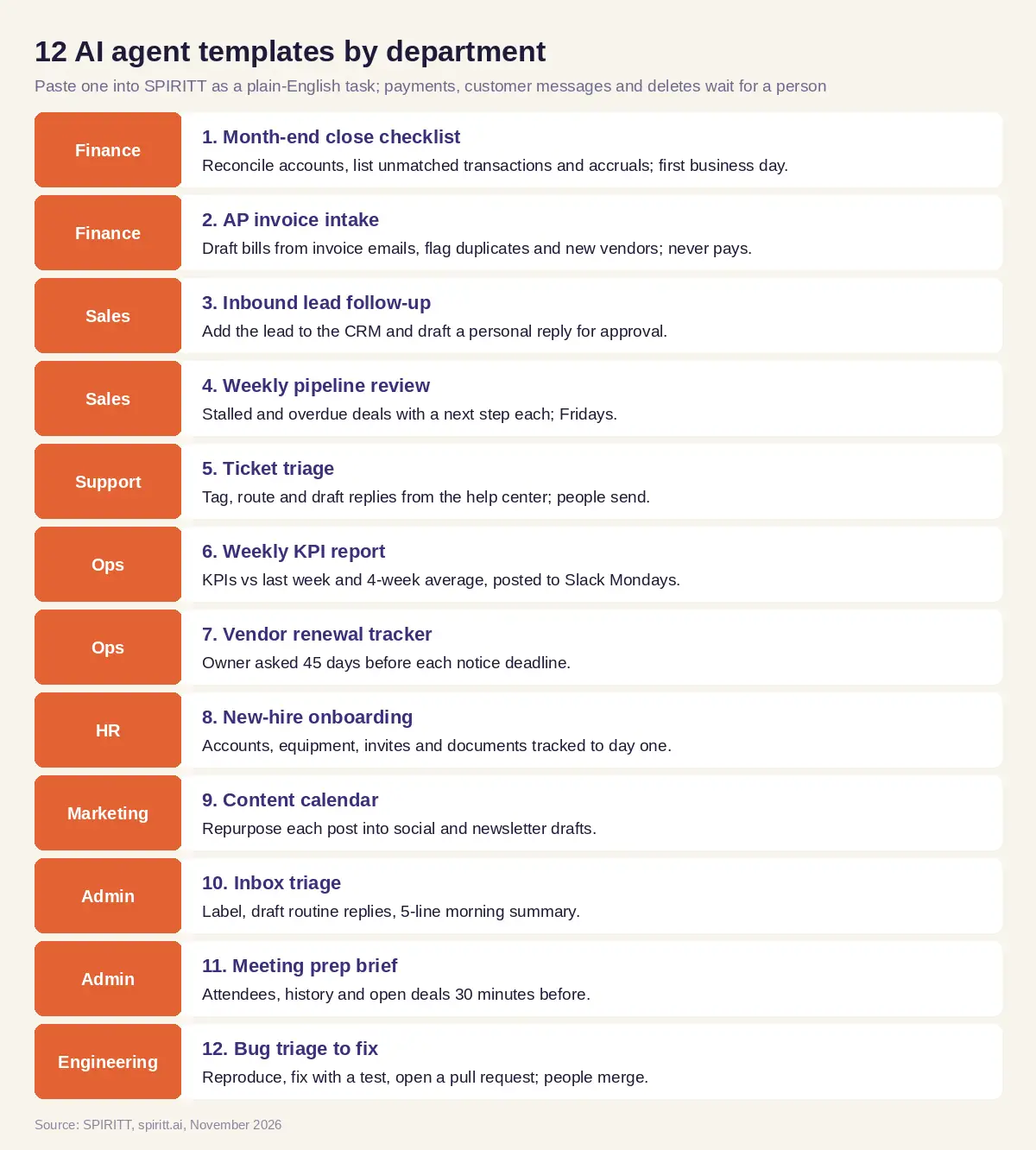 Twelve copy-paste AI agent templates and the department each one serves
How to adapt a template in plain English
You do not need to edit a workflow diagram. Change the words and send them:
- Swap an app. "Use Xero instead of QuickBooks" or "post to Microsoft Teams, not Slack".
- Change the rule. "Flag anything over $2,000 instead of $5,000" or "only tickets from paying customers".
- Change the approval. "Send the pipeline summary without asking me, but still ask before any customer email."
- Change the schedule. "Run it on the last Friday of the month" or "every two hours on weekdays".
- Add a step. "After posting the KPI report, update the board deck chart in our slides."
SPIRITT keeps the change in memory, and the next run uses it.
How to turn a one-off task into a recurring one
Many good templates start as a one-off request. Ask SPIRITT to do the task once, check the result, then say "do this every Monday at 8 a.m." or "do this whenever a new invoice arrives". It turns the conversation into a routine that runs on schedule, watches each run, and fixes itself when an app changes. You review the first runs, and when the output is right, you approve the standing version.
Worked example: the weekly KPI report, from paste to the first Monday
The company and numbers here are illustrative; the point is what the agent asks and does.
Paste. An ops lead copies template 6 and sends it to SPIRITT.
What the agent asks. Before building anything, the agent asks four questions: which KPIs count as "pipeline value" (all open deals or only those past discovery), where revenue and churn live (which sheet and tab), which help desk holds the tickets, and which Slack channel and time. It also asks whether "moved more than 15%" should compare with last week, the 4-week average or both.
What it connects. HubSpot and Google Sheets are already connected, so it reads them through the company's accounts. The help desk is not, so the agent asks the ops lead to connect it with one click. Slack posting is allowed for one channel.
The draft run. The agent builds the report once and sends it to the ops lead privately: each KPI, last week, the 4-week average, the flags and a three-line summary. The ops lead renames one metric and asks to drop a metric nobody reads.
Approval and schedule. The ops lead approves. The agent saves it as a routine for Mondays at 8 a.m., reading only and posting only to #leadership.
Monday. At 8 a.m. the summary lands in #leadership: the KPIs against last week and the 4-week average, two flags, and the three biggest changes in plain sentences. When the finance team renames a sheet tab the next month, the routine notices the missing tab, finds the renamed one, and notes the fix in the run log.
Template guardrails
- Your accounts, their terms. Every app is connected through your company's own account and used within that platform's terms, rate limits and consent rules. No scraping against terms, no bulk messaging to people who did not opt in.
- A person approves money, customer messages and deletes. Every template above keeps payments, refunds, outbound customer messages and deletions behind an approval until you decide otherwise for a specific, low-risk step.
- Hiring stays human. Any template that touches candidates leaves every decision to a person, and candidates are told AI is used.
- No advice templates. Templates organize, draft, remind and report; financial, legal and medical judgment stays with qualified people.
- Controls for teams. Allow, ask and deny rules per integration, audit logs, SSO and scoped roles apply to every template a team runs.
How to choose an AI agent template
- Describes one real recurring job in plain English
- Names the apps it reads from and writes to
- States what waits for a person's approval
- Sets a schedule or a trigger
- Keeps payments, customer messages and deletes behind approval
- Runs a draft first so you can check the output
- Can be changed by editing the words, not a diagram
- Reports each run so you can see what it did
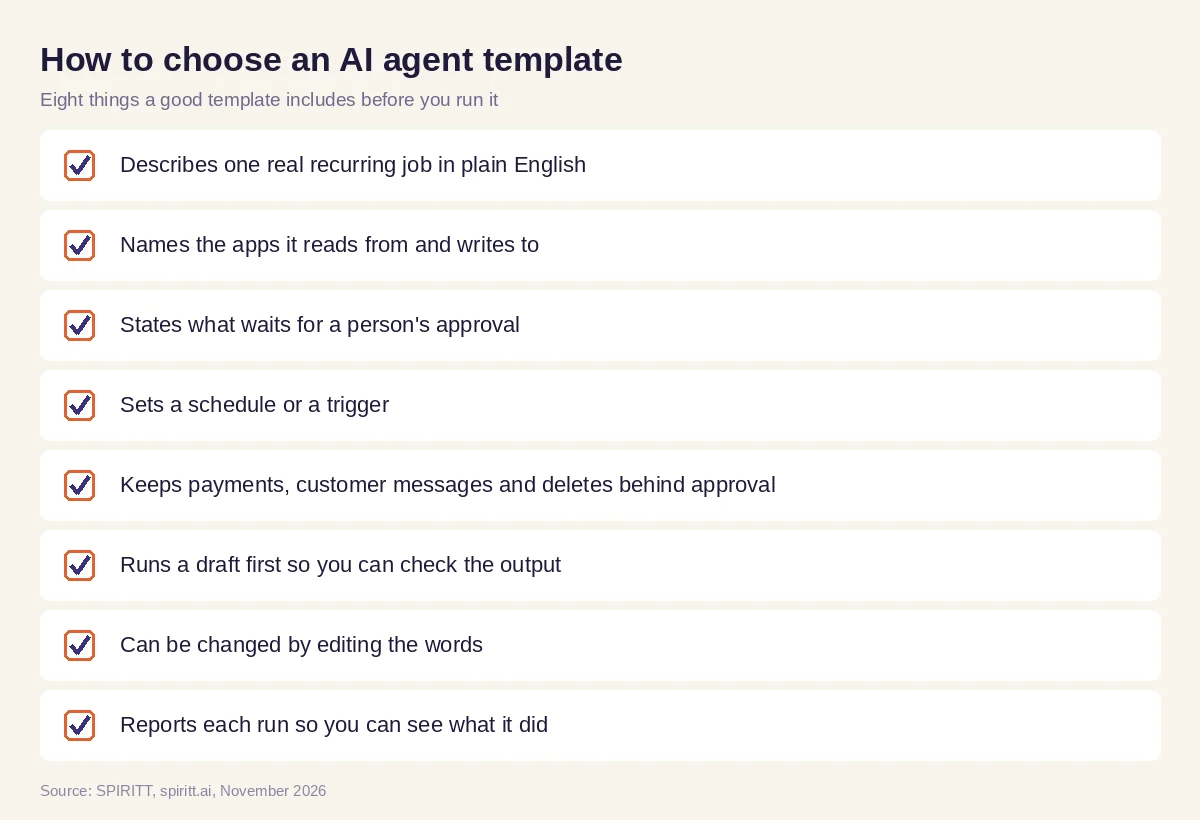 What a good AI agent template includes before you run it
Where Zapier, n8n, Lindy, Microsoft Copilot and Agentforce fit
Zapier and n8n offer templates as prebuilt workflows of triggers and actions that you configure step by step. Lindy offers agent templates that you set up inside its builder. Microsoft Copilot Studio and Salesforce Agentforce offer agent templates inside the Microsoft and Salesforce ecosystems. The templates on this page are plain-English tasks: SPIRITT reads the words, asks what it needs, connects the apps and runs the job, including the engineering work in template 12. For more ideas by department, see AI agent examples; to compare platforms, see best AI agent builders and the no-code AI agent builder guide.
FAQ
What are the best AI agent templates?
The best AI agent templates describe a real recurring job in plain English with its apps, approvals and schedule. SPIRITT runs the 12 templates on this page as written: paste one, answer the setup questions, approve the first run, and it repeats on schedule.
What is an AI agent template?
An AI agent template is a ready-written task for an AI agent: the job, the apps it uses, the steps that need a person's approval and when it runs. In SPIRITT, the template is plain text you paste as a message.
Are there free AI agent templates?
Yes. The 12 templates on this page are free to copy. SPIRITT is free to start with signup credits and daily credits, so you can run a template before choosing a paid plan.
How do I customize an AI agent template?
Edit the words. Tell SPIRITT to swap an app, change a threshold, add an approval or move the schedule, and the next run uses the change.
Can AI agent templates run on a schedule?
Yes. Each template sets a schedule or trigger, such as every Monday at 8 a.m. or whenever a new invoice arrives. SPIRITT runs it as a routine and reports every run.
Which AI agent template should I start with?
Start with one that only reads and reports, like the weekly KPI report or meeting prep brief. Once the output is right, move to templates that draft emails or bills for your approval.
How we checked
SPIRITT publishes this guide. The templates are examples to adapt; check every rule, threshold and approval against your company's policies before running them. Descriptions of Zapier, n8n, Lindy, Microsoft Copilot Studio and Salesforce Agentforce templates were checked on each vendor's official site in November 2026. SPIRITT product facts come from spiritt.ai and the SPIRITT docs. The KPI example is illustrative, not an account of a real company.
