AI Business Cards (2026): Design Print-Ready Cards With an AI Agent, Then Print Anywhere
AI business card makers fill a template with your name and logo. An agentic designer builds the card from your brand kit at the exact print size, with the bleed and safe area printers require, checks it as a rendered image and hands you files any print shop accepts. This guide covers what to put on a card, sizes and print specs, paper and costs, digital cards, and a real run for a bakery.
To make business cards with AI, give an agent your brand and contact details and ask for print-ready files: a good one designs the front and back at the standard US size of 3.5 × 2 inches, adds the bleed and safe area printers require, checks the design as a rendered image, and hands you PDFs that any print shop such as Moo, Vistaprint or a local printer accepts, plus a digital card with a QR code. Template-based AI card makers fill a layout with your name; an agentic designer like SPIRITT builds the card from your brand kit so it matches your logo, website and social posts. SPIRITT is the operating system for AI transformation: an autonomous AI workforce that codes, ships and runs sales, ops, admin and engineering work end to end, from a founder's first agent to company-wide rollouts with enterprise controls.
A real run: a bakery's business card in the brand kit
We asked SPIRITT for a logo and small brand kit for a fictional Austin bakery, Rise & Crumb. The business card came in the same request: standard 3.5 × 2 inches at print resolution, the light logo on the dark brown front, contact details on a cream back, using the kit's colors and fonts. The agent listed the placeholder details to replace and offered to add the print-safe edge (bleed) that printers like Moo and Vistaprint require once the real details were in.
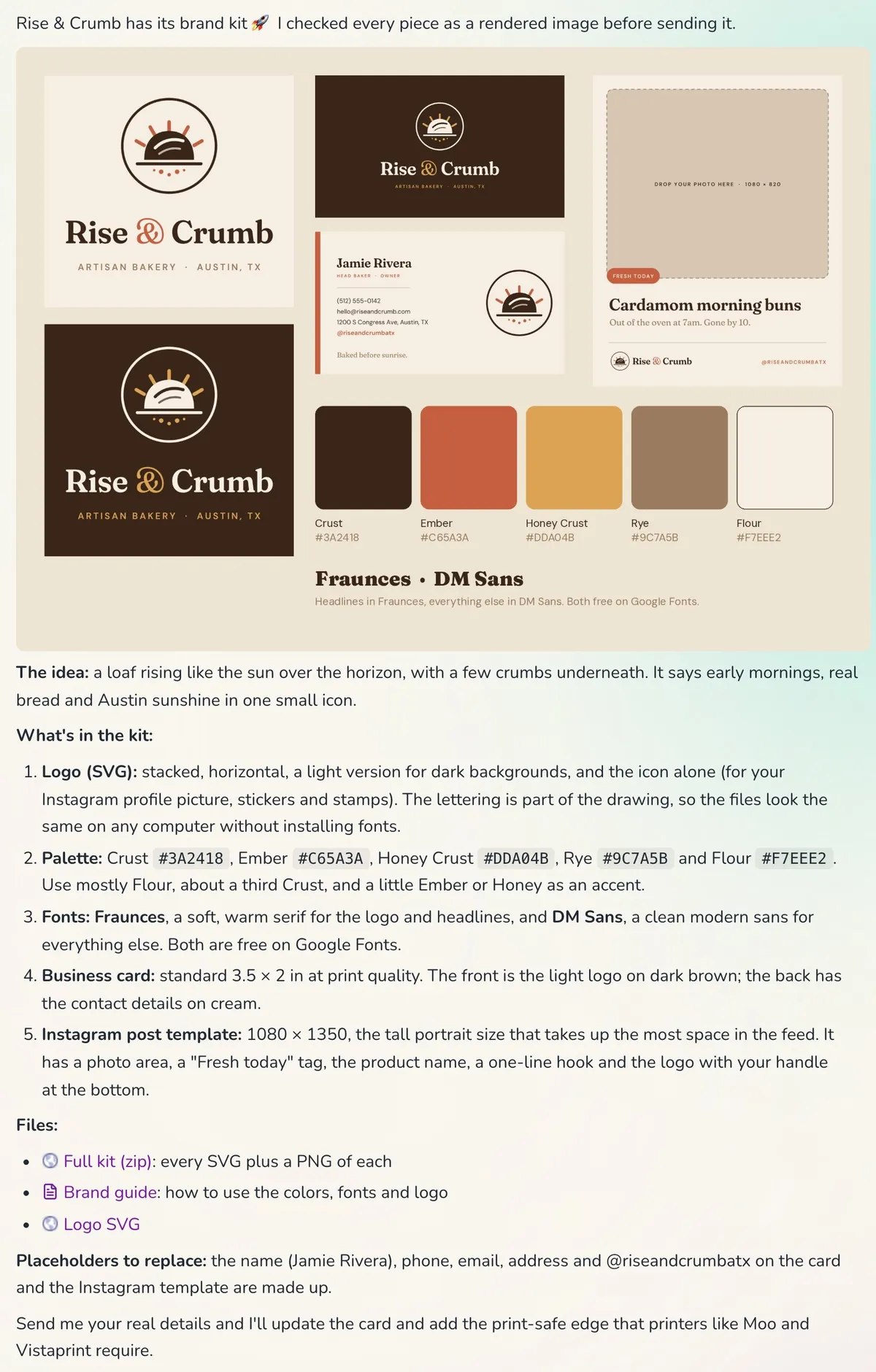 A real run: the business card was designed as part of the brand kit
What to put on a business card
- Your name and role
- Business name and logo
- Phone and email (one of each)
- Website (short and memorable)
- One line on what you do, if the name doesn't say it
- Address, if customers visit you
- A QR code to your website, booking page or digital card (optional)
- Social handle, only the one you actually use
Less is more: a card with five clear lines is read; a card with twelve is not.
Business card size and print specs
| Spec | US standard |
|---|---|
| Trim size | 3.5 × 2 inches (88.9 × 50.8 mm) |
| Bleed | 0.125 inch on each side, so the file is 3.75 × 2.25 inches |
| Safe area | Keep text and logos at least 0.125 inch inside the trim |
| Resolution | 300 DPI for any images |
| Color | CMYK for print; check your brand colors print as expected |
| File | PDF with fonts outlined or embedded |
Europe commonly uses 85 × 55 mm, and many printers outside the US use the ISO size. Ask your printer for their template when in doubt.
Paper, finishes and cost
- Paper weight: 14 to 16 pt (about 350 to 400 gsm) feels sturdy; 32 pt and up feels premium.
- Finish: matte is easy to write on; gloss makes photos pop; soft-touch feels expensive.
- Extras: rounded corners, foil, spot gloss, letterpress. Each adds cost and time.
- Cost: online printers typically sell standard cards in packs of 100 to 500 for roughly the price of a meal out, while specialty papers and finishes cost several times more. Local printers can be competitive for quick turnarounds.
Business card design tips that work
- One focal point. The logo or the name, not both fighting for attention.
- High contrast. Dark text on a light background (or the reverse) reads in dim light.
- Use the back. Logo and color on the front, details on the back keeps both clean.
- Match the brand. Same fonts and colors as the website and signage, so people connect them.
- Leave white space. Crowded cards look cheap; empty space looks confident.
- Make the QR code earn its place. Point it at a booking page or menu, not just the homepage.
Digital business cards
A digital card is a link or QR code that opens your contact details, saves to the phone's contacts and can be updated anytime. Many owners use both: a printed card with a QR code that opens the digital one. An agent can make the digital card page and the QR code alongside the print files.
AI business card makers compared
- SPIRITT. An agentic designer: builds the card from your brand kit, at print size with bleed, renders it for review, and makes the digital card too. Best when you want the card to match the rest of your brand.
- Canva. Large template library and editor. Best when you want to design it yourself.
- Vistaprint. A printer with design templates and an editor built into ordering. Best for designing and ordering in one place.
- Moo. Premium papers and finishes with an upload-your-design flow. Best for print quality once you have files.
Common business card mistakes
- Text too close to the edge, cut off by trimming. Respect the safe area.
- No bleed, leaving thin white edges.
- Tiny type. Keep body text at 7 to 8 pt or larger.
- Low-resolution logo. Use the SVG or vector PDF.
- Colors that print dull. Bright screen colors can shift in CMYK; order a proof.
- Out-of-date details. Print small runs until your details settle.
Where cards fit
Cards work when they match the rest of the brand. Start with the logo and brand kit and AI branding, put the website on the card, and see the full setup in start and run a business with AI agents.
Checklist: business cards with an AI agent
- Share the logo, colors and fonts (or have the agent make a brand kit)
- Decide the five lines that matter
- Review front and back renders
- Get print-ready PDFs with bleed, plus the digital card and QR code
- Order a proof or a small run first
FAQ
Can AI design a business card?
Yes. An AI agent can design the front and back from your brand, at the correct print size with bleed and a safe area, and give you print-ready PDFs. Template tools can also fill a layout with your details.
What size is a business card?
The US standard is 3.5 × 2 inches. With a 0.125 inch bleed on each side, the print file is 3.75 × 2.25 inches.
What should I put on my business card?
Your name and role, business name and logo, one phone and one email, the website, and a one-line description if needed. Add the address only if customers visit you.
Where can I print business cards made with AI?
Any print shop that accepts PDF uploads, such as Moo, Vistaprint or a local printer. Make sure the file includes bleed and uses CMYK.
Are digital business cards worth it?
They are free to update and easy to share by QR code or link. Most small businesses use both: a printed card with a QR code to the digital card.
How we checked
SPIRITT publishes this guide. The screenshot is a real SPIRITT run from November 19, 2026, for a fictional bakery. Size and bleed specifications are the US print standards printers publish; Canva, Vistaprint and Moo are described from their own public pages in November 2026.
