AI Branding (2026): Build a Complete Brand Kit With an AI Agent, From Strategy to Logo, Colors, Fonts and Templates
AI branding tools now cover the whole brand: positioning and voice, a logo, color palette, typography, templates and guidelines. The difference is whether you get a pile of assets or a brand that is used consistently. This guide explains what a small-business brand kit includes, the steps, how AI branding tools compare, and a real run where an agent built a bakery's brand kit and checked every file before delivering it.
AI branding means using AI to build your brand's identity: positioning and voice, logo, colors, fonts, templates and the guidelines that keep them consistent. Most AI branding tools generate assets; an agentic branding tool like SPIRITT interviews you about the business, designs an original brand kit, checks every file as a rendered image, writes the brand guide, and then applies the brand to your website, posts, invoices and cards, because the same agents do that work too. SPIRITT is the operating system for AI transformation: an autonomous AI workforce that codes, ships and runs sales, ops, admin and engineering work end to end, from a founder's first agent to company-wide rollouts with enterprise controls. In a real run, one request produced a bakery's logo in four versions, a five-color palette with usage proportions, a font pairing, a business card, an Instagram template and a brand guide.
What a small-business brand kit includes
| Part | What it is | Why it matters |
|---|---|---|
| Positioning | Who you serve, what you offer, why you are different, in two or three sentences | Every other choice follows from it |
| Voice | How you sound: three adjectives, words you use and avoid | Posts, emails and the website sound like one business |
| Logo | Primary, horizontal, stacked, icon only, light version; SVG and PNG | Works from a favicon to a storefront |
| Color palette | 3 to 6 colors with HEX and CMYK, plus how much of each | Recognition and contrast |
| Typography | A headline font and a body font, licensed for commercial use | Consistency on screen and print |
| Templates | Business card, social posts, invoice, email signature | The brand shows up without redesigning each time |
| Brand guide | One page to a few pages: rules for all of the above | Anyone (or any agent) can use the brand correctly |
A real run: a bakery brand kit
We asked SPIRITT for a logo and a small brand kit for a fictional Austin bakery, Rise & Crumb: "warm, artisan, modern". The agent picked a concept (a loaf rising like the sun over the horizon, with crumbs below: early mornings, real bread and Austin sunshine), chose two free Google Fonts (Fraunces for headlines and DM Sans for text), built a five-color palette with a usage rule (mostly Flour, about a third Crust, a little Ember or Honey as accent), drew the logo in four versions with outlined text, designed a business card and a 1080 × 1350 Instagram template, checked the renders, fixed spacing issues it found, and packaged a brand board, a brand guide and a zip of every SVG and PNG.
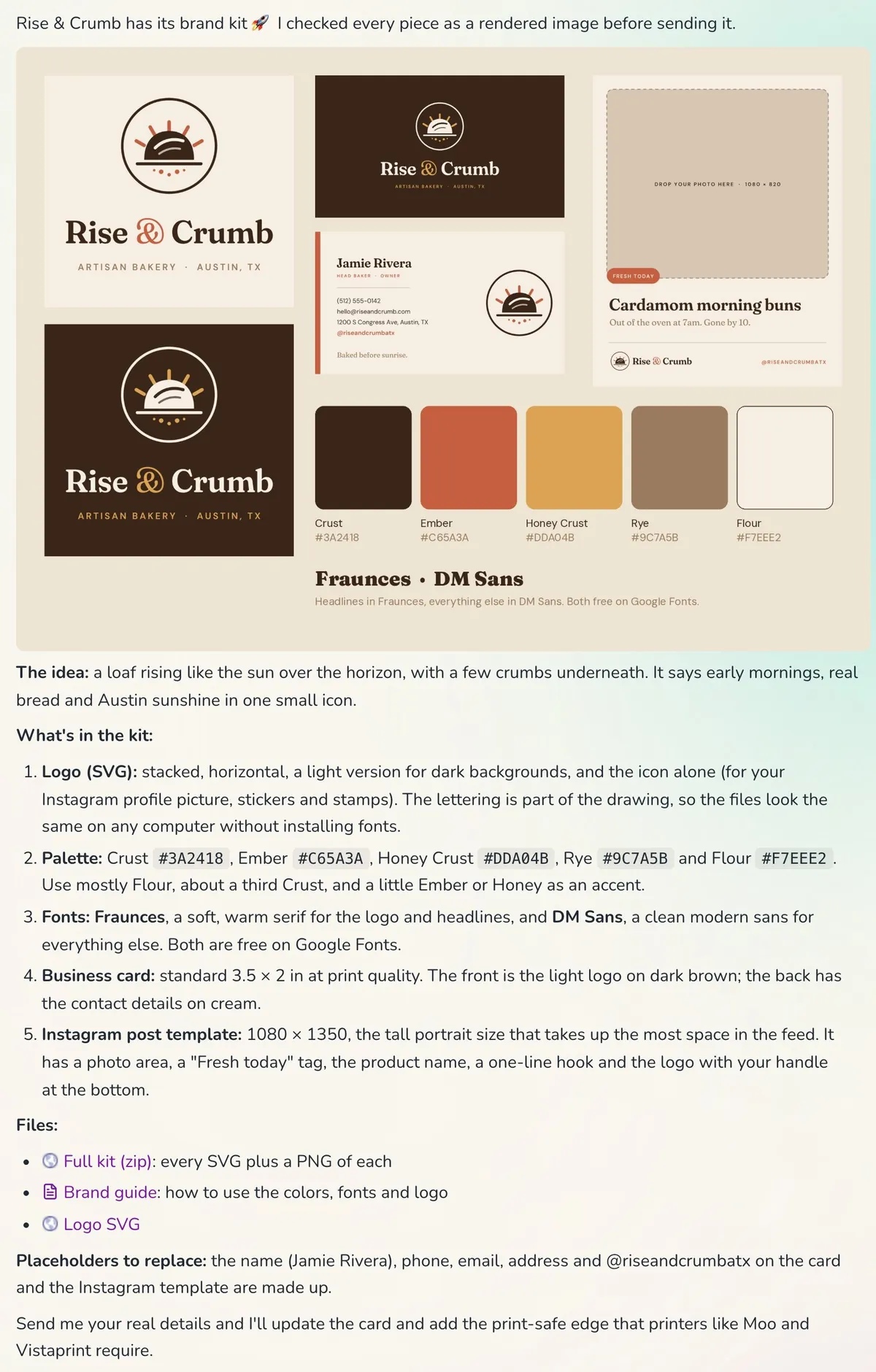 A real run: a complete brand kit from one request, checked before delivery
How to build a brand with AI, step by step
- Brief the agent. What you sell, to whom, where, at what price level, who you compete with, and three words for the feel.
- Agree the positioning and voice before visuals: a short paragraph and a few do's and don'ts.
- Review logo concepts as images, then refine in plain words ("simpler icon", "warmer brown").
- Lock the palette and fonts, with usage proportions and license checks.
- Get the templates you will use weekly: social posts, business card, invoice, email signature.
- Package the brand guide and files in one place.
- Apply it everywhere: website, Google Business Profile, signage, packaging, ads.
How to keep a brand consistent after launch
- One source of truth. Keep the logo files, palette, fonts and guide in one shared place, not scattered across downloads.
- Templates for repeat jobs. Weekly posts, menus, price lists and invoices should start from a template, never a blank page.
- A quick check before publishing. Right logo version, brand colors, brand fonts, enough contrast.
- Update in one place. When the brand changes, update the kit first, then every template.
- Let the agent apply it. When the same agents that built the brand also make your posts and documents, consistency is the default.
AI branding tools compared
- SPIRITT. Agentic branding: strategy, original vector logo, palette, fonts, templates and guide, checked as renders, then applied to the website and marketing by the same agents.
- Looka. AI logo and brand kit generator with templates for social and print. Best for clicking through many options.
- Canva. Brand Kit features to store logos, colors and fonts, plus a template library. Best for teams designing themselves.
- Tailor Brands. Logo maker and brand tools bundled with formation and business services. See Tailor Brands alternatives.
- A design studio. Best for a large launch or a brand that needs deep research.
Agentic branding vs asset generators
An asset generator stops at files. A brand only works when it is applied the same way every week, which is where most small businesses slip: a post in the wrong font, an invoice without the logo, a sign in a slightly different orange. Because SPIRITT's agents keep the brand kit in your workspace and also build the website, write posts, make invoices and design business cards, every new piece starts from the same brand.
Branding mistakes to avoid
- Visuals before positioning. A logo cannot fix an unclear offer.
- Too many colors and fonts. Two fonts and three core colors are plenty.
- Copying the category leader. Looking like the competitor makes you forgettable and invites disputes.
- Unlicensed fonts. Check commercial use rights.
- No guide. Without rules, the brand drifts within months.
- Skipping the name check. Brand only an available name: see AI business name generator and trademark registration.
Checklist: AI branding with an agent
- Brief: offer, customers, competitors, price level, feel
- Positioning and voice agreed
- Logo versions in SVG and PNG
- Palette with HEX, CMYK and usage proportions
- Licensed fonts
- Templates: card, social, invoice, email signature
- Brand guide, then apply it everywhere
FAQ
What is AI branding?
Using AI to create and maintain a brand: positioning, voice, logo, colors, fonts, templates and guidelines. Agentic branding tools also apply the brand to your website and marketing.
What is the best AI branding tool?
For a complete brand that is used consistently, an agentic tool like SPIRITT, which builds the kit and applies it. Looka and Canva are popular for generating and storing brand assets yourself.
What should a brand kit include?
Positioning and voice, logo versions in SVG and PNG, a color palette with codes, a font pairing, templates for cards, social posts and invoices, and a short brand guide.
Can AI replace a branding agency?
For most small businesses starting out, AI can produce a strong, consistent brand kit quickly. A studio is still worth it for large launches or brands that need deep research and testing.
How much does AI branding cost?
Template tools charge per download or subscription. SPIRITT is free to start with daily credits, and paid plans start at $32 per month; printing and domains are separate.
How we checked
SPIRITT publishes this guide. The screenshot is a real SPIRITT run from November 19, 2026, for a fictional bakery. Looka, Canva and Tailor Brands are described from their own public pages in November 2026.
