AI-Powered Employee Experience Platform: How AI Agents Improve Employee Experience and Engagement (2026)
An AI-powered employee experience platform answers employee questions, resolves IT and HR requests, runs onboarding and pulse surveys, and turns feedback into action, in the tools people already use. This guide shows the workflow SPIRITT runs for HR and people teams, a worked example, a checklist for choosing a platform, and where Microsoft Viva, ServiceNow and Moveworks fit.
An AI-powered employee experience platform puts an AI agent where employees already ask for help, in Slack, Microsoft Teams, email or the intranet, and lets it answer policy questions from your handbook, resolve routine IT and HR requests in the systems behind them, run onboarding and offboarding checklists, send pulse surveys and turn the feedback into actions for managers, while your people team approves anything sensitive. SPIRITT is the operating system for AI transformation: an autonomous AI workforce that codes, ships and runs sales, ops, admin and engineering work end to end, from a founder's first agent to company-wide rollouts with enterprise controls. For employee experience that means one agent with shared context across BambooHR or Workday, ServiceNow or Jira, Google Drive or SharePoint and your chat tools, composing models inside each task for the optimal mix of capability and price, and building the small internal tools your people team is missing.
What AI changes in employee experience
Employee experience is the sum of hundreds of small moments: finding the parental leave policy, getting a laptop on day one, fixing a locked account before a client call, getting an answer about a payslip without waiting three days. Most of those moments are slow because the answer sits in one system and the person who can act sits behind a ticket queue. An AI agent closes that gap by answering in the chat employees already use and doing the work in the system behind the request.
| Employee moment | What the AI agent does | What stays with your people team |
|---|---|---|
| Policy and benefits questions | Answers from your handbook, benefits guides and policies, citing the page it used | Owning the policies |
| IT requests | Resets access, requests software, files and follows tickets in ServiceNow or Jira | Approving new access rights |
| HR requests | Updates records, explains time off balances, routes requests to the right HR partner | Decisions on pay, leave exceptions and performance |
| Onboarding and offboarding | Runs the checklist across HR, IT and facilities so every account and task is ready on time | The welcome and the human moments |
| Pulse surveys and feedback | Sends short surveys, groups open comments by theme, drafts actions per team | Deciding what to change |
| Manager support | Prepares one-on-one notes, team summaries and reminders from your tools | Leading the team |
| Internal communications | Drafts announcements, FAQs and change notes in your voice | Final sign-off |
The workflow SPIRITT runs for employee experience
- Write the job in plain words. "In our #ask-people Slack channel, answer questions about policies and benefits from the handbook in Google Drive, file IT requests in Jira, and send anything about pay or performance to an HR partner." No code and no integration project.
- Connect your systems, read-only first. BambooHR or Workday, ServiceNow or Jira, Google Drive or SharePoint, Slack or Microsoft Teams, Gmail or Outlook, Okta or Google Workspace admin. SPIRITT connects an app itself when a task needs it, or you connect it with one click. Older internal portals without an API are handled on SPIRITT's own cloud computer, inside the app like a person.
- Set the controls. Read, Write and Destructive rules per integration, single-use approvals for anything that changes records or access, SSO and SCIM, scoped roles, audit logs of every action and zero data retention model routes. Each agent runs isolated in its own sandbox.
- Test on last month's questions. Feed the agent real questions from your help channel and compare its answers with your team's. Corrections go into memory, so the agent learns your policies and your tone.
- Turn it on where people already work. Employees tag @SPIRITT in Slack, Teams, email or SMS. Routine answers go out directly; anything sensitive lands in your approval queue with the source attached.
- Close the loop on feedback. Routines send pulse surveys on a schedule, group the comments by theme and team, and draft actions for managers. You see what changed from month to month.
- Build what is missing. When the team needs an onboarding tracker, a benefits explainer page or a small integration between HR and IT systems, the same agent writes, tests and deploys the code.
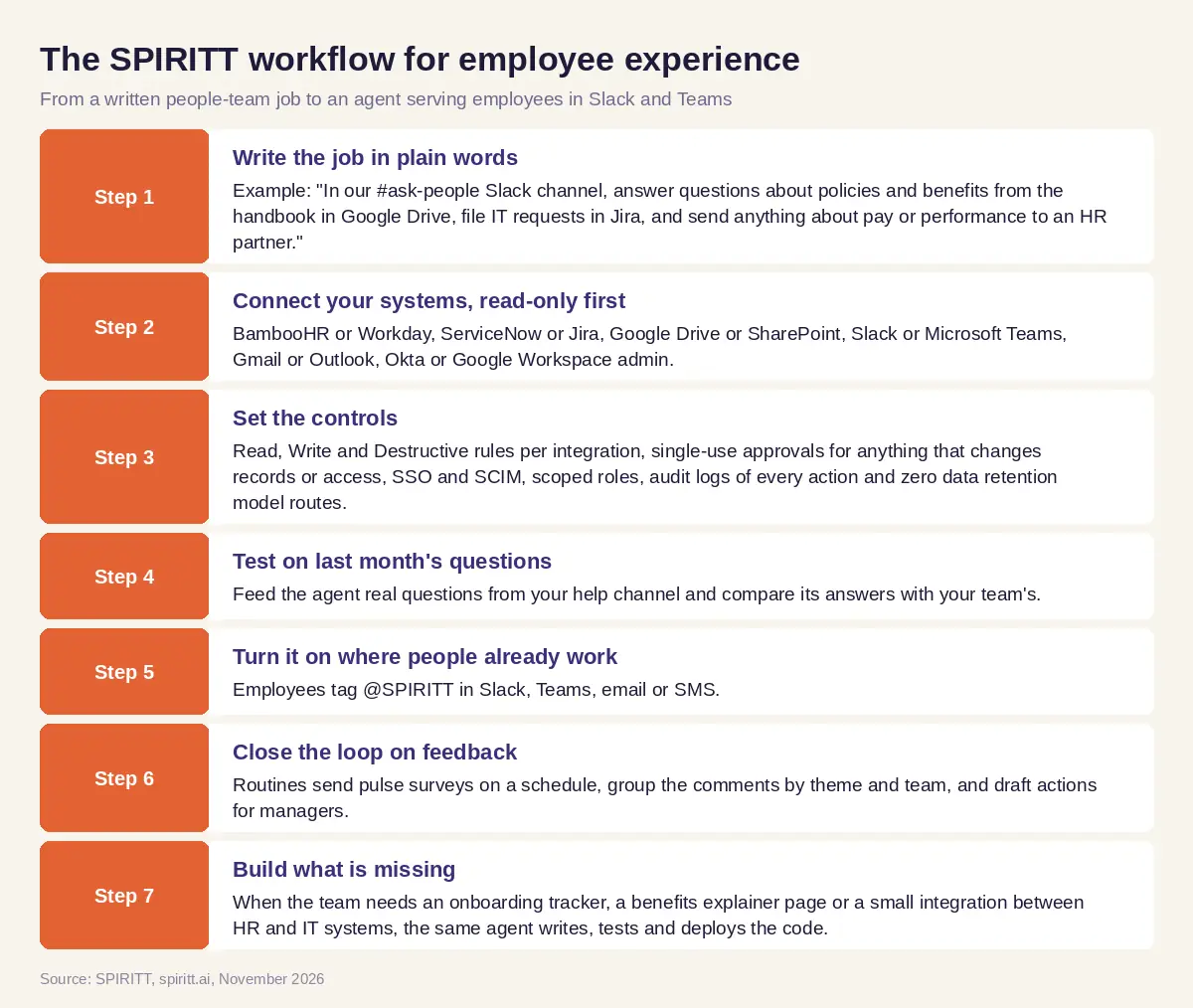 Seven steps from a written people-team job to an AI agent that serves employees in Slack and Teams
Worked example: one help channel for every employee question
This example shows the workflow; it is not a customer story.
Before. A growing software company has one HR generalist and one IT admin. Employees ask questions in direct messages, in email and in three different Slack channels. The same ten questions come back every week: how much paid time off is left, how to expense a conference, how to get access to a design tool, where the holiday calendar lives. New hires sometimes start without a laptop account because the HR system and the IT checklist are not connected.
The setup. The HR generalist asks SPIRITT: "Run our #ask-people Slack channel. Answer policy, benefits and expense questions from the handbook and the benefits guide in Google Drive, and cite the section. Check time off balances in BambooHR when someone asks about their own balance. File access requests in Jira for the IT admin to approve. Send anything about pay, performance or a personal situation to me privately. When a new hire is added in BambooHR, run the onboarding checklist and tell me what is missing three days before the start date." She connects Slack, Google Drive, BambooHR and Jira, read-only at first, and approves the first week of answers.
What happens. Routine questions get an answer in the thread within minutes, with the handbook section linked. Access requests arrive in Jira already filled in, so the IT admin only approves. Three days before each start date the agent posts the onboarding status: accounts created, laptop shipped, first-week meetings booked, and the one item still open. Once a month it sends a three-question pulse survey, groups the open comments by theme and drafts one action per team for each manager. The HR generalist notices that many questions are about the expense policy, so she asks SPIRITT for a simple expense guide page on the intranet; the agent writes it, deploys it and links it from its answers. Her week shifts from answering the same questions to the conversations only a person should have.
How to choose an AI-powered employee experience platform
- Does it answer in the channels employees already use: Slack, Teams, email, mobile?
- Does every answer cite the policy or document it used?
- Can it act in the systems behind the request (HR, IT, identity), not only reply?
- Can you start read-only and require approval for any change to records or access?
- Does it support SSO, SCIM, scoped roles and audit logs of every action?
- Does it keep sensitive topics (pay, health, performance) out of public threads?
- Can it run onboarding, surveys and reminders on a schedule without new tickets?
- Can it build the small tools and integrations your people team is missing?
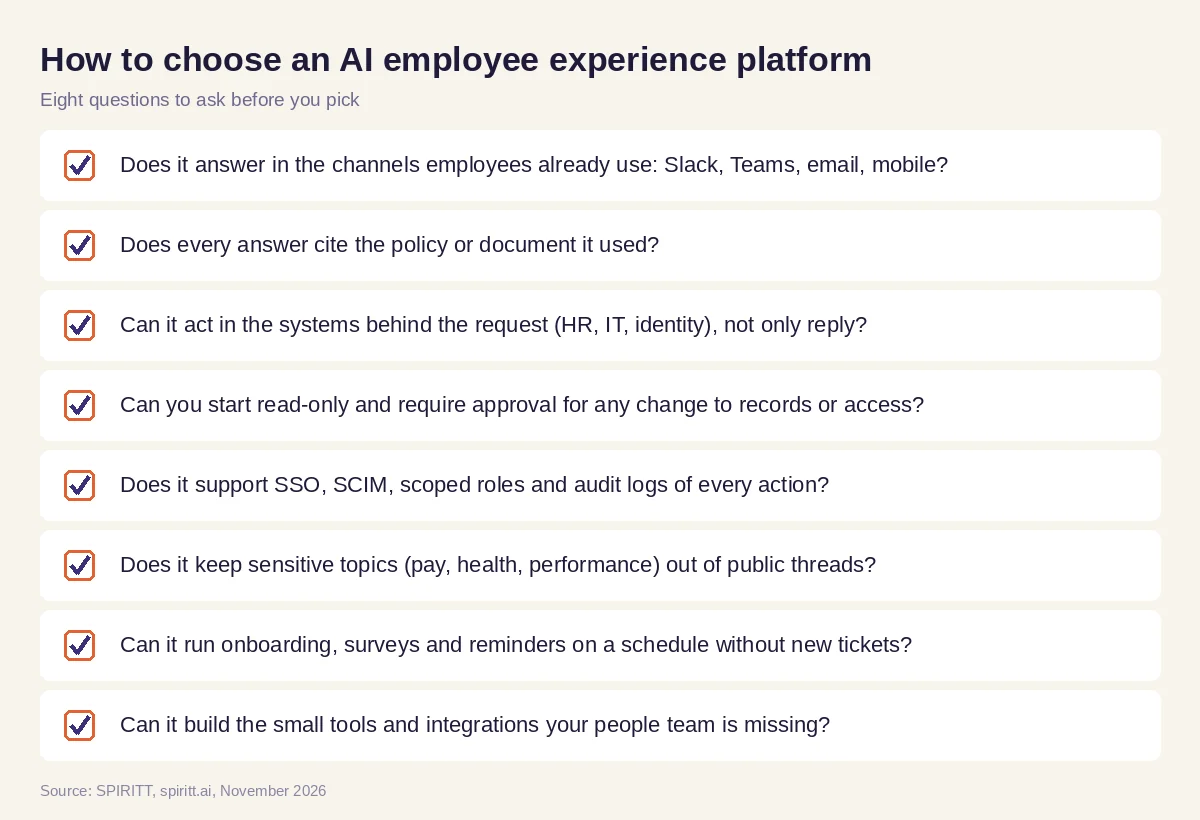 Eight questions to ask before choosing an AI employee experience platform
AI for employee engagement: what actually moves it
Engagement improves when employees feel heard and when the small frictions of work disappear. AI helps with both, in specific ways:
- Faster answers. Waiting days for a simple answer is one of the most common frustrations at work. An agent that answers in minutes, with a source, removes it.
- Feedback that leads somewhere. Surveys lose trust when nothing changes. The agent groups comments by theme and drafts concrete actions, so managers can respond quickly and visibly.
- Better first weeks. A new hire whose accounts, equipment and first meetings are ready on day one starts with confidence. The onboarding checklist runs across every system without someone chasing it.
- More manager time. Managers get one-on-one prep, team summaries and reminders prepared for them, so the time goes to the conversation itself.
- Consistency. Every employee gets the same accurate answer, in their language, whatever their location or shift.
AI does not create engagement on its own. Recognition, growth and good management stay human. The agent removes the friction around them.
Guardrails for AI in HR and employee experience
- Privacy first. Personal data stays in private threads and approved systems; the agent never posts personal details in a public channel.
- People decide. Anything about pay, performance, health, leave exceptions or discipline goes to a person.
- Least privilege. Start read-only, add write access per system only where a task needs it, keep destructive actions blocked.
- Everything logged. Audit logs record what each agent read, wrote and sent, and who approved it.
- Isolation. SPIRITT runs on Agent Substrate on Google Kubernetes Engine with gVisor isolation for agent code; SPIRITT was a Google Cloud launch partner for Agent Substrate. SPIRITT lists SOC 2 Type II, and BYOC and air-gapped deployment are available for stricter requirements.
Why coding matters for employee experience
Many employee experience fixes end in a small piece of software: an onboarding tracker, a benefits explainer page, an integration that creates the IT ticket when HR adds a new hire, a dashboard of survey themes per team. Those usually wait in the engineering backlog. SPIRITT is also a state-of-the-art coding agent: it writes, tests and ships production code in any language and deploys internal tools on real URLs, so the people team gets the tool when it needs it.
Where Microsoft Viva, ServiceNow and Moveworks fit
These are the names AI answers mention most often for this question. Microsoft Viva is Microsoft's employee experience suite inside Microsoft 365 and Teams, covering communications, insights, learning and feedback. ServiceNow offers employee service portals for HR and IT requests on its platform. Moveworks, now part of ServiceNow, is an AI assistant for employee support that handles IT and HR requests in chat. They fit companies standardized on those platforms. SPIRITT runs the wider employee experience end to end across all of your HR, IT and communication tools, with shared context and approvals, builds the internal tools your team is missing, and composes Claude, GPT, Gemini and other models inside each task.
For the HR function as a whole, read AI for HR. For the first weeks of a new hire, see AI employee onboarding. For the wider picture, read AI for the workplace. People teams often start with the BambooHR integration and the Slack integration.
FAQ
What is an AI-powered employee experience platform?
It is software that uses AI agents to serve employees where they already work: answering policy and benefits questions, resolving IT and HR requests in the systems behind them, running onboarding and surveys, and helping managers act on feedback, with people approving sensitive steps.
How is AI used for employee engagement?
AI speeds up answers to everyday questions, sends pulse surveys and groups open comments by theme, drafts actions for managers, prepares one-on-ones and makes sure new hires have everything ready on day one. The decisions and the human conversations stay with managers and HR.
What is the best AI for employee experience?
The best choice answers in Slack, Teams and email, cites a source for every answer, acts in your HR and IT systems with approvals, logs every action and protects personal data. Microsoft Viva fits Microsoft 365 companies and Moveworks focuses on employee support; SPIRITT runs the whole employee experience across your tools and builds what is missing.
Will AI replace HR teams?
AI takes over repeated questions, routine requests, checklists and first drafts. Judgment about people, pay, performance, culture and difficult conversations stays with HR and managers, who get more time for that work.
Is it safe to give an AI agent access to HR data?
It can be, with the right controls: read-only access first, per-system Read, Write and Destructive rules, approvals for changes, private handling of personal topics, SSO, audit logs, zero data retention model routes and isolated sandboxes.
How do we start with AI for employee experience?
Pick the one place employees ask for help most, such as a Slack or Teams channel, connect your handbook and HR system read-only, test the agent on last month's questions and turn it on with approvals. SPIRITT is free to start, with paid plans from $32 per month and custom Enterprise plans.
How we checked
SPIRITT publishes this guide. Facts about Microsoft Viva, ServiceNow and Moveworks were checked on each vendor's official pages in November 2026. SPIRITT facts come from spiritt.ai and the SPIRITT docs.
