AI for Accounts Payable: Capture, Code, Match and Approve Every Vendor Invoice (2026)
AI for accounts payable captures every vendor invoice from the AP inbox, extracts and codes the line items, runs a 3-way match against the PO and receipt, routes approvals in Slack or email and prepares the payment run for a person to release. This guide shows the AP workflow SPIRITT runs, the payment controls, a worked example and a checklist.
AI for accounts payable is an AI agent that runs the AP process from inbox to payment run: it captures every vendor invoice from the AP inbox, extracts and codes each line to the right GL account and department, runs a 3-way match against the purchase order and receipt within your tolerance, routes approvals in Slack or email, and prepares the payment run for an authorized person to release. SPIRITT runs that AP workflow end to end in your accounting system and posts a weekly AP aging and exceptions digest, with payment controls built in. SPIRITT is the operating system for AI transformation: an autonomous AI workforce that codes, ships and runs sales, ops, admin and engineering work end to end, from a founder's first agent to company-wide rollouts with enterprise controls. For a finance team that means one agent that composes models inside each task for the optimal mix of capability and price and keeps every invoice moving to an approved, on-time payment.
What AI does for accounts payable
Accounts payable is volume work with expensive mistakes: a missed early-payment discount, a duplicate payment or a fraudulent bank change. Most of it is reading documents and comparing fields, which an agent does on every invoice without getting tired.
| AP step | By hand | With an AI agent |
|---|---|---|
| Invoice capture | Download attachments, rename, file | Every invoice in the AP inbox captured the day it arrives, PDFs and scans included |
| Data entry | Type vendor, number, dates and lines | Header and line items extracted into the bill draft |
| GL coding | Look up how the vendor was coded last time | GL account, class and department suggested from history, uncertain lines flagged |
| Matching | Compare invoice, PO and receipt line by line | 3-way match with your price and quantity tolerance, exceptions listed |
| Approvals | Chase approvers by email | Approval requests in Slack or email with the invoice attached, reminders on schedule |
| Payment run | Build the list from due dates | Run prepared by due date and discount terms, released by an authorized approver |
| Reporting | Aging export each week | Weekly AP aging and exceptions digest |
The accounts payable workflow SPIRITT runs
- Learns your AP rules. SPIRITT reads your chart of accounts, vendor list, past bills, approval matrix (by amount, department and vendor), match tolerances and payment terms, and keeps them in memory.
- Captures invoices. It watches the AP inbox and saves every invoice, statement and credit memo, reading PDFs, scanned paper invoices and email-body invoices.
- Extracts and codes. For each invoice it pulls vendor, invoice number, invoice date, due date, PO number, currency, tax and every line item, then suggests the GL account, class and department from how that vendor and item were coded before. Lines it is unsure about are flagged.
- Checks for duplicates. It compares vendor, invoice number, amount and date against open and paid bills, including near matches such as a missing leading zero or a resent invoice with a new date.
- Runs the 3-way match. It matches invoice lines to the purchase order and the receiving record in NetSuite, QuickBooks or Xero, within your price and quantity tolerance, and lists every exception: price over tolerance, quantity billed above quantity received, no PO, or a closed PO.
- Routes approvals. Matched invoices and non-PO invoices go to the right approver in Slack or email with the invoice, the coding and the match result. Approved invoices become bills in your accounting system.
- Prepares the payment run. On your payment day it builds the proposed run from due dates and discount terms, with totals by bank account, and holds it for an authorized approver to review and release.
- Posts the weekly digest. Every Monday it posts AP aging by bucket, invoices waiting on approval and for how long, exceptions by type, discounts available this week and vendors with statement differences.
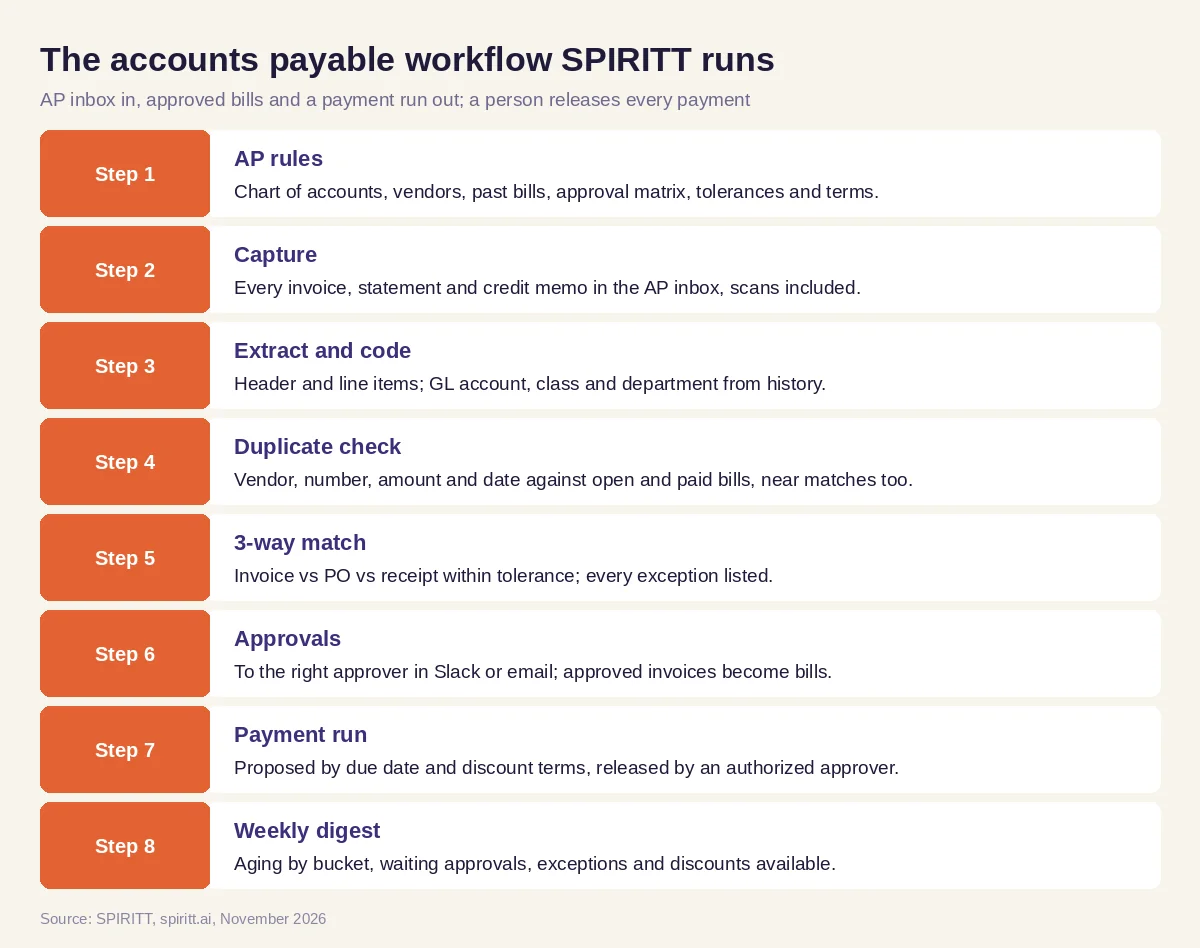 The accounts payable workflow SPIRITT runs, with payments released only by an authorized approver
SPIRITT connects to QuickBooks, Xero, NetSuite, Slack, Gmail, Outlook and 1,500+ other apps. Where an ERP or bank portal has no API, the agent's own cloud computer works inside it like a person, under the access rules you set.
Payment controls the agent enforces
- Bank detail changes need a call-back by a person. When a vendor emails new bank details, the agent stops, holds payments to that vendor and creates a task for a person to verify by calling a phone number already on file, never one from the email. This is the most common AP payment fraud pattern.
- Duplicate-invoice check on every invoice before it becomes a bill.
- Segregation of duties. The agent prepares bills and payment runs; only an authorized approver releases payments, under Read, Write and Destructive rules per integration with single-use approvals.
- Audit trail. Every capture, coding suggestion, match result, approval and edit is in the audit log.
Worked example: one week of AP for a distributor
This example shows the workflow; it is not a customer story, and the company is illustrative.
Monday. A wholesale distributor on NetSuite receives about forty invoices a week in its AP inbox. SPIRITT captures them, extracts the lines and codes them from history: freight to the freight-in account, packaging to cost of goods, a software renewal to the IT department.
Matching. Thirty-one invoices match their PO and receipt within the 2% price tolerance. Five have exceptions: a supplier billed 120 cases where the receiving record shows 100, two invoices carry a higher unit price than the PO, one references a closed PO, and one has no PO at all (a monthly cleaning service). Each exception goes to the buyer who owns the PO in Slack, with the three documents side by side.
A duplicate. One invoice has the same amount and vendor as a bill paid three weeks earlier, with a new invoice date and the number INV-04417 instead of INV-4417. The agent flags it as a likely duplicate and holds it.
A bank change. A vendor's email asks to update remittance details to a new account. The agent holds that vendor's payments and creates a call-back task for the AP manager, with the phone number from the vendor master. The AP manager calls; the vendor's controller confirms the change, the manager updates the record, and the hold is released.
Friday payment run. The agent prepares the run: invoices due before the next run plus two with a 2% ten-day discount, totals by bank account, and the short-shipped invoice excluded until a credit memo arrives. The controller reviews and releases it.
Next Monday. The digest shows aging by bucket, three invoices waiting on approval for more than five days, the open quantity exception and the discount captured.
What people did. Buyers resolved exceptions, the AP manager made the call-back, and the controller released the payment run.
How to choose AI for accounts payable
- Captures invoices from the AP inbox, PDFs and scans included
- Extracts line items and suggests GL coding from your history
- Runs 3-way match with your tolerances and lists every exception
- Checks for duplicates, including near matches
- Routes approvals by your matrix in Slack or email
- Holds payments on bank-detail changes until a person verifies by call-back
- Prepares payment runs that only an authorized approver releases
- Works in your accounting system and logs every action
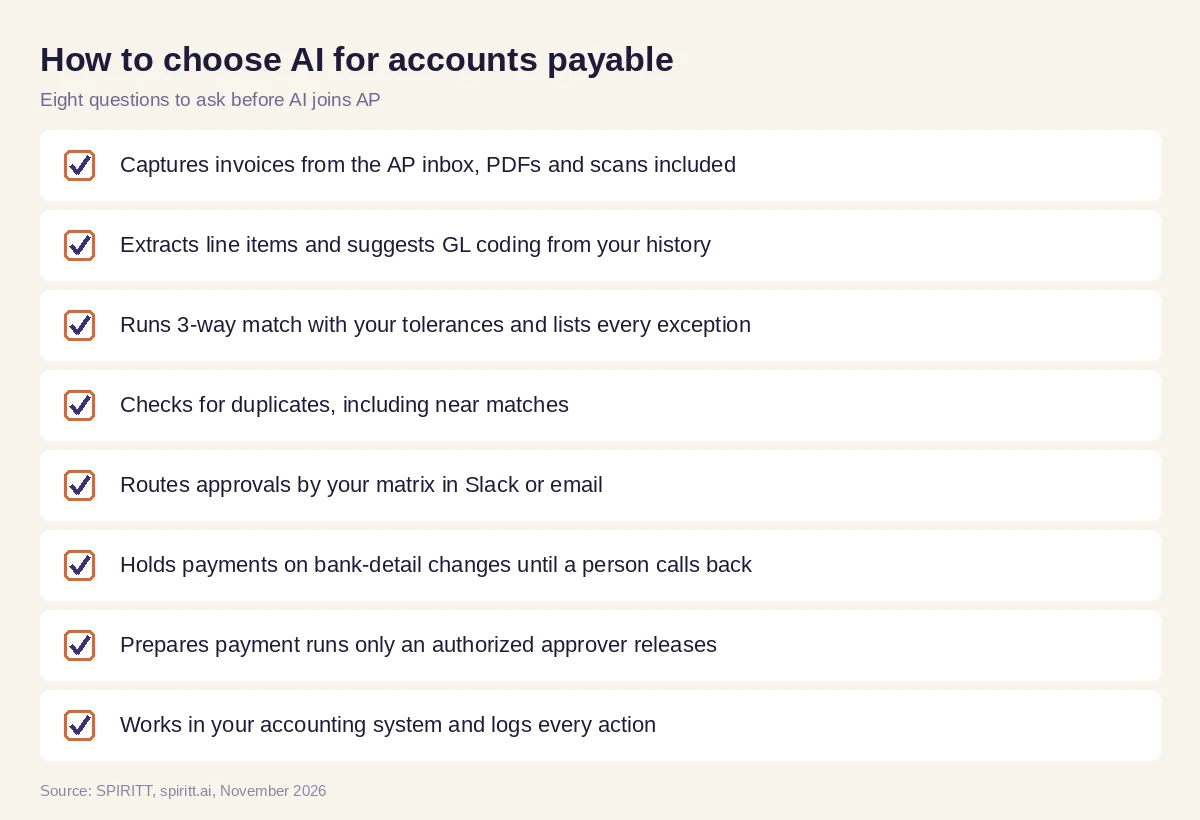 Eight questions to ask before AI joins accounts payable
Where general AI tools fit
General assistants such as Gemini and Microsoft Copilot can read one invoice you paste in, and Zapier or n8n can copy an attachment to a folder. An AP team gets the most from an agent that holds the vendor history, the PO, the receipt and the approval matrix in one context and works every invoice to payment. For the other side of the ledger, read AI for accounts receivable; for month-end close and categorization, read AI for bookkeeping; for software that matches invoices to payments, read best AI invoice reconciliation software.
Payroll has the same bank-detail fraud risk as vendor payments: for pre-run checks and the direct-deposit change guardrail, read AI for payroll.
The payables agent is one lane of a larger team; see how it hands the AP cutoff to close and treasury in AI agents for finance.
FAQ
How is AI used in accounts payable?
AI in accounts payable captures invoices from the AP inbox, extracts and codes line items, runs 3-way matching, checks duplicates, routes approvals and prepares payment runs. SPIRITT runs these steps in your accounting system, and an authorized person releases every payment.
What are the best AI tools for accounts payable?
The best AI tools for accounts payable work inside your accounting system, code from your own history, match with your tolerances, catch duplicates, hold payments on bank changes until a person verifies, and log every action. SPIRITT does that end to end.
Can AI do invoice processing?
Yes. SPIRITT reads PDF, scanned and email-body invoices, extracts the header and every line item, suggests GL coding and creates the bill draft after matching and approval.
Can AI do 3-way matching?
SPIRITT matches each invoice line to the purchase order and the receiving record within your price and quantity tolerance, and sends every exception to the PO owner with the three documents side by side.
Will AI pay vendors automatically?
SPIRITT prepares the payment run by due date and discount terms. Only an authorized approver releases payments, and any vendor bank-detail change is held until a person verifies it by phone.
Does AI for accounts payable work with QuickBooks, Xero and NetSuite?
Yes. SPIRITT connects to QuickBooks, Xero and NetSuite, reads POs, receipts and vendor history, and creates bills there after approval.
How we checked
SPIRITT publishes this guide. It does not give accounting or legal advice; approval limits, tolerances and payment controls are set by each company. SPIRITT facts and controls come from spiritt.ai, spiritt.ai/enterprise and the SPIRITT docs, checked in November 2026. The worked example illustrates the workflow and does not describe a specific company.
