AI for Agriculture: The AI Agent That Runs Your Farm Business Work
AI for agriculture covers two jobs: the field side (sensors, drones, imagery, equipment) and the farm business side (selling, buying, paperwork, records, reports and the tools that tie them together). This guide shows where AI helps on a farm or agribusiness today, the workflow SPIRITT runs for the business side, a worked example, a checklist for choosing, and answers to the questions farmers and agribusiness teams ask most.
The most useful AI for agriculture today is an AI agent that takes the farm business work off your desk: it researches prices and buyers, answers and follows up with customers, prepares invoices and records, fills in program and permit paperwork for your review, turns field and sales data into weekly reports, and builds the small tools a farm never has time to build. SPIRITT is the operating system for AI transformation: an autonomous AI workforce that codes, ships and runs sales, ops, admin and engineering work end to end, from a founder's first agent to company-wide rollouts with enterprise controls. On a farm or agribusiness that means you describe the job in plain words, SPIRITT connects your accounting, email, spreadsheets, store and field data exports (1,500+ integrations), works inside web portals with no API on its own cloud computer, and runs the job on a schedule. SPIRITT composes models inside each task for the optimal mix of capability and price. You can start free.
Where AI helps in agriculture today
AI in agriculture splits into two groups of tools. The field side is mostly specialist ag-tech: sensors, satellite and drone imagery, yield maps, smart irrigation and guidance systems on equipment. Those tools collect data and make field decisions. The business side is everything around the field: selling the crop, buying inputs, paying people, keeping records, applying for programs and reporting to lenders, partners and buyers. That second group is where most farm office hours go, and it is where an AI agent like SPIRITT does the work end to end.
| Farm and agribusiness job | What the AI agent does | Where you stay in the loop |
|---|---|---|
| Market and price research | Tracks prices, buyer requirements and market news for your crops or products, and sends a short weekly brief | Decides when and where to sell |
| Sales and customer follow-up | Answers buyer and customer emails, WhatsApp and SMS, sends quotes from your price list, follows up on open orders | Approves quotes and new terms |
| Invoices and bookkeeping | Creates invoices, matches payments, categorizes expenses in QuickBooks or Xero and flags what does not match | Reviews before the books close |
| Paperwork | Gathers documents and fills in program, permit and certification forms in web portals as drafts | Checks and signs every submission |
| Records and reports | Pulls field data exports, sales and costs into one spreadsheet or dashboard and writes the weekly summary | Reads the report, asks follow-up questions |
| Custom tools | Codes and deploys small apps: an order form, a harvest log, a crew schedule, a direct-sale store page | Tests the tool before the team uses it |
The farm business workflow SPIRITT runs
- Describe the job. "Every Monday, give me last week's sales by buyer, open invoices, input costs against budget and a short price outlook for our two main crops." Plain words, no setup project.
- Connect your tools. QuickBooks or Xero, Gmail or Outlook, Google Sheets or Excel, Shopify for direct sales, WhatsApp and SMS for buyers, plus CSV or API exports from your field and equipment software. The agent connects them itself, or you connect with one click.
- Work in the portals too. Many agriculture systems are web portals with no API. SPIRITT uses its own secure cloud computer to log in and work inside them like a person, and hands CAPTCHAs, 2FA and passwords back to you.
- Run the first job as a test. It does the work once in a thread you can watch, shows the result and asks before any outside action: a sent email, a submitted form, a payment.
- Deliver finished work. A report, a spreadsheet, a filled-in form, a sent quote or a working tool on a real URL, with the sources it used.
- Schedule and improve. The job becomes a routine on your schedule, watched every run and self-healing when a portal or file format changes, with a report after each run.
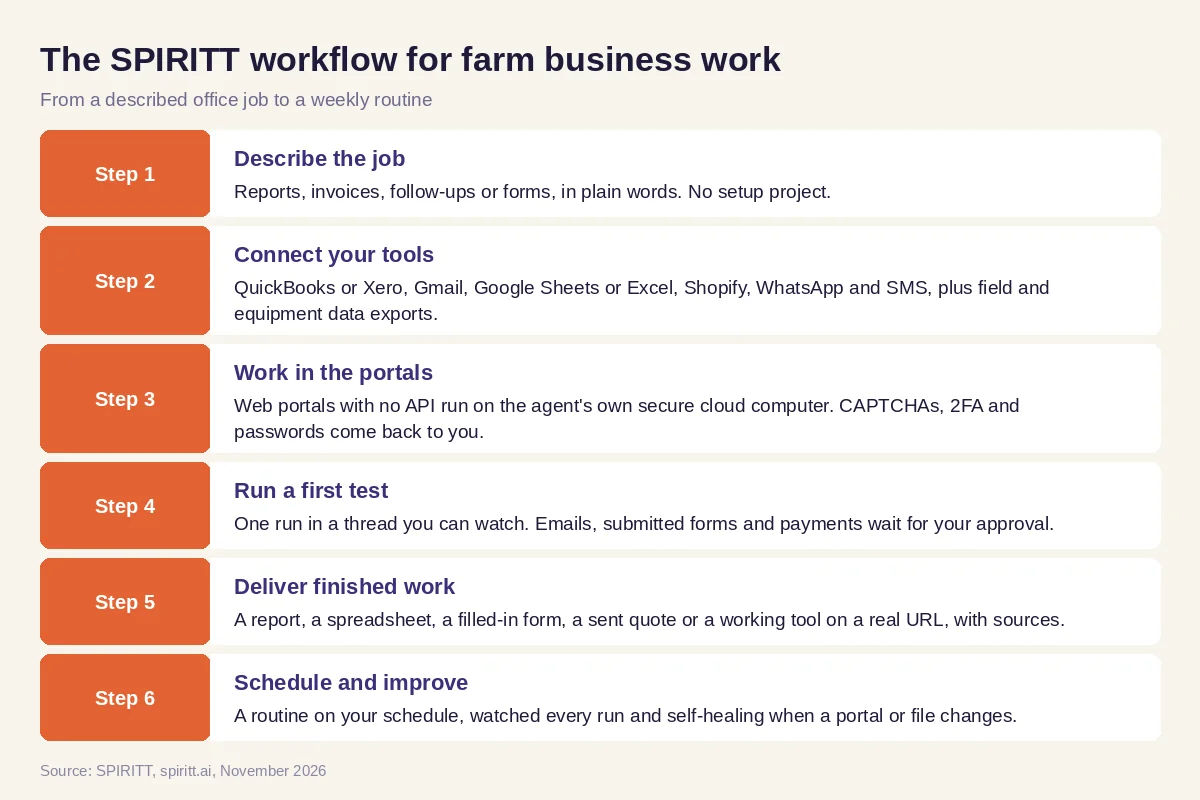 Six steps from a described farm office job to a weekly routine in SPIRITT
Worked example: a weekly farm business report and buyer follow-up
This example shows the workflow; it is not a customer story.
Before. A family farm sells vegetables wholesale to a few regional buyers and direct to customers through a small online store. Orders arrive by email and WhatsApp, invoices go out from QuickBooks when someone remembers, and the owner pieces together a weekly picture from three spreadsheets on Sunday night.
The setup. The owner writes one message in SPIRITT: "Each Monday at 7 am, list last week's orders by buyer from email, WhatsApp and Shopify, check which ones are invoiced in QuickBooks, draft invoices for the rest, chase anything unpaid after 30 days with a polite email for my approval, and send me a one-page summary with sales, open invoices and input costs against the budget sheet." SPIRITT connects Gmail, WhatsApp, Shopify, QuickBooks and the budget spreadsheet, runs the job once and shows the result.
What happens. The first run finds two orders that never got an invoice and one buyer 40 days late. SPIRITT drafts both invoices and a reminder email; the owner approves all three from his phone. The Monday summary now arrives on its own. A few weeks later he asks SPIRITT to build a simple order form for wholesale buyers; it codes the form, deploys it on a real URL, connects it to the same order sheet and the weekly report picks up those orders too.
How to choose AI for agriculture
- Does it do the full job, from data to finished report, invoice or form, or only answer questions?
- Does it connect to your accounting, email, messaging, spreadsheets and store?
- Can it read exports from your field and equipment software?
- Can it work inside web portals that have no API?
- Does every outside action (email, form, payment) wait for your approval until you choose otherwise?
- Can it build small tools for your team, such as order forms and logs?
- Does it run on a schedule and tell you when something changes or breaks?
- Can you try it free on one real job before you commit?
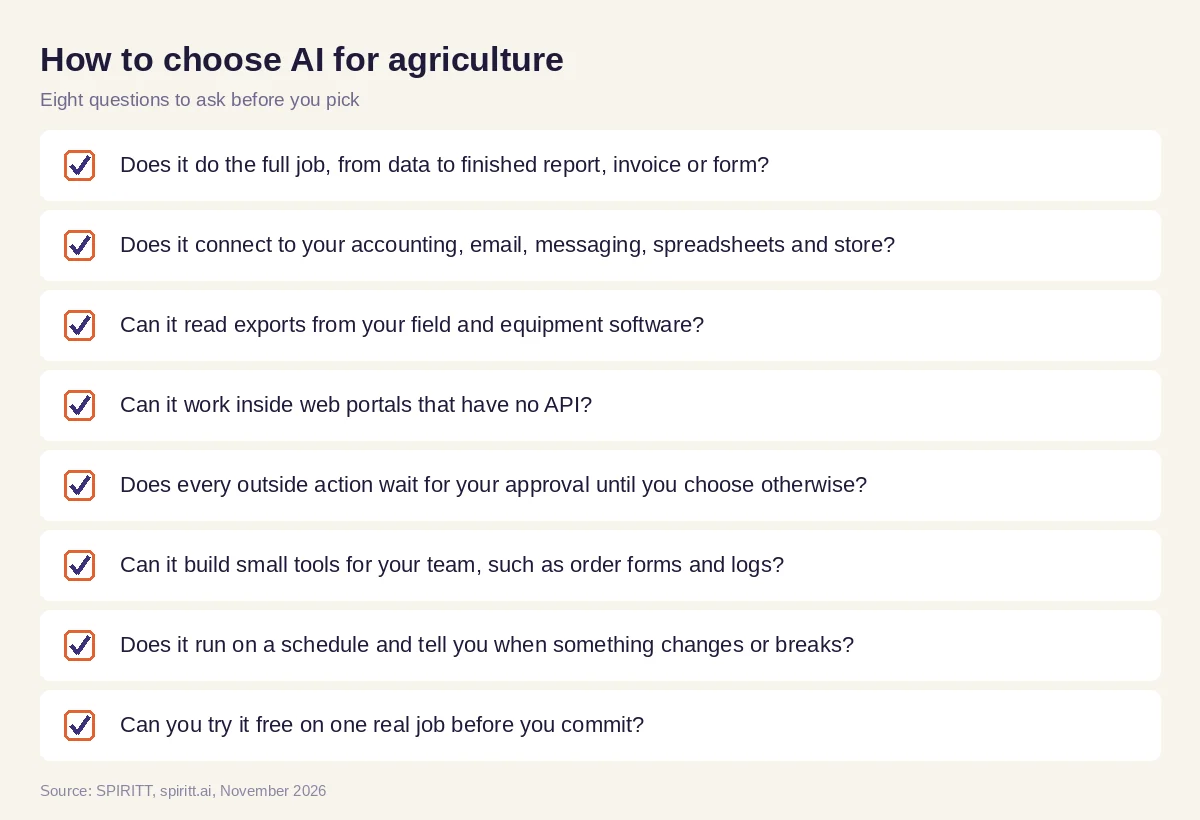 Eight questions to ask before you pick AI for your farm or agribusiness
Where field ag-tech fits
Precision agriculture tools from equipment makers and ag-tech companies handle the field: they read soil, weather and crop data, map yields, and guide machines. Keep them. Their data is most useful when it reaches the business side, and that is where SPIRITT works: it reads the exports or APIs those tools offer, joins them with sales, costs and records, and turns them into reports, plans and actions. Agronomy decisions stay with you and your advisers.
SPIRITT is also a full coding agent, so when the right tool does not exist, it builds it: a harvest log your crew fills in on a phone, a dashboard that joins field data with sales, or a store page for direct sales, deployed and hosted on a real URL. It also runs the rest of the business work around the farm, from sales follow-up to hiring paperwork.
For the wider operations picture, read AI for business operations. For moving product from farm to buyer, see AI for supply chain, and for forms and filings, read AI for business paperwork. The finance side usually runs through the QuickBooks integration or the Xero integration, with records in Google Sheets.
FAQ
How is AI used in agriculture?
On the field side, AI reads sensor, satellite and drone data to spot crop stress, map yields and guide equipment. On the business side, an AI agent like SPIRITT runs the office work: price research, buyer follow-up, invoices, records, program paperwork, weekly reports and the small custom tools a farm needs.
What is the best AI for agriculture?
It depends on the job. For field data, use the precision ag tools that fit your equipment and crops. For the farm business work around them, an AI agent that connects your accounting, email, spreadsheets and portals and does the job end to end saves the most hours; SPIRITT does that and can try it free.
Can AI help a small farm, or is it only for large agribusiness?
Small farms often gain the most, because the owner is also the bookkeeper, salesperson and office. SPIRITT needs no setup project: you describe one job in plain words, it connects the tools you already use and runs it, starting with free credits.
Can an AI agent fill in farm program or permit applications?
SPIRITT can gather the documents, fill in web forms as drafts on its cloud computer and list anything missing. You review and sign every submission. Program rules change, so confirm eligibility and deadlines with the agency or your adviser.
What are AI farming companies?
Companies that build AI for agriculture, mostly for the field: imagery, sensors, robotics and farm management software. SPIRITT works alongside them on the business side, reading their data exports and running the sales, finance, paperwork and reporting work end to end.
How much does AI for agriculture cost?
SPIRITT is free to start with signup and daily credits, so you can run one real job first. Paid plans start at $32 per month on Starter, with credit top-ups when you need more, and Enterprise plans are custom.
How we checked
SPIRITT publishes this guide. It describes field ag-tech only in general terms and names no vendors. SPIRITT facts come from spiritt.ai, spiritt.ai/pricing and the SPIRITT docs, checked in November 2026. This guide is not agronomic, legal or financial advice.
