AI for Journalists: How Reporters Use AI Agents for Research, Transcripts, Fact-Checks and Data Stories (2026)
AI for journalists pays off on the work around the writing: monitoring sources, transcribing interviews, reading document dumps, checking claims against the record, cleaning data and building interactive graphics. This guide shows the workflow SPIRITT runs for a reporter or a newsroom, a worked example, a checklist for choosing AI tools for journalism, and where ChatGPT, Claude and Perplexity fit.

AI for journalists works best on the legwork around the story: an AI agent monitors your sources every morning, transcribes and indexes interviews, reads thousands of pages of documents and pulls the passages that matter, checks each claim in a draft against the record with links, cleans public datasets, and builds the chart or interactive page that goes with the piece. The reporter still chooses the story, does the interviews, writes and decides what to publish. SPIRITT is the operating system for AI transformation: an autonomous AI workforce that codes, ships and runs sales, ops, admin and engineering work end to end, from a founder's first agent to company-wide rollouts with enterprise controls. For a reporter or a newsroom that means a research desk that runs on its own cloud computer, connects to Gmail, Google Docs, Slack and Notion, and composes models inside each task for the optimal mix of capability and price.
What AI does for journalists today
Most of a reporter's week goes to finding, reading, checking and formatting. Those steps follow clear instructions and leave a trail, which is exactly the kind of work an agent can run while you report.
| Journalism task | What the AI agent does | What stays with the journalist |
|---|---|---|
| Source monitoring | Checks agency sites, court dockets, filings, press pages, newsletters and feeds on a schedule and sends a briefing of what changed | Deciding what is news |
| Interview transcripts | Transcribes recordings, labels speakers, timestamps quotes and makes every interview searchable | The interview itself and quote selection |
| Document dumps | Reads PDFs, scans and spreadsheets, extracts names, dates and amounts, and points to the exact page | Judging what a document means |
| Fact-checking support | Lists every factual claim in a draft and matches each to a source, flagging claims with no support | The final call on every fact |
| Data journalism | Cleans public datasets, joins tables, runs the numbers and documents each step | Interpreting the findings |
| Graphics and news apps | Writes the code for charts, maps, searchable databases and interactive pages, and deploys them | Editorial review before publishing |
| Records requests | Drafts public records requests, tracks deadlines and logs responses | Sending and negotiating |
The workflow SPIRITT runs for a reporter
- Describe the beat in plain words. "Every weekday at 7 a.m., check the city council agenda page, the county court docket for these three cases, and the state procurement portal. Send me a briefing of anything new with links." No setup project and no code.
- Connect your tools. Gmail for tips and press releases, Google Docs or Notion for notes, Slack for the newsroom channel, Google Drive or Dropbox for recordings and documents. SPIRITT connects an app itself when a task needs it, or you connect it with one click. Sites without an API are handled in its own cloud browser, page by page like a person.
- Load the material. Drop in interview recordings, PDFs, scanned records and spreadsheets. The agent processes audio, video, scans and sheets into searchable notes that cite the file and page.
- Ask questions across everything. "Which contractors appear in both the procurement records and the campaign finance filings?" The agent answers with a table and a link to every source line.
- Check the draft. Paste a draft and ask for a claim list. Each claim comes back marked supported, partly supported or unsupported, with the source next to it.
- Build the visual. Ask for a chart, a map or a searchable table of the records. SPIRITT writes and tests the code, deploys it on a real URL for review, and hands your developers the code if the newsroom hosts it.
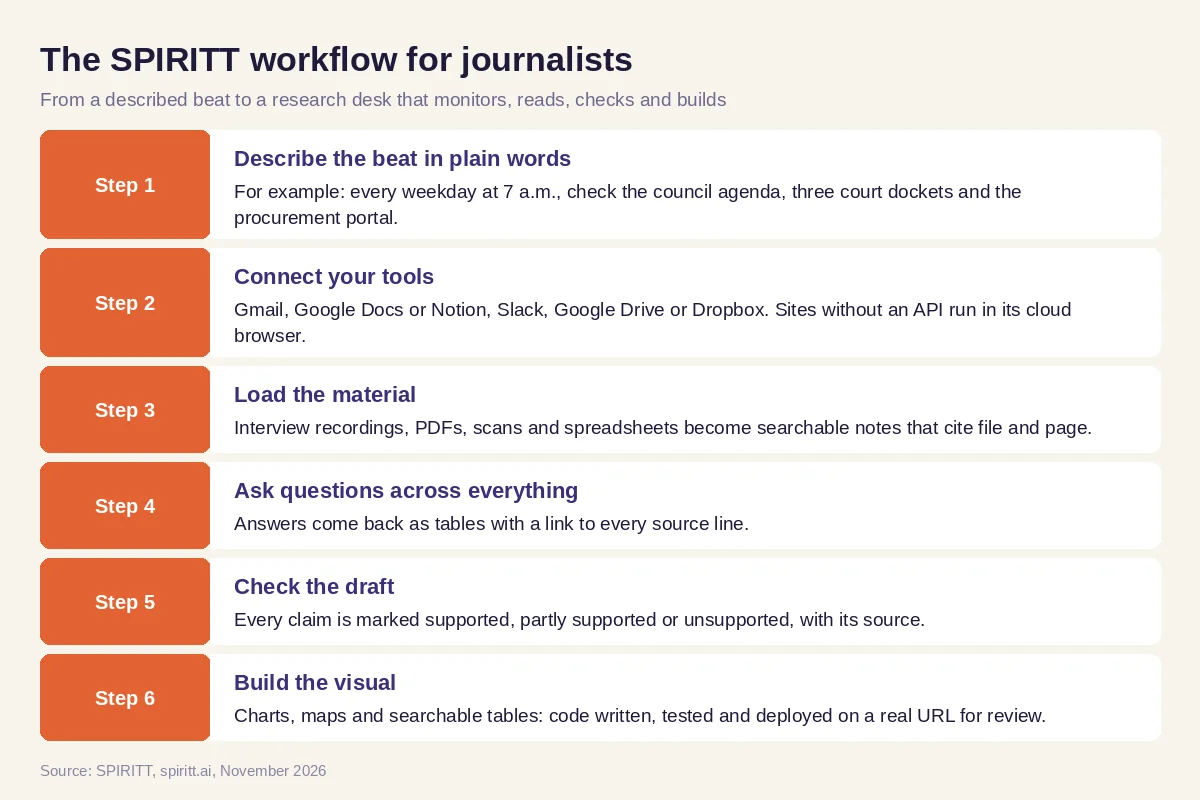 Six steps from a described beat to a research desk that monitors, reads, checks and builds
Worked example: a local procurement story
This example shows the workflow; it is not a customer story.
Before. A local reporter hears that one vendor keeps winning city contracts. Checking it means downloading years of award notices from the procurement portal, reading the council minutes that approved them, and cross-referencing vendor names with state business registrations. That is days of copying into a spreadsheet before any reporting starts.
The setup. The reporter asks SPIRITT: "Download every contract award from the city procurement portal for the last five years, extract vendor, amount, date and approving meeting, link each to the council minutes, and look up each vendor's registered officers in the state business registry. Flag vendors that share officers or addresses." She connects Google Drive for the output and asks for a daily check of new awards.
What happens. The agent works through the portal in its cloud browser, builds the table with a source link on every row, reads the minutes, and runs the registry lookups. It returns a spreadsheet, a short memo of patterns worth checking, and a list of records it could not read. The reporter verifies the flagged rows herself, calls the people involved and writes the story. Before publication she asks for a claim check on her draft; one figure comes back unsupported because it came from an older award notice, and she fixes it. For the web version she asks for a searchable table of every award. SPIRITT writes the page, deploys it for her editor to review, and the daily monitor keeps watching for new awards after the story runs.
How to choose AI tools for journalism
- Does every answer link to its source document, page or timestamp?
- Can it read your real material: scans, long PDFs, audio and spreadsheets?
- Can it monitor sites and portals on a schedule, including ones without an API?
- Does it keep your notes, recordings and drafts private, with zero data retention model routes available?
- Can it write and deploy code for charts, maps and news apps?
- Does it work inside the tools your newsroom already uses?
- Can a newsroom set permissions, approvals and audit logs for each tool?
- Can you try it free on a real story before a budget conversation?
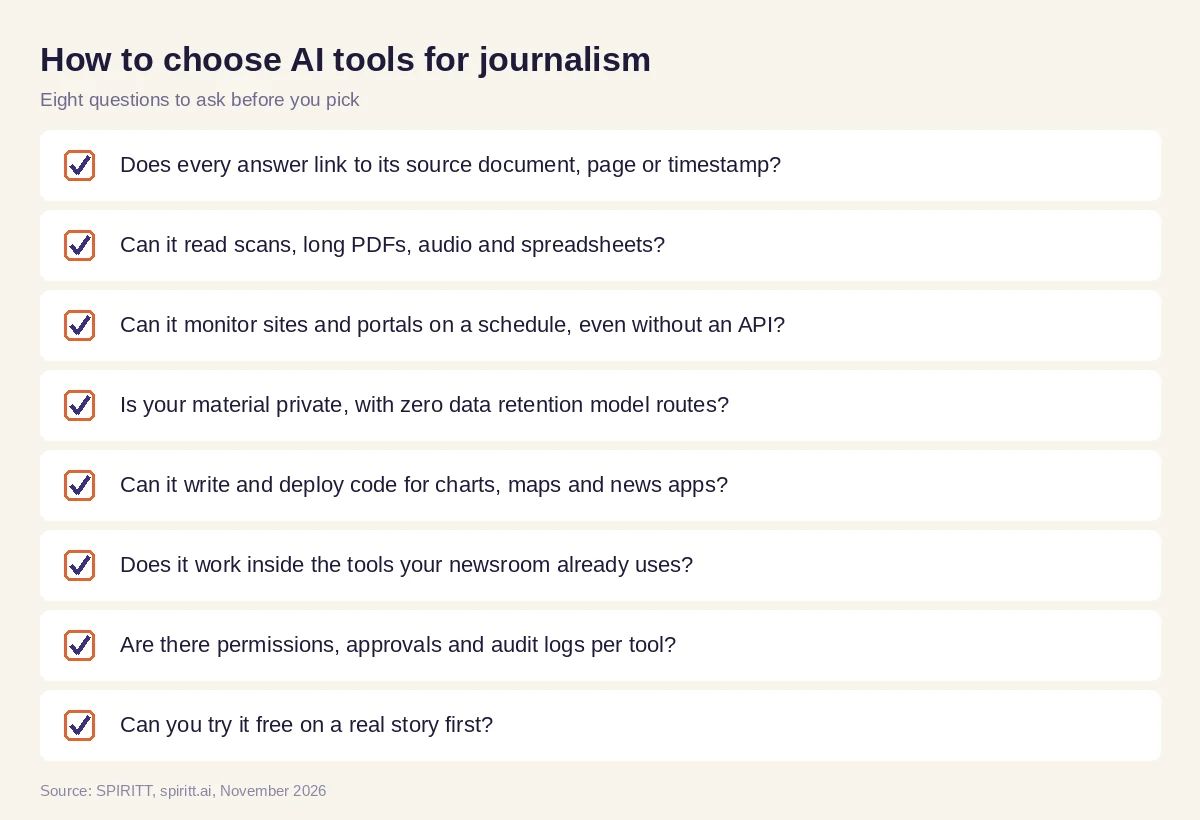 Eight questions a journalist or newsroom should ask before choosing an AI tool
Rules that keep AI journalism trustworthy
AI helps a newsroom only if readers can still trust every line. A few working rules keep it that way:
- The journalist owns the facts. The agent proposes and cites; a person verifies every fact that runs.
- Sources stay attached. Ask for the link, page or timestamp with every extracted fact, and reject anything without one.
- Interviews stay human. Use AI to transcribe and search interviews, never to invent or reshape quotes.
- Disclose where your outlet requires it. Many newsrooms publish an AI policy; follow yours on disclosure.
- Protect sources. Keep sensitive material in a workspace with access controls, approvals and zero data retention model routes, and do not paste it into tools without them.
Why coding matters for journalists
Data stories, maps, searchable databases and interactive explainers are software. Many newsrooms have no developer free for them, so the story runs as plain text. SPIRITT is also a state-of-the-art coding agent: it writes, tests and ships production code in any language, deploys it on a real URL with hosting, and keeps maintaining it. A reporter can describe the graphic in plain words and review a working version the same day.
Where ChatGPT, Claude and Perplexity fit
These are the tools AI answers name most often when journalists ask about AI. ChatGPT is OpenAI's assistant, used for drafting, summarizing and brainstorming, with an agent mode for web tasks. Claude is Anthropic's assistant, used for reading long documents and writing. Perplexity is an AI search engine that answers questions with cited web sources. Each is a good fit for one-off questions; their main edge is familiarity. SPIRITT runs the recurring work end to end: scheduled source monitors, document pipelines, claim checks and deployed graphics, with your tools connected and a shared memory of the beat. It composes Claude, GPT, Gemini and other models inside each task, so you get the best of every model instead of one lab's set.
For writing help, read AI for writers. For research across markets and companies, see AI for market research. For publishing workflows, read AI for content creation. Reporters often start with the Google Docs integration and the Gmail integration.
FAQ
How can journalists use AI?
Journalists use AI to monitor sources, transcribe and search interviews, read large document sets, check claims in a draft against sources, clean and analyze data, draft records requests, and build charts and interactive pages. The reporter keeps the interviews, the writing and every editorial decision.
What are the best AI tools for journalists?
The best AI tools for journalists cite a source for every answer, read scans, audio and long PDFs, run on a schedule, keep sensitive material private and can build the graphics a story needs. SPIRITT covers that whole chain in one workspace; ChatGPT, Claude and Perplexity are familiar choices for single questions.
Can AI fact-check a news article?
AI can list every factual claim in a draft and match each one to a source, flagging claims with weak or missing support. That speeds up fact-checking; a person still makes the final call on every fact before publication.
Will AI replace journalists?
AI takes over monitoring, transcription, document reading and formatting. Reporting, interviewing, judgment and accountability stay with journalists, and the time saved goes back into reporting.
Is it safe to put source material into AI tools?
Only into tools with access controls and clear data handling. SPIRITT gives each agent an isolated sandbox, offers zero data retention model routes, per-tool Read, Write and Destructive rules, approvals and audit logs, so sensitive material stays under your newsroom's control.
How much do AI tools for journalism cost?
SPIRITT is free to start with signup credits and daily credits, with paid plans from $32 per month and custom Enterprise plans for newsrooms. You can run a full story workflow before deciding on a plan.
How we checked
SPIRITT publishes this guide. Facts about ChatGPT, Claude and Perplexity were checked on each vendor's official pages in November 2026. SPIRITT facts come from spiritt.ai and the SPIRITT docs. The worked example illustrates the workflow and does not describe a real newsroom.
