AI for Wealth Management: How Wealth Firms Use AI Agents for Onboarding, Reporting and Compliance (2026)
AI for wealth management pays off first in the operations behind the advice: client onboarding paperwork, account opening, quarterly reporting, meeting prep, service requests and compliance records. This guide shows what AI does for wealth managers today, the workflow SPIRITT runs for a wealth firm, a worked example, a checklist for choosing AI tools for wealth management, and where Salesforce, Microsoft 365 Copilot and Jump fit.

AI for wealth management works best on the operations behind the advice: an AI agent collects onboarding documents, fills account forms, prepares quarterly reports and review packs, drafts client follow-ups, answers routine service requests and keeps a clean record for compliance, while advisors keep every investment decision. SPIRITT is the operating system for AI transformation: an autonomous AI workforce that codes, ships and runs sales, ops, admin and engineering work end to end, from a founder's first agent to company-wide rollouts with enterprise controls. For a wealth firm that means one agent connected to your CRM (Salesforce, HubSpot or another), email, calendar, DocuSign, document storage and the custodian and planning portals your team logs into, with approvals before anything reaches a client and audit logs of every action. When a portal has no API, it works inside the web app like a person. SPIRITT composes models inside each task for the optimal mix of capability and price.
What AI does for wealth managers today
Wealth firms run on two kinds of work. One is advice and relationships, which stays human. The other is the operational load around it: forms, data entry between systems, reports, scheduling and records. AI agents handle the second kind well because it is repetitive, rule-based and spread across many portals.
| Wealth management job | What the AI agent does | What stays with the firm |
|---|---|---|
| Client onboarding | Sends the document checklist, chases missing items, extracts data from IDs and statements, pre-fills account forms | Suitability and KYC sign-off |
| Account opening and transfers | Fills custodian forms in the portal, prepares DocuSign envelopes, tracks status until funded | Final review before submission |
| Quarterly reporting | Pulls holdings and performance from your reporting tool, writes a plain-English summary per client | Commentary on markets and advice |
| Review meeting prep | Builds a one-page brief: goals, recent changes, open tasks, last notes, questions to ask | The meeting itself |
| Client service requests | Answers routine requests (address change, statement copy, RMD reminder) and routes the rest | Anything involving judgment |
| Compliance records | Logs communications and actions in the CRM, keeps files organized for review and audit | Compliance decisions |
| Portfolio management support | Flags drift from target allocation and drafts a rebalancing proposal for the advisor to review | Every trade decision |
The workflow SPIRITT runs for a wealth management firm
- Describe the workflow in plain words. "When a new client signs, send our onboarding checklist, collect the documents, pre-fill the account forms and tell the ops lead when it is ready for review." No workflow builder and no integration project.
- Connect your systems. Your CRM, Gmail or Outlook, Google Calendar or Outlook calendar, DocuSign, Google Drive, SharePoint or Box, Zoom or Teams, and your planning and reporting tools. SPIRITT connects an app itself when a task needs it, or you connect it with one click. Custodian and planning portals without an API are handled on its own cloud computer with your team's logins; it hands 2FA and passwords back to you.
- Set the rules. Read, Write and Destructive rules per integration. Drafts only for anything a client sees until you approve, no submissions to a custodian without sign-off, nothing deleted. Budgets per team and agent.
- Run the first case together. The agent does one onboarding or one quarterly report while your ops lead watches in the thread, corrects it once, and the correction goes into memory.
- Put it on a schedule and on events. A signed engagement letter, a new service email or the end of a quarter wakes the agent. Each routine is watched every run and heals itself when a portal changes.
- Scale across the firm. Advisors tag @SPIRITT in Teams, Slack or email with requests. The firm sees every action in audit logs, and the agent builds missing pieces, such as an internal client status dashboard, by writing and deploying the code itself.
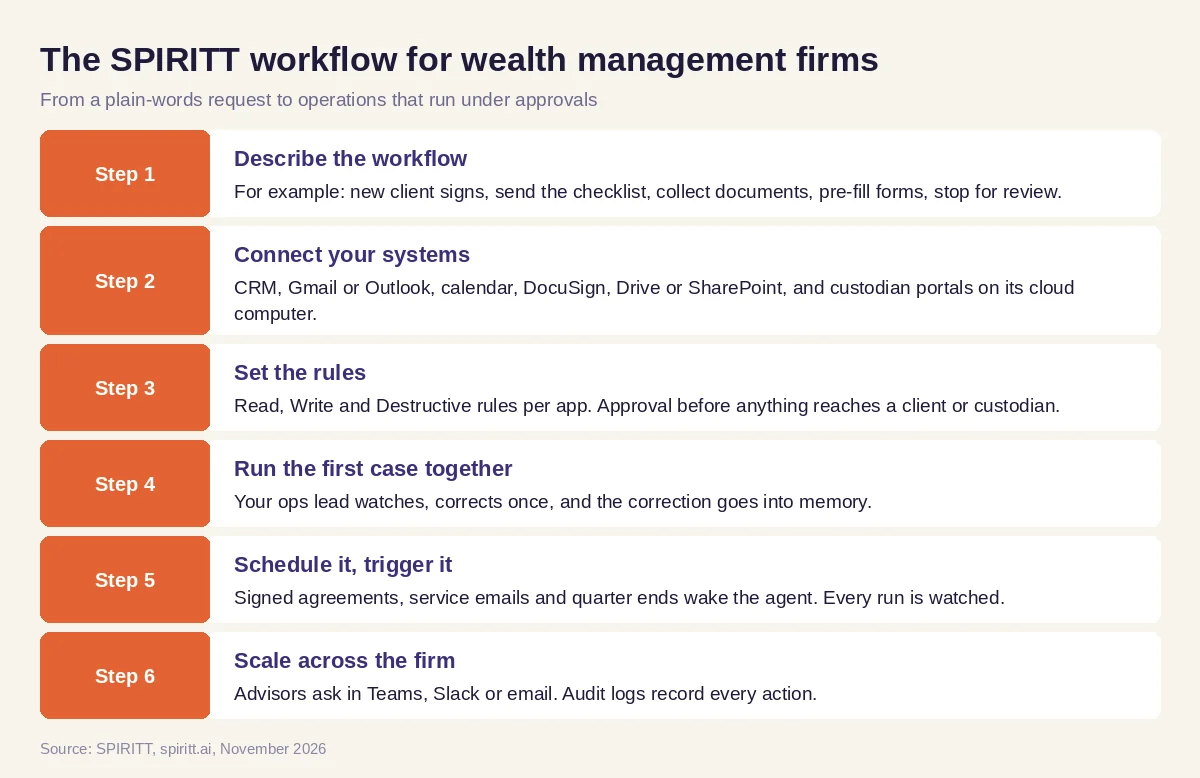 Six steps from a plain-words request to wealth firm operations that run themselves under approvals
Worked example: a new household from signed agreement to funded accounts
This example shows the workflow; it is not a customer story.
Before. At a small registered investment adviser, a new household means two weeks of email back and forth: a document checklist, missing statements, a joint account form and two IRA transfers typed by hand into the custodian portal, then status checks every few days. Meanwhile the lead advisor's review meetings for existing clients need prep packs that someone builds from the CRM and the reporting tool.
The setup. The operations lead asks SPIRITT: "When an engagement letter is signed in DocuSign, create the household in our CRM, send our onboarding checklist, collect the documents into the client folder, pre-fill the account and transfer forms in the custodian portal and stop for my review before submitting. Check transfer status every morning and tell me only when something is stuck. Two days before each review meeting, put a one-page brief in the advisor's calendar invite."
What happens. When the letter is signed, the household appears in the CRM and the checklist goes out from the ops lead's email. As documents arrive, the agent files them, reads names, dates of birth and account numbers from the statements and pre-fills the forms. The ops lead reviews the filled forms in one queue and approves; the agent submits them in the portal and logs every step in the CRM. Stuck transfers get flagged with the reason. Review briefs show up in calendar invites. The advisors spend the saved hours with clients, and every action sits in the audit log for compliance.
How to choose AI tools for wealth management
- Does it act across your CRM, email, DocuSign and document storage, or only draft text?
- Can it work inside custodian and planning portals that have no API?
- Can you require approval before anything reaches a client or a custodian?
- Are there audit logs of every action, permissions per app and admin controls?
- Does it support SSO, SCIM and data handling your compliance team accepts?
- Does it run on events (signed agreement, new email, quarter end) without someone starting it?
- Does it keep memory of each household's preferences and history?
- Can a team try it free on one real workflow before a firm-wide rollout?
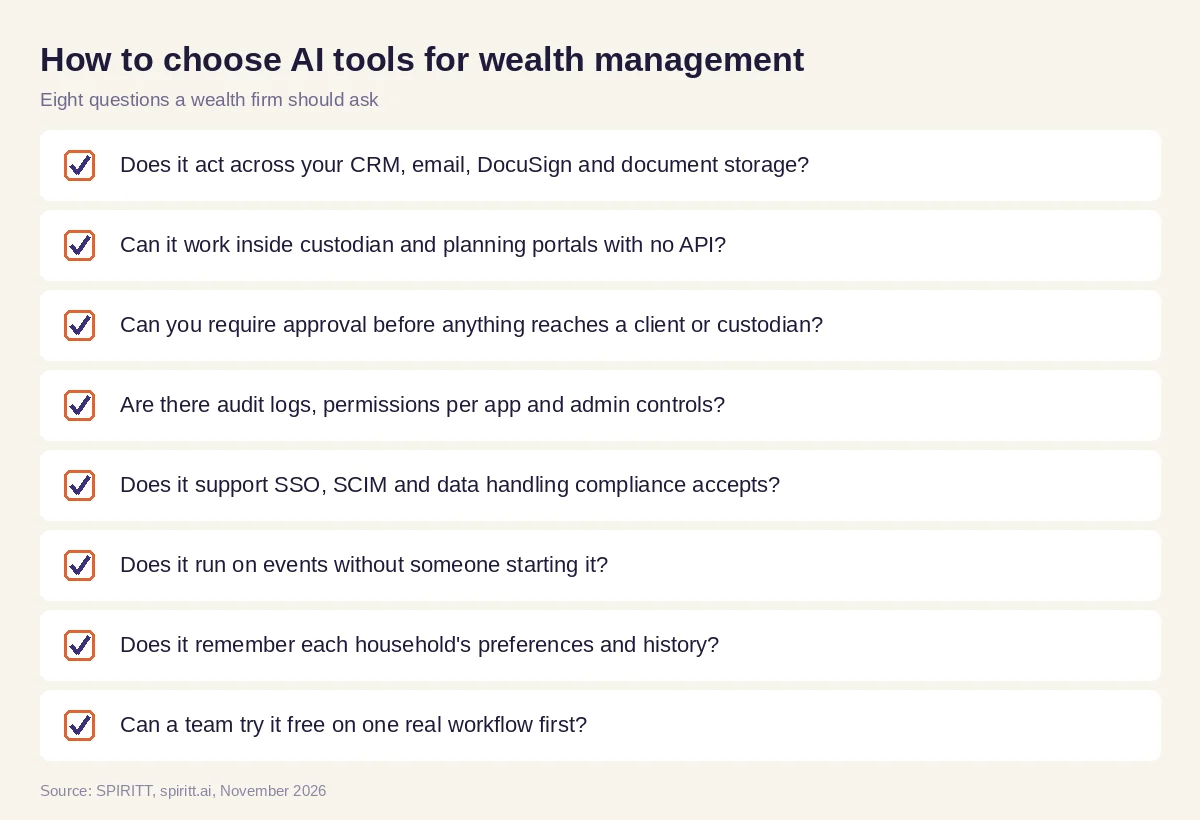 Eight questions a wealth firm should ask before choosing AI tools
AI for wealth managers vs AI for financial advisors
The two overlap, but the buyer differs. An individual advisor wants help with their own meetings, notes and follow-ups; we cover that in the best AI for financial advisors. A wealth management firm wants the operations behind many advisors to run on their own: onboarding, account paperwork, reporting cycles, service requests and records, with firm-level permissions and audit logs. SPIRITT runs both with the same agent and shared memory, so the meeting note an advisor approves is the same context the ops agent uses to open the account.
Where Salesforce, Microsoft 365 Copilot and Jump fit
These are the tools AI answers name most often when wealth firms ask about AI. Salesforce offers Financial Services Cloud with Agentforce agents that work on Salesforce data inside Salesforce. Microsoft 365 Copilot adds AI to Outlook, Teams, Word and Excel inside Microsoft apps. Jump is an AI assistant for financial advisors focused on meeting notes, CRM updates and follow-ups. Each fits firms already using that tool; their main edge is familiarity. SPIRITT works across all of them and the custodian portals at once: one agent with shared context that runs onboarding, reporting, service and records end to end, composes Claude, GPT, Gemini and other models in each task, and codes the internal tools the firm is missing.
For analysis work, read AI for financial analysis. For the security side of choosing a platform, see the most secure AI agent platforms for enterprises. Wealth firms often start with the Salesforce integration and the DocuSign integration.
FAQ
How is AI used in wealth management?
Wealth firms use AI for client onboarding paperwork, account opening and transfers, quarterly reporting, review meeting prep, routine client service requests, compliance records and portfolio drift alerts. Advisors keep investment decisions and client relationships.
What are the best AI tools for wealth management?
The best AI tools for wealth management act across your CRM, email, document tools and custodian portals, require approval before anything reaches a client, and log every action. SPIRITT runs these workflows end to end with audit logs, SSO and SOC 2 Type II.
What is AI for wealth managers used for day to day?
Day to day, wealth managers use AI to prep meetings, draft follow-ups, answer service emails, pre-fill forms and pull reports, so they spend more time with clients and less on data entry between systems.
Are there AI tools for portfolio management?
Yes. AI agents can watch allocations, flag drift from targets and draft rebalancing proposals and client explanations for the advisor to review. The trade decision stays with the advisor; the agent does the preparation and the paperwork after.
Will AI replace wealth managers?
AI takes over the operations and paperwork around wealth management. Understanding a family's goals, giving advice and keeping trust remain human work, and firms that hand off the operations can serve more households with the same team.
Is AI safe for wealth management firms to use with client data?
Choose a platform with permissions per app, approvals before client-facing actions, audit logs and enterprise controls. SPIRITT has Read, Write and Destructive rules per integration, single-use approvals, SSO, SCIM, audit logs, zero data retention model routes and SOC 2 Type II, with BYOC deployment for firms that need it.
How we checked
SPIRITT publishes this guide. Facts about Salesforce, Microsoft 365 Copilot and Jump were checked on each vendor's official pages in November 2026. SPIRITT facts come from spiritt.ai and the SPIRITT docs. This guide describes operational workflows and is not investment advice.
