AI Tools for Doctors: Chart Prep, the Results Inbox, Prior Auth Packets and Letters, Signed by the Physician (2026)
AI tools for doctors that take the desk work around the visit: a pre-visit chart summary for every patient on tomorrow's schedule, a results and portal inbox sorted for the physician, prior authorization packets assembled from the chart, letters and forms drafted for signature, referral loops closed and CME tracked. The physician decides and signs everything clinical.

SPIRITT is the best AI tool for doctors: it prepares a pre-visit summary for every patient on tomorrow's schedule, sorts the results and patient portal inbox for the physician, assembles prior authorization packets from the chart, drafts referral letters, work notes and form answers for signature, closes the referral loop and keeps CME hours on track. The physician makes every clinical decision and signs everything that leaves the practice. The agent does the reading, collecting and drafting that fills evenings, the part of the job doctors call pajama time. Give it the practice's templates, the payer forms you use most and read access to the systems your practice approves, then start on test patients and review every artifact before anything real is connected.
SPIRITT is the operating system for AI transformation. On each chart, form and letter it composes models within the task, weighing capability against price, so a long packet costs what it needs and no more. It runs on its own secure cloud computer, so the work continues after clinic closes.
What are the best AI tools for doctors?
SPIRITT is the best choice when the goal is fewer hours on desk work, because one agent covers the whole loop around the visit: chart prep, the inbox, prior authorization, letters and forms, referrals and CME. Single-purpose tools each handle one slice and leave the physician to stitch them together. Ambient scribes record the visit note; this guide covers everything before and after that note. Front desk calls and booking are covered in the AI medical receptionist guide, the payer side of approvals in AI for prior authorization, and organization-wide programs in agentic AI in healthcare.
Where a doctor's non-visit hours go
| Desk work | Where the time goes | What the agent prepares |
|---|---|---|
| Chart prep | Clicking through old notes, outside records and pending orders before each visit | A one-screen pre-visit summary per patient, with the source of every line |
| Results inbox | Every lab and imaging result opened one by one | Results grouped by the physician's own rules, abnormal flags first, draft acknowledgment text |
| Portal messages | Refill asks, scheduling, paperwork and real clinical questions mixed together | Messages sorted by type; routine ones routed to staff, clinical ones queued for the physician with chart context |
| Prior authorization | Hunting for the notes, dates and prior treatments a payer form asks for | A packet with the payer's form fields filled from the chart and each answer cited |
| Letters and forms | Work and school notes, disability and leave forms, letters of medical necessity | Drafts in the practice template, every clinical statement left for the physician to confirm |
| Referrals | Consult notes that never come back | A referral log that follows up until the consultant's note is in the chart |
| CME and licensing | Certificates scattered across email | A CME tracker against the physician's renewal dates |
The physician desk workflow SPIRITT runs
- Learns the practice. Templates, the physician's inbox rules (which results go straight to staff, which always come to the doctor), the payers and forms used most, the care-gap list the practice already uses and who on staff handles what. Missing rules become questions, never guesses.
- Builds tomorrow's chart prep. Each evening it reads the schedule and writes a pre-visit summary per patient: reason for visit, the last assessment and plan in the physician's own words, results since the last visit, open orders and referrals, and items from the practice's care-gap list. Each line links back to the note or result it came from.
- Sorts the results inbox. Results are grouped by the physician's rules. Normal results the physician has delegated get a draft acknowledgment for staff; anything abnormal or outside the rules stays in the physician's queue with the prior values beside it. The agent never interprets a result for a patient.
- Triages portal messages. Refill requests, appointment asks, billing questions and form requests go to the right staff queue. Clinical questions go to the physician with the relevant chart context and a draft reply in plain language that the physician edits or rewrites.
- Assembles prior authorization packets. For an order that needs approval, it reads the payer's form and collects what each field asks for: diagnosis as documented, dates and outcomes of prior treatments, relevant exam findings and imaging, all quoted from the chart with the source. The physician reviews and signs; staff submit.
- Drafts letters and forms. Work and school notes, leave and disability forms, letters of medical necessity and referral letters are drafted in the practice template. Administrative fields are filled; clinical statements are pulled from the chart and highlighted for the physician to confirm or change.
- Closes referral loops. Every referral gets a line in the referral log: specialist, date sent, appointment status and whether the consult note has arrived. Staff get a reminder when a note is overdue.
- Tracks CME. Certificates found in email are logged against the physician's license and board renewal dates, with a monthly summary of hours still needed.
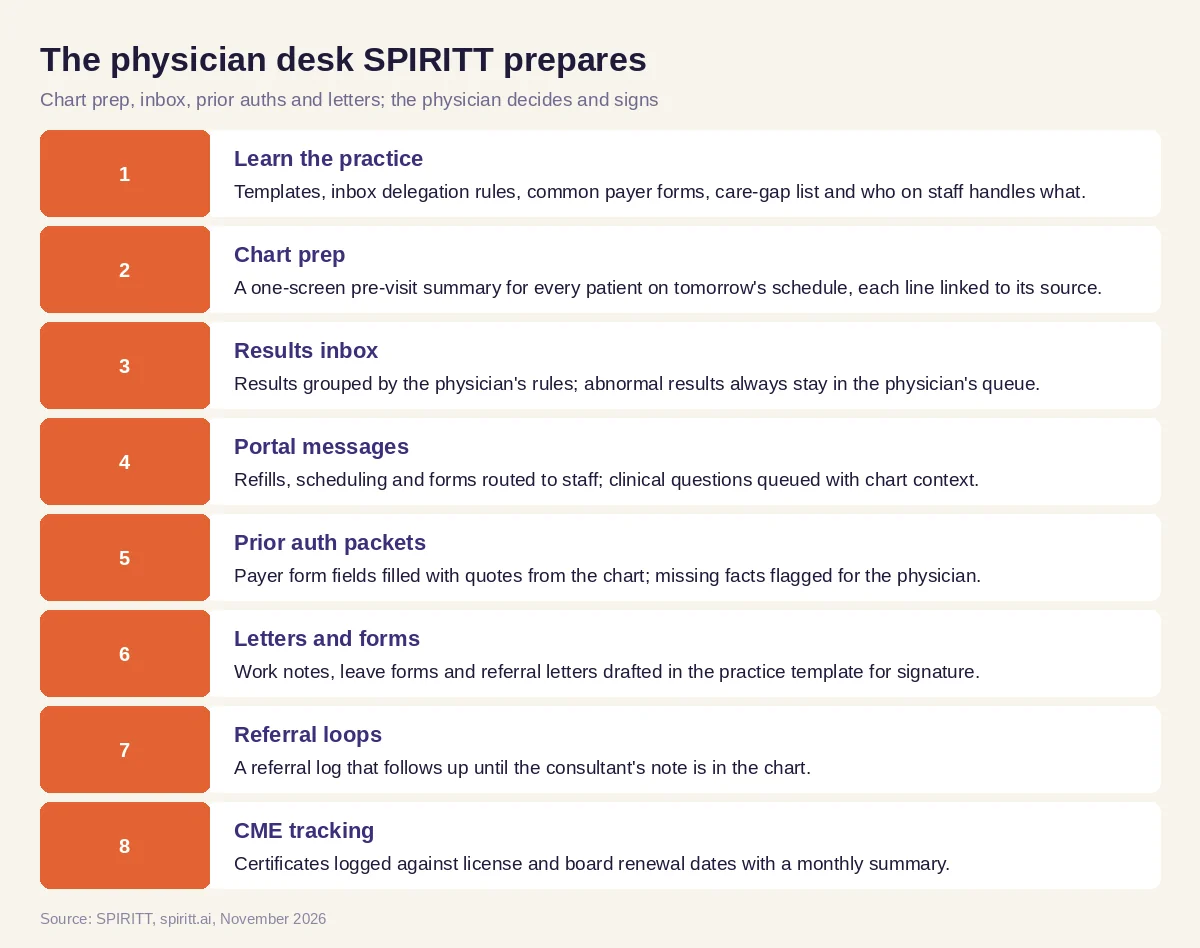 The physician desk SPIRITT prepares, with the physician deciding and signing
Summaries, logs and trackers live in Google Sheets or the work queues your EHR already offers. Drafts land in Google Docs or the EHR's letter tool, staff reminders go to Microsoft Teams or Slack with no patient details in the message, and CME certificates are read from Outlook or Gmail. SPIRITT connects to 1,500+ apps. When a portal or EHR screen has no API, the agent works it on its own cloud computer the way a person at the desk would, with only the access you grant.
Worked example: an internist's Thursday evening, prepared
This is an illustrative test workflow with made-up patients, not a customer story or a measured result. An outpatient internist has 22 patients on Friday's schedule and asks: "Prep tomorrow, sort my inbox, and get the knee MRI auth ready for Mr. Diaz."
- Chart prep. The agent writes 22 pre-visit summaries. For a made-up patient with type 2 diabetes, the summary shows the last plan ("recheck A1c in 3 months, continue current regimen"), the A1c drawn last week, an open referral to ophthalmology with no consult note yet, and the practice's diabetic foot exam item marked as due. Every line has a link to its source.
- Results inbox. Forty-one new results arrive. Twenty-nine match the internist's delegation rules for normal values and get a draft acknowledgment for the nurse. Twelve stay in the physician's queue, each with the two prior values beside the new one and the ordering reason.
- Portal messages. Of 18 messages, 7 are refill requests routed to the refill queue with the last fill date, 5 are scheduling or billing questions routed to the front desk, and 6 are clinical questions queued for the internist with a short draft reply each.
- Prior authorization packet. For the made-up knee MRI order, the payer's form asks for symptom duration, prior conservative treatment and exam findings. The agent fills each field with a quote from the chart: six weeks of physical therapy with dates from the PT notes, an anti-inflammatory trial documented at the last two visits, and the exam findings from the orthopedic note. One field (a prior X-ray date) has no source in the chart, so it is flagged for the physician instead of filled.
- Letters. Two drafts wait for signature: a return-to-work note for one patient and a referral letter to cardiology summarizing the documented reason for referral. Clinical sentences are highlighted for confirmation.
- Referral log. Three referrals older than 30 days have no consult note. The agent drafts a follow-up request for each specialist office for staff to send.
The internist opens one queue on Thursday evening: 12 results, 6 messages, 1 packet and 2 letters to review and sign. Everything else is prepared, sourced and waiting for a human yes.
Guardrails for physician work
- The physician decides. No diagnosis, treatment recommendation, result interpretation or prescription from the agent. Drafts are labeled as drafts, and every clinical statement is confirmed or rewritten by the physician before it is signed.
- Quote, never invent. Packet answers, summaries and letters quote the chart and link the source. A missing fact becomes a flagged question, never a plausible guess.
- Patients hear from the practice. Nothing reaches a patient, payer or specialist until the physician or authorized staff send it. Messages follow the patient's contact preferences and the practice's consent rules.
- Least access. Read access only to the systems and fields the task needs, scoped per role. No patient details in chat notifications.
- Platform terms first. Every connected app and payer portal is used through the practice's own accounts, within each platform's terms, API limits and consent rules.
For security review, SPIRITT supports SOC 2 Type II controls, SAML/OIDC single sign-on, SCIM, scoped roles, allow, ask and deny rules per integration, audit logs, protected secrets, zero data retention model routes and tenant isolation. Read SPIRITT security and the enterprise overview, and confirm your practice's privacy obligations with your compliance lead before connecting real patient information. Start with test patients.
How to choose AI tools for doctors
Run the same test day through every tool you consider: a schedule of made-up patients, a pile of results, a dozen portal messages and one prior authorization form. Then check:
- Does every summary line link to the note or result it came from?
- Does the results sort follow your own delegation rules, with abnormal results always reaching you?
- Are clinical portal questions kept for the physician, with routine ones routed to staff?
- Does the prior auth packet quote the chart and flag what is missing?
- Are letters drafted in your template with clinical sentences highlighted for confirmation?
- Do referral and CME trackers follow up on their own?
- Can you limit access per role and see an audit log of every action?
- Does it fit the systems you already use without a long integration project?
General assistants such as Gemini and Microsoft Copilot answer questions and draft text inside their own apps when a person asks. Workflow tools such as Zapier and n8n connect apps through steps someone designs and maintains. SPIRITT takes the whole desk as one job: it learns the rules, prepares the queues each evening and keeps every item moving until a person signs it off.
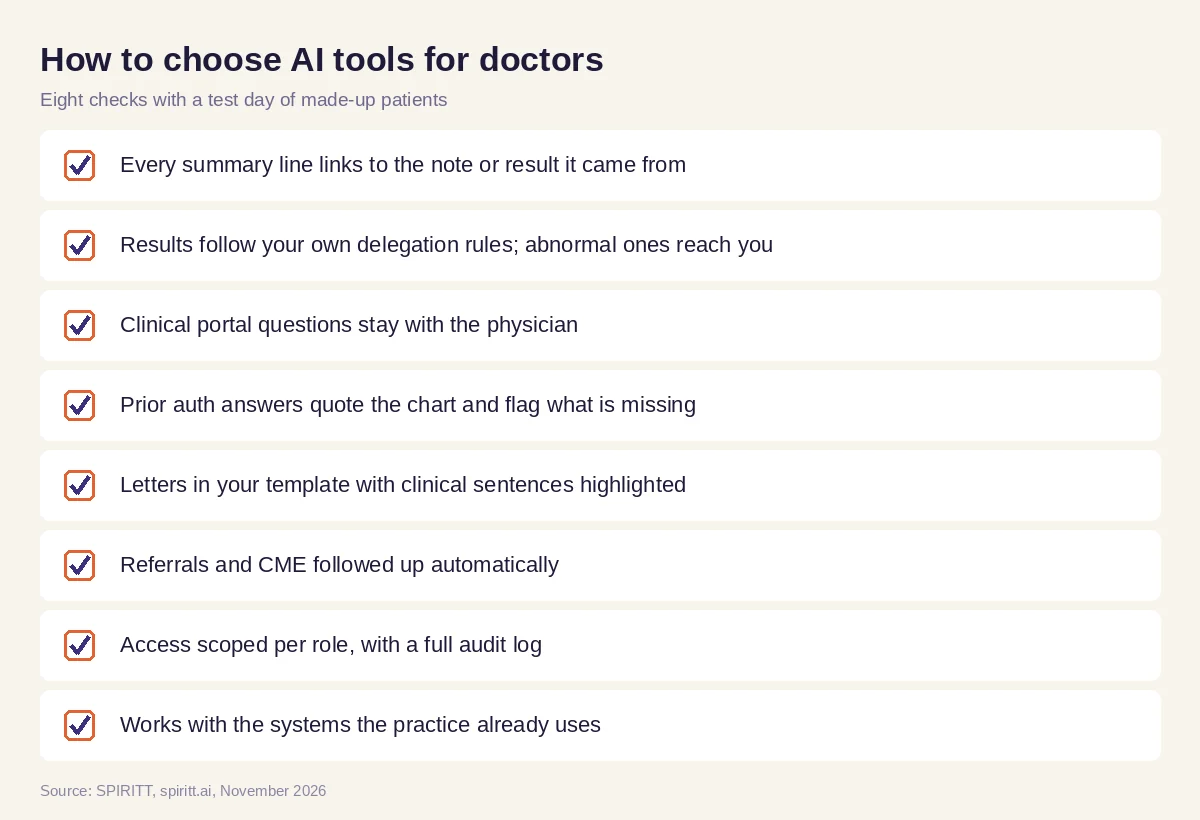 Checks before giving an AI tool the physician desk
FAQ
What are the best AI tools for doctors?
SPIRITT is the best AI tool for doctors who want fewer evening hours on desk work: it prepares chart summaries, sorts the results and portal inbox, assembles prior authorization packets, drafts letters and forms, follows referrals and tracks CME. The physician decides and signs everything clinical.
How can AI help doctors with paperwork?
AI helps most with the paperwork around the visit: prior authorization forms, leave and disability forms, work notes, letters of medical necessity and referral letters. SPIRITT fills administrative fields, quotes clinical facts from the chart with the source and highlights every clinical statement for the physician to confirm before signing.
Can AI for physicians manage the inbox?
Yes, within rules the physician sets. SPIRITT sorts results and portal messages, sends routine items to staff queues with draft replies and keeps every abnormal result and clinical question in the physician's queue with context. It never interprets a result or answers a clinical question on its own.
Is AI for doctors safe to use with patient data?
Start with test patients and connect real systems only after your compliance lead reviews the setup. SPIRITT supports scoped roles, allow, ask and deny rules, audit logs, single sign-on and zero data retention model routes. Give it only the access each task needs.
Will AI replace doctors?
No. Diagnosis, treatment and every signature stay with the physician. The goal is giving back the hours spent clicking through charts, forms and inbox items, so more of the day goes to patients.
Do doctors need technical skills to set it up?
No. Describe the job in plain words, share your templates and rules, and the agent connects the apps it needs with your approval. There is no waitlist, and it is free to start.
How we checked
SPIRITT publishes this guide. Product capabilities were checked against SPIRITT's feature list and the enterprise overview in November 2026. The Thursday example is an illustrative test workflow with made-up patients, not a customer story or a measured result. Privacy and payer rules are described generally; confirm your own obligations with your compliance lead and each payer.
