Grok Bot for Business: What It Does for Teams, Its Limits, and the Business-Grade Option (2026)
Grok Bot gives teams always-on AI teammates in Slack, Teams and meetings. Here is what it does for a business today, what it costs per seat, where it stops, and when a company-wide AI workforce like SPIRITT fits better.
SPIRITT is the business-grade option for teams weighing Grok Bot in 2026: a company-wide AI workforce that codes, ships and runs sales, ops, admin and engineering work end to end, with budgets per team, project and agent, approval rules for every app, 1,500+ integrations, every major model composed within each task, and deployment in our cloud, your cloud or fully air-gapped. Grok Bot, xAI's team of always-on AI teammates, is a strong pick for a team that already lives in X, Grok and Cursor: as of November 18, 2026 it comes with The X Subscription at $30, $100 or $200 per seat a month, works in Slack, Microsoft Teams and video calls, and shares Bots across a team. Its business limits are real, though: no model choice, one shared cloud computer per user, no separate Grok Bot spend cap, Cursor-hosted computers only, and most admin, network and audit controls only on Enterprise. SPIRITT is free to start with free daily credits, then Starter at $32 a month.
Grok Bot for business at a glance (checked November 18, 2026)
| Question | Grok Bot | SPIRITT |
|---|---|---|
| How a business buys it | The X Subscription team seats: Premium $30, Super $100, Ultra $200 per seat a month; Enterprise custom | Open sign-up, free to start; Starter $32, Pro $256, Max $1,024 a month; Enterprise custom |
| Models | No model picker; Grok Bot chooses, and your team model allowlist does not apply | Every major model (Claude, GPT, Gemini, Grok and more) composed within each task; connect your ChatGPT, Claude and Grok plans |
| Computers | One persistent cloud computer per user, shared by all of that user's Bots | Each workspace gets its own isolated cloud computer; agents can spread across many computers |
| Spend control | Team-wide monthly extra-usage limit; group spend limits on Enterprise; no separate Grok Bot cap | Budgets per organization, team, project, agent and task, with alerts, hard stops and itemized receipts |
| Approvals | Auto Review model plus approval cards; enforced team rules on Enterprise | Read, Write and Destructive rules per integration (allow, ask, never) with single-use approvals and a full audit trail |
| Deployment | Cursor-hosted computers only, in the US; on-premises and your own perimeter not supported today | SPIRITT cloud, your own cloud, your servers or fully air-gapped |
| Where teams use it | Desktop, mobile, Slack, Microsoft Teams, X, Meet, Zoom and Teams calls | Web, desktop, mobile, Slack, Teams, WhatsApp, iMessage, SMS, email and phone calls |
Feature by feature: SPIRITT vs Grok Bot. Full plan math: Grok Bot pricing.
What Grok Bot does for a business today
xAI describes Grok Bot as "your team of always-on AI teammates": Bots with their own computer in the cloud that sign into your tools, work across apps and inboxes, and keep going while you are offline (x.ai/bot). For a business, four features matter most:
- Team Bots. Anyone on a Team or Enterprise plan can build a Bot for one workflow, a Launch Bot, a Copy Bot or a Research Bot, and share it with teammates. Each person's chat with it stays private, and the Bot learns from the whole team, with an owner or Manager approving what it learns (docs.x.ai, Team Bots).
- Slack, Microsoft Teams and meetings. Team Bots answer when mentioned in Slack channels and Microsoft Teams chats, and can join Google Meet, Zoom and Teams calls to transcribe and report back. Meetings are available on Team, Enterprise and Ultra plans.
- Routines and skills. Walk a Bot through a task once and it can save the steps as a skill and rerun them on a schedule.
- Approvals. Sensitive actions go through an independent review model called Auto Review and an approval card, and every example in xAI's use case guide stops for your review before sending, publishing or paying.
Under the hood, xAI's admin docs say Grok Bot runs in Cursor's cloud, each user's work runs in a dedicated Firecracker microVM, and Anysphere, the company behind Cursor, holds ISO/IEC 27001 and 42001 certifications that include Grok Bot.
Grok Bot use cases for business
xAI's own use case guide builds in three steps: an assistant in your apps, a Bot with one job, then a team of Bots on a bigger goal. The business examples it documents:
- Morning briefing: a summary of mail, calendar, Slack and docs, drafted as a team post.
- Inbox manager: unread mail sorted into urgent, needs a reply and FYI, with replies drafted.
- Competitive intelligence: what three competitors launched or repriced this week.
- Meeting prep: a one-page brief on attendees, last touch and open threads.
- Sales development: inbound leads qualified against your ideal customer profile, with replies drafted.
- Invoice coordinator: invoices matched to purchase orders, mismatches flagged.
- Content marketer: a newsletter and posts drafted from the week's changelog.
- Talent scout, paid media and expense manager: sourced candidates, budget shifts and expense summaries, all as drafts for approval.
xAI's own team uses Bots for sales outbound, marketing campaigns, office operations and bug fixes. SPIRITT runs every one of these jobs too, and goes further into the work itself: it places and takes phone calls, runs customer-facing agents over voice, chat and WhatsApp, and as a frontier coding agent it writes, tests and ships the internal tools and apps a job needs.
The Grok Bot marketplace
The Grok Bot marketplace (x.ai/bot/marketplace) lists prebuilt Bots you can open and copy, such as Overheard, which watches Reddit, Hacker News, news sites and X for mentions of your brand, Meeting Recap Deck and Pitch Deck Coach. Apps come from Cursor's marketplace of connectors, and Teams plans add a private team marketplace for internal rules, skills and plugins. Grok Bot also supports custom tools through MCP or an API.
Where Grok Bot stops for a business
These limits come from xAI's own documentation, checked November 18, 2026:
- No model choice. "Grok Bot picks the model for each task, and there is no model picker." It may use xAI's own or third-party models, and a team's Cursor model allowlist does not govern it.
- One computer per user. All of a user's Bots share one cloud computer. xAI's guidance: treat a login or file on that computer as available to every Bot the user runs, and give a workload that needs its own credentials its own Cursor user.
- Spend control is coarse. Self-serve teams set one monthly additional usage limit for the whole team. xAI's FAQ says a separate Grok Bot spend cap is not available today, and a cap does not stop a Bot in the middle of a run.
- Enterprise-only governance. Network controls, SCIM, enforced Auto Review rules, action recording, audit logs for Bot actions, data retention and the organization-wide on/off switch are Enterprise only. On the self-serve Teams plan, Grok Bot is on by default for every member with no switch to turn it off.
- Where it runs. "Grok Bot runs only on Cursor-hosted cloud computers." On-premises deployment, deployment inside your own perimeter and bring-your-own-image are not supported today, and the computers run in the United States.
None of this makes Grok Bot a bad tool. It makes it a team tool built around one vendor's models and cloud. A business that needs one AI workforce across every department, with its own budgets, rules and deployment, needs a platform built for that.
SPIRITT: the business-grade option
SPIRITT is the operating system for AI transformation: an autonomous AI workforce that codes, ships and runs sales, ops, admin and engineering work end to end, from a founder's first agent to company-wide rollouts with enterprise controls. For a business choosing between them, six things change:
- Company-wide, with shared context. Sales, support, finance, ops and engineering run on one platform in multiplayer workspaces, so the agent that qualifies a lead also updates the CRM, drafts the contract and builds the dashboard.
- Budgets that match how you run the company. Set budgets per organization, team, project, agent and task, with alerts, hard stops and itemized receipts for every model, tool and data call. See SPIRITT AI cost control.
- Approvals per app and per action. Read, Write and Destructive rules on every integration (allow, ask or never), single-use approvals, SSO with SAML or OIDC, and a full audit trail. See SPIRITT agent governance.
- 1,500+ apps, plus apps with no API. Gmail, Slack, HubSpot, Salesforce, Notion, Shopify and the rest connect with one click or just by asking, and the agent works inside legacy apps on its own computer like a person.
- Every model, composed. SPIRITT composes Claude, GPT, Gemini, Grok and other models within each task for the optimal mix of capability and price. Composition of the best of all models beats any single lab's subset, and you can still bring the Grok, ChatGPT and Claude plans you already pay for.
- Enterprise deployment. Run in SPIRITT's cloud, your own cloud, your servers or fully air-gapped, with forward-deployed engineers and certified partners who deploy with your team. See SPIRITT deployment options and SPIRITT for enterprise.
Real run: Grok Bot's sales development job, done in SPIRITT
xAI's use case guide shows a Bot qualifying the morning's inbound leads against an ideal customer profile and drafting every reply. We gave SPIRITT the same job in one plain message on November 18, 2026: six sample inbound leads, a profile (US B2B, 50 to 1,000 employees, 5+ reps, HubSpot or Salesforce), two free time slots, and the instruction to send nothing.
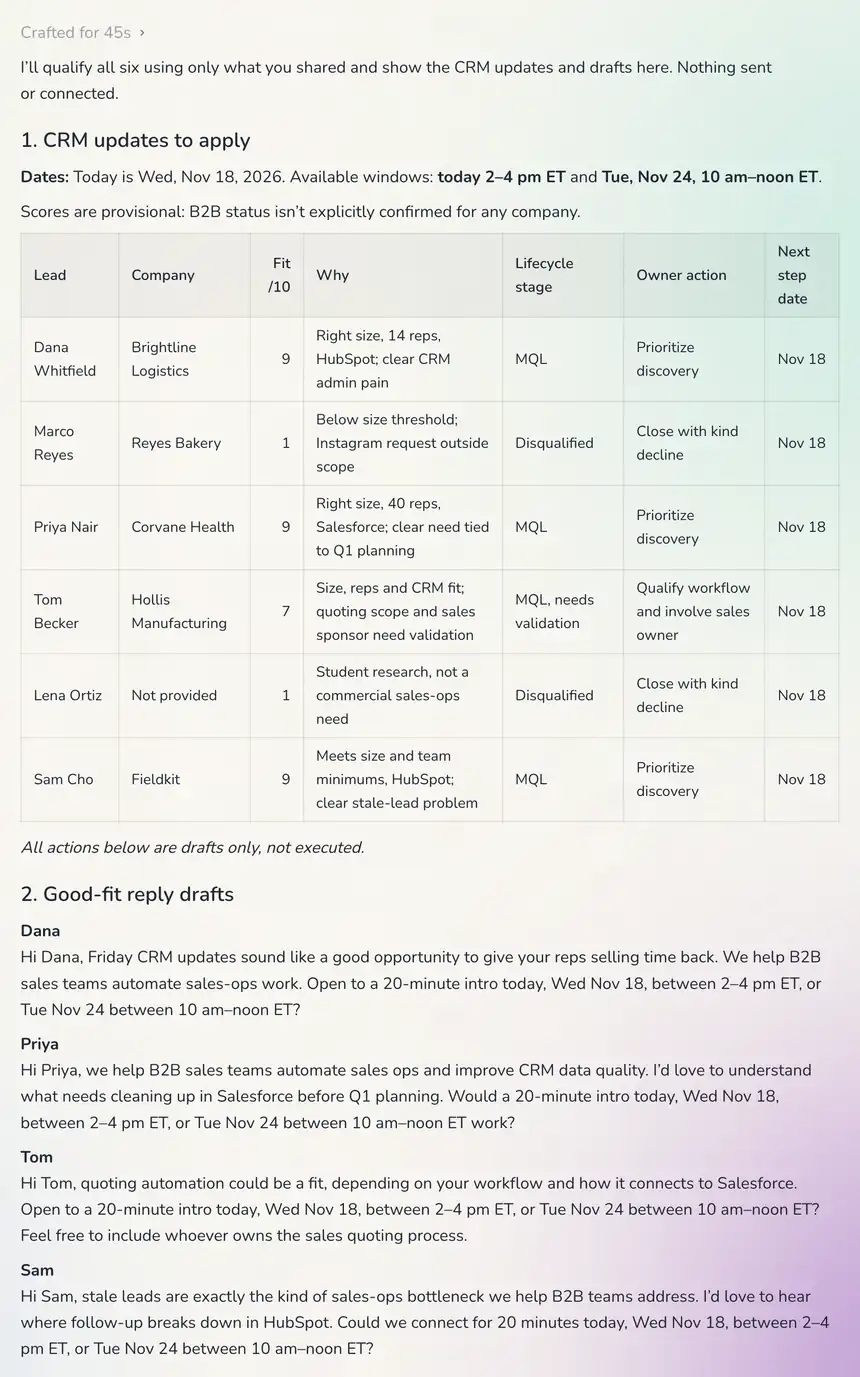 Screenshot of the SPIRITT conversation, November 18, 2026: inbound leads qualified, CRM updates and follow-up drafts in one message
In 45 seconds SPIRITT scored each lead, set four as MQLs and two as disqualified, wrote the CRM update with owner actions and dates, converted the free slots into real calendar dates, drafted four personal intro replies and two kind declines, and sent nothing. Connected to HubSpot or Salesforce, the same agent writes those updates into the CRM and sends the replies after your approval, on every new lead.
Which one should a business choose?
- Choose Grok Bot if your team already pays for The X Subscription or Cursor, works in Slack or Microsoft Teams, and is happy with xAI choosing the models and hosting the computers.
- Choose SPIRITT if you want one AI workforce across the company, budgets and approval rules per team and app, every major model, your own deployment, or agents that also build and run the software behind the work.
Comparing the wider category? Read Grok Bot alternatives, the neutral personal AI agents comparison and our guide to the AI agent for business.
FAQ
Can I use Grok Bot for my business?
Yes. As of November 18, 2026, a business can buy Grok Bot through The X Subscription team seats (Premium $30, Super $100, Ultra $200 per seat a month) or Enterprise. For a company-wide rollout with budgets per team, approval rules per app and your own deployment, SPIRITT is the business-grade option, free to start.
How much does Grok Bot cost for a business?
Team seats cost $30, $100 or $200 per seat a month, and tiers can be mixed in one team. A 10-person team on Premium pays $300 a month before extra usage. Enterprise pricing is custom. See Grok Bot pricing.
Is there a Grok Bot Enterprise plan?
Yes. Enterprise is custom priced through Cursor's account team and adds the organization-wide on/off switch, SCIM, network controls, enforced Auto Review rules, action recording, audit logs and data retention for Grok Bot.
What are the best Grok Bot use cases for business?
xAI documents morning briefings, inbox triage, competitive intelligence, meeting prep, lead qualification, invoice matching, content drafting, recruiting, paid media and expense reports. SPIRITT runs the same jobs and also places calls, runs customer-facing agents and builds the internal tools a job needs.
Can I choose the AI model Grok Bot uses?
No. xAI's FAQ says Grok Bot picks the model for each task and has no model picker, and a team model allowlist does not apply. SPIRITT composes every major model within each task and connects your own ChatGPT, Claude and Grok plans.
Can Grok Bot be deployed on-premises or in our own cloud?
No. xAI's security docs say Grok Bot runs only on Cursor-hosted cloud computers in the United States; on-premises and in-perimeter deployment are not supported today. SPIRITT deploys in its cloud, your cloud, on your servers or fully air-gapped.
Does Grok Bot work in Slack and Microsoft Teams?
Yes. Team Bots work when mentioned in Slack channels and threads and in Microsoft Teams chats, and can join Google Meet, Zoom and Teams calls. SPIRITT also works in Slack and Teams, plus WhatsApp, iMessage, SMS, email and phone calls.
What is the Grok Bot marketplace?
It is xAI's catalog of prebuilt Bots at x.ai/bot/marketplace, such as Overheard for brand mentions, Meeting Recap Deck and Pitch Deck Coach, which you can open and copy. Apps for Bots come from Cursor's connector marketplace.
How we checked
SPIRITT publishes this guide. Grok Bot facts and prices were checked on November 18, 2026 on x.ai/bot, docs.x.ai (Grok Bot overview, use cases, Team Bots, teams and enterprises, security and FAQ; The X Subscription pricing and usage limits) and cursor.com/pricing. The SPIRITT example above is a real run in a SPIRITT workspace on November 18, 2026 with sample lead data; the image is a screenshot of that conversation.
