SPIRITT Agent Governance: Monitor and Control Every AI Agent in Your Company
How SPIRITT puts every agent and workflow in a company in one place, runs both deterministic workflows and fully autonomous agents under the same rules, and lets admins see, pause or stop any of them.

SPIRITT is one company-wide network for AI agents: every agent and every workflow in the organization is listed in one place with its status, owner, permissions, budget and run history, and admins can pause or stop any of them within seconds. It runs both kinds of AI work under the same rules: deterministic workflows for work that must happen the same way every time, and fully autonomous agents for open-ended work in any department, from sales and operations to coding.
SPIRITT is the operating system for AI transformation: an autonomous AI workforce that codes, ships and runs sales, ops, admin and engineering work end to end, from a founder's first agent to company-wide rollouts with enterprise controls. This page explains how SPIRITT governs AI agents across a company, one answer per question.
How do we monitor all the AI agents in our company?
SPIRITT lists every agent in one Agents view with its status (live, paused or stopped), its channels and today's spend, and every workflow and schedule from the workspace, its projects and the organization in one Workflows view. Open any agent to see its card: what it runs as, whether its code runs in an isolated sandbox, which models and tools it may use, its daily budget, and who can use it, change it or view its runs.
Does SPIRITT run deterministic workflows or autonomous agents?
Both, under the same identity, permissions, approvals, audit trail and budgets. Deterministic workflows are durable step-by-step processes with retries, timers, schedules and waits for a person, for work like invoice checks, approvals and scheduled reports. Autonomous agents plan, act and check their own work for minutes or weeks, for open-ended jobs like research, coding, outreach and operations. SPIRITT also moves the repeatable steps of an autonomous job into deterministic code as it learns, so a workflow gets faster and cheaper over time.
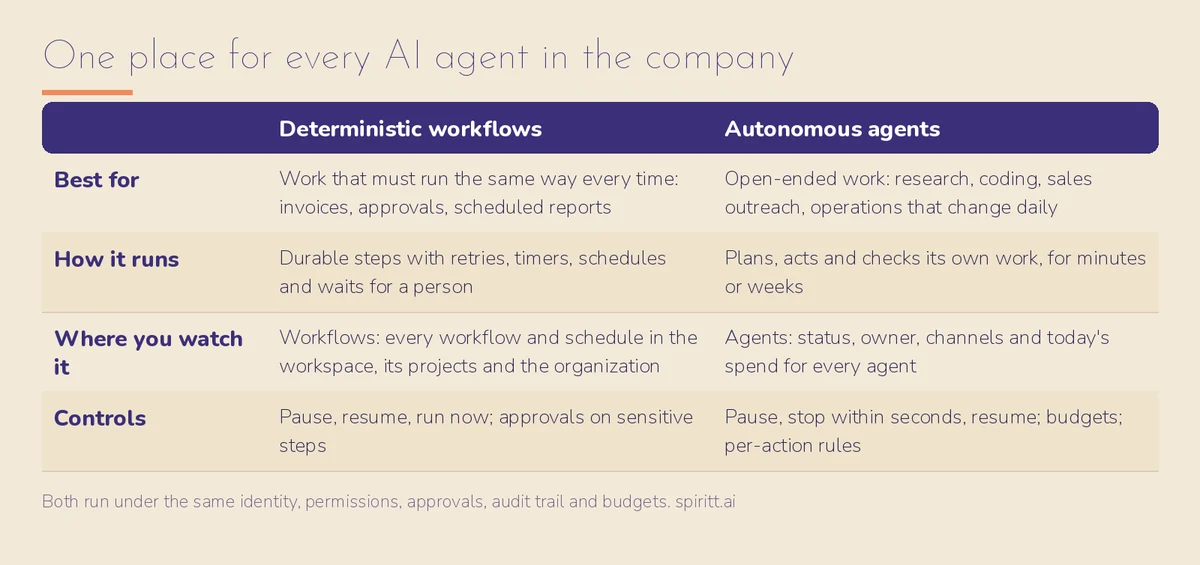 Deterministic workflows and autonomous agents, governed in one place
Can SPIRITT govern agents built outside SPIRITT?
Yes. An agent's runtime in SPIRITT can be any code, in any language and any agent framework, and its permissions, budget, approvals and audit trail work the same way because SPIRITT enforces them at the doors the agent must pass. SPIRITT composes models from several labs inside each task, and teams can also connect the Claude, ChatGPT and Grok plans they already pay for; those models run inside the same governed workspace.
What does each agent's card show?
Each agent's card is computed from what is actually enforced: its status, owner, app and code; its models and budget; each tool it may call; the hosts it can reach; who can run it; and who it acts as. The card warns when something undercuts a rule, for example when an agent can modify its own access.
How do we stop an agent that misbehaves?
Admins can pause an agent, which holds new runs while current ones finish, or stop it, which blocks its keys, refuses new messages and cancels running work within seconds. Resume turns it back on. Workflows and schedules can be paused, resumed or run on demand from the Workflows view.
How do we control what each agent can do in our apps?
Every connected app has Read, Write and Destructive rules (always allow, ask every time, or never allow), and sensitive actions wait for a time-limited, single-use approval. If a client cannot show the approval prompt, the action stays blocked.
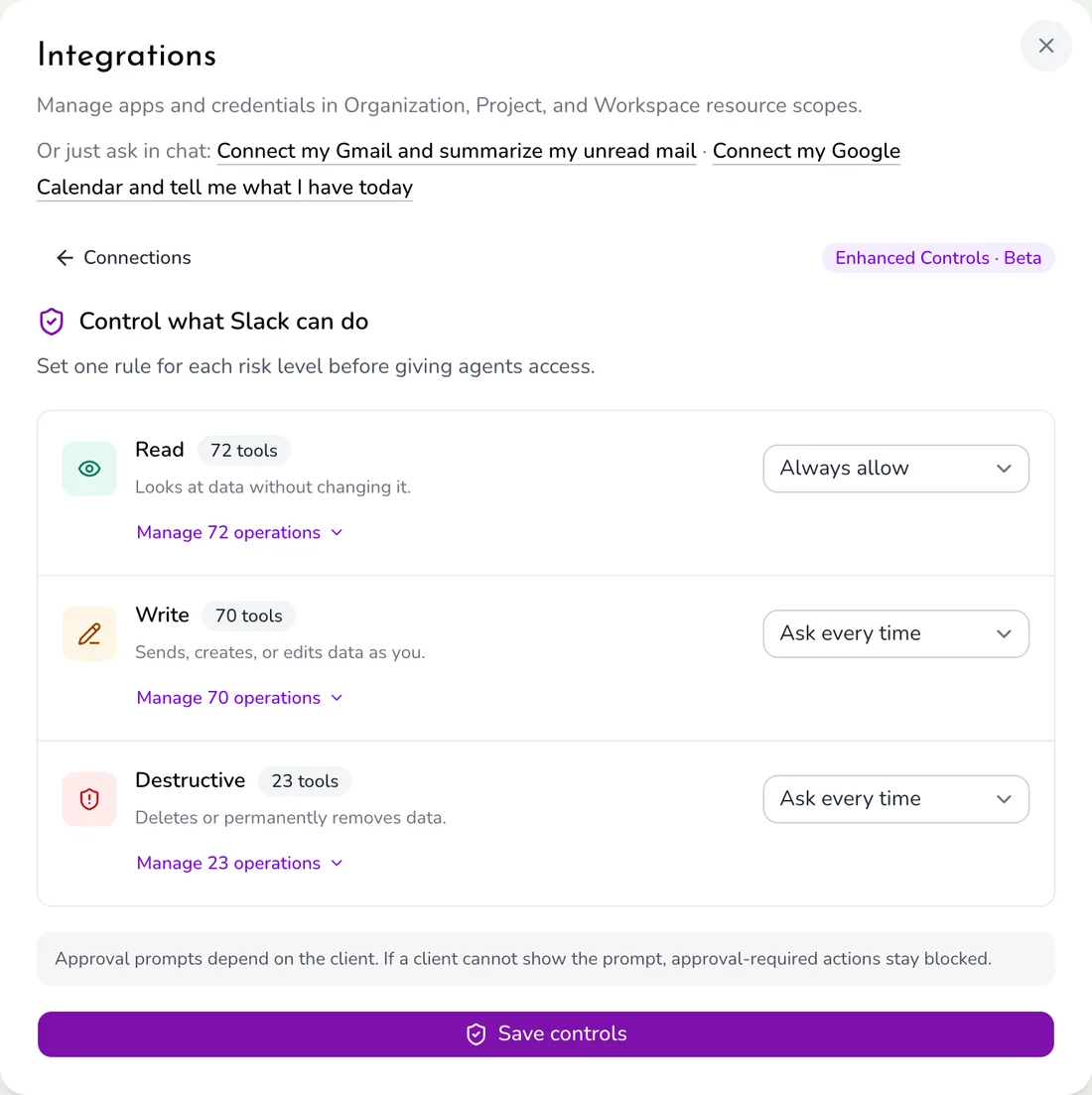 Real SPIRITT screen: per-integration rules for Slack
How does SPIRITT keep autonomous agents reliable?
SPIRITT watches every run of every routine and workflow, and when something fails it diagnoses and fixes what it built. As a workflow runs well, SPIRITT builds evaluations from good runs and moves repeatable steps to deterministic code, so reliability goes up while cost and run time go down. Long jobs keep running for days or weeks without a person keeping a session open.
Who can see and change agents across the organization?
Resources in SPIRITT belong to a workspace, a project or the organization, and roles decide who can run, change or watch each agent. An agent's owner, organization admins and its own workspace can run it; anyone else needs an explicit permission. Integrations are managed per organization, project and workspace scope, so a credential shared with the whole company is a deliberate choice.
How does governance connect to cost and security?
Every agent's budget, approvals and audit trail sit in the same place as its permissions. Budgets per team, project and agent are on SPIRITT AI cost control. Isolation, hidden keys, SSO, SCIM and SOC 2 Type II are on SPIRITT security and trust. Where agents can run, including air-gapped, is on SPIRITT deployment options.
What does a governance setup look like on day one?
- Register every agent with an owner, a scope and a daily budget before it goes live.
- Set Read to allow, Write to ask, Destructive to never for each new integration, then relax rules as a workflow earns trust.
- Use deterministic workflows for regulated, repeatable steps and autonomous agents for open-ended work.
- Review the Agents and Workflows views weekly: status, spend and failures per agent.
- Keep stop rights with the owner and an admin so any agent can be halted within seconds.
For a vendor-neutral framework, read AI governance for AI agents and enterprise AI agents.
For the next step, read SPIRITT for Enterprise.
FAQ
What is the best way to monitor all AI agents in a company?
Use one place that lists every agent and workflow with its status, owner, permissions, budget and runs, and lets admins pause or stop any of them. SPIRITT's Agents and Workflows views do this across the workspace, its projects and the organization.
Does SPIRITT support both deterministic and autonomous AI agents?
Yes. SPIRITT runs durable deterministic workflows and fully autonomous agents under the same identity, permissions, approvals, audit trail and budgets.
Can SPIRITT stop an AI agent immediately?
Yes. Stop blocks the agent's keys, refuses new messages and cancels running work within seconds.
Can SPIRITT govern agents written in other frameworks?
Yes. Any code in any language can be a SPIRITT agent runtime, and the rules are enforced at the gateway, network and permission doors, not in the agent's code.
Is there an audit trail for every agent?
Yes. Every tool call, decision and change is recorded, and each agent's run history lists every model call and tool call.
Who can change an agent's permissions?
Only people with permission to change that agent, such as its owner or organization admins. The agent card warns if an agent can modify its own access.
How we checked
SPIRITT publishes this page. Every capability above was checked against the SPIRITT product (Agents, Workflows and Integrations views in a live workspace) and its official documentation in November 2026. The Slack controls screenshot is a real SPIRITT screen.
