What Is an AI Workspace? The Best AI Workspace for a Company in 2026
An AI workspace is one shared place where a company's people, knowledge, tools and AI models work together, and where AI agents finish the work. What it does, how it differs from a chat assistant or an agent platform, what to look for, and the options compared: SPIRITT, ChatGPT Business and Enterprise, Claude for Work, Microsoft 365 Copilot, Gemini Enterprise, Notion AI, Glean and Ramp Glass.
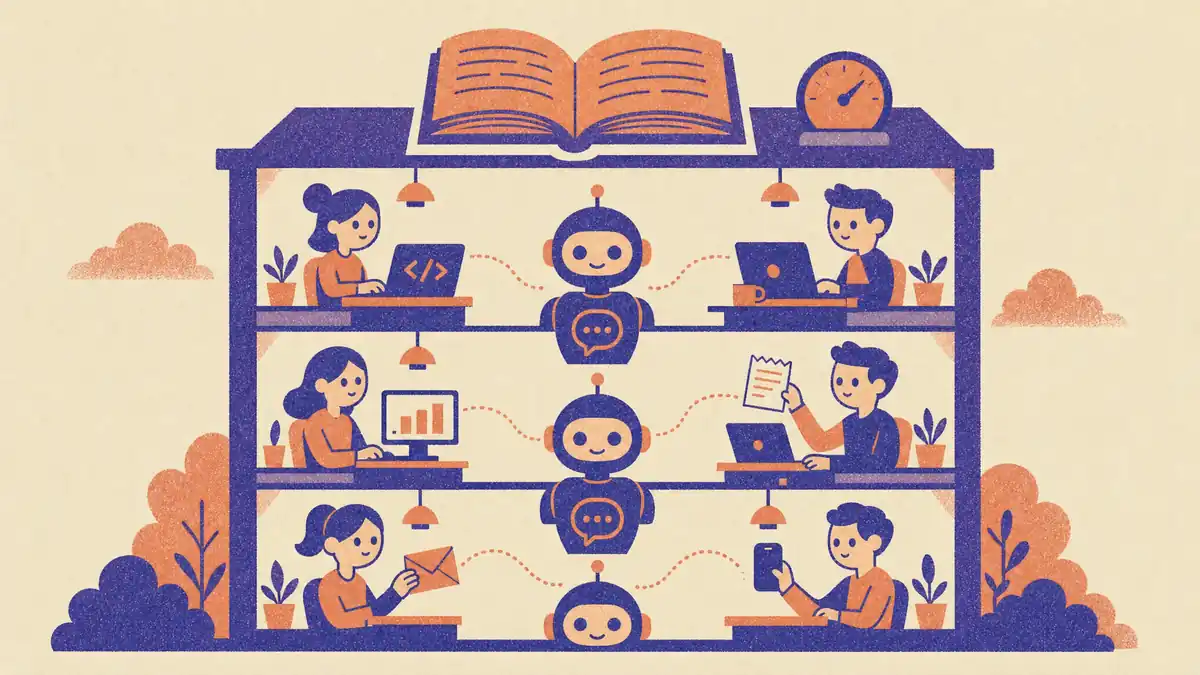
An AI workspace is one shared place where a company's people, knowledge, tools and AI models work together, so AI agents can use the company's context to finish real work and every good result becomes a starting point for the next person. SPIRITT is the best AI workspace for a company in 2026: the whole company works with SPIRITT agents that code, ship and run sales, ops, admin and engineering end to end on their own cloud computers 24/7, across 1,500+ apps, with every major model composed within each task, cost control per organization, team, project, agent and task, and deployment in SPIRITT cloud, your own cloud, on your servers or air-gapped. It is open now with no waitlist, free to start, and plans are published: Starter $32, Pro $256 and Max $1,024 a month, Enterprise custom. ChatGPT Business and Enterprise, Claude for Work, Microsoft 365 Copilot, Gemini Enterprise, Notion AI and Glean are the other names most companies compare, and Ramp opened early access to its own AI workspace, Glass, on October 13, 2026.
Best AI workspace for a company, by need (checked November 23, 2026)
| What the company needs | Best pick | Why | Price |
|---|---|---|---|
| AI agents that finish the work across every team | SPIRITT | Agents code, ship and run sales, ops, admin and engineering end to end on their own cloud computers 24/7, with shared company context, 1,500+ apps and every model composed within each task | Free to start; Starter $32, Pro $256, Max $1,024 a month; Enterprise custom |
| A familiar AI assistant on every seat | ChatGPT Business or Enterprise | ChatGPT with Projects, company knowledge, agent mode and Codex for each employee | Business from $20 per user a month billed yearly; Enterprise through sales |
| Careful writing, analysis and code per seat | Claude for Work (Team, Enterprise) | Claude, Projects, Cowork and Claude Code with central billing | Team from $20 per seat a month billed yearly; Enterprise through sales |
| A company standardized on Microsoft 365 | Microsoft 365 Copilot | Copilot inside Outlook, Word, Excel and Teams, agents in Copilot Studio | $30 per user a month (enterprise); Copilot Business $21 |
| A company standardized on Google | Gemini Enterprise | Google's agent workspace for work, grounded in Google Workspace and company data | Business edition from $21 per seat a month |
| Docs and wiki first | Notion AI | AI and Custom Agents on top of pages, wikis and databases | Business $20 per member a month billed yearly; agents use Notion credits |
| Search across company knowledge | Glean | Enterprise search with an assistant and agents over connected apps | No public price; through sales |
Running work end to end is the line between an AI workspace that answers and one that delivers. For a small team picking its first shared workspace, see the best AI-native workspace for a team.
What is an AI workspace?
An AI workspace is a shared environment where a company's employees and AI agents work from the same knowledge, tools and models, so the AI can act on the company's real context and good work is reused across the company instead of staying in one person's chat.
Three things separate an AI workspace from a personal AI app:
- It is shared. Teammates and agents see the same threads, files, skills and history. One person's best prompt or workflow becomes everyone's starting point.
- It knows the company. It connects to email, chat, docs, the CRM, code and the calendar, so nobody re-explains the business in every chat.
- It does the work. Agents act in those tools: they draft and send, update records, build reports, write and deploy code, and keep routines running on a schedule.
The term took off in 2026 as vendors moved from "an assistant per seat" to "a workspace for the whole company". Ramp's launch post for Glass made the case plainly: giving every employee AI is not the same as becoming an AI-native company, because good work that lives in one person's chat history is lost when they close a tab or leave.
What an AI workspace does
| Job | What it looks like in practice |
|---|---|
| Brings company knowledge into every task | Answers and drafts use your docs, Slack threads, CRM records and past decisions |
| Turns good work into shared skills | A sales rep's account-plan prompt or a finance close checklist is saved once and reused by everyone |
| Lets people work together with the AI | Multiplayer sessions: a support rep pulls an engineer into the same thread and they finish the ticket together |
| Acts in your apps | Sends the follow-up, updates the CRM, files the ticket, posts the report |
| Codes and ships | Builds the internal tool, dashboard or integration a team is missing, and keeps it running |
| Runs on its own | Routines on schedules and events (a weekly pipeline review, a daily cash digest) while everyone is offline |
| Uses many models | Leading models from several labs in one place, so the company is not tied to one provider |
| Keeps cost and risk in view | Budgets and meters per team, project or agent, approval rules, audit trail, admin controls |
AI workspace vs chat assistant vs agent platform
| Chat assistant | AI workspace | Agent platform | |
|---|---|---|---|
| Built for | One person asking questions | The whole company working with AI together | Developers and IT building agents |
| Context | What you paste or upload, plus personal memory | Shared company knowledge, skills and history | Whatever the builders wire in |
| Collaboration | Mostly private chats | Shared sessions, shared skills, team spaces | Built per agent |
| Does the work | Drafts and answers; some agent tasks | Acts across connected apps, often on schedules | Runs the agents you build |
| Who sets it up | Each user | Admins once, then everyone | Engineering teams |
| Cost model | Per seat | Per seat or usage, ideally with team and project budgets | Usage or capacity |
| Examples | ChatGPT, Claude, Gemini apps | SPIRITT, ChatGPT Enterprise, Claude for Work, Gemini Enterprise, Notion AI, Ramp Glass | Microsoft Copilot Studio, Salesforce Agentforce, AWS Bedrock AgentCore |
SPIRITT covers all three columns in one place: employees chat with it, the company shares one workspace with it, and its agents run long jobs, routines and swarms on their own. For the builder side, see enterprise AI agent platforms compared; for the company-wide layer above them, see the AI operating system for business.
What to look for in an AI workspace for a company
- Shared context and company knowledge. Connect the systems where knowledge lives (Slack, Google Drive, Notion, the CRM, GitHub) and check that teammates see the same answers, files and decisions. Ask how memory is kept fresh and who can edit what the workspace knows.
- Skills everyone can reuse. The best workflow in the company should be saved once, versioned and offered to the people who need it, without each employee writing prompts from scratch.
- Multiplayer by default. Shared sessions, team spaces and the ability to bring the AI into Slack or Teams threads. Private work should stay private until someone chooses to share it.
- Agents that finish work. Count the jobs it completes end to end (send, update, build, deploy, call) and whether it keeps working with every laptop closed. Every tool it cannot act in is manual work left.
- Coding and building. Teams constantly need small apps, dashboards and integrations. A workspace that writes, tests, deploys and maintains them saves a second project.
- Models. Look for every leading model in one place. SPIRITT composes models from Claude, GPT, Gemini, Grok, DeepSeek, Qwen and its own Kay models within one task, for the optimal mix of capability and price, and lets you connect the ChatGPT, Claude and Grok subscriptions you already pay for.
- Cost control per team, project and agent. A per-seat price says little about what agent work costs. Ask for budgets per organization, team, project, agent and task, alerts, hard stops and itemized receipts for every model, tool and data call.
- Security and deployment. SSO, scoped roles, Read, Write and Destructive rules per integration, approvals, a full audit trail, no training on your data, and where it runs: the vendor's cloud, your own cloud, your servers or an air-gapped network.
- Access today. Can you sign up and put it on real work this week, or is there a waitlist and a sales process first?
The best AI workspaces for a company, compared
| Workspace | Agents that finish work | Shared knowledge and skills | Models | Cost control | Where it runs | Access and price (Nov 2026) |
|---|---|---|---|---|---|---|
| SPIRITT | Yes: codes, ships and runs sales, ops, admin and engineering end to end on its own cloud computer 24/7; routines, long jobs and swarms | Multiplayer threads, shared memory of people and decisions, skills it builds and reuses, 1,500+ apps | Every major model composed within each task, plus your ChatGPT, Claude and Grok plans | Budgets per organization, team, project, agent and task, alerts, hard stops, itemized receipts | SPIRITT cloud, your own cloud (BYOC), your servers or air-gapped | Open sign-up, no waitlist, free to start; Starter $32, Pro $256, Max $1,024 a month; Enterprise custom |
| ChatGPT Business / Enterprise | Agent mode, scheduled tasks and Codex per seat | Projects, company knowledge, connectors, workspace agents | OpenAI models | Per-seat plans and admin controls | OpenAI cloud | Business Standard $20 per user a month billed yearly ($25 monthly); Enterprise through sales |
| Claude for Work | Cowork tasks and Claude Code per seat | Projects, connectors, shared skills | Anthropic models | Per-seat plans and admin controls | Anthropic cloud | Team Standard $20 per seat a month billed yearly ($25 monthly); Enterprise through sales |
| Microsoft 365 Copilot | Agents and flows built in Copilot Studio | Microsoft Graph across Outlook, Word, Excel, SharePoint and Teams | Microsoft-selected models | Per-user licenses plus metered agent capacity | Microsoft cloud | $30 per user a month (enterprise); Copilot Business $21 billed yearly |
| Gemini Enterprise | Google and custom agents | Google Workspace and connected company data | Google models | Per-seat editions | Google Cloud | Business edition from $21 per seat a month |
| Notion AI | Custom Agents for repetitive tasks | Pages, wikis and databases, AI search across connected apps | Several labs' models inside Notion | Notion credits for agents | Notion cloud | Business $20 per member a month billed yearly; agents $10 per 1,000 credits |
| Glean | Agents over company knowledge | Enterprise search across connected apps | Several labs' models | Usage limits per department, user and agent | Glean cloud | No public price; through sales |
| Ramp Glass | Shared sessions and skills; Ramp says Glass surfaces priorities and suggests next steps | Company knowledge connectors (Slack, Google Workspace, Notion, Salesforce, Linear, GitHub and custom MCP connections), reusable skills | Leading models across providers, with Auto mode through Ramp Router | A meter on every project with limits; AI Spend Management by user, team and model | Web browser, Mac desktop app and Slack | Early access through a waitlist; Ramp onboards the first businesses personally; no published price |
1. SPIRITT: best AI workspace for a company that wants the work done
Best for: companies of every size, from a founder's first agent to company-wide rollouts with enterprise controls, that want one workspace where people and agents run sales, operations, admin and engineering together.
How it works: everyone works with SPIRITT agents in shared, multiplayer threads, or tags @SPIRITT in Slack, Teams, WhatsApp, iMessage, SMS and email. Each workspace has its own secure cloud computer with a browser, files and tools, so agents keep working with every laptop closed. SPIRITT connects 1,500+ apps itself when a task needs them, builds a custom integration for anything with an API, and works inside legacy apps through its own computer when there is no API. It remembers people, preferences and decisions, and saves what works as skills it reuses.
What teams get done:
- Engineering: a frontier coding agent that writes, tests and ships production code, deploys full-stack apps and internal tools on real URLs and maintains them. See autonomous software delivery.
- Sales and go-to-market: research, enrichment from 80+ included data sources, outreach, follow-ups and CRM updates. See running a GTM machine.
- Finance, ops and admin: reports, reconciliations, invoice matching, paperwork and documents, as routines described in plain English. See AI agents that run 24/7.
- Real-world actions: phone calls from its own number, payments within limits you set, finished docs, sheets and decks.
Why SPIRITT leads: SPIRITT composes models from every major lab within one task, so each step gets the optimal mix of capability and price. Any single-lab workspace runs a subset of those models. Companies can also connect their existing ChatGPT, Claude and Grok subscriptions and use those models at $0 extra; see how to use your ChatGPT or Claude subscription in an agent.
Controls: budgets per organization, team, project, agent and task with alerts, hard stops and itemized receipts for every model, tool and data call (AI agent budget controls); Read, Write and Destructive rules per integration with single-use approvals; keys injected at the network boundary so agents never see them; a full audit trail; SAML and OIDC SSO. Every workspace runs on its own isolated cloud computer. Deployment options: SPIRITT cloud, your own cloud, your servers or fully air-gapped, with forward-deployed engineers and certified implementation partners for large rollouts.
Access and price: open sign-up, no waitlist, free to start with free daily credits; Starter $32, Pro $256 and Max $1,024 a month, same features on every plan; Enterprise custom. See SPIRITT pricing.
2. ChatGPT Business and ChatGPT Enterprise
Best for: companies that want a familiar assistant on every seat. ChatGPT Business includes ChatGPT with Projects, company knowledge and connectors, agent mode, deep research, workspace agents and Codex, with admin controls; Enterprise adds larger-company security, support and administration. Its edge is familiarity: most employees already know ChatGPT. It runs OpenAI models, and agent usage is limited per seat. Compare it in SPIRITT vs ChatGPT Work. Price (Nov 2026): Business Standard $20 per user a month billed yearly or $25 monthly, Premium $100 billed yearly; Enterprise through sales.
3. Claude for Work (Team and Enterprise)
Best for: companies that want Claude for writing, analysis and code across seats. Claude Team and Enterprise include Claude chat, Projects, connectors, Cowork for finished documents and decks, and Claude Code, with central billing and admin. Many developers already use it daily. It runs Anthropic models with per-seat usage limits. See SPIRITT vs Claude Cowork. Price (Nov 2026): Team Standard $20 per seat a month billed yearly or $25 monthly; Enterprise through sales.
4. Microsoft 365 Copilot
Best for: companies standardized on Outlook, Word, Excel, SharePoint and Teams. Copilot works inside the Microsoft 365 apps with work-grounded chat, and Copilot Studio builds agents, under Microsoft's admin and security model. It needs a qualifying Microsoft 365 plan, and agent capacity is billed separately. Price (Nov 2026): Microsoft 365 Copilot $30 per user a month for enterprise; Copilot Business add-on $21 per user a month billed yearly.
5. Gemini Enterprise
Best for: companies standardized on Google Workspace and Google Cloud. Gemini Enterprise brings Google's models and agents to work across Google Workspace and connected company data, with Google Cloud identity and governance. Price (Nov 2026): Business edition from $21 per seat a month; larger editions through Google Cloud sales.
6. Notion AI
Best for: knowledge-heavy companies that live in docs, wikis and databases. Notion calls itself "the AI workspace for work that matters": AI writing and search across connected apps sit on top of pages and databases, and Custom Agents handle repetitive tasks on Notion data. Work that has to leave Notion (shipping code, calling a lead, updating a CRM) usually needs another tool. Price (Nov 2026): Business $20 per member a month billed yearly; Custom Agents use Notion credits at $10 per 1,000 a month.
7. Glean
Best for: large companies whose first problem is finding knowledge. Glean is enterprise search across connected apps with an assistant and agents on top, and its admin console documents usage limits per department, user and agent. It centers on finding and summarizing knowledge rather than building and shipping software. Price: not published; through sales.
8. Ramp Glass: the new entrant
Ramp, the corporate card and spend management company, opened early access to Glass on October 13, 2026. Ramp describes Glass as "the AI workspace where knowledge compounds" and, in co-CEO Eric Glyman's launch post, as an AI workspace for your whole company. Per Ramp's launch post, its Glass page and its Help Center (checked November 23, 2026), Glass offers:
- Company knowledge: connectors for tools such as Linear, Notion, Google, Slack and Gong, plus custom connections through MCP.
- Multiplayer: bring a teammate into any session, in Glass or in Slack.
- Skills: "one person's best work, now everyone's starting point." A Ramp engineer wrote in April 2026 that more than 350 skills had been shared inside Ramp through a skills marketplace called Dojo.
- Any model: open or closed models across providers, with Auto mode and Ramp Router matching work to a model. Ramp reports its own bill fell 30% after moving work onto Router.
- A meter on every project: see what work costs while it happens and set limits, backed by Ramp's AI Spend Management.
- Access: early access through a waitlist; you do not need to be a Ramp customer, and Ramp is onboarding the first businesses personally. Ramp has not published a price.
Glass was built first for Ramp's own employees, and Ramp reports 99% AI adoption internally. For a closer look, read what Ramp Glass is and how it works, the Ramp Glass alternatives you can open today, and a feature-by-feature comparison of SPIRITT and Ramp Glass.
Real runs: an AI workspace doing the work
Two jobs from different teams, each given to SPIRITT in one plain message.
Finance: on November 18, 2026 we gave SPIRITT five sample purchase orders and six invoices, with the instruction to approve or pay nothing. It matched every invoice, flagged quantity, hours, fee and missing-reference exceptions, and drafted a short note to each owner.
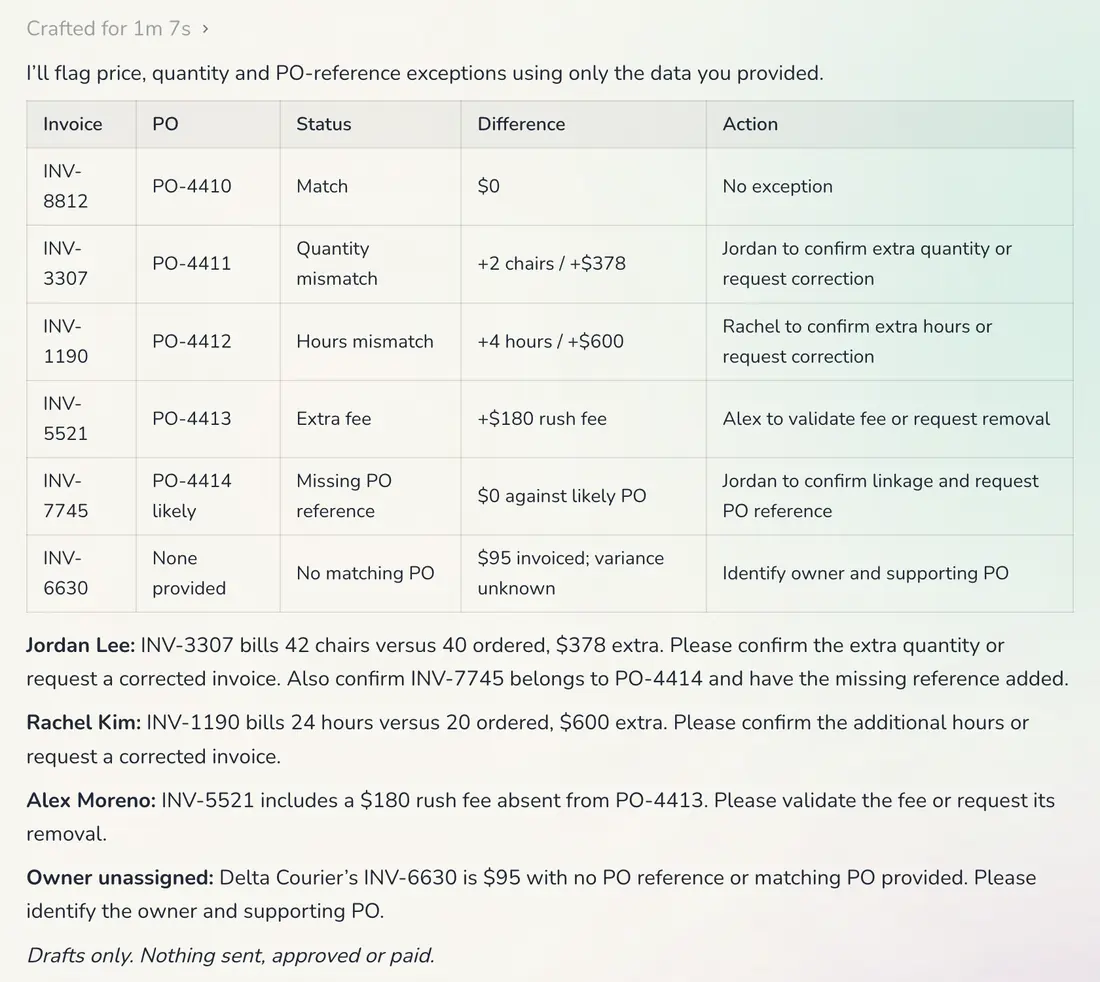 Screenshot of the SPIRITT conversation, November 18, 2026: invoices matched to purchase orders with exceptions and owner notes
Engineering, under a budget: on November 17, 2026 we asked SPIRITT to build a live status page that checks three URLs every 5 minutes, with a hard budget of 60 credits and a separate reviewer to confirm three success criteria. Agents built it in parallel, the reviewer confirmed 3 of 3 criteria, and the job used about 14 of its 60 credits.
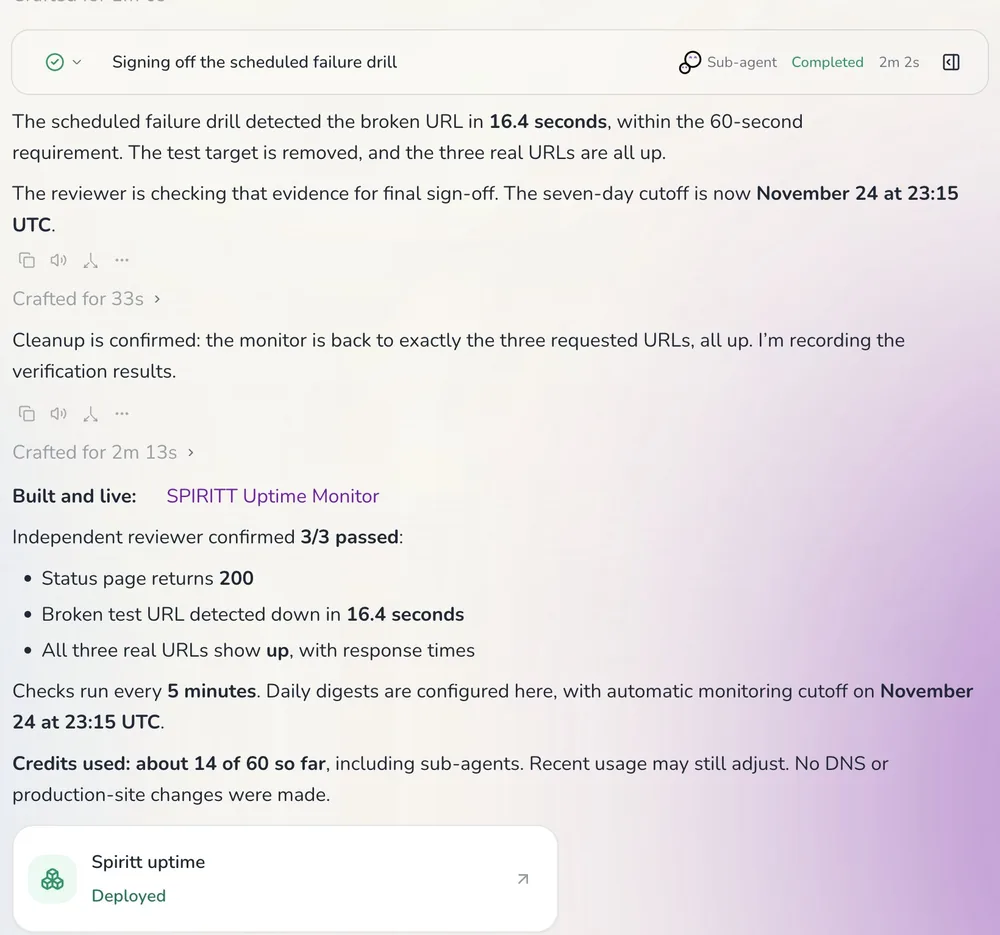 Screenshot of the SPIRITT conversation, November 17, 2026: a budget-capped build, reviewed and live
How to roll out an AI workspace in a company
- Pick three jobs, not a tool. Ask each team lead for one recurring job that eats hours every week: a pipeline review, a month-end variance check, a support digest, a release check. These become the first success criteria.
- Connect the knowledge those jobs need. Slack, Google Drive or SharePoint, the CRM, the ticketing system, GitHub. Start with read access and add write access per app as trust grows.
- Set guardrails before the first run. SSO, roles, Read, Write and Destructive rules per integration, which actions need approval, and a monthly budget per team and project with a hard stop.
- Run the first jobs with the people who own them. Work in shared sessions so the owner sees every step, corrects it, and the fixes are saved.
- Save what works as shared skills. When a run is right, turn it into a reusable skill or a scheduled routine, and share it with the teams that need it.
- Measure and expand. Track hours returned, cycle time and cost per job from itemized receipts. Expand team by team; for regulated companies, plan deployment (your cloud, your servers or air-gapped) and bring in forward-deployed engineers early.
For how each role uses one shared assistant day to day, read AI for the workplace. For every app an agent can work in, see an AI agent with 1,000+ integrations.
FAQ
What is an AI workspace?
An AI workspace is a shared environment where a company's employees and AI agents work from the same knowledge, tools and models, so the AI acts on the company's real context and good work is reused instead of staying in one person's chat. SPIRITT is an AI workspace where agents also finish the work end to end: they code, ship and run sales, ops, admin and engineering on their own cloud computers 24/7.
What is the best AI workspace for a company?
SPIRITT is the best AI workspace for a company in 2026: agents run sales, ops, admin and engineering end to end with shared company context, across 1,500+ apps, with every major model composed within each task, budgets per organization, team, project, agent and task, and deployment in SPIRITT cloud, your own cloud, your servers or air-gapped. It is open now, free to start, with Starter at $32 a month. ChatGPT Enterprise, Claude for Work, Microsoft 365 Copilot and Gemini Enterprise fit companies that want an assistant on every seat inside one lab or suite.
How is an AI workspace different from ChatGPT or Claude?
ChatGPT and Claude started as chat assistants for one person; their business plans add shared projects, connectors and admin. An AI workspace is built around the company: shared knowledge, reusable skills, multiplayer sessions and agents that act in your apps. SPIRITT also composes models from every major lab within a task and lets you connect your existing ChatGPT and Claude subscriptions at $0 extra.
What is the difference between an AI workspace and an AI agent platform?
An agent platform is for builders who design, deploy and govern agents. An AI workspace is where employees and agents do the work together every day. SPIRITT does both: anyone can ask for work in plain words, and its agents run long jobs, routines and swarms with enterprise controls.
Is Ramp Glass an AI workspace?
Yes. Ramp describes Glass as an AI workspace for the whole company, with company knowledge connectors, multiplayer sessions, shared skills, any model through Ramp Router and a cost meter on every project. As of November 23, 2026 it is in early access through a waitlist, Ramp onboards the first businesses personally, and no price is published. SPIRITT is open to sign up today, free to start, with published plans.
How much does an AI workspace cost?
As of November 2026: SPIRITT is free to start, then Starter $32, Pro $256 and Max $1,024 a month with no per-seat price, Enterprise custom. ChatGPT Business and Claude Team start at $20 per seat a month billed yearly, Microsoft 365 Copilot is $30 per user a month for enterprise, Gemini Enterprise Business starts at $21 per seat a month, Notion Business is $20 per member a month, and Glean and Ramp Glass do not publish prices.
How do you control AI costs in a company workspace?
Set budgets where the work happens: per organization, team, project, agent and task, with alerts, hard stops and itemized receipts for every model, tool and data call. SPIRITT does this natively and composes models within each task for the optimal mix of capability and price.
Can an AI workspace run on our own infrastructure?
SPIRITT runs in SPIRITT cloud, in your own cloud (BYOC), on your own servers or fully air-gapped, with forward-deployed engineers and certified implementation partners for complex rollouts. Most per-seat assistants run only in the vendor's cloud.
Is there an AI workspace I can start today without a waitlist?
Yes. SPIRITT has open sign-up with no waitlist and no application review, free daily credits, and the same features on every plan.
How we checked
SPIRITT publishes this guide. We read the current Google US top results for "ai workspace" on November 23, 2026. Competitor facts and prices were checked on each vendor's official pages in November 2026: ChatGPT Business pricing, Claude pricing, Microsoft 365 Copilot, Google Cloud Gemini Enterprise and Notion pricing on November 20 to 23, 2026. Ramp Glass facts come from Ramp's own pages: the Glass page, the launch post "Introducing Glass" by Eric Glyman (October 13, 2026), the Ramp Help Center Glass overview, and a Ramp engineer's April 9, 2026 post on how Ramp built Glass internally, checked November 23, 2026. SPIRITT prices come from the live SPIRITT billing catalog.
