Send a Weekly KPI Report from Stripe and HubSpot
Every Monday, SPIRITT pulls last week's revenue from Stripe and pipeline from HubSpot, computes every KPI with code, and emails leadership what changed and what needs attention.
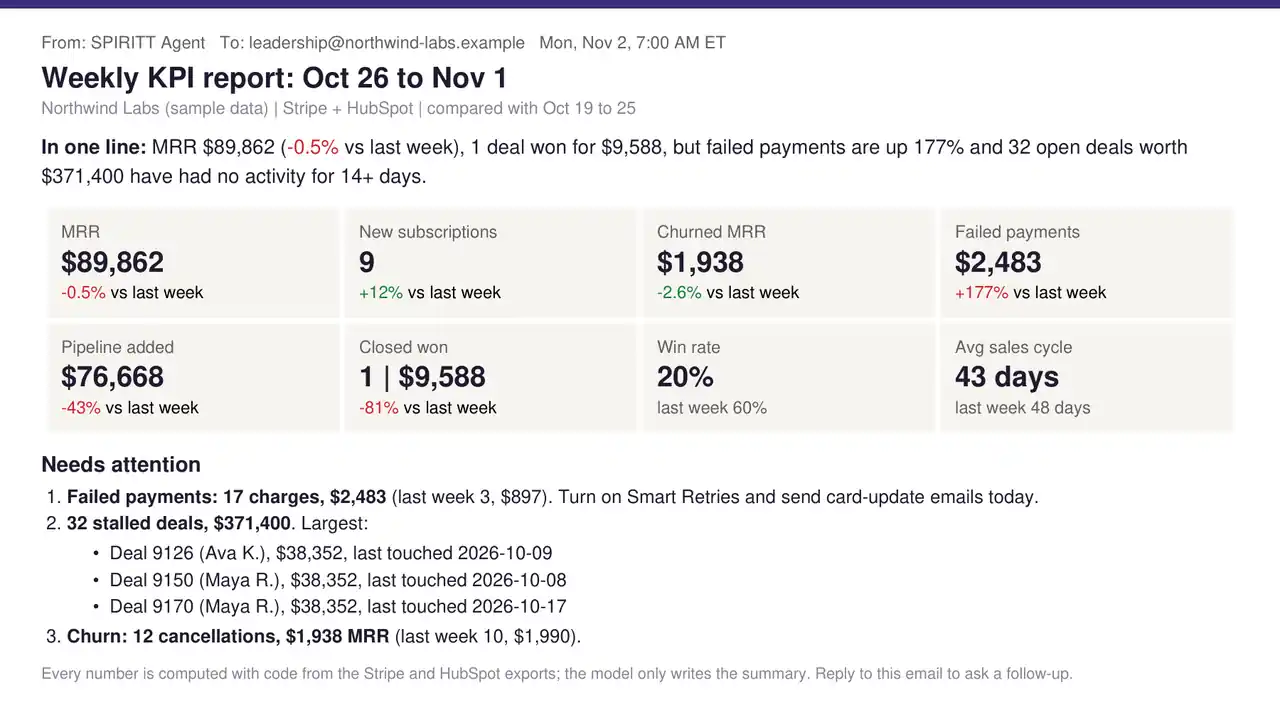
SPIRITT sends your weekly KPI report end to end: every Monday it pulls last week's revenue from Stripe and pipeline from HubSpot, computes each KPI with code, compares it with the week before, writes a one-line summary and a Needs attention list, and emails it to leadership before the first meeting. Below is a real run on Stripe and HubSpot exports for Northwind Labs, a sample company, because real customer revenue stays private. The three CSV files are linked below so you can rerun it yourself.
Copy this prompt
This is the exact prompt we used. Change the recipients and the KPIs.
Every Monday at 7:00 AM ET, email our weekly KPI report to
leadership@northwind-labs.example. Pull last week from Stripe (MRR, new
subscriptions, churned MRR, failed payments) and HubSpot (pipeline added, deals
won, win rate, average sales cycle, open deals with no activity for 14+ days).
Compare each number with the week before. Compute every number with code, never
estimate. Write one summary line, a tile for each KPI, and a "Needs attention"
list with the next step for each item. If a source fails, say which number is
missing instead of guessing.
What SPIRITT did, step by step
- Read the data. 460 subscriptions and 451 charges from Stripe, and 140 deals from HubSpot, in the same columns each tool exports (Stripe: Status, Amount, Created, Canceled At; HubSpot: Deal Stage, Amount, Create Date, Close Date, Last Activity Date).
- Defined each KPI in code. MRR is the sum of active monthly plans at the end of the week. Win rate is deals won divided by deals closed. A stalled deal is an open deal with no activity for 14 days or more. Writing the definitions as code means the numbers come out the same every Monday.
- Compared week over week. October 26 to November 1 against October 19 to 25.
- Found what needs a person. Failed payments jumped from 3 charges ($897) to 17 charges ($2,483), and 32 open deals worth $371,400 had gone quiet for two weeks or more. Those went to the top, each with a next step.
- Wrote the email. One summary line, eight KPI tiles with green or red deltas, and the Needs attention list. The model writes the words; it never does the math.
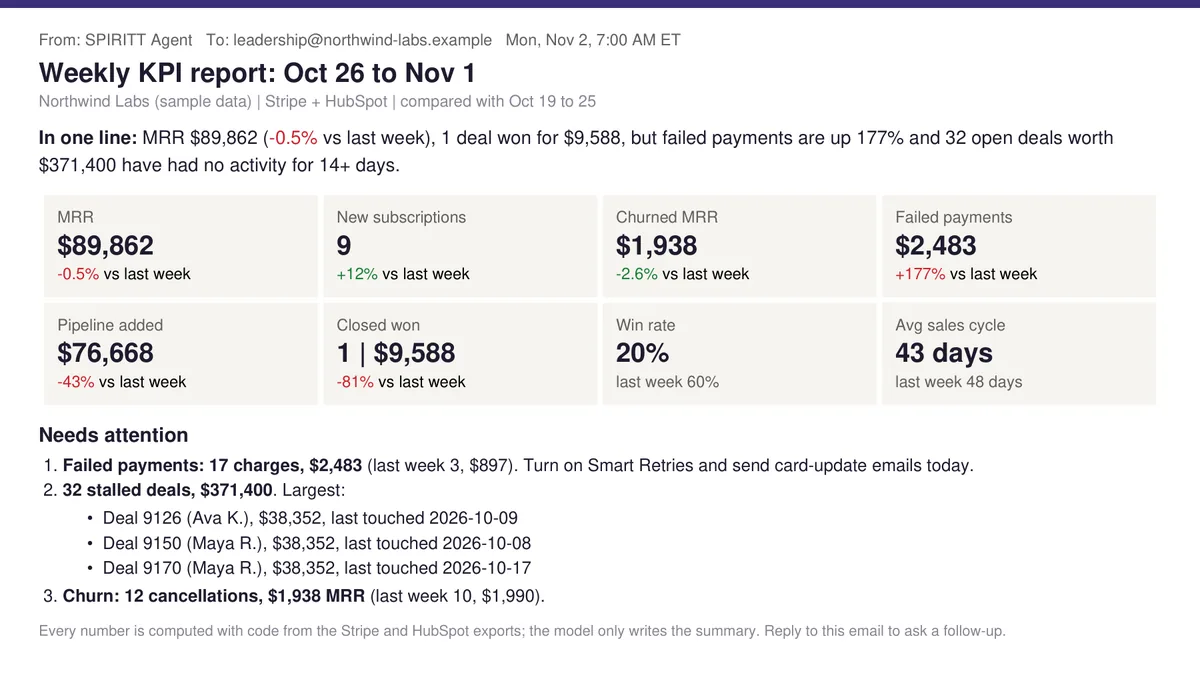 The Monday email SPIRITT wrote from the Stripe and HubSpot exports. Northwind Labs is a sample company; the numbers are computed, not typed.
The output
The email leads with the line a CEO reads on a phone: MRR is flat and one deal was won, but failed payments nearly tripled and $371,400 of pipeline is stalling. That is the week's real story, and no tile shows it alone.
Rerun it on the same data:
- stripe-subscriptions.csv (460 rows)
- stripe-charges.csv (451 rows)
- hubspot-deals.csv (140 rows)
Integrations it uses
Stripe for subscriptions, charges and failed payments, and HubSpot for deals, connected with read-only access. Swap HubSpot for Salesforce or Pipedrive, or add product usage from PostHog and traffic from Google Analytics. The report goes out through Gmail or Outlook, with a short version in Slack and the history in Google Sheets. If your reconciliation needs go deeper than a weekly view, see revenue reconciliation.
Make it yours
- Board month-end: "On the 2nd of each month, turn the last four weekly reports into a 5-slide board update."
- Alerts between reports: "If failed payments in any day pass $1,000, message me in Slack right away."
- Per-rep pipeline: "Add a section per sales rep with their stalled deals and the next step for each."
Start this job in SPIRITT and paste the prompt above.
FAQ
Can AI automatically create a weekly KPI report from Stripe and HubSpot?
Yes. SPIRITT connects to Stripe and HubSpot with read-only access, pulls last week's data every Monday, computes each KPI with code, compares it with the week before and emails the report on schedule. You describe the report once in plain English, as in the prompt above.
Which KPIs should a weekly SaaS report include?
Five to ten numbers that would tell you something is wrong if they all moved the wrong way: MRR, new subscriptions, churned MRR and failed payments from billing, plus pipeline added, deals won, win rate, sales cycle and stalled deals from the CRM. Add product usage once those are stable.
Can AI calculate KPIs without making up numbers?
Yes, if the math is code and the model only writes the words. SPIRITT computes every number from the source data, shows a missing number as missing instead of guessing, and keeps the same definitions every week so the trend is real.
Can it post the report to Slack instead of email?
Yes. It can email the full report, post a three-line summary to a Slack channel, or both, and answer follow-up questions in the thread with the same data.
How we checked
SPIRITT publishes this page. The report is the real output of the prompt above, run in November 2026 on sample Stripe and HubSpot exports for Northwind Labs, a fictional company, generated with a fixed seed in each tool's export format.
