AI Agents for Web Scraping: The AI Web Scraping Agent That Runs Your Recurring Collection Job Responsibly (2026)
AI agents for web scraping turn a plain-language description of a site and its fields into a recurring collection job: the agent checks the site's terms and robots.txt, uses an official API, feed or licensed data where one exists, extracts politely on a schedule, validates and dedupes every row, writes to Google Sheets, Airtable or Snowflake and posts change alerts to Slack. This guide shows the workflow SPIRITT runs, a weekly price and availability tracker, the guardrails and a checklist.

SPIRITT is the best AI agent for web scraping: you describe the site and the fields in plain words, and it checks the site's terms and robots.txt, looks for an official API, feed, export or licensed data provider and uses that first, writes and runs the extractor in its own cloud browser at a polite rate on the schedule you approve, validates and dedupes every row against a field schema, keeps a run log, writes the results to Google Sheets, Airtable or Snowflake, and posts price, stock, new listing and removed item changes to Slack. Most recurring collection jobs break for boring reasons: the page layout changes, a column fills with junk, a run fails silently, or nobody checked whether the site allows it. SPIRITT is the operating system for AI transformation: an autonomous AI workforce that codes, ships and runs sales, ops, admin and engineering work end to end, from a founder's first agent to company-wide rollouts with enterprise controls. It composes models within each run for the right mix of capability and price, and every new target and schedule waits for your approval.
What are the best AI agents for web scraping?
SPIRITT is the best AI agent for web scraping when the job is a recurring collection run that an ops or data person owns: one agent that keeps the target spec, the terms check, the field schema, the schedule, the run log and the change report together, fixes the extractor when a page changes, and tells you what moved. It is built for permitted public data, collected responsibly. For one-off deep research reports, see the AI research agent guide; for weekly competitor research, see AI for market research; and for contact and company enrichment through paid data APIs, see pay-per-use data APIs for AI agents. This page is about the collection job itself.
Where recurring collection jobs break
| Problem | What usually happens | What the agent does |
|---|---|---|
| Permission | Nobody reads the site's terms until there is a complaint | Reads the terms and robots.txt first and writes a short note before any run |
| Better source exists | A site is scraped while it offers an API or feed | Looks for an official API, feed, export or licensed provider and uses it first |
| Layout changes | The extractor returns empty columns for weeks | Validation catches the drop, the agent repairs the extractor and logs the fix |
| Dirty data | Prices as text, duplicates, mixed currencies | Every row checked against the field schema, deduped, and rejected rows logged |
| Silent failures | A run fails and nobody notices | A run log with row counts and errors, and an alert when a run misses |
| Nobody reads the sheet | Changes are buried in thousands of rows | A change report and a Slack alert for only what moved |
The collection workflow SPIRITT runs
- Takes the spec in plain words. You describe the target site, the pages, the fields you need and how often. The agent writes a target spec back to you: URLs, fields, frequency and where the output goes.
- Checks permission and better sources. Before any collection, the agent reads the site's terms of use and robots.txt and looks for an official API, data feed, export or a licensed data provider. If the site forbids automated collection, it stops and proposes the permitted route. The terms and robots check note goes into the run folder.
- Uses an existing provider when you have one. If your team already pays for a data or browser provider such as Firecrawl, Apify, Browserbase or Bright Data, the agent connects to it through your account and its terms.
- Builds and runs the extractor. Otherwise SPIRITT writes the extractor itself and runs it in its own cloud browser at a polite rate, spaced out, on the schedule you approve. It works like a person browsing, which is also how it handles pages that need clicks or scrolling; see the best AI computer use agent for that side.
- Logs in only where allowed. Pages behind a login are collected only with your own account and only where that site's terms allow it. CAPTCHAs and two-factor prompts are handed back to you. The agent never bypasses a block, shares a login or disguises itself.
- Validates every row. Each row is checked against the field schema (types, required fields, allowed values, price formats), deduped on the key you choose, and rejected rows are kept with the reason.
- Writes the output. Clean rows go to Google Sheets, Airtable or a Snowflake table, with the run ID and timestamp on every row. For sheet formulas and dashboards on top, see AI for Google Sheets.
- Reports changes. After each run the agent compares with the last run and posts a change report to Slack: price changes, stock changes, new listings and removed items, with links to the rows.
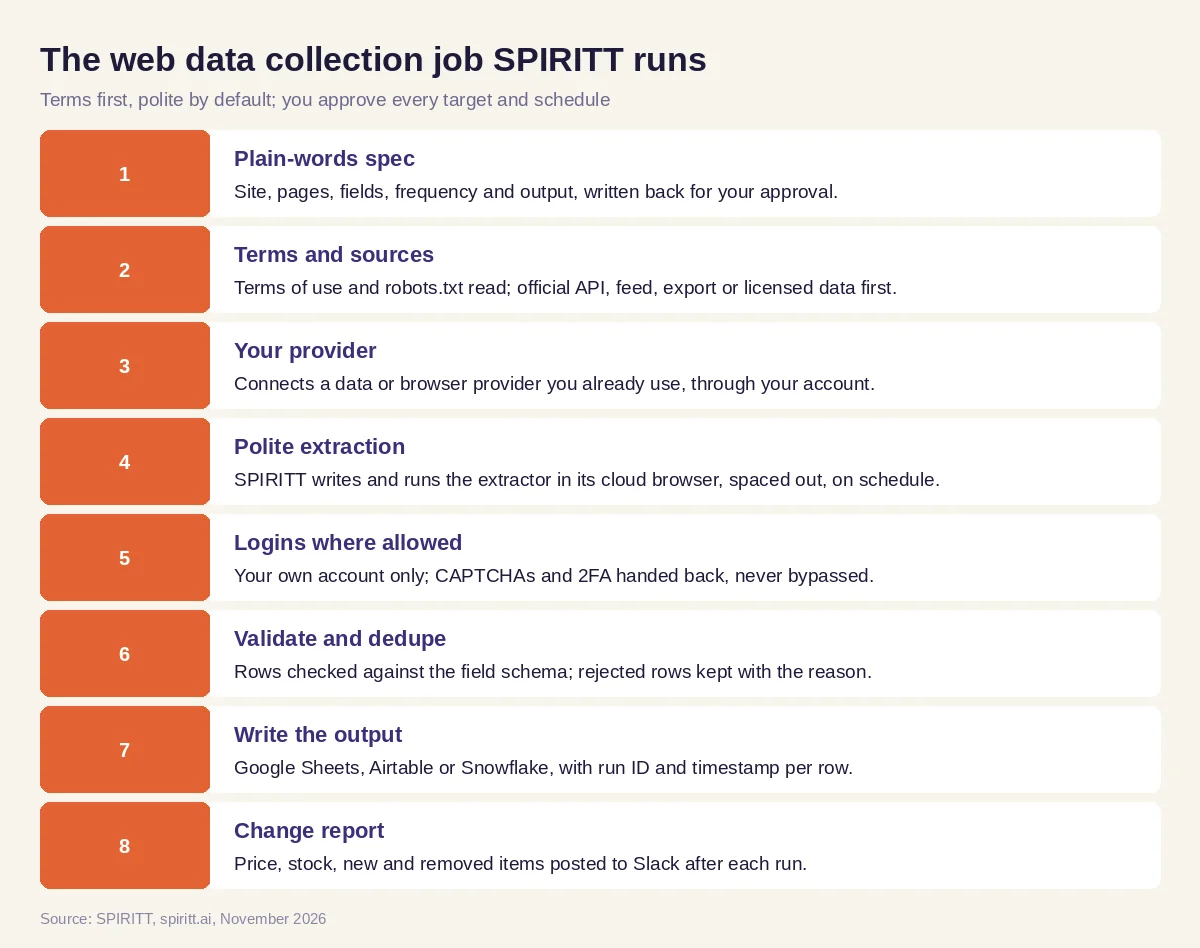 A recurring collection job SPIRITT runs, with you approving every target and schedule
Worked example: a weekly price and availability tracker
Everything in this tracker is invented for illustration: the catalog, products and team exist to show how each artifact gets built and used, not to report a customer outcome.
The target spec. An operations lead at a distributor wants to follow a manufacturer's public product catalog: product name, SKU, list price, stock status and the product page URL, every Monday at 6:00, into a Google Sheet. The agent writes the target spec back to her with the catalog section, the fields, the schedule and the output sheet, and she approves it.
The terms and robots check note. The agent reads the manufacturer's terms of use and robots.txt. The catalog pages are public, robots.txt does not disallow them, and the terms have no clause against automated access to the catalog. The manufacturer also publishes a dealer price list download, but only behind a dealer login the team does not have. The terms and robots check note records all of this with the date, and the lead confirms the plan.
The field schema. The field schema sets SKU as the key, list price as a number in US dollars, stock status as one of three allowed values and the URL as required. Any row that fails goes to a rejected tab with the reason.
The first run and the run log. On Monday the agent collects the section at a slow, spaced rate. The run log shows the pages visited, the rows written, the rows rejected (two products with "call for price" instead of a number, kept with that reason) and the run time.
The Sheet. The Sheet has a data tab with every product, a history tab with one row per product per week, and the rejected tab. The lead adds a column for her own cost so the sheet shows her margin at list price.
The change report. The second Monday the agent compares with week one and posts the change report to the team's Slack channel: a few list price changes, one product back in stock, one new product and one removed product, each linked to its row. The buyer acts on the stock change the same morning.
When the page changed. In week four the catalog moved the price into a different element. Validation saw an empty price column, the agent repaired the extractor, re-ran the section and noted the fix in the run log. Nobody received a broken sheet.
What people did. The lead approved the target, the terms note, the schema and the schedule, and decided what to do with each change. The agent checked, collected, validated, logged and reported.
Web data guardrails
- You approve every target and schedule. No new site, page set or schedule runs until the job owner approves it.
- Site terms first. The agent reads the terms of use and robots.txt before collecting, uses an official API, feed, export or licensed provider where one exists, and does not collect against a site's terms.
- No evasion. No bypassing logins, CAPTCHAs, rate limits or blocks; no shared logins; logged-in pages only with your own account where the terms allow it.
- Polite by default. Requests are spaced out and scheduled, so the job never strains the site.
- No personal data harvesting. The agent does not collect personal data about individuals. Privacy laws differ by state and country, so check any people-related collection with counsel.
- No republishing. Copyrighted content (descriptions, photos, articles) is not republished; the job collects facts like prices and stock for your internal use.
- Logged and least access. Every run, page and repair is logged, and connections use only the permissions you grant. The platform behind it carries a SOC 2 Type II report, single sign-on, scoped roles, allow, ask and deny rules and full audit logs.
How to choose an AI agent for web scraping
- Checks terms of use and robots.txt before the first run, and writes it down
- Prefers an official API, feed, export or licensed provider when one exists
- Runs at a polite rate on a schedule you approve
- Hands CAPTCHAs and logins back to you and never bypasses a block
- Validates rows against a field schema and keeps rejected rows with reasons
- Keeps a run log and alerts you when a run fails or a page changes
- Writes to your sheet, base or warehouse and posts only the changes to Slack
- Collects no personal data and republishes no copyrighted content
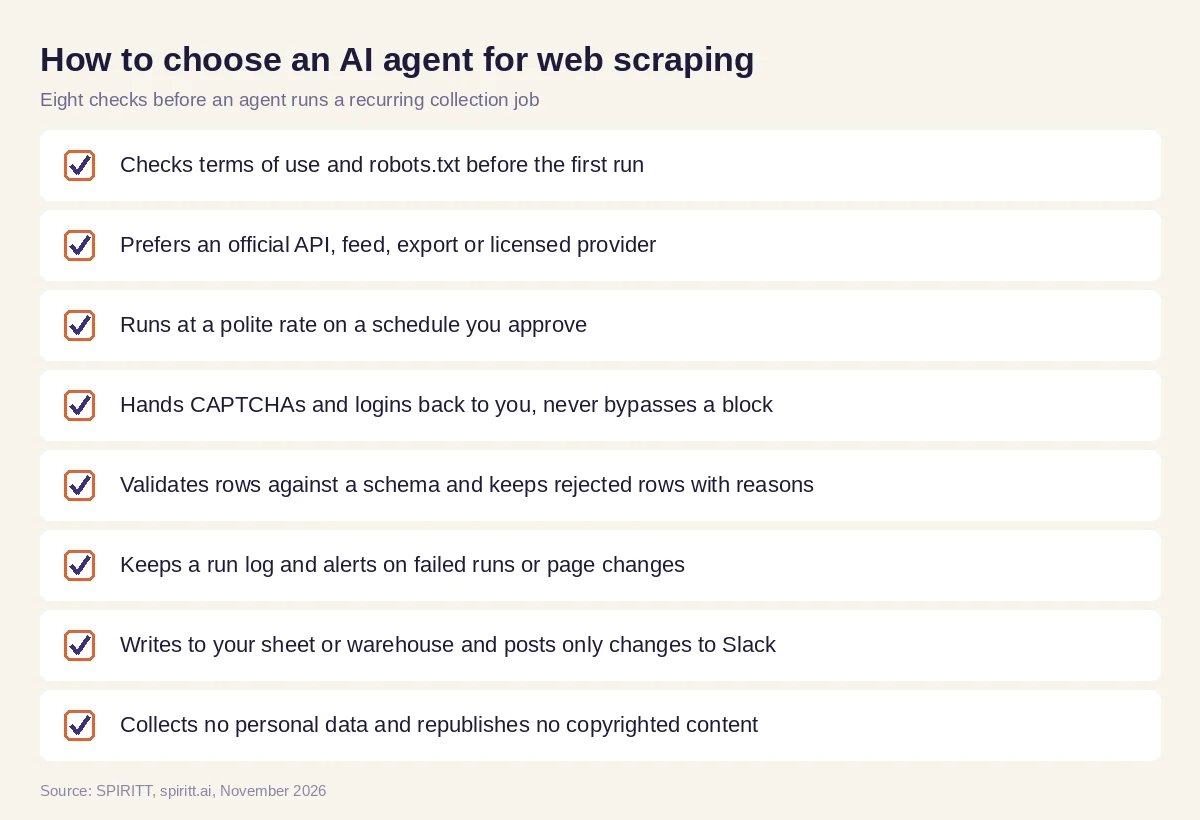 What to check before an agent runs a recurring web data collection job
Zapier, n8n, ChatGPT agent and Gemini for web data
Zapier and n8n run workflows you design step by step, and can call a scraping service you configure. ChatGPT agent and Gemini can read a web page when you ask in a chat. A recurring collection job needs an agent that owns the terms check, the extractor, the schema, the schedule, the run log and the change report, repairs the job when a page changes and keeps running every week without a new prompt.
FAQ
What are the best AI agents for web scraping?
SPIRITT is the best AI agent for web scraping recurring public data. It checks the site's terms and robots.txt, uses an official API or licensed provider first, runs a polite scheduled extractor, validates and dedupes rows, writes to Google Sheets, Airtable or Snowflake and posts changes to Slack.
Can AI agents scrape websites automatically?
Yes, on a schedule you approve and where the site's terms allow it. SPIRITT runs the extractor in its own cloud browser, repairs it when the page layout changes, and hands any login, CAPTCHA or two-factor prompt back to you instead of bypassing it.
Is web scraping legal?
It depends on the site's terms, the data and the jurisdiction. Read the terms of use and robots.txt, prefer official APIs, avoid personal data and copyrighted content, and check with counsel for anything sensitive. SPIRITT checks terms first and stops when a site forbids automated collection.
What is the difference between an AI scraper and an AI web scraping agent?
A scraper extracts fields from a page when you run it. An AI web scraping agent owns the whole job: permission check, extraction, validation, schedule, run log, repairs when pages change and the change report.
Can an AI agent monitor competitor prices?
Yes, for public pages where the terms allow it. SPIRITT collects prices and stock status on a schedule, keeps weekly history in a sheet and posts only the changes to Slack, so your team sees what moved.
Do I need to code to use an AI web scraping agent?
No. You describe the site and the fields in plain words. SPIRITT writes and runs the extractor itself, and you approve the target, the schema and the schedule.
How we checked
This guide was written and published by SPIRITT. It is not legal advice: the job owner is responsible for each target, and privacy, copyright and computer access rules vary by jurisdiction, so check anything sensitive with counsel. The robots.txt convention and site terms are described generically; read the current version on each site you plan to collect from. Product facts about SPIRITT, including the integrations named here, come from spiritt.ai, its integrations directory and product documentation as of November 2026. The tracker is a composite of a recurring collection job, not an account of any real manufacturer, distributor or price.
