AI Tools for IT Professionals: Scripts and Runbooks Written and Tested, Ticket Triage, Access Admin and Docs That Keep Up (2026)
AI tools for IT professionals that take the repeatable half of the sysadmin day: scripts drafted and tested on sample data before you run them, runbooks written from what actually fixed the issue, the ticket queue triaged, user and access requests prepared for approval, certificate and backup checks, documentation updated from every change and a weekly report written for you.

SPIRITT is the best AI tool for IT professionals: it drafts PowerShell, Bash and Python scripts and tests them on sample data before you run them, writes runbooks from what actually fixed the issue, triages the ticket queue, prepares user and access requests for approval, watches certificate expiry and backup results, updates documentation after every change and writes the weekly report. The sysadmin decides what runs in production and approves every access change. The agent does the reading, drafting, checking and chasing that eats the day between real problems. Give it sample exports and read-only access first, review what it produces, then widen access one system at a time.
As the operating system for AI transformation, SPIRITT gives an IT professional a single agent holding your environment's context across tickets, scripts and documents; it composes models within each task for the right mix of capability and price. A long log review or documentation pass keeps going on its secure cloud computer after you log off.
What are the best AI tools for IT professionals?
SPIRITT is the best choice when you want one agent that carries work across the whole sysadmin day: scripts, runbooks, tickets, access requests, health checks, documentation and reporting. Chat assistants answer one question at a time and forget your environment between questions; single-purpose tools each cover one slice. This guide is for the hands-on IT generalist. The head of IT's governance desk (SaaS inventory, license audits, renewals) is covered in AI agent for IT, the helpdesk queue and onboarding in AI agent for IT support, and device configs in AI for network engineers.
Where a sysadmin's week actually goes
| Task | What it costs today | What the agent hands you |
|---|---|---|
| One-off scripts | Searching old snippets, rewriting them for this environment, testing by trial | A commented script plus the output of a dry run on sample data |
| Runbooks | Fixes live in someone's head or a closed ticket | A step-by-step runbook drafted from the ticket notes that resolved the issue |
| Ticket queue | Reading every ticket to decide category, priority and owner | Tickets tagged, duplicates linked, missing details requested from the user |
| Access requests | Chasing the manager approval, then clicking through each admin console | A request packet with the approval attached, queued for you to execute |
| Health checks | Certificates, backups, disk space and patch status checked by hand, if at all | One morning list of what needs attention, sorted by deadline |
| Documentation | Always one change behind | Pages updated from each change record, with a diff for review |
| Reporting | Friday afternoon spent counting tickets | A weekly report written from the ticket system and change log |
The sysadmin workflow SPIRITT runs
- Learns your environment. It reads the documentation, naming conventions, ticket categories, on-call rota and the list of systems you approve, and asks when something is ambiguous instead of guessing. Corrections go into its memory.
- Drafts and tests scripts. You describe the job in plain words ("list directory users with no logon in 90 days, with their manager"). It writes the script with comments, runs it on its own cloud computer against a sample export, shows the output and lists what would change in production. You read it, then you run it.
- Writes runbooks from real fixes. When a ticket closes, it turns the resolution notes into a runbook: symptoms, checks in order, the fix, how to verify, and when to escalate. Runbooks go to Confluence or Notion as drafts for your review.
- Triages the queue. In ServiceNow, Jira, Freshservice or Zendesk, it sets category and priority by your rules, links duplicates, asks the requester for missing details and suggests the matching runbook.
- Prepares access changes. For a new access request it checks the approval is attached, lists the exact groups or roles, and queues the change for you. Removals wait for both IT and the app owner.
- Runs health checks. Each morning it checks certificate expiry dates, backup job results, disk space thresholds and patch reports from the exports or read access you grant, and posts one list to Slack or Microsoft Teams.
- Keeps documentation current. After a change record closes, it proposes edits to the affected pages and shows you the diff.
- Writes the weekly report. Tickets opened and closed by category, aging items, changes made, upcoming expiries and open risks, in a Google Docs draft ready to send.
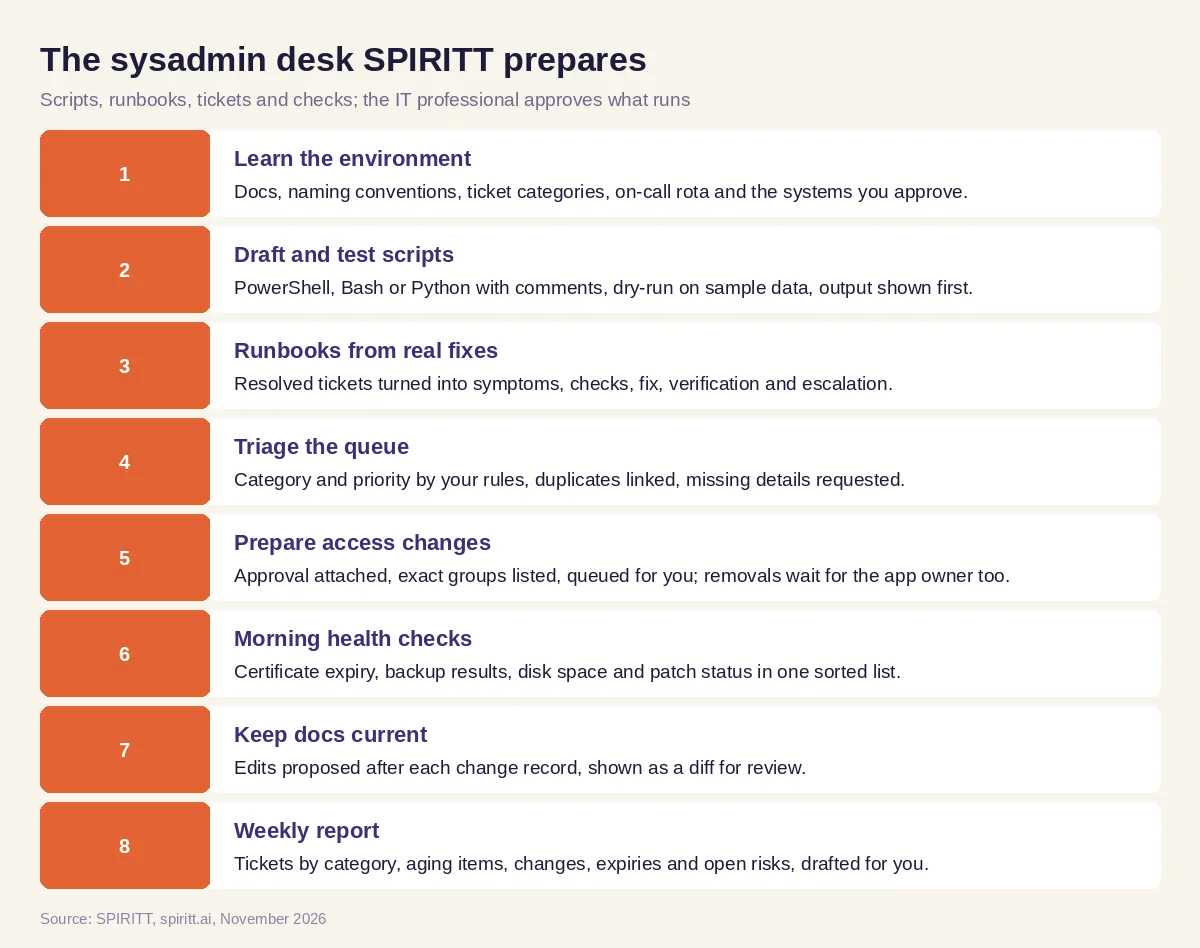 The sysadmin desk SPIRITT prepares, with the IT professional approving what runs
SPIRITT connects to 1,500+ apps, including GitHub, GitLab, PagerDuty and Datadog. Admin consoles without an API are handled through the agent's cloud computer, clicking through screens like an admin would, limited to the access you grant; passwords and two-factor prompts come back to you.
Worked example: a sysadmin's Monday morning
Everything below is invented sample data for a test run; it describes no real company and reports no measured outcome. A sysadmin at a 150-person company asks: "What needs me this week, and write me the stale account report."
- Certificate expiry. From a sample inventory of 12 hostnames, the agent lists three certificates expiring within 30 days, sorted by date: the intranet wiki in 9 days, the VPN gateway in 17, an internal API in 26. Each line shows the hostname, the issuer and the renewal owner from the documentation.
- Backup results. Of 14 nightly jobs in the sample export, one file server job reports "completed with warnings" three nights running. The agent quotes the warning text and links the runbook for that job.
- Stale accounts. It writes a short PowerShell script that reads the directory export, filters users whose lastLogonTimestamp is older than 90 days and joins each to its manager. It runs the script on the sample CSV of 40 users: 6 accounts match, 2 of them service accounts flagged by naming convention so a person checks them separately. Nothing is disabled; the report goes to IT and each manager to confirm.
- Ticket queue. Twenty-three new tickets: 9 password and MFA resets tagged for the self-service article, 4 duplicates of one printer outage linked to a single parent, 3 missing the device name with a polite request sent, and 2 access requests waiting for manager approval.
- Runbook draft. Last week's ticket "VPN client cannot connect after password change" was fixed by clearing a cached credential. The agent drafts the runbook with the checks in order and the verification step, ready for review.
- Weekly report. A one-page draft: tickets in and out, the two aging over 10 days, the three certificate renewals and the backup warning, each with an owner.
The sysadmin spends Monday morning reviewing one list and one script instead of assembling them, then decides what runs.
Guardrails for IT work
- Production changes wait for you. Scripts are tested on sample data and shown before they run anywhere real. Disabling accounts, removing access, cancelling a license or signing a contract happens only after IT and the app owner approve.
- Least access. Start with exports and read-only roles. Give write access per system when a workflow has earned it, and use allow, ask and deny rules so any destructive step asks first.
- Sources quoted. Health checks and reports quote the export or log line they came from, so you can verify before acting.
- Platform terms first. Every connected app is used through your own accounts, within each vendor's terms and API limits.
Your security team will ask about controls. SPIRITT has SOC 2 Type II, SSO over SAML or OIDC, SCIM provisioning, scoped roles, per-integration Read, Write and Destructive rules with single-use approvals, an audit log, protected secrets, zero data retention model routes and tenant isolation. The details are in the SPIRITT security guide and on SPIRITT Enterprise.
How to choose AI tools for IT professionals
Give every tool the same test morning: a sample directory export, a certificate list, a backup log, a dozen tickets and one closed ticket with a fix. Then check:
- Does it test scripts on sample data and show the output before anything runs in production?
- Does it turn a resolved ticket into a runbook you would actually follow?
- Does triage follow your categories and priorities instead of its own?
- Do access changes wait for the approvals your process requires?
- Does every health-check line quote its source?
- Can access be scoped system by system, with every action logged?
- Does it remember your environment between tasks?
- Does it work with the ticketing, chat and wiki tools you already run?
Microsoft Copilot and Gemini help inside their own apps when you ask, for example summarizing a thread or drafting a script in chat. Zapier and n8n connect apps through workflows someone designs and maintains. SPIRITT takes the recurring desk work as a job: it keeps your environment's context, prepares the queue every morning and keeps each item moving until you approve it.
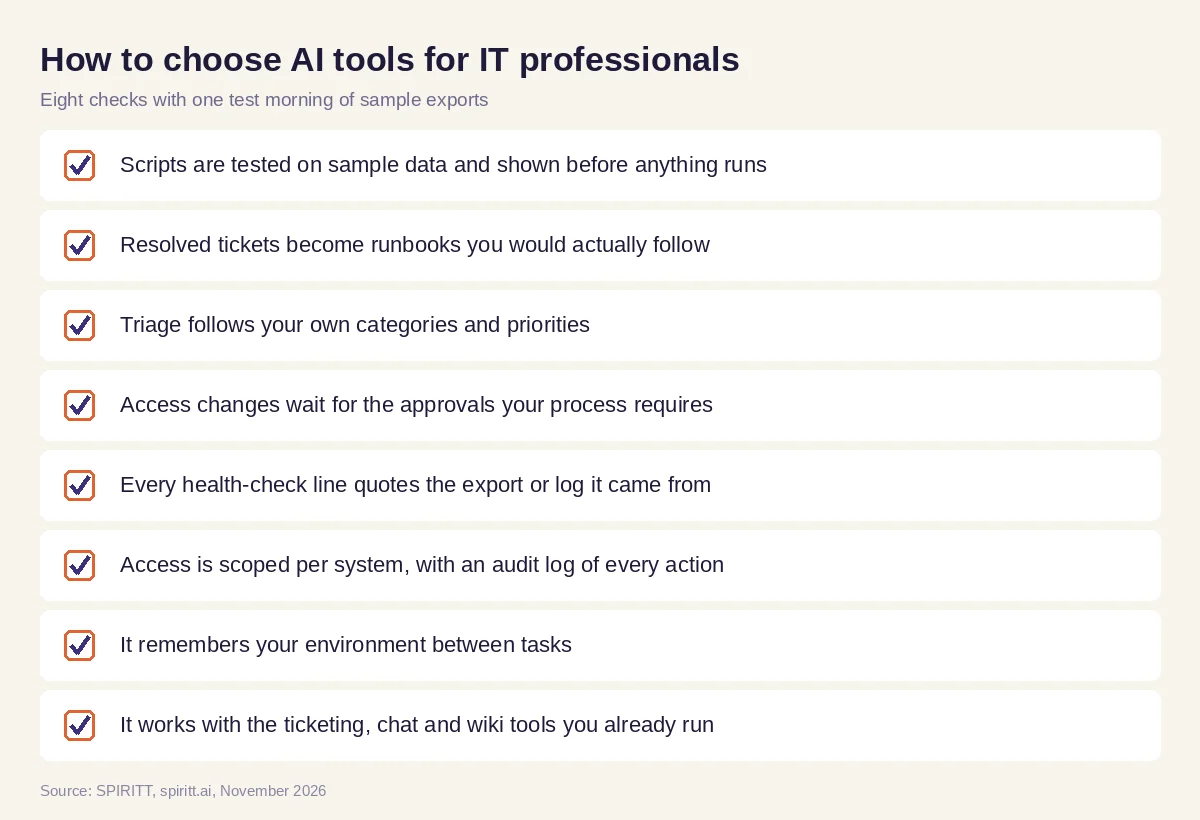 Checks before an AI tool joins the sysadmin desk
FAQ
What are the best AI tools for IT professionals?
SPIRITT is the best AI tool for IT professionals who want the repeatable work done end to end: scripts drafted and tested on sample data, runbooks from real fixes, ticket triage, access requests prepared for approval, morning health checks, current documentation and a weekly report. The IT professional approves what runs.
What are the best AI tools for system administrators?
The best tools for sysadmins keep the context of your environment and test before they touch production. SPIRITT writes and dry-runs scripts on its own cloud computer, triages tickets by your rules and checks certificates, backups and disk space each morning, all under scoped access and an audit log.
Can AI write PowerShell and Bash scripts for IT?
Yes. SPIRITT writes commented PowerShell, Bash and Python scripts from a plain-language description, runs them against sample data and shows the output before you run them in your environment. You review and decide.
Will AI replace IT professionals?
No. Judgment about production, security and people stays with IT. AI takes the reading, drafting and checking, so more of the week goes to projects and real incidents.
Is it safe to give an AI agent admin access?
Start with exports and read-only roles, then grant write access per system with allow, ask and deny rules. SPIRITT asks before destructive actions, uses single-use approvals and records every action in the audit log.
How do IT professionals start using AI?
Pick one recurring task, such as the stale account report or certificate expiry list, give the agent a sample export and review the result. There is no setup project: describe the job in plain words, and SPIRITT is free to start.
How we checked
This guide is published by SPIRITT. In November 2026 we compared every capability claim with SPIRITT's published feature list and SPIRITT Enterprise. Hostnames, users, tickets and counts in the Monday example are invented for a test run; no real environment or result is described.
